
Designing Large Transfers to Resume
Most transfer protocols can resume an interrupted file. Most large transfers still restart from zero when they fail. The gap between those two facts is design: resume is a capability the protocol offers. Whether an unattended job actually uses it depends on a dozen small decisions about names, state, verification, and retries that nobody made deliberately. The job uploads to a temporary name, the retry looks for the final name, finds nothing, and starts again. The source file was regenerated between attempts, the resume appends new bytes onto old ones, and the result is corrupt. Each of these is a design flaw, not a network problem.
This article is about making those decisions on purpose. It does not explain how resume works inside each protocol — restart markers in FTP, offsets in SFTP, byte ranges in HTTP. Our resume and checkpoint restart series does that. Here the subject is the transfer around the protocol. We cover how temporary names interact with resume, how to detect a changed source, and what a job needs to remember between attempts. We explain how to make a re-run safe no matter what state the last run left behind and how to verify a resumed file. We also cover the retry loop that does all of this without a person. It is part of our Large File Strategies series.
Four Things a Resumable Transfer Needs
Resume means continuing an interrupted transfer from the byte where it stopped instead of from the beginning. For that to happen in an unattended job, four things have to be true at once:
- The protocol supports it. FTP, FTPS, and SFTP can resume uploads and downloads. HTTP can resume downloads through byte ranges, and uploads only when the server offers a chunked or resumable upload scheme. rsync resumes with its partial-file options. A streaming pipeline — compress-and-pipe over SSH, for example — cannot resume at all, because there is no file on either side to continue.
- The client asks for it. Resume is never the default. Every client has a flag or setting, and a scripted transfer has to pass it explicitly on every run.
- The server permits it. Some servers disable resumed uploads, some disable them for particular accounts or folders, and some silently overwrite when asked to append. Test it with a deliberately interrupted small transfer before trusting it on a large one; the resume series has the checks for each server type.
- The design cooperates. Names, state, verification, and retries all have to be arranged so that the second attempt can find and continue what the first left behind. This is the part that is usually missing, and it is the rest of this article.
Temporary Names and Resume
The standard defense against a half-written file being picked up by whatever consumes it is a temporary name. Upload as export.bin.part, then rename to export.bin only when the transfer completes. That way, the final name never exists in an incomplete state. The full argument is in temp names and atomic renames, and every large transfer should use it. But temporary names and resume interact, and the interaction has to be designed.
The first rule: resume targets the temporary name. After an interruption, the partial file on the server is called export.bin.part. A retry that uploads to export.bin with resume enabled finds no such file, starts from byte zero, and — worse — leaves the old partial lying around forever. The retry must ask the server for the size of export.bin.part, continue that file, and rename only after the whole thing is confirmed. Some clients and servers generate their own temporary names by appending a random suffix or writing into a hidden folder. If such a tool drives the transfer, find out what it does on an interrupted run before relying on it. A temporary name the next run cannot predict is a temporary name that cannot be resumed.
The second rule: the rename is the last step, after verification. A rename immediately after the last byte is sent is one step too early. The transfer may have completed with the wrong length, and now the wrong file has the right name. Verify first, rename second. The rename itself is instant on the same volume and cannot be interrupted halfway, which is exactly why it is the right signal of completion.
The third rule concerns whatever is watching the receiving folder. A watcher that reacts to *.part files, or to any file that stops growing for thirty seconds, will pick up a paused partial during the retry delay. Configure the watcher to ignore the temporary pattern outright, so that only the rename triggers it. The arrival contract article covers the receiving side of that agreement.
The Modified-Source Problem
Here is the failure that turns resume from a convenience into a hazard. Attempt one sends 28 GB of a 40 GB export and dies. Overnight, the export job runs again and regenerates the file with today's data. Attempt two, the next morning, asks the server how much of export.bin.part it has — 28 GB — and appends bytes 28 GB onward from the new file. The result has the right length, passes a size check, and is 28 GB of yesterday followed by 12 GB of today. Nothing in the protocol can detect this; the bytes were delivered exactly as requested.
The defense is to record what the source looked like when the transfer started, and refuse to resume if it has changed. Three cheap facts identify a source: its size in bytes, its modification time, and a hash of its first few megabytes. The hash catches a regenerated file of identical size. Before resuming, compare all three with the live source. If any differ, the partial on the server is worthless: delete it and start from zero. That is the only correct outcome, and a job that does it automatically never ships a stitched-together file.
Remember: a resume is only valid if the source is byte-for-byte what it was when the partial was written. Size, modification time, and a head hash cost nothing to record and compare. A job that resumes without checking them will, one day, deliver a file that is half yesterday and half today. That file will pass every size check on the way.
The State File
The three source facts, the names in play, and where the transfer got to all need to live somewhere between attempts. A state file — a small text file beside the job — is the simplest place. It is the large-file cousin of the manifest used in chunked transfers, and it carries everything the next run needs to decide what to do:
job: export-push
source: /srv/export/export.bin
source_size: 40000000000
source_mtime: Mar 14 01:52
source_head_sha256: 5b7d0c…91ae   (first 64 MB)
remote_tmp: /inbound/export.bin.part
remote_final: /inbound/export.bin
started: Mar 14 02:10
attempts: 1
last_confirmed_bytes: 27917287424
status: interrupted
Write it when the transfer starts, update it after every attempt, and mark it done after the final verification and rename. If the job is invoked again and finds a state file with status: done for a source that has not changed, it has nothing to do. That single check is what makes the job safe to run twice, which is the property the next section is about.
Idempotent Re-Runs
An idempotent job is one you can run any number of times and get the same result as running it once. A second run after success does no harm. A run after a failure finishes the work rather than duplicating or corrupting it. The general idea is explained in idempotency in plain words. For a resumable large transfer it comes down to inspecting the situation at the start of every run and choosing one of five actions. The diagram below shows the decision.
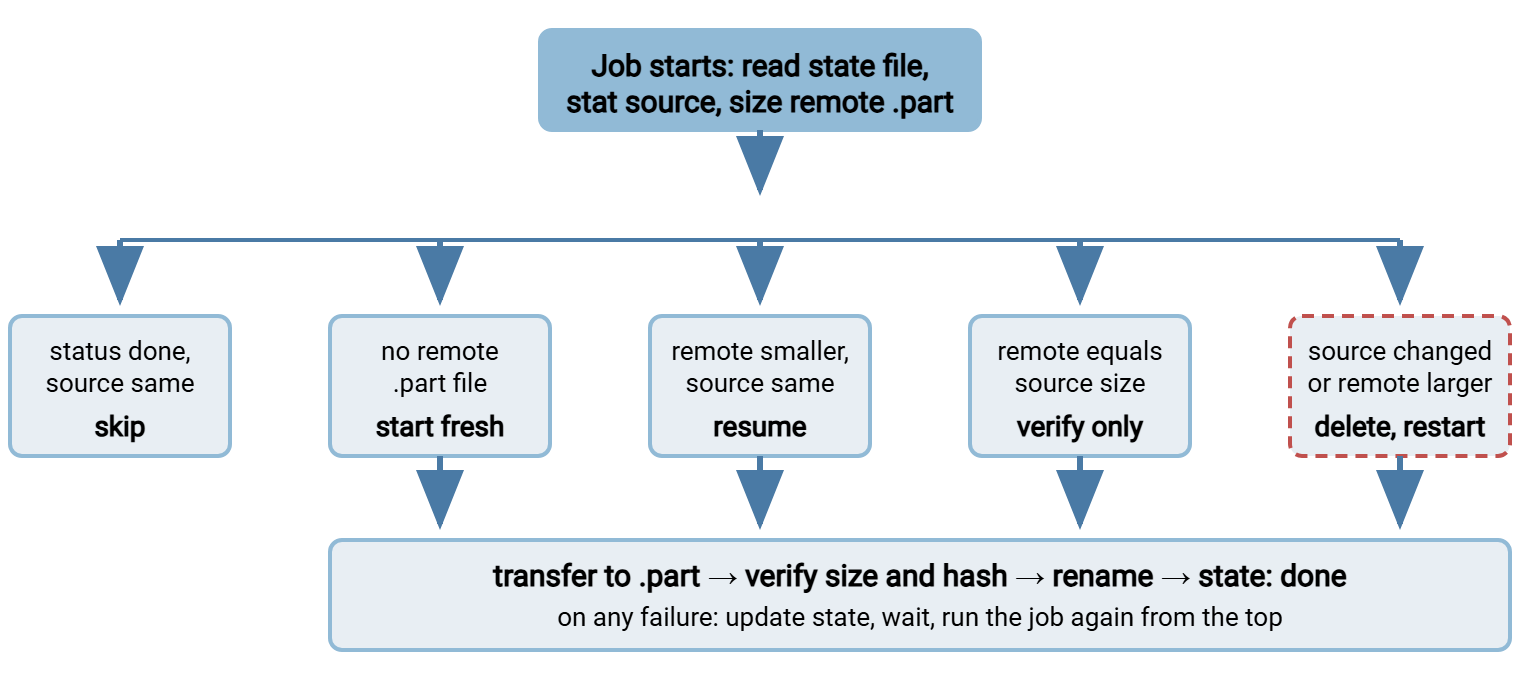
The five branches in words. If the state file says done and the source is unchanged, exit — nothing to do. If there is no remote partial, start a fresh upload to the temporary name. If the remote partial is smaller than the source and the source is unchanged, resume from the remote size. If the remote partial is exactly the source size, skip the transfer and go straight to verification. A previous attempt may have finished sending and died before the rename. And if the source has changed, or the remote partial is somehow larger than the source, delete the remote partial and start fresh. A larger partial is a sure sign of an earlier stitched resume or a stale file. Every branch ends in the same place: verify, rename, record. Any failure updates the state file and returns to the top on the next run.
The Commands That Resume
The design above works with any client that can resume; three long-standing open-source tools show the shape. Each uploads to the temporary name, resumes if a partial exists, and renames only on success.
# curl: -C - asks the server for the partial's size and continues from there;
# the -Q command runs on the server only after a successful transfer
$ curl -sS -u alex: --key ~/.ssh/id_ed25519 -C - -T /srv/export/export.bin \
    -Q "-rename /inbound/export.bin.part /inbound/export.bin" \
    sftp://10.20.30.40/inbound/export.bin.part

# lftp: put -c continues an existing remote file; mv renames it afterward
$ lftp -e "put -c /srv/export/export.bin -o export.bin.part; mv export.bin.part export.bin; bye" \
    sftp://alex@10.20.30.40/inbound/

# rsync: --partial keeps the partial on interruption, --append-verify continues it
# next time and checks the whole file's checksum at the end
$ rsync --partial --append-verify --timeout=120 /srv/export/export.bin \
    alex@10.20.30.40:/srv/inbound/export.bin.part
$ ssh alex@10.20.30.40 mv /srv/inbound/export.bin.part /srv/inbound/export.bin
The rsync variant deserves a note. Plain --append trusts the existing remote bytes without checking them, which is exactly the modified-source hazard. --append-verify includes the existing bytes in a whole-file checksum after the transfer and re-sends the entire file from scratch if it does not match. This is a built-in version of the source check above, at the price of reading the whole file on both ends. Our rsync flags that matter article covers the surrounding options. Windows includes curl.exe, so the first form works unchanged from PowerShell. Scripted SFTP clients on Windows have their own resume switches, and PowerShell SFTP scripting shows where they live.
Verifying After a Resume
A resumed file deserves more suspicion than a file sent in one piece, because the join point is a place where things go wrong. A server may have reported a partial's size before its last buffer was flushed to disk. A resume may have started one byte off, or a client may have appended to the wrong file. Two checks catch all of these.
Size first. Compare the remote file's size with the source's. It is instant, and a mismatch means something is wrong before you spend minutes hashing. Then hash. Compute a hash of the whole remote file. Either ask the server, if it offers a hashing command, or read the file on the server side. Then compare the hash with the source's hash. A size match with a hash mismatch is the signature of a bad join or a changed source. The only fix is to delete the remote file and start over; do not try to repair it. Computing hashes on 40 GB without doubling the transfer time is its own subject, covered in verifying large transfers. The verification checks specific to resumed transfers, protocol by protocol, are in the resume series.
The Unattended Pattern
All of the above is useless unless it runs without a person. The pattern is a loop: attempt, and on failure record state, wait, and attempt again. Set a limit, so a permanent failure eventually raises an alarm instead of retrying forever. Because every attempt starts by inspecting the situation, the loop body is simply "run the job." The job decides whether that means start, resume, verify, or skip.
#!/bin/bash
# Retry a resumable upload up to six times with a growing delay.
# push-export.sh inspects the state file and does the right thing on each call.
for attempt in 1 2 3 4 5 6; do
    if /opt/jobs/push-export.sh; then
        exit 0
    fi
    echo "$(date '+%b %d %H:%M') export-push attempt $attempt failed, waiting" >&2
    sleep $(( 60 * attempt ))
done
echo "$(date '+%b %d %H:%M') export-push gave up after 6 attempts" >&2
exit 1
The delay grows with each attempt — one minute, then two, up to six. That way, a far end that is briefly down is not hammered, and a longer outage is given time to end. The reasoning behind the schedule and the limit is in retry strategies and backoff. What the loop produces in practice looks like this in the job's log:
Mar 14 02:10:03 export-push attempt=1 remote=0 source=40000000000 action=start
Mar 14 02:31:47 export-push attempt=1 error: connection reset by peer at 27917287424
Mar 14 02:32:47 export-push attempt=2 remote=27917287424 source=40000000000 action=resume
Mar 14 02:41:58 export-push attempt=2 sent=12082712576 size=ok sha256=ok renamed=export.bin
Mar 14 02:41:58 export-push status=done attempts=2
Read it against the running example of this series — a 40 GB file on a 200 megabit link, about 22 MB per second. The first attempt ran twenty-one minutes and died at 27.9 GB. One minute later the second attempt found the partial, confirmed the source had not changed, resumed, and sent the remaining 12 GB in nine minutes. Total time: thirty-two minutes, against thirty for an uninterrupted run — and against fifty-one for a restart from zero. Nobody was awake. That is the whole point.
Scheduled-transfer tools package this loop. Sysax FTP Automation, for example, has built-in retry and error handling for its scheduled jobs. So the attempt-wait-attempt cycle and the failure alert are configuration rather than script. The resume-or-restart decision remains a matter of how the transfer is designed, exactly as above.
Chunks as Resume Points
One more design option combines the two large-file tactics. If the file is split into chunks, each chunk boundary is a natural resume point that needs no protocol support at all. In that design, the job records which chunks the receiver has confirmed, and a retry simply sends the ones that are missing. This is the right approach when the far end cannot resume. It has a side benefit — the per-chunk hashes in the manifest give you verification for free at every boundary. Where the far end can resume, a chunked transfer whose pieces also resume is about as robust as a network transfer gets. In that case, an interruption costs a few seconds within one chunk, and a corrupt piece is identified by name.
The Version to Keep in Your Head
Resume is a protocol feature; a transfer that actually resumes unattended is a design. Upload to a temporary name and make the retry target that same name. Record the source's size, modification time, and head hash, and refuse to resume onto anything that has changed. Keep a state file so each run knows what the last one did. Start every run by inspecting the situation and choosing skip, start, resume, verify, or delete-and-restart. That makes the job safe to run any number of times. Verify size and hash before the rename, never after. Wrap it all in a retry loop with a growing delay and a limit.
Continue with verifying large transfers without doubling the time for the hashing side. Continue with choosing protocols and settings for multi-gigabyte moves if you are still deciding which protocol will carry the file. For a wider view of recovery design — what to do when the failure is not the network but the far end, the credentials, or the file itself — see designing for recovery.
Frequently Asked Questions
My client supports resume, so why does my scheduled job always restart from zero?
Is it dangerous to resume a file that was regenerated between attempts?
Should the file be renamed to its final name as soon as the last byte is sent?
What is the difference between rsync --append and --append-verify?
How many times should an unattended job retry before giving up?
From the Sysax team: we build secure file transfer software for Windows. Sysax Multi Server is an FTP, FTPS, SFTP, and HTTPS server. Sysax FTP Automation handles scheduled, scripted transfers. Free trials are on the download page.