
When a Scan Hits: Responding to an Infected Transfer
One day a scan lights up, or a re-scan flags a file that passed last week, or a partner calls to say something is wrong. A genuinely malicious file has been found in your transfer flow. What you do in the next hour matters more than anything you configured beforehand. The two natural instincts — open the file to see what it is, or immediately phone the partner and demand answers — are both mistakes. The right response is a calm, ordered sequence: contain before you understand, and trace before you conclude. Notify as a collaborator rather than an accuser, and harden once the dust settles.
This article is that sequence as a working runbook. It walks through containing the file without destroying evidence and using your logs to trace everywhere the file may have traveled. It covers having the partner conversation in a way that fixes the problem instead of the blame. It also covers turning the incident into the one hardening improvement that stops a repeat. It is the closing article of our malware scanning for file flows series — the day the earlier articles' controls either pay off or reveal their gap.
First Move: Contain, Don't Investigate
The strongest instinct is the most dangerous one: to double-click the flagged file, or open it in some viewer, to find out what it is. Do not. Opening or running a suspected malicious file is how a contained problem becomes an active one — on your own machine, with your own access. Investigation of the file's contents is a later, controlled step, if it happens at all; it is never the first move. For the purposes of response, you already know enough: a file is flagged, and it must be prevented from doing harm before you understand anything else about it.
Containment means two quick actions taken together. Isolate the file — ensure it is in the quarantine area, out of every path where anything could consume it. Do not delete it, because it is now evidence for tracing and for the partner conversation. Pause the affected flow — stop the pipeline that carried the file so that no further files from the same source move inward while you assess. Freezing the flow buys you time to understand scope without new arrivals complicating the picture. The reflex to "clean it up" by deleting the file immediately is the wrong one; you freeze, you do not wipe.
Remember: the first hour has one job — stop the file from doing harm. There are two forbidden actions: do not open the file to investigate it, and do not delete it. Opening it risks infecting yourself; deleting it destroys the evidence you need to trace where it went and to talk to the partner. Isolate, pause the flow, and only then start to understand.
The Response Flow, End to End
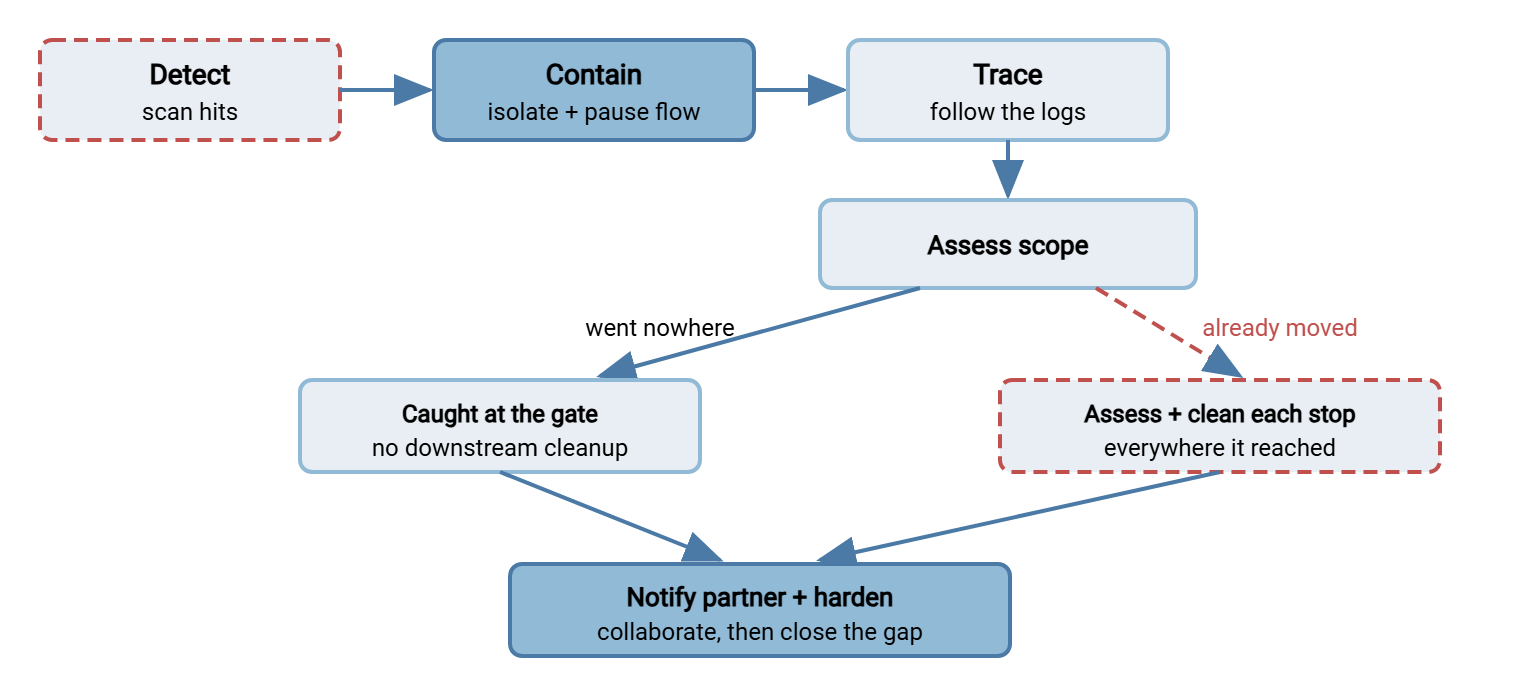
The whole response is a short pipeline of its own, and seeing it laid out keeps you from skipping a step under pressure. Detection leads to immediate containment. Containment is followed by tracing the file's movement through your logs. Tracing produces a scope you can assess. Assessment drives a calm partner notification and any downstream cleanup. The incident closes with a hardening pass that feeds back into the controls.
The diagram below shows that sequence, with the two branches that tracing reveals. The file was caught at the gate and went nowhere. Or it had already moved and each place it reached must be assessed.
Tracing Where the File Traveled
Containment stops the bleeding; tracing tells you how bad the wound is. The central question of the whole incident is where did this file go? — and the answer lives in your logs. A receiving server such as Sysax Multi Server records each authenticated session and file operation. That activity log is the raw material a trace follows: who connected, what they uploaded, and when. This is the moment logging stops being a compliance chore and becomes the difference between "we know exactly what happened" and "we are guessing." If the earlier articles' controls were the prevention, logging is what makes the response possible at all. How to keep those logs complete and trustworthy is the whole transfer logging and audit series. An incident is when that investment is repaid.
Trace the file's journey in both directions from the point of detection:
- Where did it land, and when? Which flow, which partner, which account uploaded it, at what time. This anchors the timeline and identifies the source channel.
- Did it move inward before it was caught? If detection happened on a re-scan rather than on arrival, the file may already have been pulled to a processing system and opened by an application. Every inward hop is a place to check.
- Did it fan out to others? The worst case from the first article — did the file reach a shared distribution folder and get pulled by partners? Each partner that downloaded a copy is now part of the incident's scope, and the logs of who pulled what are how you find them.
- Were there siblings? Did the same source send other files around the same time that deserve a fresh look, now that you know the channel produced at least one bad file?
The trace produces a scope: the definitive list of every place a copy of this file exists or was processed. That list drives everything after. A file caught cleanly at the on-arrival gate that went nowhere needs no downstream cleanup. One that moved inward or fanned out means each location on the list must be assessed and remediated. Do not notify, do not conclude, until the scope is drawn, because the scope is what you will be talking about.
Assessing and Cleaning Each Location the File Reached
If the trace shows the file went nowhere — caught at the on-arrival gate, isolated before it moved — you are fortunate and there is nothing downstream to clean. When the trace shows movement, though, the scope list becomes a work list, and each location on it gets the same three questions. Did a copy of the file actually land here? Was it opened or processed by anything? What does cleaning it up require?
The important discipline is not to do this alone for systems you do not own. A file that reached an internal processing server, a partner's download, or an application's import folder involves the team responsible for that system. They know what "opened and processed" means in their context and what remediation looks like. Your job is to hand them a precise, calm scope: this file, this timestamp, arrived in this location, detected as this. Resist two temptations. One is the temptation to quietly clean it up and not mention it, which leaves other teams blind to something that touched their systems. The other is the temptation to declare a full-blown crisis before the scope is known. That burns credibility if the file turned out to have gone nowhere. Work the list location by location, close each one with its owner, and record what was found at each. That record is both your proof of thoroughness and the raw material for the hardening pass.
Ask How It Got In
Parallel to tracing where the file went is understanding how it got past your controls, because that answer becomes the hardening pass. There are only a few possibilities, and each points at a specific fix:
- It was new. The file was genuinely not recognized when it arrived and was caught later by a re-scan once detection improved. This is the expected, designed-for case from the scanner-limits article. Your re-scan worked; the lesson is to confirm the re-scan window is tight enough.
- It was unscannable and slipped a gap. An encrypted or over-nested file was treated as clean instead of held — a fail-open where there should have been a fail-closed. The fix is the third branch from the pipeline article.
- It bypassed the scan entirely. A flow existed that had no scan on it — the exact gap the whole series warns about. The fix is to gate that flow.
- Hygiene should have caught it. The file was a type, size, or shape that a hygiene rule would have rejected, but no rule was in place for that flow. The fix is a hygiene profile.
Notifying the Partner Without Starting a War
Here is the part that ruins relationships when handled badly. A malicious file arrived over a partner's channel — and the reflex is to treat the partner as the culprit. Resist it, for a reason that is almost always true: your partner is probably a victim too. The overwhelmingly common story is not a malicious partner. It is a partner whose own machine or automated export was compromised without their knowledge, quietly sending something bad along with the legitimate files. Accusing them is both likely wrong and guaranteed to make the next hour adversarial, exactly when you need cooperation.
So notify as a collaborator sharing information, not a prosecutor filing charges. The shape of the message: state the fact plainly and without blame ("our scanning flagged a file that came through your channel at this time"). Share the specifics they need to investigate their side (file name, timestamp, what was detected). Ask rather than accuse ("we have contained it here; can you check whether your system that produces this feed is healthy?"). Offer what you know; request what you need. This tone does two things: it gets the partner working the problem on their end, where the actual compromise usually lives. It also preserves a relationship you will still need tomorrow.
This is where the groundwork from the partner-agreement article pays off. If the agreement already established that you scan files and that either side flags problems, then the call is a continuation of a normal understanding. In that case, it is not an ambush — you are doing exactly what you told them you would. The onboarding relationship set up in trading partner onboarding is the foundation that makes the hard conversation a working one.
The Hardening Pass After
An incident is expensive; waste none of it. Every infected file that reaches you is precise, real-world data about exactly which of your controls has a gap. The response is not complete until that gap is closed. The "how did it get in" analysis above hands you the specific fix. It could be a tighter re-scan window or a fail-open turned fail-closed. It could be a scan added to an ungated flow or a hygiene rule that was missing. Make that change, and then make the meta-change: update the runbook itself with anything the incident taught you, so the response is faster next time. A hardening pass that closes the one door this file used is worth more than a generic security review. That is because it is aimed at a threat you now know is real for your environment. The broader posture work lives in transfer threat modeling, but the immediate, cheap win is fixing the specific gap in front of you.
One cultural note makes the hardening pass actually happen instead of being quietly skipped. Keep the review blameless and systemic: the useful question is "what in our design let this through, and what change prevents the class of it?" — not "who forgot to configure the scan?" An incident review that hunts for a person to fault teaches everyone to hide the next incident, which is the opposite of what you need. A review that hunts for the missing control teaches people to surface problems early, when they are cheap. The infected file was almost never the result of one careless click, and the durable fix is almost never "be more careful." It is a gate that was not there, a branch that failed the wrong way, or a rule nobody had written yet. That is a structural gap that a structural change closes for good. Frame the pass that way and the same file cannot walk through the same door twice.
The Infected-File Response Runbook
Here is the whole sequence as a runbook to keep where your team will find it at 2 a.m. Written to be followed top to bottom under pressure, when clear thinking is in shortest supply:
INFECTED-FILE RESPONSE RUNBOOK

0. DO NOT
   [ ] Do NOT open, run, or "preview" the file to investigate it.
   [ ] Do NOT delete it — it is evidence for tracing and the partner.

1. CONTAIN  (first, before understanding anything)
   [ ] Confirm the file is isolated in quarantine, out of all paths.
   [ ] Pause the affected flow so no new files move inward.
   [ ] Note the time and who is handling it.

2. TRACE  (from the logs — where did it go?)
   [ ] Source: which flow/partner/account, and when it landed.
   [ ] Inward: was it pulled to processing or opened downstream?
   [ ] Fan-out: did any partner pull a copy from a shared folder?
   [ ] Siblings: other files from the same source, same window?
   [ ] Write the SCOPE: every place a copy exists or was processed.

3. ASSESS + ERADICATE  (per location in scope)
   [ ] Caught at the gate, went nowhere -> no cleanup needed.
   [ ] Moved inward / fanned out -> assess and clean each stop;
       involve the owning system's team for anything it reached.

4. HOW DID IT GET IN?  (this becomes step 6)
   [ ] New (caught on re-scan) / unscannable-slip / no scan on flow /
       missing hygiene rule — identify which.

5. NOTIFY THE PARTNER  (as a collaborator, not an accuser)
   [ ] State the fact without blame; share file name, time, detection.
   [ ] Assume they may be a victim; ask them to check their side.
   [ ] Give a named contact and keep the channel open.

6. HARDEN  (close the specific gap from step 4)
   [ ] Make the one fix that would have stopped this file.
   [ ] Re-scan the source's recent files with the lesson applied.
   [ ] Update THIS runbook with anything learned.

7. RECORD
   [ ] Timeline, scope, decisions, notifications, and fix — logged,
       so the incident is reconstructable and the fix is auditable.
The runbook's order is its whole value. Containment comes before investigation so the problem stops growing while you think. Tracing comes before notification so you speak to the partner with facts, not fears. Hardening comes last so the incident produces a permanent improvement rather than just a cleanup. Follow the order and even a genuinely bad day stays a managed one.
The Short Version
When a scan hits, run a sequence, not a scramble. Contain first — isolate the file and pause the flow. Never open the file to investigate it or delete it, because one infects you and the other destroys your evidence. Trace where it traveled using your logs: where it landed, whether it moved inward, whether it fanned out to partners. That gives you a definitive scope before you say a word. Notify the partner as a collaborator who assumes they are also a victim, sharing facts and asking them to check their side. That is both usually accurate and relationship-preserving. Then spend the incident's one gift — precise knowledge of which control had a gap — on the single hardening change that stops a repeat. Update the runbook while it is fresh.
That closes the series. To prevent the next hit rather than respond to it, revisit inbound partner file hygiene and where to put scanning. To make tracing effortless next time, the transfer logging and audit series is where the evidence trail is built. For the calm handling of held files short of a full incident, read designing a quarantine workflow.
Frequently Asked Questions
Should I open the flagged file to confirm it's really malicious?
Why not just delete the infected file immediately?
How do I find out where the file went?
How do I tell a partner their file was infected without a fight?
What is the most important thing to do after the incident is contained?
What if the file was caught on arrival and never went anywhere?
From the Sysax team: we build secure file transfer software for Windows. Sysax Multi Server is an FTP, FTPS, SFTP, and HTTPS server. Sysax FTP Automation handles scheduled, scripted transfers. Free trials are on the download page.