
What Scanners Can't See: Archives, Encryption, Evasion
Malware scanning is necessary. It is not sufficient, and the fastest way to get hurt is to forget the second half of that sentence. A green "clean" result is reassuring, and reassurance is exactly what makes people stop thinking. But a scan looked at a file through a specific set of eyes with specific limits. Understanding those limits is what separates a defense that actually holds from one that just displays a checkmark.
This article is the honest inventory of what a scanner cannot see. It covers archives nested or bloated beyond what it will unpack, and files it cannot read because they are password-protected or encrypted. It also covers the general reality that recognition-based detection can be slipped past. The centerpiece is a genuine architectural tension every serious shop hits. End-to-end encryption like PGP is designed so that nothing in the middle can read the file, and your scanner is something in the middle. You cannot have perfect end-to-end privacy and mid-stream scanning of the same bytes at the same point; you have to choose where each one happens.
None of this is an argument against scanning. It is an argument for layering — for building so that a file the scanner could not truly inspect is caught, contained, or limited by something else. This article is part of our malware scanning for file flows series. It is the counterweight to the case for scanning made in why transfer flows need their own scanning.
What "Clean" Actually Means
Start by translating the verdict. When a scanning engine returns "clean," the honest expansion is: "in the portion of this file I was able to read, I did not recognize anything I have been taught to consider malicious." Three qualifiers hide in that sentence, and each is a blind spot.
- "Able to read" — if part or all of the file was encrypted, password-protected, or packed in a way the engine could not open, that part was not examined at all. The verdict covers only what was legible.
- "Recognize" — detection works by matching against known-bad patterns and suspicious behaviors. Something the engine has never been taught to recognize can pass, because recognition is comparison against what is already known.
- "Taught to consider malicious" — the engine's knowledge is a snapshot that improves over time. That is why a file can be clean today and flagged next week, and why re-scanning matters.
Read that way, "clean" is a useful signal, not a guarantee. It means "nothing known was found in what could be seen" — genuinely valuable, and genuinely not the same as "this file is safe." Every limit below is just one of those three qualifiers made concrete.
A worked example ties the qualifiers together. Suppose a document arrives that carries active content — the kind of embedded automation a productivity file can legitimately contain. The scanner can read the document perfectly, so "able to read" is satisfied. Whether that active content is hostile, though, is a judgment call the engine makes by recognizing patterns it has been taught to distrust. That lands squarely on the "recognize" and "taught to consider malicious" qualifiers. A document whose active content is benign should pass. One whose active content matches known-bad patterns should flag. One crafted to sit in the unrecognized gap is exactly the case scanning is weakest against. The same file, fully readable, can be any of the three depending only on what the engine currently knows. That is why readable does not mean judged-safe, and why the layers later in this article matter even for files the scanner had no trouble opening.
Nested and Oversized Archives
An archive — a zip or similar container that bundles files together, often compressed — is the everyday case where "able to read" gets tested. To inspect inside an archive, the scanner must unpack it and scan the contents. That works fine for a normal archive. It runs into two walls with unusual ones.
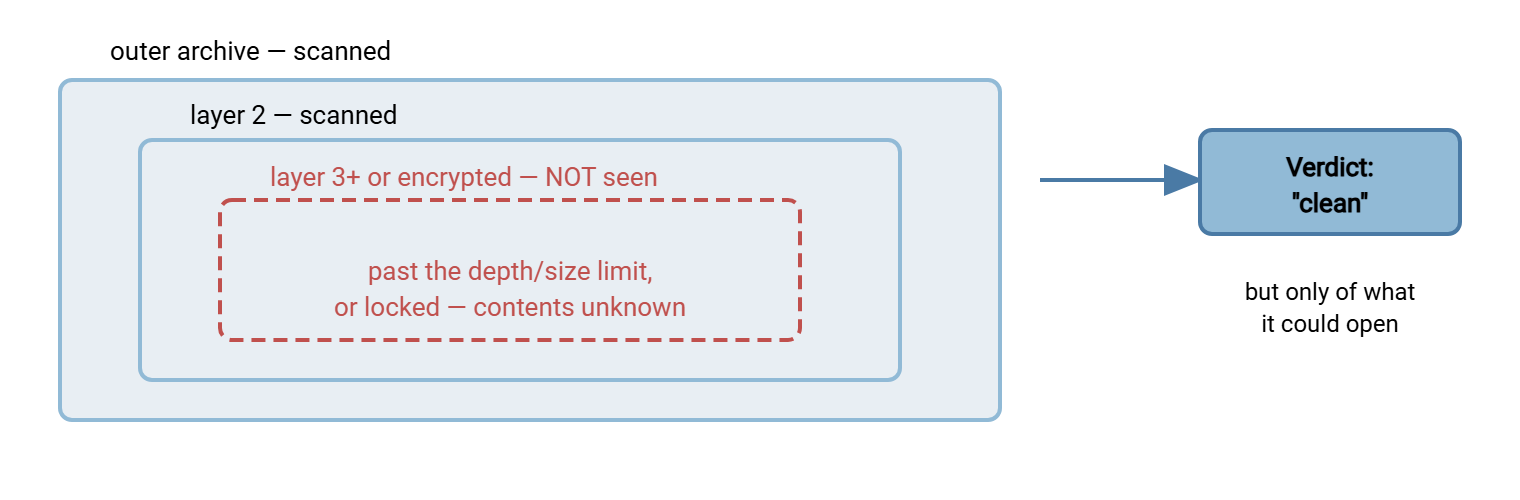
The first wall is nesting: an archive inside an archive inside an archive. Each layer must be unpacked before the next can be reached. Engines set a limit on how many layers deep they will go, because unpacking cannot continue forever. A file buried below that depth limit is simply not reached. The second wall is expansion size: a small compressed archive can expand into an enormous amount of data. Engines cap how much they will extract to avoid exhausting the machine. Past the cap, the rest is not examined.
The diagram below shows the blind spot: the scanner peels the outer layers it is willing to open. But content below the depth or size limit — or inside a layer it cannot open at all — is never seen. The overall verdict may still come back clean.
The defensive move here is not to demand infinite unpacking — that is a path to exhausting your own systems. It is to treat "this archive exceeded what the scanner would open" as its own outcome, distinct from clean. It is also to constrain archives at the hygiene layer: limit accepted nesting depth and cap sizes. Question why a partner is sending deeply nested containers at all when the flow calls for a simple data file. Those constraints belong in inbound partner file hygiene.
Password-Protected and Encrypted Files
A scanner cannot read what it cannot decrypt — this is the plainest limit of all. A password-protected archive or an encrypted file is opaque to the engine: the bytes are scrambled. Without the key or password the contents are unreadable, to your scanner exactly as to any other party without the secret. The engine can see that the file is encrypted; it cannot see what is inside.
This produces a verdict that is easy to mishandle: "could not scan." The one fatal error is letting "could not scan" quietly become "clean." That treats an opaque file as safe because nothing bad was found, when the truth is nothing at all could be looked for. An encrypted file that flows inward on a clean-by-default assumption has bypassed your scanning entirely while appearing to have passed it. The correct handling is the third branch from the pipeline article: a file that cannot be scanned does not silently proceed. Either it is decrypted first and then scanned, or it is held and handled as an unscannable exception, per the policy at the end of this article.
Remember: "could not scan" is not a pass. A password-protected or encrypted file was never examined — the scanner only confirmed it is unreadable. If your pipeline treats an unscannable file as clean, you have built a bypass: anything opaque flows straight through the control that was supposed to inspect it.
The Honest PGP Privacy-vs-Scanning Tension
Now the tension the whole topic dances around, stated without euphemism. End-to-end encryption — PGP being the common example for files — is designed so that only the holder of the recipient's private key can read the content. Everything between sender and recipient sees ciphertext: the network, the transfer server, intermediate systems, and yes, your malware scanner. That opacity is not a bug in PGP; it is the entire feature. The sender sealed the file specifically so that nothing in the middle could read it.
Your scanner is in the middle. So the two goals collide directly: you cannot simultaneously have "no intermediary can read this file" and "my intermediary scanner read this file." The first is the promise of end-to-end encryption; the second is the promise of mid-stream scanning. At a single point in the flow, you get one or the other. Pretending otherwise means running a scanner in front of PGP traffic and trusting its clean verdicts. The scanner is dutifully examining ciphertext and finding nothing, because there is nothing legible to find. The whole payload sails past under a green light.
The resolution is not to break the encryption or abandon it. It is to move the scan to where the plaintext exists. In a well-designed pipeline, encrypted files are decrypted at a controlled point on your side — after arrival, in a protected processing area. The scan happens on the decrypted plaintext, before it is consumed. The decryption point becomes the scan point. This keeps the file encrypted across the untrusted journey (its purpose) and still inspects the real contents (your purpose). It does so by ordering the two operations instead of forcing them into the same instant. A workflow tool with built-in OpenPGP decryption and pre/post-processing steps, such as Sysax FTP Automation, is a natural fit for that ordering. It decrypts the arriving file at the controlled point and hands the plaintext to the scan as the very next step. The wider mechanics of decrypt-on-arrival pipelines, and where the keys and plaintext should live, are the domain of the encryption at rest and PGP series. Malware scanning and file-level encryption are two controls that have to be sequenced deliberately. That series and this one describe the two halves of the same handshake.
Where a file must stay encrypted end-to-end until it reaches a system you do not control, be honest about the consequence. In that case, you cannot scan its contents, and the scanning responsibility sits with whoever holds the key and decrypts it. That may be an acceptable, deliberate choice for a highly sensitive flow between trusted parties. But it should be a choice made with eyes open, documented, and compensated by other controls. It should not be an accident of nobody realizing the scanner was reading ciphertext the whole time.
Evasion: Recognition Has Limits
The last blind spot is the most general and needs care to discuss responsibly, so here it is at the level that helps a defender and nothing more. Detection is fundamentally recognition — comparing a file against known-bad patterns and known-suspicious behaviors. Anything recognition-based shares one structural property: it is strong against what is known and inherently weaker against what is not yet known. New and previously unseen threats exist in the gap between "a threat is created" and "detection engines have learned it." A determined adversary invests specifically in staying in that gap.
The practical lesson for an administrator is not a technique — it is a posture. Never treat a clean scan as proof of safety. A clean result lowers the probability that a file is a known threat. It does not certify the file benign, because recognition cannot certify the absence of something it has not learned. This is precisely why the re-scanning practice from the pipeline article matters. The engine that could not recognize a file today may recognize it tomorrow. That is also why scanning is one layer in a stack rather than the whole defense. The systematic way to think about which threats you actually face and where they enter is the transfer threat modeling series.
How Layers Compensate for the Gaps
Every limit above is survivable because scanning was never meant to stand alone. The compensating layers are ordinary controls, each covering where scanning is blind:
- Decrypt, then scan. Order the operations so the scan sees plaintext, as above. This converts the single biggest blind spot — encrypted contents — back into scannable content.
- Constrain the unscannable. Reject or hold what cannot be inspected: over-nested archives, files that exceed unpack limits, unexpected encrypted blobs on flows that should carry plain data. If it cannot be scanned and it does not belong, it does not proceed. This is hygiene doing scanning's job for it.
- Restrict types to the inspectable. A flow that only ever needs a specific, simple file type has no reason to accept arbitrary containers. Narrow the accepted types and most archive and packing tricks never get a foothold. Type allowlisting is the core of partner file hygiene.
- Limit downstream blast radius. Assume a file will occasionally slip through, and make sure the account and system that consume it can touch as little as possible. That way, a miss is contained rather than catastrophic. Least privilege on the consuming side is the safety net under scanning, and it is the whole point of the file server permissions series.
- Re-scan over time. Detection improves; run the scheduled re-sweep so today's clean file gets tomorrow's verdict while it still sits in your folders.
Notice that these layers do not make scanning perfect — nothing does. They make the system resilient to scanning's imperfection, which is the achievable goal. A file that hides below an archive depth limit is stopped by a type restriction. A file that stays encrypted past your control is contained by least privilege downstream. A genuinely novel threat that no engine yet recognizes is caught by a re-scan next week. Or it is limited by the small blast radius of the account that opened it. That is what "layers compensate" means in practice.
A Policy for Unscannable Files
The recurring decision this article circles is what to do when a file cannot be truly inspected. Rather than improvise per incident, adopt a standing policy. This one is copyable and covers the cases above:
POLICY: HANDLING FILES THAT CANNOT BE FULLY SCANNED

Trigger: scan verdict is "could not scan", "encrypted", "exceeded
limits", or the file type is not one we can inspect.

DEFAULT: an unscannable file NEVER proceeds as if clean. Route to the
hold/quarantine path and treat per category below.

1. ENCRYPTED WITH A KEY WE HOLD (e.g. PGP to our own key)
   -> Decrypt at the controlled processing point.
   -> Scan the decrypted plaintext BEFORE it is consumed.
   -> Only a clean post-decryption scan proceeds.

2. PASSWORD-PROTECTED ARCHIVE, PASSWORD KNOWN/AGREED
   -> Open with the agreed password in the controlled area, then scan.
   -> If no agreed password exists, treat as category 4.

3. OVER-NESTED / OVERSIZED ARCHIVE (exceeded unpack limits)
   -> Do not force unlimited unpacking.
   -> Hold + alert. Question why this shape arrived on this flow.
   -> Require re-send in the agreed simple form, or investigate.

4. ENCRYPTED/OPAQUE, WE CANNOT DECRYPT, ON A FLOW THAT SHOULD BE PLAIN
   -> Hold + alert. This does not match the agreed file spec.
   -> Contact the partner; do not release on assumption.

5. ENCRYPTED END-TO-END BY DESIGN, DECRYPTED ONLY DOWNSTREAM
   -> Documented exception. Scanning responsibility moves to the
      system that decrypts. Confirm that system scans post-decryption.
   -> Compensate: least privilege + logging on the downstream consumer.

Record every unscannable-file decision in the log (file, flow, category,
who decided, outcome).
The value of writing this down is that "could not scan" stops being a moment of improvisation under pressure and becomes a category with a known answer. Categories 1 and 2 recover the file into scannable form; categories 3 and 4 refuse to guess. Category 5 makes the end-to-end case an explicit, compensated exception rather than a silent hole.
The Short Version
A clean scan means "nothing known was found in what could be read" — three qualifiers, three blind spots. Scanners cannot see below archive nesting and size limits, cannot read password-protected or encrypted contents, and cannot recognize what they have not yet been taught. The sharpest case is the PGP tension: end-to-end encryption exists so that nothing in the middle can read the file. Your scanner is in the middle, so you order the operations — decrypt at a controlled point, then scan the plaintext. You do that rather than pretending a scanner can inspect ciphertext. And because recognition is never complete, you never treat a clean verdict as proof of safety. Layers compensate: decrypt-then-scan, constrain and reject the unscannable, restrict types to the inspectable, re-scan over time, and keep the downstream blast radius small so an inevitable miss is contained.
From here: inbound partner file hygiene builds the type and archive constraints this article leaned on. The article designing a quarantine workflow covers where held and unscannable files land. And responding to an infected transfer covers the day a layer other than scanning is the one that catches it.
Frequently Asked Questions
If a file is PGP-encrypted, can my scanner check it?
Should I just block all encrypted or password-protected files?
Why do scanners give up on deeply nested archives?
Does a clean scan mean the file is definitely safe?
What is the single most common scanning mistake?
If scanning has all these gaps, is it even worth doing?
From the Sysax team: we build secure file transfer software for Windows. Sysax Multi Server is an FTP, FTPS, SFTP, and HTTPS server. Sysax FTP Automation handles scheduled, scripted transfers. Free trials are on the download page.