
Designing a Quarantine Workflow That People Follow
A scanner that flags a file has done the easy half of its job. The hard half is everything that happens next: where the file goes, who finds out, and who decides whether it is really dangerous. It also includes how a legitimate file that got flagged by mistake finds its way back into the flow. That second half is a workflow — a sequence of steps involving actual humans — and it is where malware scanning quietly succeeds or fails. A world-class scanning engine wired to a broken follow-through is a broken control.
The phrase that matters in this article's title is "that people follow." A quarantine process that is slow, unclear, or has no fast path for the inevitable false alarm does not get followed — it gets routed around. Someone starts copying flagged files straight out of quarantine "because the last three were fine," and the control is dead while still appearing on the diagram. The goal here is a quarantine workflow that protects the network and stays low-friction enough that nobody has a reason to bypass it.
This article covers the quarantine area's required properties and notifications that reach the right people. It covers an accountable release process with a template you can adopt, and the false-positive path that keeps the whole thing trustworthy. It is part of our malware scanning for file flows series and picks up where where to put scanning left off. That article routed flagged files to quarantine; this one designs what quarantine actually is.
Why the Workflow Beats the Scanner
Consider what a flagged file represents: a decision point with no default that is safe to automate. You cannot auto-delete it — sometimes the flag is wrong, and you have just destroyed a partner's legitimate file. You cannot auto-release it — sometimes the flag is right, and you have just waved malware inward. The only correct next action is a human looking at context and deciding. That means the quality of your quarantine depends on the quality of the human process around it, not the sensitivity of the scanner.
This is why organizations with excellent scanning still get hurt. The scan worked; the file was flagged. Then the alert went to a mailbox nobody reads. Or the flagged file sat in a folder for a week because no one owned the decision. Or a frustrated operator released a batch of flags without looking because the real false-positive rate had trained them to. Every one of those is a workflow failure, not a scanning failure. Design the workflow first and the scanner becomes genuinely useful; skip it and the scanner becomes a source of ignored noise.
A concrete version makes the stakes obvious. Suppose a nightly partner file that a billing job depends on is flagged and quarantined at 2 a.m. With a good workflow, an alert lands in a monitored queue. The on-call triager sees the file is an unexpected type from a partner who normally sends plain data. The file waits safely until morning — the billing team is told their input is held, and nothing bad reaches the importer. With a broken workflow, the same flag produces an email in an unwatched inbox; the billing job simply fails. Someone under pressure to "just make billing run" copies the file out of quarantine by hand without anyone checking what it was. The scanner performed identically in both stories. The difference in outcome was entirely the human process wrapped around it — and the second story is how a flagged file ends up inside the network anyway.
The Quarantine Area Itself
A quarantine area is an isolated holding place for files a scan has flagged or a check has failed. It is not a folder like the others; it holds the most dangerous content on your server, and its design reflects that. Four properties are non-negotiable:
- Isolated from every normal path. No downstream job watches it, no application reads from it, no partner can see it. A file in quarantine is out of circulation completely — the entire point is that nothing consumes it by accident. If any automated consumer can reach the quarantine folder, it is not a quarantine.
- Tighter permissions than anywhere else. Only the people who triage flagged files should be able to open, move, or release them. Because quarantine holds live malicious files, its access list is the shortest on the server. Enforcing that separation is exactly the discipline in the file server permissions series.
- Bounded but not hasty retention. Flagged files must persist long enough to be investigated and to serve as evidence if the flag was a real infection. But they must not persist forever, because a folder full of aging malicious files is pure liability. A defined, enforced retention window with a controlled disposal step is the balance.
- Logged on every touch. Arrival, alert, who looked, what they decided, release or destruction — every event is recorded. That is because quarantine decisions are exactly the kind an auditor or an incident responder will need to reconstruct later. Where those records belong is the transfer logging and audit series.
Remember: quarantine is not a trash folder and not a staging folder. It is an isolated evidence locker for dangerous files: nothing automated can reach it, and only triagers can open it. Every touch is logged, and files are held for a bounded window before controlled disposal. If any of those four is missing, it is a folder pretending to be a quarantine.
The Quarantine Flow, End to End
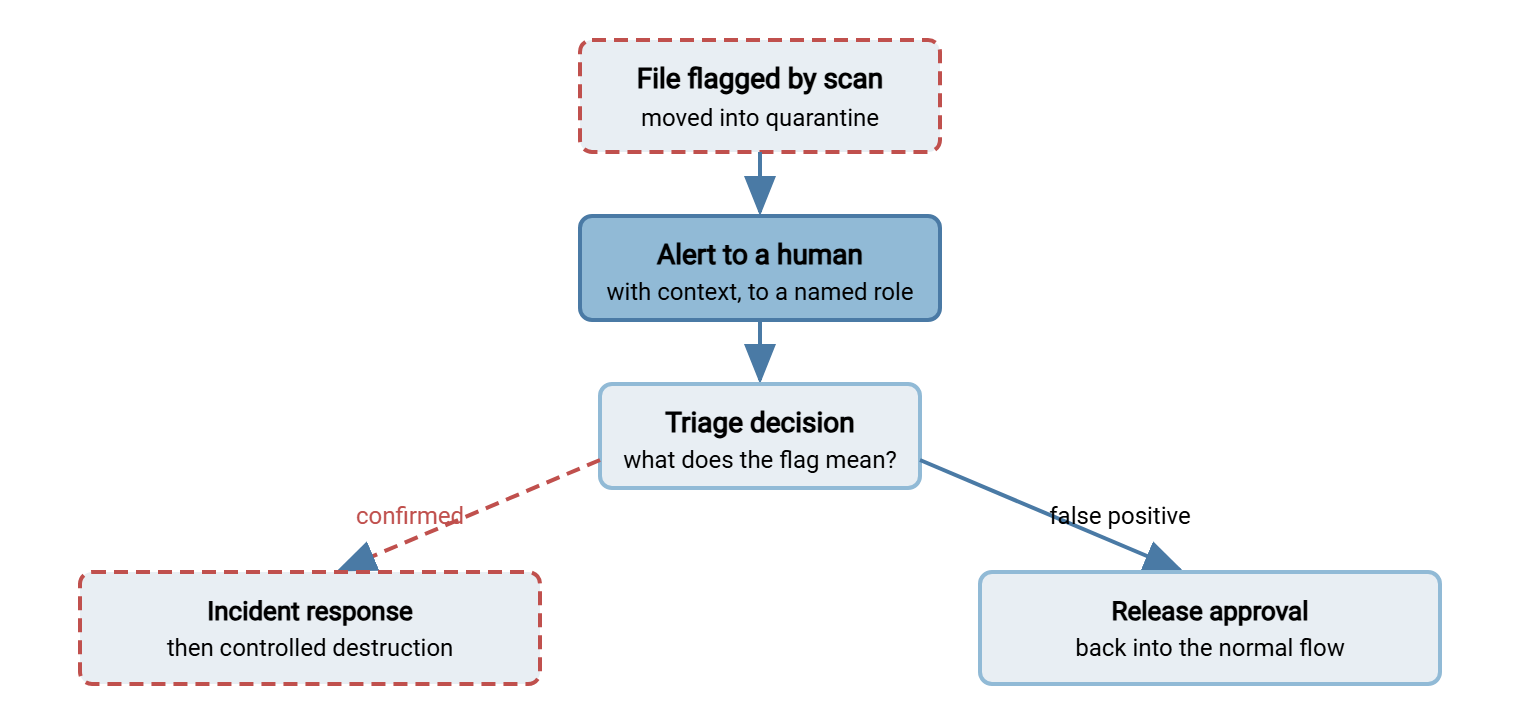
The workflow itself is a short branching path. A file is flagged and moved to quarantine; an alert fires to a human. That human triages — decides what the flag really means — and the file goes down one of two roads. If it is confirmed malicious, it is handled as an incident and eventually destroyed on a controlled step. If it is a false positive, it is released back into the flow through an accountable approval. Every branch is logged. The first two steps should be automatic. They use the same folder-monitoring step that ran the scan — the pre- and post-processing hook in a workflow tool such as Sysax FTP Automation. That step moves the flagged file into quarantine and raises the alert without waiting for anyone to notice.
The diagram below shows that flow: the single entry from the scan, the alert to a human, the triage decision, and the two outcomes with their very different follow-ups.
Notifications That Reach the Right Human
A flagged file that nobody hears about is the same as a file that was never scanned. The alert is what converts a scan result into action, and most quarantine failures trace back to an alert that went nowhere useful. Three rules make notifications work.
Send it to a role, not a person. An alert addressed to one administrator dies when that person is on vacation, has left, or simply misses it. Route quarantine alerts to a monitored role mailbox or a ticketing queue that a defined group watches, so coverage never depends on a single human being online.
Include enough context to act. A bare "file quarantined" forces the recipient to go digging before they can even start. A useful alert carries the file name, the source partner or flow, the timestamp, the scanning engine's verdict text, and the quarantine location. That is enough to begin triage without a scavenger hunt. Context is what turns an alert into a first triage step rather than a nag.
Reach two audiences, because two people care. The security or triage role needs to know because it makes the malicious-or-not call. The flow owner — whoever depends on that file arriving — needs to know because a held file means their process is now waiting. They would rather learn it from an alert than from a downstream failure an hour later. Notifying only security leaves the flow owner mystified; notifying only the flow owner leaves the decision to someone not equipped to make it.
The counter-risk is alert fatigue — so many alerts that people stop reading them. If quarantine fires constantly, that is a signal to fix the upstream hygiene rules (covered in inbound partner file hygiene). Fix them so fewer benign files reach the scanner in the first place. Constant quarantine alerts are not a reason to mute them. A quarantine alert should be rare enough that each one is worth a look.
The False-Positive Path Is What Keeps Trust
Here is the reality that makes or breaks a quarantine: scanners flag clean files. A false positive — a legitimate file wrongly flagged as malicious — is not a rare malfunction; it is a normal, expected event. An unusual file format, an installer a partner legitimately sends, a document with an embedded macro that is entirely benign: any of these can trip a flag. Your workflow may treat every flag as certain doom and offer no fast, trusted way to release a wrongly-flagged file. In that case, you have built a trap for your own operations.
And the failure mode is predictable. When releasing a false positive is slow or undefined, the people whose work is blocked find a way around it. They pull the file out of quarantine directly or disable the check for "that reliable partner." Or they start ignoring the alerts because most turn out fine. The false-positive path is not a nicety; it is the pressure-release valve that keeps the whole control from being sabotaged by the people it inconveniences. A quarantine with a smooth false-positive path gets respected. One without gets bypassed within a month.
A good false-positive path is fast, defined, and accountable. It has a known way to request release and a named person who can approve it. It includes a quick verification that the file really is benign, and a logged record of the decision. Fast enough that legitimate work is not badly delayed; accountable enough that "release it" is never a casual, invisible act.
Release With Accountability
The single most important rule of release: nobody releases a file on their own unrecorded say-so, and ideally not their own file at all. Release is the moment a flagged file re-enters your network, so it deserves the same separation-of-duties thinking you apply anywhere consequential. The person who wants the file (the flow owner) requests release. A different person with the authority (the triager or security role) approves it after a check. The decision is written down with a reason. That way a release is always a deliberate, attributable act, never a quiet click by the one person most motivated to skip the check.
Here is a complete quarantine runbook and a release-approval template you can adopt directly. The runbook is the sequence every flagged file follows; the template is the record every release produces.
QUARANTINE RUNBOOK  —  every flagged file follows these steps

1. ISOLATE
   - File is moved to the quarantine area automatically on flag.
   - It leaves the landing/processing path entirely. Nothing consumes it.

2. ALERT
   - Notify the triage role AND the flow owner.
   - Alert carries: file name, source flow/partner, time, engine verdict,
     quarantine location.

3. TRIAGE  (triage role)
   - Review the verdict and the file's context (expected? from whom?
     right type and size for this flow?).
   - Decide: CONFIRMED MALICIOUS  or  SUSPECTED FALSE POSITIVE.
   - Do NOT open/execute the file to "check" — judge from metadata,
     verdict, and flow context.

4a. IF CONFIRMED MALICIOUS
   - Hand to incident response (see the infected-transfer runbook).
   - Keep the file in quarantine as evidence until IR says otherwise.
   - Do NOT release. Do NOT delete yet.

4b. IF SUSPECTED FALSE POSITIVE
   - Flow owner submits a RELEASE REQUEST (template below).
   - A different, authorized approver verifies and signs off.
   - On approval, file is released to the normal flow and the event logged.

5. DISPOSE
   - Confirmed-malicious files: destroyed on a controlled step after
     IR closes, per retention policy.
   - Released files: removed from quarantine once promoted.
   - Every disposal logged: what, when, by whom, why.


RELEASE-APPROVAL RECORD  —  filled for every false-positive release

  Quarantine file ...... ______________________________________
  Source flow/partner .. ______________________________________
  Date/time flagged .... ______________________________________
  Engine verdict text .. ______________________________________

  REQUESTED BY (flow owner)
    Name/role .......... ______________________________________
    Why this file is expected and legitimate:
      __________________________________________________________
    Basis it is safe (e.g. expected type from known partner, matches
    the agreed file spec, re-scanned clean on updated engine):
      __________________________________________________________

  APPROVED BY (must be a DIFFERENT authorized person)
    Name/role .......... ______________________________________
    Verification performed:
      __________________________________________________________
    Decision ........... RELEASE / KEEP IN QUARANTINE
    Date/time .......... ______________________________________

  Recorded in log? ..... yes / no      Ticket ref: ____________
Two details in that template do real work. It forces the requester to state a basis for safety rather than just asserting it. That surfaces the difference between "I recognize this partner" and "this matches our agreed spec and re-scanned clean." And the template requires the approver to be a different person, which is what makes the record meaningful rather than a self-signed permission slip. Notice too that triage never involves opening or running the file to see what it does — that is how triagers infect themselves. The judgment is made from metadata, verdict text, and whether the file fits the flow.
Retention and Disposal of Quarantined Files
Quarantined files need a lifecycle of their own. Hold them long enough to investigate and to preserve evidence. A confirmed-malicious file may be needed by the incident-response process for tracing and partner notification. But put a bounded, enforced window on that retention, because a quarantine folder that only accumulates becomes a stash of live malware nobody is managing. Disposal should be a controlled step: a defined retention period, a named authority who can destroy, and a logged record of each destruction. Confirmed-malicious files are destroyed after their incident closes; released files are removed once promoted; everything is written down. That combination keeps quarantine both useful as evidence and safe as storage.
One subtlety is worth flagging for junior admins. A quarantine folder should be excluded from the ordinary sweeps and backups that touch the rest of the server, or at least handled with care in them. You do not want a routine scheduled sweep re-processing quarantined files. You do not want live malicious files silently copied into a long-retention backup set where they will outlive your quarantine window by months. Treat the quarantine area as a place with its own rules end to end. It needs its own permissions, its own retention, its own exclusion from the automation that serves the healthy folders. The moment quarantine is treated like just another directory, one of those background jobs will eventually do something with its contents that you did not intend.
Building a Workflow People Actually Follow
Everything above serves one meta-goal, so it is worth stating plainly. A quarantine control survives contact with real operations only if it is protective for the dangerous case and low-friction for the common benign case. That means a fast, defined false-positive path so blocked work is not badly delayed. It means clear ownership so no file sits undecided because nobody's job it was. It means alerts rare enough to stay meaningful, and a release process accountable enough to trust but quick enough to use. Get that balance right and people follow the workflow because it works for them. Get it wrong — make it slow, unclear, or all-or-nothing — and the smartest, busiest people on your team will be the first to route around it. They take the protection with them.
The Short Version
A scan that flags a file has only started the control; the quarantine workflow finishes it. Build the quarantine area as an isolated, tightly-permissioned, logged evidence locker with bounded retention — not a trash folder and not a staging folder. Send context-rich alerts to a role, not a person, and to both the security triager and the flow owner. Treat false positives as normal and give them a fast, accountable release path, because a workflow with no relief valve gets bypassed. Make release a separation-of-duties act: the flow owner requests, and a different authorized person approves and records it. Triage never means opening the file to see what it does. That is a quarantine people follow instead of route around.
When triage lands on "confirmed malicious," the workflow hands off to responding to an infected transfer. To reduce how often quarantine fires in the first place, see inbound partner file hygiene. For the limits that make quarantine necessary at all, see what scanners can't see.
Frequently Asked Questions
Why not just delete flagged files automatically?
Who should be allowed to release a file from quarantine?
Our scanner keeps flagging clean partner files. What do we do?
How long should we keep files in quarantine?
Should the triager open the file to confirm it's malicious?
Where do quarantine records need to go?
From the Sysax team: we build secure file transfer software for Windows. Sysax Multi Server is an FTP, FTPS, SFTP, and HTTPS server. Sysax FTP Automation handles scheduled, scripted transfers. Free trials are on the download page.