
Where to Put Scanning in a Transfer Pipeline
Once you accept that a transfer flow needs its own malware scanning, the interesting question is not whether to scan but where. A file passes through several stages between the moment a partner uploads it and the moment an internal system acts on its contents. You can put the scan at any of them. Each placement makes a different trade among three things you care about. The first two are how much delay it adds and how reliably it catches a file before harm. The third is what happens on the bad day when the scanner itself is unavailable.
Get the placement right and scanning becomes an invisible, dependable part of the pipeline. Get it wrong and you bottleneck every transfer behind a slow scan. Or you leave a window where an unscanned file has already moved inward before anything looked at it. This article walks through the four common placements — the on-arrival hook, the staging folder, the scheduled sweep, and the gateway. It covers the tradeoffs that decide between them. It is part of our malware scanning for file flows series and follows directly from why transfer flows need their own scanning.
The Three Things Placement Trades Off
Before the options, fix the three axes in your mind, because every placement is just a different point on them.
Latency is the delay scanning adds between a file arriving and being usable. A scan that must finish before a file moves inward adds its own duration to every transfer. For a small order file that is milliseconds; for a multi-gigabyte archive it can be minutes. Whether that delay matters depends entirely on the flow. A nightly batch does not care about two minutes; an interactive upload where a user waits for a "done" message very much does.
Coverage timing is how soon after arrival the scan happens. That determines how large the window is in which an unscanned file exists somewhere it could do harm. An immediate scan closes that window to near zero. A scan that runs once an hour leaves up to an hour in which the file sits unexamined. Coverage timing is the security heart of the decision.
Failure behavior is what the pipeline does when the scanner is slow, overloaded, or down. This axis is invisible until the scanner has a bad day, and then it is the only axis that matters. The two choices are to hold the file until scanning recovers (fail closed) or let it through unscanned (fail open). They are opposite bets, and the placement you pick shapes which one is natural. We give failure behavior its own section because it is the decision most often made by accident.
The Pipeline and Where the Checkpoint Can Sit
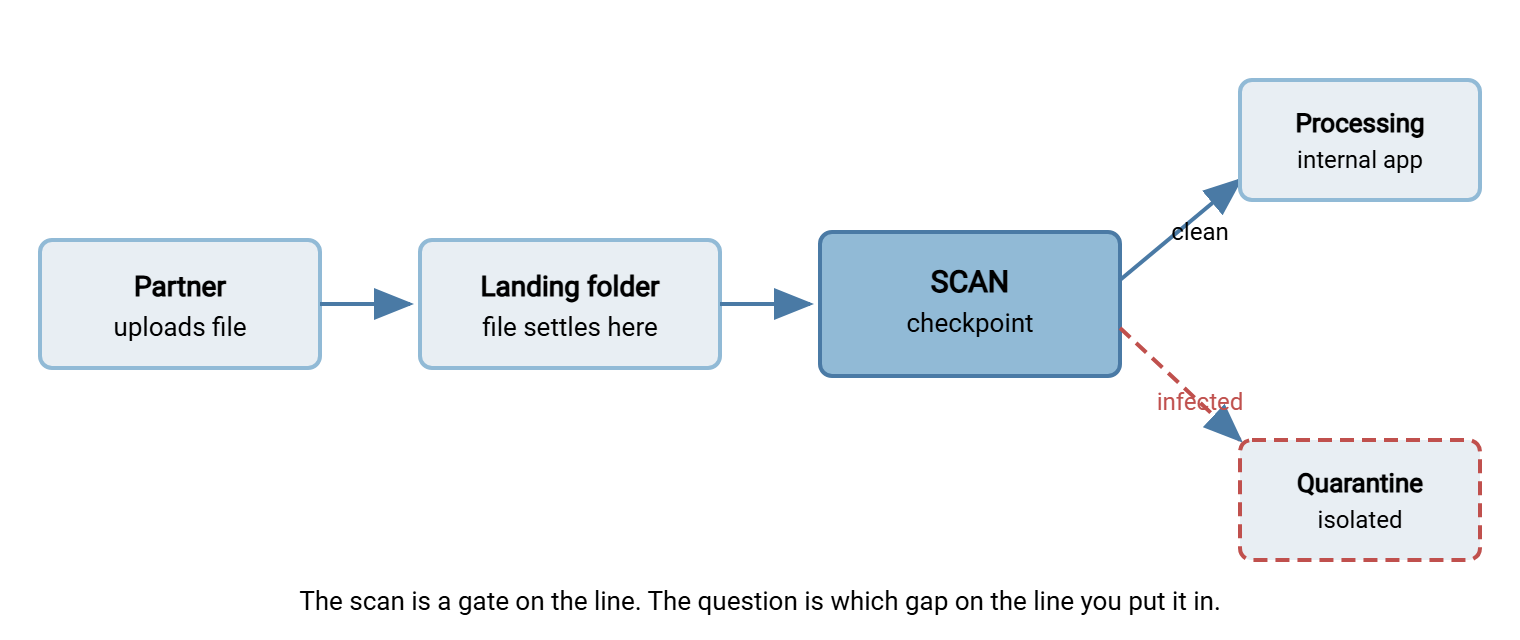
Picture the inbound flow as a short assembly line. A partner authenticates and uploads a file to a landing folder on your receiving server. A step picks the file up and moves it to a processing area on an internal system. An application reads it and acts. The scan is a checkpoint you insert somewhere on that line — and the whole placement question is which gap you drop it into.
The diagram below shows the line with a scan checkpoint at the point of arrival. A clean verdict lets the file continue inward; an infected verdict diverts it to an isolated quarantine area instead of the processing system.
On-Arrival Hook Scanning
An on-arrival hook scans a file the moment it finishes landing, and blocks it from moving inward until the verdict comes back. It is the most protective placement: the window between arrival and inspection is essentially zero. No downstream system ever sees a file that has not been scanned. If you can only build one thing, build this.
The mechanism is a folder monitor — a watcher that fires when a new file appears. It is attached to a processing step that calls your scanning engine and routes the file based on the result. The word hook just means "run my step at this event"; here the event is "a file arrived." Because the scan runs inline, before the file continues, it adds its duration to the flow. That is the on-arrival trade in one sentence: immediate coverage, at the cost of latency on every file.
The logic of the hook is worth writing out, because getting the branches right is the entire craft. Here it is as tool-agnostic pseudocode you can adapt to whatever folder-monitor and scanning engine you run:
# ON-ARRIVAL SCAN HOOK  (pseudocode for a folder-monitor pre-processing step)
# Fires when a new file appears in the inbound landing folder.

on_file_arrived(path):

    # 1. Make sure the upload actually finished. Scanning a file that is
    #    still being written wastes a scan and can give a false verdict.
    if not upload_complete(path):
        return                      # let the watcher re-fire when it settles

    # 2. Hand the whole file to the scanning engine, with a time limit.
    result = scan_engine.scan(path, timeout = SCAN_TIMEOUT)

    # 3. Route on the verdict. Three outcomes, three destinations.
    if result.status == "clean":
        move(path, PROCESSING_DIR)          # promote inward — the only path onward
        log("clean", path, result.detail)

    elif result.status == "infected":
        move(path, QUARANTINE_DIR)          # isolate; DO NOT delete yet (evidence)
        log("infected", path, result.detail)
        notify(SECURITY_CONTACT, path, result.detail)

    else:
        # error, timeout, engine down, or "unable to scan this file"
        move(path, HOLD_DIR)                # FAIL CLOSED: never promote unscanned
        log("scan-error", path, result.detail)
        notify(OPS_CONTACT, path, result.detail)
Three properties of that pseudocode are not optional. It waits for the upload to complete before scanning, because a partially written file scans wrong. It has a distinct branch for "could not scan" that is separate from "clean" and "infected." The mistake that sinks real deployments is treating a scan error as a pass. And the pseudocode never deletes an infected file inline; it moves it to quarantine intact. That is because the file is now evidence for the response process described in responding to an infected transfer. The quarantine area those files land in — isolated, alerted, accountable — is designed in designing a quarantine workflow.
Remember: the on-arrival hook has three outcomes, not two. "Clean" and "infected" are obvious; the one people forget is "could not scan" — engine down, timeout, unreadable file. That third branch must have its own behavior, and for an inbound flow the safe behavior is to hold the file, not wave it through.
Staging-Folder Scanning (the Airlock)
A staging folder placement separates where files land from where files are consumed, with the scan as the gate between them. Partners upload into a staging area that internal systems cannot see. A scan step inspects each file there and promotes only clean files into the real folder that downstream jobs watch. Think of it as an airlock: nothing reaches the inside until it has passed the check in the middle chamber.
The difference from a bare on-arrival hook is architectural rather than mechanical. Both scan before the file goes inward; the staging pattern adds a structural guarantee that the folder internal systems read from only ever contains scanned files. A downstream job pointed at the promoted folder can trust its contents by construction, because the only way in is through the gate. That guarantee is valuable when several different consumers pull from the same place and you do not want each of them to re-check.
Staging pairs naturally with the per-partner landing design where each partner writes only to its own staging area. So a scan failure or a quarantined file for one partner never touches another's flow. Keeping partners structurally separated this way is the subject of the file server permissions series. The cost of staging is a little more moving-parts complexity — two folders and a promotion step instead of one folder and a hook. In exchange, you get a cleaner guarantee about what internal systems are allowed to see.
Scheduled Sweep Scanning
A scheduled sweep is a job that runs on a timer — every few minutes, hourly, nightly — and scans everything currently sitting in a set of folders. It is the opposite trade from the on-arrival hook: it adds no latency to any individual transfer. That is because files move through the pipeline without waiting for a scan. But the sweep leaves a window of exposure between when a file arrives and when the next sweep reaches it.
On its own, a sweep is a weak primary defense for inbound flows, precisely because of that window. A file can arrive, be pulled inward, and be opened by an application before the sweep ever runs. Do not rely on a sweep alone to gate files that move quickly. But a sweep earns its place in two roles the real-time placements cannot fill:
- Catching what a real-time scan missed the first time. Scanning engines update their detection data continually. A file that scanned clean on arrival may be recognized as malicious a day later once the engine learns a new signature. A scheduled re-sweep of recently received files — not just newly arrived ones — is how that late recognition reaches files already sitting in your folders. This is one of the strongest reasons to run a sweep alongside a hook, not instead of it.
- Covering at-rest folders that no real-time hook watches. Archives, sent folders, long-lived distribution directories — places files rest rather than flow through. A periodic sweep is the sane way to keep an eye on stored files that no arrival event will ever re-trigger.
Gateway Scanning
Gateway scanning moves the checkpoint out to the network edge, so files are inspected on a dedicated system before they ever reach the transfer server that stores them. In a segmented network this often lives in a DMZ — the buffer network between the internet and your internal systems. There, an edge component scans arriving files and passes only clean ones inward. The appeal is that a bad file is stopped before it lands anywhere valuable. The scanning load sits on a machine built for it rather than on the transfer server itself.
The cost is complexity and coordination. A gateway is another system to build, harden, and keep running, and it has to integrate with the transfer path so nothing routes around it. Gateway scanning tends to make sense for larger estates that already run a DMZ architecture for other reasons. The broader design of that edge is its own subject in the DMZ and gateway architecture series. For a small shop, an on-arrival hook on the receiving server delivers most of the same protection with a fraction of the moving parts. That is why it is the usual starting point.
Comparing the Four Placements
| Placement | Latency added | Exposure window | Best role |
|---|---|---|---|
| On-arrival hook | Per file, inline | Near zero | Primary gate for inbound flows |
| Staging folder (airlock) | Per file, before promotion | Near zero | When many consumers share one clean folder |
| Scheduled sweep | None on the transfer | Up to one sweep interval | Re-checking + at-rest folders, alongside a hook |
| Gateway (edge) | Per file, at the edge | Near zero | Larger estates already running a DMZ |
Fail Open or Fail Closed: The Decision You Must Make on Purpose
Every inline placement faces the same unavoidable question: what happens when the scan cannot render a verdict? The engine is down, the file is too large to finish in the timeout, a queue is backed up. There are exactly two answers, and choosing between them is a policy decision, not a technical detail.
Fail closed means a file that cannot be scanned does not proceed. It is held — parked in a hold folder, alerted on, and left for a human — until scanning is healthy again and it can be re-checked. This is the safe default for inbound flows carrying files you do not control. The downside is real: if the scanner stays down, files back up and transfers appear stalled to your partners. That is a availability problem, and an availability problem is a better problem than a compromise.
Fail open means a file that cannot be scanned proceeds anyway, usually with a logged warning. This keeps the pipeline flowing during a scanner outage at the price of letting unscanned files inward — exactly the thing the scan existed to prevent. Fail-open is occasionally defensible for low-risk internal flows where availability genuinely outranks inspection. But it should always be a conscious, documented choice. It should never be the accidental result of a scan-error branch that quietly treats "couldn't scan" as "clean."
Remember: the most dangerous configuration is fail-open by accident — a hook where a scanner timeout or crash silently lets the file through because nobody wrote the third branch. Decide fail-open versus fail-closed deliberately, write it down, and make sure the "could not scan" path in your code actually does what you decided.
Combine Placements — Don't Pick Just One
The placements are not rivals; the strong designs layer them. A very common and very effective combination for a serious inbound flow is:
- An on-arrival hook (or staging airlock) as the primary gate, so nothing reaches processing unscanned, failing closed when it cannot scan.
- A scheduled re-sweep of recently received files, so that late-arriving detection catches a file that scanned clean yesterday and is recognized today.
- A periodic sweep of at-rest folders — archives, distribution directories — that no arrival event covers.
That combination closes the two gaps a single placement leaves. The hook closes the arrival window. The re-sweep closes the time gap created by detection data that improves after the file was already here. Layering is the same logic email's stack uses — several imperfect checks in a row beat one check trusted to be perfect.
Wiring the Checkpoint Into a Real Pipeline
The reason the on-arrival hook is the usual recommendation is that most transfer automation already has the seam it needs. A pipeline built on folder monitoring with pre- and post-processing is exactly the hook the pseudocode above describes. It uses a watcher that runs your step when a file lands. In a tool such as Sysax FTP Automation, the folder-monitor plus processing-step model is the documented place to insert a scan. The watcher fires on arrival, and your step invokes the scanning engine. The file is promoted or diverted on the result before any downstream job sees it. The receiving side of the flow is the authenticated endpoint partners actually upload to, dropping files into the landing folder the watcher is pointed at. That endpoint is a server such as Sysax Multi Server. Between the two you have both halves of the checkpoint: a place files arrive, and a place a step runs on arrival.
Whatever tools you use, the shape is the same. There is a folder where files land, an event when they do, a step that scans and routes, and three destinations for the three verdicts. Build that, decide your failure behavior on purpose, and add a re-sweep for the late-detection gap. That is a complete, honest scanning integration.
The Short Version
Scanning can sit at four points in a transfer pipeline, and each trades latency against exposure. The on-arrival hook scans inline the moment a file lands and is the strongest single gate for inbound flows. The staging airlock adds a structural guarantee that internal systems only ever see scanned files. The scheduled sweep adds no transfer latency but leaves an exposure window, so it belongs alongside a real-time gate. Its real value is re-checking files against detection data that improved after arrival, and watching at-rest folders. The gateway pushes the check to the edge and suits larger estates already running a DMZ. Across all of them, the decision that matters most is failure behavior: fail closed for untrusted inbound files. Make sure your code has a real third branch for "could not scan" instead of quietly treating it as clean.
Next in the series is designing a quarantine workflow for where the infected and held files go. Continue with what scanners can't see for the honest limits of any placement. Read inbound partner file hygiene for the cheap checks that run at the same checkpoint.
Frequently Asked Questions
Should I scan on arrival or just run a nightly sweep?
Won't scanning every file slow my transfers down?
What should happen if the scanning engine is down?
Why re-scan a file that already passed once?
Do I need a gateway, or is scanning on the server enough?
Where do the infected files go after the scan flags them?
From the Sysax team: we build secure file transfer software for Windows. Sysax Multi Server is an FTP, FTPS, SFTP, and HTTPS server. Sysax FTP Automation handles scheduled, scripted transfers. Free trials are on the download page.