
Inbound Partner Files: Hygiene Rules That Prevent Incidents
Malware scanning answers the question "is this file known to be bad?" File hygiene answers a cheaper and often more useful one: "is this file even the kind of thing we agreed to accept?" Most inbound flows have a narrow, predictable shape — this partner sends a data file, named this way, about this big, in this format, every day. A file that violates that shape is suspicious long before any scanner opens it, and refusing it takes microseconds and no detection knowledge at all.
Hygiene rules are the simple, deterministic checks that enforce the expected shape of a flow. They accept only the file types the flow needs, validate names against the agreed pattern, and sanity-check sizes. They also verify that a file's contents actually match what it claims to be. They catch things scanning cannot — the unscannable encrypted blob on a plaintext flow, the executable where only data belongs, the file named to escape its folder. They do it before the expensive, fallible scan even runs. Best of all, they are set once, with the partner, up front.
This article covers the four hygiene checks and the allowlist mindset that makes them strong. It covers a copyable per-partner hygiene profile and the agreement language that keeps a rejected file from turning into an argument. It is part of our malware scanning for file flows series, and it is the layer that makes the scanner's job smaller by handing it fewer, better-shaped files.
Hygiene Before Scanning: Cheaper and Deterministic
Put hygiene checks before the scan in the pipeline, and they earn their place three ways. They are cheap — checking a file's type, name, and size is trivial compared to a full content scan. So obviously-wrong files are rejected without ever consuming a scan. They are deterministic — a rule that says "accept only CSV files under 50 MB named to our pattern" gives the same answer every time. There is no recognition guesswork and no false-negative gap. And they cover scanning's blind spots. The encrypted file the scanner cannot read, the deeply nested archive it will not fully unpack, and the plain wrong-type file all fail a hygiene rule cleanly. That turns several of the limits from what scanners can't see into simple rejections.
The mental model is a bouncer with a guest list versus a bouncer with a photo book of banned troublemakers. Hygiene is the guest list: short, definite, and it does not matter how clever a stranger is if their name is not on it. That is the allowlist idea, and it is the single most important concept in this article.
Hygiene also has a natural home in the pipeline: the same on-arrival checkpoint that runs the scan, described in where to put scanning. The sensible order is hygiene first, then scan. A file arrives; the hygiene checks run in a few microseconds. Anything that fails is held before a scan is even attempted. Only files that pass the shape check are handed to the scanning engine. Ordering it this way means the scanner spends its effort on plausible files rather than on obviously-wrong ones. It means the expensive, fallible step protects the cheap, deterministic step rather than the other way around. One checkpoint, two layers, in the order that wastes the least work.
Allowlist, Not Blocklist
There are two ways to decide what to accept. A blocklist enumerates what is forbidden and accepts everything else. An allowlist enumerates what is permitted and rejects everything else. For inbound files, the allowlist wins decisively, and the reason is structural. A blocklist can only forbid what you thought to list, so anything new or unanticipated sails through the gap. An allowlist inverts the burden — the unanticipated is rejected by default, because it was not on the short list of things you deliberately chose to accept.
This matters most for file types. Trying to block "dangerous types" is a losing game; the list of file types that can carry something harmful is long, changing, and full of surprises. Trying to allow "the one or two types this flow actually needs" is a winning game, because that list is short, stable, and known to both sides. A flow that receives a daily data feed needs a data file and nothing else. So accept that, and refuse the rest without needing to reason about why each refused thing might be dangerous.
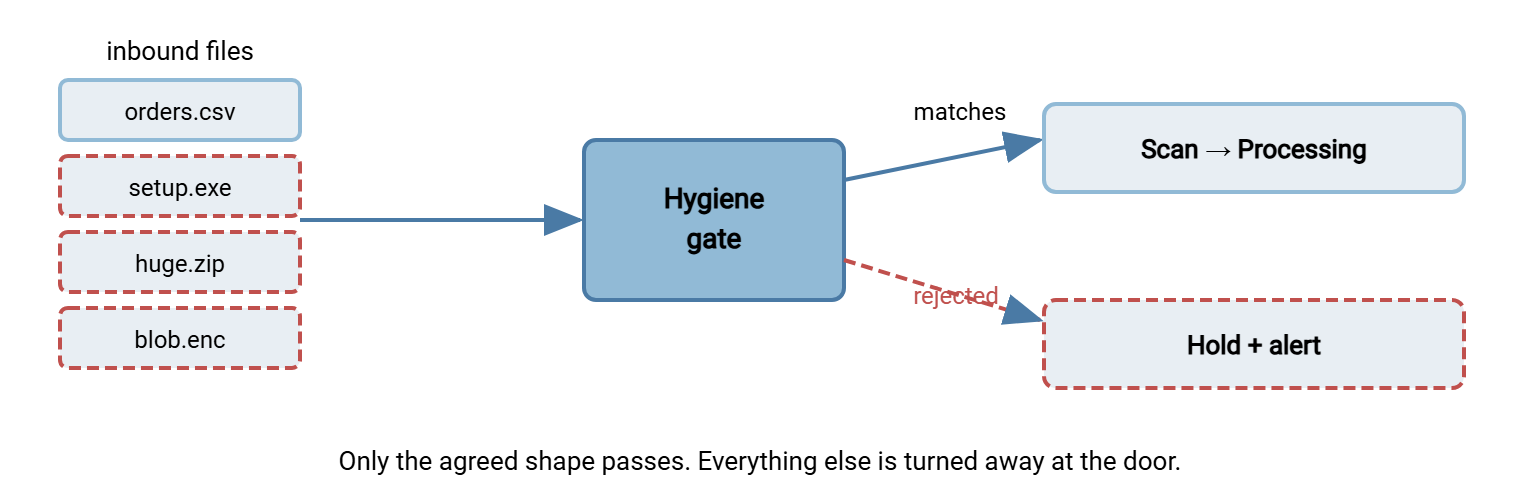
The diagram below shows the allowlist as a gate. Files matching the agreed shape pass to scanning and processing; everything else is turned away at the door, regardless of what it is.
Type Restrictions: Extension and Actual Content
Type restriction is the highest-value hygiene check, and it has one trap: a file's extension is a claim, not a fact. The .csv on the end of a name is just text the sender chose; it does not prove the file is really a CSV. So a proper type check has two parts. First, the extension must be on the allowlist. Second — and this is the part people skip — the file's actual content must match the claimed type. A file that parses as the declared format is what it says. A file named orders.csv whose contents are not comma-separated data is lying about itself. That mismatch is exactly the kind of anomaly worth rejecting before anything processes it.
Checking actual content usually means inspecting the file's leading bytes (many formats have a recognizable signature) and, better still, confirming it parses as the expected format. A flow that expects CSV can try to read the first rows as CSV; one that expects XML can confirm it is well-formed XML. The point is not exhaustive validation here — that comes in the content-verification step. It is a quick "is this even the type it claims?" that catches the crude mismatch cheaply.
Naming Validation
Filenames from an outside party are untrusted input, and they do two jobs in hygiene. They confirm a file belongs to this flow. They must not be allowed to do anything except name a file. Both jobs deserve a rule.
Enforce the agreed pattern. If the partner agreed to send ACME_orders_YYYYMMDD.csv, then a file that does not match that pattern is either an error or something unexpected. Either way, that file should not flow straight into processing. Pattern-matching the name is a simple, strong filter that also doubles as routing — the name tells you which flow and which day a file belongs to.
Reject names that try to be more than names. A filename should be a plain filename. A name that contains path separators or sequences like .. is attempting path traversal. It is trying to steer the file out of its intended folder to somewhere it should not go, and must be refused outright. Names with control characters, unusual invisible characters, or wildly excessive length are similarly not normal filenames and should be rejected. You are not trying to guess the sender's intent; you are enforcing that a name is just a name. That removes an entire category of trouble regardless of intent. The structural backstop is confining each partner to its own authenticated folder tree. This is the per-user isolation a receiving server such as Sysax Multi Server applies when each partner logs into its own account. It ensures even a slipped name cannot reach another partner's data. This backstop comes from the file server permissions series.
Size Sanity Checks
Size is the most overlooked signal and one of the easiest to check. Every flow has a normal size range, and files outside it are worth stopping:
- A zero-byte or tiny file where real data is expected usually means a truncated transfer, a failed export on the partner's side, or an empty batch. It is not something to feed to a processor that assumes real content.
- A file far larger than normal — many times the usual size — is an operational risk (it can exhaust processing resources). It is also an anomaly signal worth a human glance before it is consumed.
- A size that is plausible but off-pattern — a daily feed that is normally a few megabytes suddenly arriving at a few hundred kilobytes — can indicate the partner sent partial data. A warning threshold that alerts without blocking handles this middle case.
Set a minimum and a maximum per flow, plus an optional warn-level in between. The minimum catches the empties and truncations; the maximum protects your systems and flags the absurd; the warn-level notices the merely unusual. None of it requires understanding the file's contents — just its length — which is why it is nearly free to run on every arrival.
Remember: hygiene rules are an allowlist for the whole shape of a file — its type, name, and size — enforced before the scanner ever runs. They cost almost nothing, they are deterministic where scanning is probabilistic, and they cleanly reject exactly the unscannable and unexpected files that scanning struggles with. A narrow, well-defined flow is a flow that is easy to defend.
Content Verification
The deepest hygiene check confirms that a file is not just the right type by its first bytes but genuinely well-formed as the expected format. A data file should parse cleanly as data with the expected columns or fields; a structured document should be valid against its expected structure. This content verification sits at the boundary between hygiene and the application's own validation. Doing a structural pass early — before the file reaches deep processing — catches malformed and manipulated files while they are still cheap to reject.
Content verification is also where you enforce format expectations that double as security rules. On a flow agreed to carry plaintext data, an encrypted or password-protected file fails verification because it is not the agreed format. On a flow that expects a single flat file, a nested archive fails because that is not the shape agreed either. These are the same constraints that keep the unscannable cases from the scanner-limits article from ever reaching an ambiguous verdict. The file is rejected for not matching the spec long before "could not scan" is even a question.
A Copyable Per-Partner Hygiene Profile
Here is all four checks expressed as a single per-partner, per-flow hygiene profile. It is written as a tool-agnostic config you can translate to whatever your pipeline uses; the value is the structure and the defaults, not the syntax:
# INBOUND HYGIENE PROFILE
# Partner: ACME Corp        Flow: daily-orders
# Applied at the landing folder BEFORE scan and processing.

accept_types:                 # ALLOWLIST — anything not listed is rejected
  - csv                       # checked by extension AND actual content
  - xml
                              # (no archives, no executables, no "everything else")

naming:
  must_match: "ACME_orders_<YYYYMMDD>.csv"   # the agreed pattern
  reject_if_name_contains:
    - "/"  "\"  ".."          # path traversal attempts
    - control_characters       # non-printing / invisible characters
  max_name_length: 120
  case_sensitive: false

size:
  min_bytes: 20               # reject empty / truncated transfers
  max_bytes: 50000000         # ~50 MB hard ceiling for this flow
  warn_over_bytes: 10000000   # alert but still accept (unusual, not wrong)

content:
  must_parse_as: csv          # structural check, not just first bytes
  reject_encrypted: true      # this flow is plaintext by agreement
  reject_password_protected: true
  max_archive_depth: 0        # this flow expects no archives at all

on_reject:
  action: hold                # move to hold area; do NOT process
  notify: [ ops-queue, acme-partner-contact ]
  log: true                   # record file, rule failed, timestamp

# One profile per partner+flow. Start strict; widen only on real need.
Two habits make profiles like this durable. Keep one profile per partner and flow, not a single global ruleset. That is because a payroll feed and a public catalog have genuinely different expected shapes. A shared rule would be too loose for one and too tight for the other. And start strict, widen deliberately. It is far easier to relax a rule when a partner has a legitimate new need. Tightening one after a loose default has been quietly accepting junk for a year is much harder. Every rejection lands in the hold area with an alert, so a too-strict rule surfaces as a quick conversation, not a silent loss.
Putting Scanning and Hygiene Into the Partner Agreement
Hygiene rules reject files, and a rejected file involves a partner. If the first time a partner hears that you enforce file types, names, sizes, and scanning is the day you bounce their file, you have turned a control into a conflict. The fix is to move all of it into the partner agreement — the written understanding of how the two of you exchange files. That way, enforcement is the expected behavior both sides signed up for, not a surprise. This is set at the start of the relationship, which is why it belongs with trading partner onboarding.
The agreement does not need legal weight to be useful; it needs to be specific and mutual. Worth stating plainly in it:
- What they will send: state the exact file type(s), the naming pattern, and the typical and maximum size. Also state the format and encoding, and whether it is plaintext or encrypted (and if encrypted, to whose key).
- What you will do: state that inbound files are scanned for malware and validated against the agreed shape. State that files failing either are held and not processed while you resolve it. Frame this as protecting both parties, which it does.
- How exceptions work: who each side contacts when a file is held, and the expectation that a held file means "let's sort this out," not "your file is lost." A named contact on both sides turns a rejection into a five-minute email.
Framed this way, hygiene enforcement reads to the partner as professionalism, not obstruction — the same reassurance they would want from you about files flowing the other direction. When a file is later held, the conversation is "this did not match what we agreed, can you resend to spec?" — routine, blameless, and quick. That tone is also what makes the harder conversation in responding to an infected transfer survivable, because the relationship already treats file checks as normal cooperation.
The Four Checks at a Glance
| Check | What it enforces | Catches |
|---|---|---|
| Type (allowlist) | Only agreed types, verified by content not just extension | Wrong-type files, extensions that lie, unexpected executables/archives |
| Naming | Agreed pattern; a name is only a name | Misrouted files, path-traversal names, control-character tricks |
| Size | Min, max, and warn thresholds per flow | Truncated/empty transfers, resource-exhausting files, partial data |
| Content | File parses as the expected format; matches the agreed spec | Malformed files, unexpected encryption/archives, format mismatches |
The Short Version
Hygiene rules enforce the expected shape of a flow before the scanner ever runs, and they are cheap, deterministic, and strong exactly where scanning is weak. Work from an allowlist, not a blocklist: accept the one or two types a flow needs and reject everything else by default. Check type by content and not just extension. Validate names against the agreed pattern while refusing names that attempt path traversal. Sanity-check sizes with a minimum and a maximum. Verify that files actually parse as the format they claim. Capture all of it — plus the fact that you scan — in the partner agreement up front. That way, a held file is a quick "please resend to spec" rather than a fight. Keep one strict profile per partner and flow, and widen only on real need.
This layer feeds the rest of the series: cleaner inbound files mean fewer quarantine events to triage. The type and archive constraints here are what tame the scanner blind spots. When something does get through, responding to an infected transfer is the runbook — made far easier by an agreement that already frames file checks as normal.
Frequently Asked Questions
Why allowlist file types instead of blocking dangerous ones?
Isn't checking the file extension enough to control type?
What is wrong with unusual characters in a filename?
How do I choose size limits for a flow?
Won't rejecting partner files damage the relationship?
Do hygiene rules replace malware scanning?
From the Sysax team: we build secure file transfer software for Windows. Sysax Multi Server is an FTP, FTPS, SFTP, and HTTPS server. Sysax FTP Automation handles scheduled, scripted transfers. Free trials are on the download page.