
Why File Transfer Flows Need Their Own Malware Scanning
Ask an administrator where malware gets caught and most will point at two places: the antivirus on people's laptops, and the filters on the mail system. Both answers are reasonable, and both quietly assume that every dangerous file arrives by one of those two roads. A file transfer service breaks the assumption. It accepts files from outside the organization all day long — partner uploads, automated drops, batch deliveries from systems you do not control. By default it scans none of them. The file lands, sits in a folder, and gets pulled deeper into your network by whatever job or person is waiting for it. Nothing looked at it on the way in.
That gap is easy to miss precisely because the two familiar defenses feel comprehensive. They are not covering the transfer path; they were never pointed at it. A file that arrives over SFTP, FTPS, or an HTTPS upload form skips the mail gateway entirely. It frequently reaches an automated consumer that opens it without a human — and therefore without a laptop's antivirus ever getting a vote.
This article makes the case for treating malware scanning as a deliberate part of your transfer pipeline, not an assumed side effect of tools built for other jobs. It explains why desktop antivirus and mail filtering leave the flow uncovered and how an inbound file becomes a delivery vector into your network. It also explains how your own server can become a distribution point that spreads a bad file to partners under your name. It is part of our malware scanning for file flows series, and it sets up the practical decisions the rest of the series works through.
Desktop Antivirus Was Built for a Different Job
Endpoint antivirus is the scanner on a laptop or workstation. It is built around a specific moment: a person, on that machine, is about to open or run a file. It watches the filesystem and the places programs launch from, and it steps in when something is accessed. That model works well for the job it was designed for. It maps poorly onto a transfer server for three concrete reasons.
First, the transfer server is not where the file is opened. A partner uploads an order file; it rests in a landing folder. An internal job collects it minutes later and hands it to an application on another machine. The file may be read, parsed, and acted upon several hops away from where it landed. Every one of those hops is a server process, not a person double-clicking an icon. Endpoint antivirus is tuned for the double-click that never comes.
Second, server processes read files in ways endpoint scanners do not intercept cleanly. Consider an automated importer opening a data file, a script unpacking an archive, or a service reading a spreadsheet through a library. These are ordinary file reads by trusted software, exactly the activity a server does thousands of times an hour. A scanner tuned to flag a user launching an unknown executable has little to say about a batch job dutifully parsing the file it was told to expect.
Third, much of the flow never touches an endpoint at all. Server-to-server automation is the whole point of a transfer service. A file moves from a partner's system to your server to your application, and no laptop is ever involved. There is no endpoint antivirus in that path because there is no endpoint. Assuming "the workstation AV will catch it" describes a workstation that is not on the route.
Remember: endpoint antivirus guards the moment a person opens a file on their own machine. A transfer flow rarely contains that moment — files are handled by servers, scripts, and automated jobs several hops from where they landed. The defense and the risk are in different places.
What Email Learned That Transfer Never Did
Email is the useful comparison because email faced this exact problem decades ago and built an entire industry of defenses in response. When a message with an attachment arrives, it typically passes through a stack of controls before anyone sees it. These include a gateway that filters by sender reputation and a scanner that inspects the attachment. Sometimes a sandbox opens the file in an isolated environment to watch what it tries to do. The stack also includes rules that strip or rewrite risky attachment types, and quarantine for anything suspicious. By the time an attachment reaches a person, it has been looked at several times. The layered nature of that defense is the whole point — any single layer can miss, so several stand in a row. Our companion library covers this in the security of email attachments.
A file transfer service, out of the box, has none of that. There is no reputation gateway in front of an SFTP port. There is no sandbox opening uploads. There is no attachment-stripping rule, because there is no concept of an attachment — the file is the payload, delivered directly to a folder. The transfer channel is, by design, a clean pipe: it authenticates the sender, encrypts the bytes in transit, confirms the file arrived intact, and stops there. Confidentiality and integrity are covered. Content safety is not part of the deal.
This is not a flaw in the transfer protocols; it is a scope boundary. SFTP's job is to move a file securely from one authenticated party to another, and it does that job well. Whether the file is safe to open is a separate question the protocol was never designed to answer. In the same way, a courier guarantees a sealed envelope arrived unopened without vouching for what is inside. The mistake is inheriting email's sense of safety while running on a channel that provides none of email's inspection.
| Defense layer | Typical email path | Default transfer path |
|---|---|---|
| Sender reputation filtering | Yes, at the gateway | None |
| Content scanning of the payload | Yes, before delivery | None unless you add it |
| Sandbox / behavior analysis | Common on business systems | None |
| Risky-type stripping / rewriting | Yes, by policy | None unless you add it |
| Quarantine for suspicious items | Built in | You design it |
| Encryption + integrity in transit | Yes | Yes — this part is covered |
An Inbound File Is a Delivery Vector
Consider the plain mechanics of an inbound partner flow, because the risk lives in the mechanics. A trading partner authenticates to your server and uploads a file. Your server accepts it — that is its job. A scheduled internal job notices the arrival and pulls the file inward to a processing system. An application reads the file and does something with its contents: imports records, opens a document, extracts an archive, runs a report. Somewhere in that chain, the file's contents are interpreted by software, and interpretation is where a malicious file does its work.
Notice what has happened by the time the file is interpreted. It crossed your perimeter as an authenticated, encrypted, verified transfer — every signal your defenses were watching for said "legitimate." It was written to a trusted internal folder. It was handed to a trusted internal application. At no point did anything ask the one question that mattered: is this file's content hostile? The transfer's legitimacy said nothing about the payload's safety, but the payload rode the transfer's legitimacy straight to the place it wanted to be.
This is what makes a transfer flow a delivery vector — a reliable road into your network for whatever a partner sends, wittingly or not. The partner does not have to be malicious for this to hurt. Far more common is the partner whose own machine is compromised, whose automated export now carries something it should not, and who has no idea. Their file arrives over your trusted channel with all the right credentials, and your pipeline carries it inward exactly as designed. Every relationship you accept files from is a road, and a road is only as safe as the least-defended machine at the far end of it. The wider discipline of thinking about who can reach you and how is our file server permissions series, which limits what any single arriving file can touch.
Your Server Can Become a Distribution Point
The inbound risk gets the attention, but there is a second failure mode that is arguably worse for your reputation. Your server can become the thing that spreads a malicious file. This happens whenever files flow through you to others.
Picture a common arrangement. You run a distribution folder that several partners pull from — a price list, a data feed, a software package, a nightly report. One file in that folder is malicious, whether it was uploaded by a compromised internal system, placed by a partner with write access, or slipped in through a misconfiguration. Now every partner who pulls from that folder downloads the bad file from you. From their side, the file came from a trusted source over an authenticated channel. The same reasoning that let the file into your network now vouches for it on the way out. You have become, unwillingly, a distribution point.
The diagram below shows why the choke point matters. A single unscanned file in a shared outbound folder fans out to every partner that pulls from it, turning one incident into many.
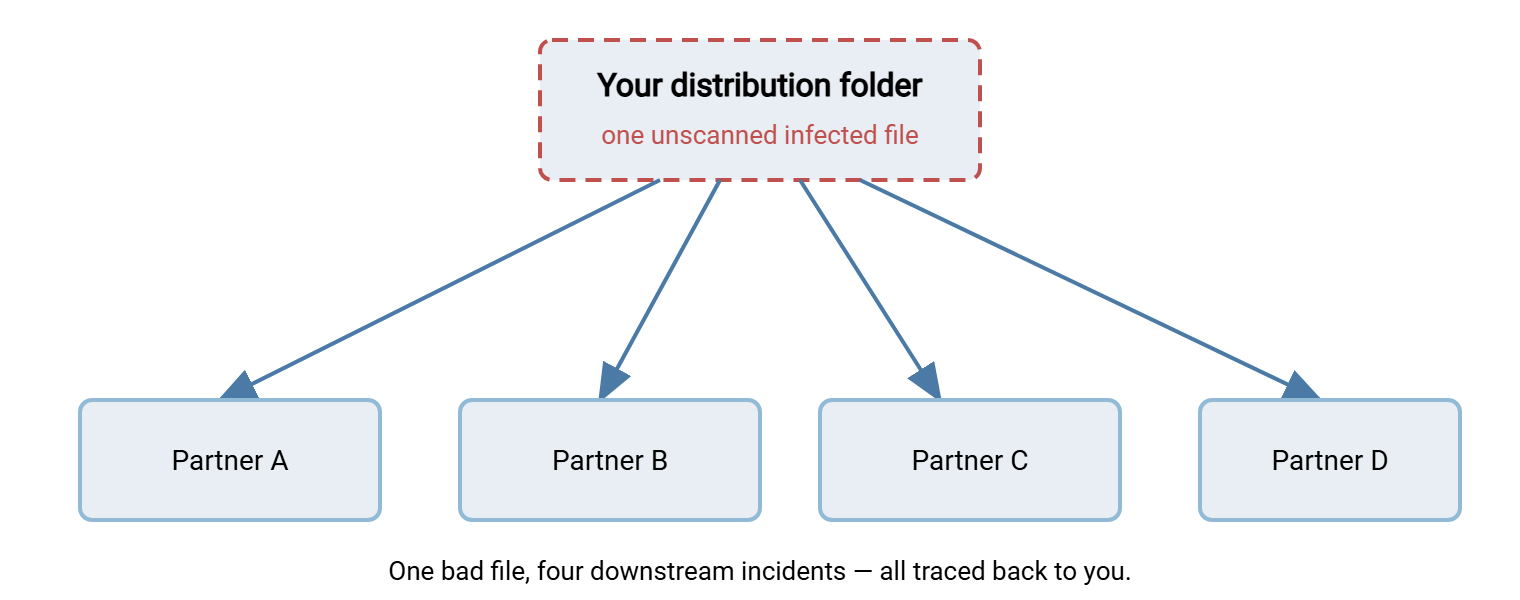
The damage from this is not only technical. When a partner's security team traces an infection back to a file they pulled from your server, the conversation that follows is about trust. Trust between trading partners is slow to rebuild. In business-to-business exchange, where the same partners exchange files for years, a reputation as the source of a bad file is expensive in ways an incident report cannot capture. Scanning what leaves you is as much about protecting the relationship as protecting the bytes. That theme runs through trading partner onboarding, where expectations between parties get set at the start.
"Something Else Will Catch It" — Why That Fails
The most common reason a transfer flow goes unscanned is a chain of reasonable-sounding assumptions, each of which fails in the transfer context:
- "The endpoint antivirus will catch it." Only if the file ever reaches an endpoint that has one, and only when a user action triggers a scan. Server-to-server flows never reach a workstation, and automated consumers open files without triggering the user-action model endpoint scanners rely on.
- "The application will reject a bad file." Applications validate that a file is the shape they expect — the right format, the right fields. That is not a safety check. A perfectly well-formed file can carry a hostile payload in exactly the format the importer was built to trust.
- "Our partner scans their side." Maybe they do. You cannot see it, cannot verify it, and cannot rely on it. It does nothing about the partner whose scanning failed or whose machine is compromised without their knowledge. Depending on a control you cannot observe is the same as having no control.
- "The transfer was encrypted, so it's secure." Encryption protects the file from third parties during the journey. It does nothing about a file that is hostile at the source. If anything, encryption guarantees the hostile payload arrives perfectly intact and unread by anything in between.
The through-line is that each assumed defense is either not on the transfer path, or is checking a different question than "is this content safe." The only reliable place to answer that question is inside the flow itself, at a point every file must pass through.
What Scanning in the Flow Actually Buys You
Putting a scan into the transfer pipeline buys four things that nothing else in your environment provides. The where and how are the subject of where to put scanning in a transfer pipeline. Those four things are:
- Inspection at the choke point. Files fan out after they arrive — pulled to processing systems, copied to partners, opened by applications. Scanning at the point of arrival catches a bad file before the fan-out, turning what could be many incidents into one contained event. It is the one place where a single check protects everything downstream.
- Coverage for the headless path. A scan wired into the flow protects the server-to-server and automation traffic that no endpoint or mailbox ever sees. This is the traffic that had zero coverage before.
- A place to enforce hygiene. The scan step is the natural home for the other content checks a flow should make — file-type limits, size sanity, naming rules. These are covered in inbound partner file hygiene. The same checkpoint, turned to face outward, is also where screening files for sensitive data leaving your network belongs. That is the subject of the data loss prevention for transfers series. One checkpoint, several guarantees.
- Evidence you can show. A logged scan result on every inbound and outbound file is proof, during an audit or an incident, that files were inspected and when. Where those records should live and how to keep them trustworthy is the transfer logging and audit series. "We scan every file at ingest, here are the logs" is a very different position than "we assumed the endpoints handled it."
None of this claims scanning is a complete defense. It is not — and being honest about its blind spots is a whole article of its own, what scanners can't see. The point is narrower and firmer. The transfer flow is currently the one major road into and out of your network with no content inspection on it. Closing that gap is high-value, well-understood work.
Where the Scan Belongs in the Machinery
The practical good news is that transfer pipelines usually already contain the hook a scan needs. Any pipeline built around folder monitoring has a natural place to insert a scan before the file moves on. Folder monitoring uses a watcher that notices a new file and runs a step. A workflow tool such as Sysax FTP Automation watches folders and runs pre- and post-processing steps around a transfer. It gives you exactly that seam: the file arrives, a processing step scans it, and only a clean result is allowed to continue inward. On the receiving side, a server such as Sysax Multi Server is the endpoint that accepts partner uploads into the landing folder where that scan step waits. The mechanics of wiring it — on-arrival versus staged versus swept — are the next article's whole subject. For now the important thing is that the seam exists and is meant to be used.
A Five-Minute Scanning-Gap Self-Assessment
Before designing anything, find out whether you actually have the gap this article describes. Most organizations do, and most are surprised by which flow surfaces it. Work down this list for your own environment:
TRANSFER SCANNING-GAP SELF-ASSESSMENT

1. INBOUND FLOWS — for each place files arrive from outside:
   [ ] Who can upload here (partners, public form, automated feeds)?
   [ ] Is any content scan performed between arrival and use? (often: no)
   [ ] What opens the file next — a person, or an automated job?
   [ ] If a job: does it reach any machine with endpoint antivirus? (often: no)

2. OUTBOUND / DISTRIBUTION FLOWS — for each folder partners pull from:
   [ ] Could a file placed here be pulled by multiple partners?
   [ ] Is anything scanned before it becomes available to them?
   [ ] Who is allowed to write into this folder, and are they all trusted?

3. THE ASSUMPTIONS — write down, honestly, for each flow:
   [ ] "What we assume catches malware here is: ____"
   [ ] "That control is actually on this path: yes / no"
   [ ] "We could show a scan record for this file today: yes / no"

4. RANK — a flow scores HIGH RISK when:
   [ ] External senders + no in-flow scan + automated consumer, OR
   [ ] Shared outbound folder + multiple partners pull + no scan

Fix the HIGH RISK flows first. They are the roads with no gate.
The assessment usually produces the same realization the retention reviews and threat models do. The dangerous flow is not the one everyone worries about, but the quiet automated one nobody thought of as a security surface. It is the nightly partner drop that feeds an importer, running untouched for years. That is the flow to gate first.
The Short Version
A file transfer service is a door in your perimeter that accepts files from outside all day. By default it inspects none of them for hostile content. The two defenses everyone assumes are covering it — endpoint antivirus and mail filtering — are pointed elsewhere. Endpoint AV waits for a user to open a file on a workstation the flow never reaches, and mail filtering only sees email. The transfer channel guarantees the file arrived encrypted and intact, and says nothing about whether it is safe. That makes every inbound flow a delivery vector into your network and every shared outbound folder a potential distribution point that spreads a bad file under your name. Scanning inside the flow, at the choke point every file passes through, is the control that closes the gap.
From here, a natural next step in this series is where to put scanning in a transfer pipeline for the placement decision. Another is designing a quarantine workflow for what to do with what the scan catches. Continue with inbound partner file hygiene for the checks that stop bad files before scanning is even needed. For the integrity side of the same arriving file — proving it arrived unaltered — see reliable transfer integrity.
Frequently Asked Questions
We already run antivirus on all our servers. Isn't the transfer server covered?
Our transfers are encrypted with SFTP. Doesn't that make them safe?
The partner says they scan their files. Can we rely on that?
Which is riskier, files coming in or files going out?
Does adding a scan mean I need to buy a big security product?
From the Sysax team: we build secure file transfer software for Windows. Sysax Multi Server is an FTP, FTPS, SFTP, and HTTPS server. Sysax FTP Automation handles scheduled, scripted transfers. Free trials are on the download page.