
Migrating the Automation: Jobs, Scripts, and Schedules
The job ran at two, finished four minutes later, and reported success, as it had every night since the cutover. On the eleventh night finance asked why the reconciliation report had been empty for a week and a half. The server swap gets all the attention, but the server is only half the workload. The other half is the automation: the scheduled jobs, scripts, and watch-folder rules that actually move the files. And automation is where migrations fail most sneakily, because a job is a pile of decisions nobody remembers making. There is this retry count, that timeout, this exact rename after upload. Move the job and lose one buried decision, and you get silent drift. The job runs, reports success, and quietly does something slightly different from what the business has depended on for years.
This article, part of our Workload Migration series, is the porting discipline. It covers extracting what each job really does, and abstracting hosts and paths so the move becomes an edit. It covers choosing between transplanting and rebuilding, and dodging the schedule traps. Then comes the part that separates careful migrations from lucky ones. Run parallel validation, reconciled output by output, until the new platform provably matches the old. A green status light is not evidence. It is a mood.
What Silent Drift Looks Like
Loud failures are a gift: the job crashes, someone looks, someone fixes. Drift does not crash. Three miniatures, all common, and I have met all three (one of them I wrote):
- The old job uploaded the invoice archive, then moved it into a
sentfolder. The rewritten job uploads perfectly — and skips the move, because nobody knew the downstream reconciliation report was built from that folder. The report reads empty. Finance notices at month-end. - The old tool retried a failed transfer three times, one minute apart, and the nightly wobble in a partner's network never mattered. The new tool's default is zero retries. The job now fails two nights a month — "transient" failures that were always there, previously absorbed in silence.
- The old job ran at 02:00 in the server's local timezone. The new platform is configured for a timezone one hour east. Every output is now an hour early. That sounds harmless until the job that packages "everything since the last run" produces a window that no longer lines up with the upstream feed.
In each case the job's own status is green. Drift is invisible to job-level monitoring precisely because the job is doing exactly what it was told. The porting changed what it was told. The wider anatomy of green-but-wrong automation is covered in why jobs fail silently; this article is about not creating those cases in the first place.
Extract the Real Configuration, Not the Documented One
Porting starts by capturing what each job actually is, from four sources that outrank the documentation. Start with the scheduler definition (trigger, run-as account, working directory) and the script text itself. Add the job's own recent logs. They are the truth serum that shows what it did last night, including steps the script's comments no longer describe. Add the tool defaults it silently inherits: transfer mode, timeouts, retry policy, what happens on partial failure. Jobs someone else wrote deserve the archaeology treatment described in inherited FTP automation. The worksheet below is the artifact to produce for every job row in the migration register:
JOB-017  nightly invoice push  (serves register flow FLOW-017)
trigger:        daily 02:00, server-local time (scheduler task "inv_push")
runs as:        svc-transfer (secret held in the scheduler's store)
connects to:    SFTP to Alder Bank -- host name HARDCODED at script line 14
auth:           private key at D:\jobs\keys\alderbank  (rotation date unknown)
steps observed in logs:
                1) zip yesterday's invoices_YYYYMMDD.csv
                2) upload to /inbound/invoices/
                3) move originals to sent\
                4) write done-marker file
                5) on failure: retry three times, then email the team
timeouts:       none set -- inherits the old tool's default
gotcha:         step 3 feeds the reconciliation report downstream;
                omit it and the drift is silent for a month
The gotcha line is the whole point of the exercise. Every job has at least one behavior that something else depends on for reasons the script never states. The logs and the downstream consumers reveal it. Writing it down is what stops the port from optimizing it away. Comments describe the job it once was; logs describe the one it became.
Abstract Hosts and Paths Before You Move Anything
Here is the single highest-leverage trick in job porting: refactor the old job in place before migrating it. Gather every hardcoded hostname, address, and path root into one spot. Use variables at the top of the script, a small config file, or the connection profile if the tool has one. Deploy that change on the old platform, where you can prove behavior is unchanged while everything else is stable. The migration of that job then stops being surgery and becomes flipping a value:
Before -- endpoints scattered through the script:
    connect sftp xfer01.corp.example
    put invoices_YYYYMMDD.zip /inbound/invoices/
    ...
    log "uploaded to xfer01"

After -- one place to change, same behavior:
    set TARGET_HOST=transfer.example.com
    set INBOX=/inbound/invoices
    connect sftp %TARGET_HOST%
    put invoices_YYYYMMDD.zip %INBOX%/
    log "uploaded to %TARGET_HOST%"
The payoffs compound. A parameterized job can run against either platform, which is what makes the parallel validation below cheap. Rollback becomes the same one-line edit in reverse. And notice the switch from machine name to service alias while you are in there. The same endpoint-stability move the cutover article recommends for partners applies to your own automation. It makes the next migration a non-event for every job treated this way. The hostname on line two will be found eventually, usually by the outage.
Bluewater Bank found their last hardcoded hostname three weeks after cutover, on line two of a script. Nobody had ported that script because nobody had known it existed. It lived on a reporting server, ran weekly, and pulled a small statement file from the old platform's machine name. That name was still answering as an alias. So the script had kept working without anyone noticing it was a stowaway. The clue was the DNS query log: one machine asking for the old name every Monday at six. The script was refactored on the spot. The hostname moved into a variable at the top, and the job was repointed at the service alias before the next Monday. Then the alias stayed up another month, in case line two had a cousin. It did not, which they could prove only because the name was still answering.
Remember: make the old job movable first, prove it unchanged where it already works, then move it. Refactoring and relocating in the same step means that when output differs, you cannot tell which change caused it.
Transplant or Rebuild?
For each job there are two honest paths. Transplant: copy the script and its scheduler entry to the new job host, repoint the abstracted values, run. Rebuild: recreate the job's logic in the target platform's tooling. Transplanting is faster and — underrated virtue — preserves the warts. Mid-migration, bug-for-bug compatibility is exactly what you want, because the downstream world has adapted to the warts. Rebuild when the old runtime is itself why you are migrating (an unsupported scripting stack, a scheduler being retired). Also rebuild when the job is unmaintainable enough that nobody can say what it does. Or rebuild when you are deliberately consolidating loose scripts into a managed scheduler. If that scheduler is Sysax FTP Automation, its wizard-generated tasks cover the standard shapes — connect, transfer, rename, notify — quickly. In that case, its script editor's line-by-line debugging is the practical way to port the custom steps. Watch the ported logic execute statement by statement against test folders until it does precisely what the worksheet says the old one did.
Whichever path, resist the third one: rebuild-and-redesign. "While we're porting it, let's also fix the naming and split the feed." That turns a verifiable like-for-like move into a new system with no baseline to compare against. Record the improvement ideas in the register; ship them after the soak. "After the migration" is a real date only when it is written in the register.
When the Job's Own Host Is Moving Too
The machine the jobs run on is often being retired too. Sometimes it is the same box as the old server, although so far we have talked as if only the transfer endpoint changes. Relocating a job between hosts adds a layer of traps that have nothing to do with transfers. They have everything to do with what quietly lived on the old machine:
- Secrets do not copy. Consider passwords held in a scheduler's protected store, keys encrypted for a specific machine or user account, and credentials cached in a profile. Most of these are deliberately non-portable. Plan to re-enter or re-issue every secret on the new host, and test each one interactively before trusting the schedule to it. The storage patterns and their portability are covered in job credentials storage.
- The runtime environment. The script interpreter and transfer tools must exist on the new host — and behave the same. A newer copy of the same tool can carry different defaults. Where the worksheet says "inherits tool default," pin the setting explicitly during the port so the default no longer matters.
- Ambient state. Mapped drives, environment variables, working directories, and file-permission assumptions all silently reset on a new machine. The worksheet's "runs as" and "paths" lines are the checklist here.
- Known hosts, again. An outbound job on a fresh machine has no recorded partner host keys. Seed them deliberately from the inventory's key list — never by configuring the job to accept whatever it meets on first connect.
Treat "same job, new host" as a port in its own right, with its own parallel validation, even when not a single line of the script changed. The script did not change; everything underneath it did.
Watch Folders and Event-Driven Jobs
Jobs triggered by file arrival rather than by clock deserve a special pass. The old platform's watch rules encode arrival behavior nobody documented. They encode how long a file must sit still before it counts as complete. They encode whether a partner's temp-name-then-rename convention is what actually fires the trigger, and what happens when ten files land at once. A new platform's watcher with different settle timing can process half-written files the old one never touched. That drift corrupts data rather than merely delaying it. Port the watch rule's contract, not just its folder path. Re-verify it against the partner's real upload rhythm during the shadow period. The concepts are laid out in arrival contracts and debouncing.
Schedules and Their Traps
Schedules look like the easy part — a time and a repeat — and carry a disproportionate share of drift. Check each of these explicitly when porting:
- Timezone and clock changes. Confirm what "02:00" means on each platform — server-local or universal time. Check what happens on the nights the clocks shift, when a local 02:00 can occur twice or not at all. A platform configured one timezone off shifts every output by an hour while every job reports success.
- Run-as identity. The account the job runs under must exist on the new host with the same rights to the same paths and the same stored secrets. Jobs that ran for years under a personal account surface here; use the move to put them on service accounts properly.
- Missed-run semantics. Schedulers disagree about what to do after downtime: some fire the missed job immediately on wake, some skip to the next occurrence. If the old behavior mattered — and for catch-up processing it usually did — configure the new scheduler to match deliberately.
- Overlap protection. The old job's lock file or "skip if already running" setting needs an equivalent. Otherwise, the first slow night on the new platform produces two copies of the job interleaving their uploads.
- Calendar quirks. Last-business-day triggers, month-end runs, holiday suppressions — the rare schedules that are easy to port wrong and slow to reveal it.
These are the same disciplines as everyday scheduled job hygiene, applied at the one moment every job in the estate is being touched at once.
The Parallel Validation Run
Now the proof. A ported job is claimed equivalent; a parallel validation run demonstrates it. Feed both platforms' versions of the job the same inputs, let each produce its outputs, and compare. Keep one iron rule carried over from the cutover strategies article: only the old platform actually delivers to partners during validation. The new job writes to a holding area instead, so a porting mistake is a line in a report, not an apology to a partner. The diagram shows the loop:
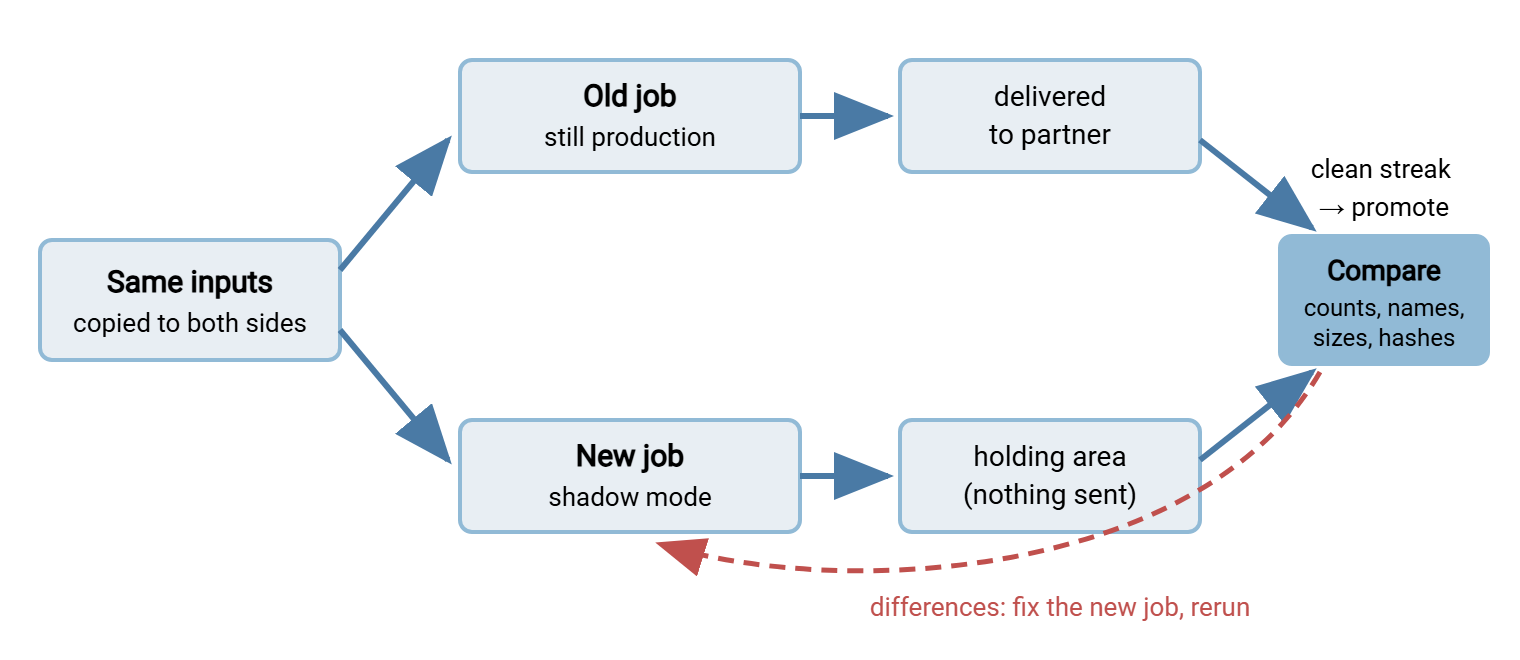
For inbound flows the "same inputs" are free — copy each arrival to the new platform's matching folder. For generated outputs (reports, extracts), point both jobs at the same source data. Where a flow cannot be duplicated at all — a poll-and-delete pickup, for instance — validate it against a test copy of the data. Give that flow extra scrutiny during its first live cycles. The same comparison discipline, applied to any later change rather than a migration, is regression testing transfer jobs.
Reconciling the Outputs
The comparison itself climbs a ladder: same file count, same names, same sizes, then same hashes. A hash is the content's fingerprint. So matching hashes end the argument about whether the platforms produced the same bytes. Build a small manifest of each side's output per cycle and diff the manifests; checksum files and manifests shows the format and tooling. Expect one honest complication: some differences are benign. Archives embed creation timestamps, so two zips of identical content can hash differently — the fix is to compare the extracted contents, not the container. Classify every difference explicitly, and let the report say so:
Reconciliation  FLOW-017  run of Mar 14

                        old platform     new platform (holding)
files produced                12               12
names match                                    12 of 12
sizes match                                    11 of 12
hashes match                                   11 of 12

difference:   invoices_batch7.zip -- sizes differ by 214 bytes
finding:      new job writes archive comments; extracted contents
              hash identical file-by-file (benign, but fix anyway)
action:       archive comments disabled to match old output
verdict:      NOT CLEAN -- clean-day counter resets to zero
The counter in the last line is the discipline: a flow is validated after an unbroken streak of clean cycles. Five consecutive clean days is a reasonable bar for a daily job, plus one clean occurrence for anything monthly. Every reset starts the streak over. It feels strict the first week; it is the reason the validation article will have real evidence to assemble instead of assurances. I have never regretted a reset, and I have regretted a streak I let slide. Reconcile against server records too, not just the jobs' own claims. Each platform's activity log is an independent witness. A target that logs to both file and database, as Sysax Multi Server does, lets you pull "what actually landed last night" with a query.
Cutting the Jobs Over
When a flow's wave arrives, order matters. Disable the old job first, then enable real delivery on the new one — never the reverse. An overlap where both platforms send is the double-delivery incident the holding area existed to prevent. Accept the small gap: for most daily flows, a cutover done between cycles means no gap at all. The per-job sequence is short enough to run from a card:
- Confirm the flow's clean streak in the reconciliation log — no streak, no cutover.
- Between cycles, disable the old job; note the time in the register.
- Switch the new job from holding area to real delivery.
- Watch the next cycle end to end: trigger fired, transfer completed, file landed, downstream consumed it.
- Compare that first live output against the old platform's last output one final time.
- Mark the register row cut over — and leave the old job disabled, not deleted.
That last line is your job-level rollback. The old job is intact — credentials, configuration, schedule, merely switched off. So reverting a misbehaving flow is one re-enable and one re-disable, executable in a minute by whoever is on call. Rollback stays that cheap exactly as long as the old job still exists. That is an argument the validation article extends to the whole platform. From cutover onward, let freshness monitoring confirm daily what the reconciliation predicted. The new job is now the one whose silence would be expensive.
Wrapping Up: Ported Means Proven
A job is not migrated when it runs on the new platform. It is migrated when all three conditions are met. Its outputs have matched the old platform's through a clean streak. Its schedule has been checked against the traps. Its old version sits disabled but ready. Do that flow by flow and the estate's riskiest phase becomes a spreadsheet of green rows. Green rows, this time, with evidence behind them rather than a mood. The wave sequencing those rows fit into is back in cutover strategies. What happens to all this evidence — the soak, the triggers, the final decommission — is next, in validating the migration and keeping rollback real.
Frequently Asked Questions
Do we really need to hash every file during validation?
What about outputs that legitimately differ every run, like embedded timestamps?
How long should the parallel validation run for each job?
Can trivial jobs skip the parallel run?
Should we fix bad jobs while porting them?
From the Sysax team: we build secure file transfer software for Windows. Sysax Multi Server is an FTP, FTPS, SFTP, and HTTPS server. Sysax FTP Automation handles scheduled, scripted transfers. Free trials are on the download page.