
When the Protocol Is the Problem: Overhead and Small Files
Here is a complaint that defeats every network test. The link is wide and healthy, the servers are idle, and a single large file moves at full speed. The nightly job still takes an hour to move a couple of gigabytes. The difference is that the job's gigabytes arrive as twelve thousand small files. The transfer protocol charges a fee per file that has nothing to do with how big the file is. Paid twelve thousand times over a long path, that fee is the whole hour.
This article explains where the fee comes from — per-file round trips, encryption handshakes, and directory listings. It counts the fee with real numbers for SFTP, FTP, FTPS, and HTTPS. That lets you predict how long a job should take and prove that overhead, not the network, is what you are looking at. It then covers the fixes that actually help, and the ones that only look like they should. It is part of our Diagnosing Slow Transfers series. It assumes you have already done the shape test from triage — one big file versus many small ones — and seen the two results come out wildly different.
The Case
A content team publishes a website's static files to a hosting partner every night: 12,000 files totaling 1.8 GB, an average of 150 KB each, over SFTP. The partner's server is 60 ms away by round trip. A single 1.8 GB test file uploads in just over three minutes, about 9 MB/s. The real job takes 58 minutes for the same bytes. The link, the disks, and the CPUs have all been cleared by the isolation ladder from the previous article. What is left is the protocol, and the way to convict it is to count.
What a File Costs Before Its First Byte
Every transfer protocol does housekeeping around each file, and the housekeeping is a conversation. The client sends a request, waits for the server's reply, then sends the next one. Each request-and-reply pair is a round trip, and it costs the path's round-trip time (RTT) — the up-and-back travel delay — however few bytes it carries. On a local network the RTT is a fraction of a millisecond and the housekeeping is invisible. At 60 ms it is anything but.
Take SFTP, which runs inside an SSH session as a series of numbered requests. To upload one small file, a typical client starts with an open request (the server replies with a file handle). Next come one or more write requests (each acknowledged), then a close (acknowledged). Usually a setstat follows to copy the modification time (acknowledged). The diagram shows the sequence for one small file with the waiting time drawn to scale.
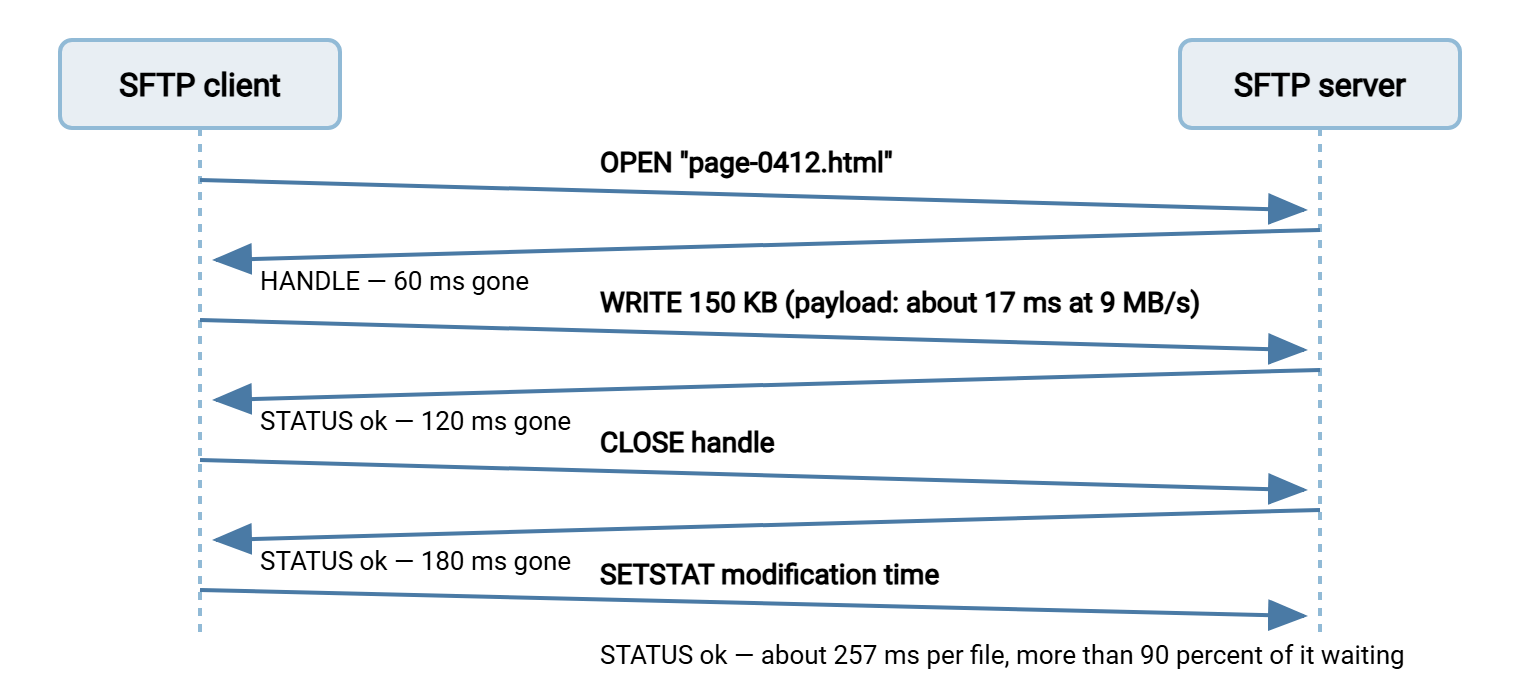
Four round trips at 60 ms is 240 ms per file before we count anything else. The 150 KB payload itself, at 9 MB/s, takes about 17 ms to send. So this file spends roughly fourteen times longer on housekeeping than on data. Multiply by 12,000:
per file:   4 round trips x 60 ms  =  240 ms overhead
            150 KB at 9 MB/s        =   17 ms payload
            total                   =  257 ms
job:        12,000 files x 0.257 s  =  3,084 s  =  about 51 minutes
observed:   58 minutes  (the rest is directory work — see below)

same bytes as ONE file:  1,843 MB / 9 MB/s  =  205 s  =  under 4 minutes
The prediction lands within a few minutes of what the job actually takes. That is the conviction: when files × RTT × round-trips-per-file explains the elapsed time, overhead is the bottleneck, and no amount of bandwidth will change it. Good clients trim the count by pipelining — sending the next request without waiting for the previous reply where the protocol allows it. So a well-written client may pay three round trips per file rather than four. It never pays zero, because the open of one file cannot complete before its handle comes back.
The Same Fee in Other Protocols
The number of round trips per file differs by protocol, and for two of them there is an extra, heavier charge: a connection setup for every file.
Plain FTP opens a brand-new data connection for each file. Per file, there is a PASV exchange to learn where to connect, then a TCP handshake to open the data connection (one round trip). Next come the STOR command and its 150 reply, the data, then the 226 completion reply. The full sequence takes about four round trips. The passive-mode mechanics are in our control and data channel article.
FTPS does everything FTP does and then adds a TLS handshake on each new data connection — the exchange in which the two sides agree on encryption keys. A full handshake costs one to two more round trips plus real processor work for the key exchange. With session resumption, where the data connection reuses the keys from the control connection, it drops to about one. That still puts FTPS at five to six round trips per file, 300 to 360 ms at our RTT. On a job of 12,000 files the key-exchange arithmetic alone becomes visible as CPU. How TLS wraps FTP explains the handshake in detail.
HTTPS is the outlier in the good direction, provided the client keeps the connection open. With a persistent connection each upload is one request and one response — a single round trip per file, and no per-file handshake. A client that opens a fresh connection per file pays the TCP and TLS handshakes every time and is worse than FTPS.
rsync avoids the problem by design: it exchanges the whole file list first, then streams file contents back-to-back down one connection with almost no per-file conversation. That is why rsync is the usual answer for small-file trees when both ends can run it; rsync over the WAN covers the settings that matter there.
| Protocol | Round trips per small file | Per-file cost at 60 ms | 12,000 files |
|---|---|---|---|
| HTTPS, connection kept open | About 1 | 60 ms | 12 minutes |
| SFTP, pipelining client | About 3 | 180 ms | 36 minutes |
| SFTP, simple client | About 4 | 240 ms | 48 minutes |
| Plain FTP, passive | About 4 | 240 ms | 48 minutes |
| FTPS, new TLS handshake per data connection | About 5 to 6 | 300 to 360 ms | 60 to 72 minutes |
| Any protocol, new session per file | Add 4 to 8 for login and key exchange | Add 240 to 480 ms | Add 48 to 96 minutes |
The last row is the one to check first in any scripted job. A script that loops over files and runs a fresh client command for each one pays the heaviest fee in the table. That means a new SSH session, a new login, a new key exchange every time. It is entirely self-inflicted. The tell-tale in the server log is a login line before every single file. Open the session once and keep it open for the whole batch.
Request Windows, in Plain Words
There is a second, subtler overhead in SFTP that bites even on large files across a long path. It is worth a paragraph because it is so often mistaken for a bandwidth problem. SFTP moves data as a sequence of write (or read) requests, each of a fixed size — commonly 32 KB — and each of which the server acknowledges. A client does not wait for each acknowledgement before sending the next request. It keeps a number of requests outstanding, and that number times the request size is the SFTP request window. This is how much data the client will put in flight before it must pause for acknowledgements.
The arithmetic is the same as TCP's: the connection cannot move more than one request window per round trip. A client that allows 64 outstanding requests of 32 KB has a 2 MB window. At 60 ms, that caps a single file at about 33 MB/s — fine for most links. A client that allows only 4 outstanding requests has a 128 KB window and caps at about 2 MB/s, regardless of how large the TCP window underneath is. If a big file is slow over SFTP but fast over HTTPS on the same path, the request window is the first suspect. Some clients expose the setting; many do not, and the practical fix is a different client, parallel files, or a different protocol. How SFTP works explains the request-and-reply structure underneath.
Remember: overhead is charged per file and per round trip, not per byte. The break-even file size — where payload time equals housekeeping time — is your per-file overhead multiplied by your throughput: 240 ms × 9 MB/s is about 2 MB. Every file smaller than that is spending most of its time waiting, and a tree of such files is overhead-bound whatever the link says.
Directory Listings and Tree Walks
Files are not the only thing that costs round trips. Directories do too, and a job that walks a large tree pays for them separately.
Listing a directory over SFTP is an opendir, a series of readdir calls each returning a batch of entries — typically a hundred or two — and a close. A directory of 12,000 entries costs somewhere between 60 and 120 round trips to list, four to seven seconds at 60 ms. That is nothing once. It is a great deal if the job lists the remote directory before every file to check whether it already exists. That is a habit of many home-grown sync scripts. Now the cost is 12,000 × 5 seconds, which is seventeen hours. The log shows it as a constant delay before each file with no data moving. Over FTP the listing is worse still: LIST needs its own data connection, so every listing costs the passive-mode setup on top.
Creating and entering directories is charged the same way: one round trip to mkdir, one to check it exists, one to change into it in protocols that track a current directory. A tree of 2,000 folders spends 2,000 to 6,000 round trips — two to six minutes at 60 ms — before the first file. Our case's missing seven minutes were exactly this. The site tree has 1,400 directories, and the client checked, created if missing, and entered each one. That is five round trips apiece, 1,400 × 5 × 60 ms, seven minutes.
Proving It in the Field
The counting above is the proof, but there are three ways to collect the numbers it needs without guessing.
Read the timestamps. A job log with a line per file shows the signature at a glance: every file takes about the same time regardless of size. In the excerpt below, a 21 KB file and a 410 KB file both take a quarter of a second, which is impossible if bandwidth were the limit and inevitable if round trips are:
Mar 14 23:41:07.104  put  css/site.css           21,388 bytes   0.25 s
Mar 14 23:41:07.361  put  img/hero-banner.jpg    410,112 bytes   0.29 s
Mar 14 23:41:07.655  put  js/vendor.js            88,209 bytes   0.24 s
Mar 14 23:41:07.902  put  page-0412.html          14,770 bytes   0.25 s
Count the round trips. Run the client in verbose mode on a handful of files — sftp -v, a graphical client's message log, curl -v. Count the request-and-reply pairs between one file's start and the next one's. That count, times the RTT from ping, is your per-file cost. If the log also shows a login or a key exchange between files, you have found a script reconnecting per file.
Do the arithmetic and compare. Files × per-file cost, plus directories × three round trips, plus bytes ÷ throughput. If the total is within twenty percent of the elapsed time, the case is closed. If the elapsed time is much larger than the prediction, something else is adding delay between files. That might be an antivirus scan on arrival, a server-side hook, or a database write per upload. In that case, the far end's owner needs to look at what runs when a file lands.
The Fixes That Actually Help
Because the cost is per file and per round trip, every effective fix reduces one of those two numbers. The options, in the order to try them:
- Keep the session open. If the job reconnects per file, fixing that alone removes the biggest line in the table. Batch the files into one session; every client and scripting library supports it.
- Bundle. Put the 12,000 files into one archive before sending and unpack at the far end. The transfer becomes one file: under four minutes instead of fifty-eight. This is the single most powerful fix and the reason many partner feeds are defined as "one zip per day." Its costs are the packing time at each end and the need for the far end to unpack; compression in transfer pipelines covers where that step belongs. In a scheduled-transfer tool with pre-processing steps, such as Sysax FTP Automation, that packing step belongs inside the job definition rather than in a separate script.
- Run files in parallel. Four sessions each moving a quarter of the files pay the same per-file fee but pay it concurrently, cutting the wall-clock time by close to four. It stops scaling when the server's connection limit, the CPU, or the disk's IOPS give out — usually somewhere between four and sixteen sessions. This is a scheduling change, not a code change, in most tools.
- Stop listing per file. List the remote tree once, compare locally, then transfer the differences. A single listing costs seconds; per-file listings cost hours.
- Change protocol for this feed. rsync for a tree that changes incrementally; HTTPS with a persistent connection for a feed you control both ends of. Our many-small-files article works through bundling and parallelism recipes for very large trees.
- Shorten the round trip. Every fix above divides the fee; moving the endpoint closer shrinks it. If the partner has a server in your region, use it. This is rarely in your gift, but it is worth asking.
Two things do not help, and both get tried constantly. More bandwidth does nothing, because the link was never full — in our case it was idle 99 percent of the time. And TCP window tuning does nothing for the small-file case, because a 150 KB file never has enough data in flight for the window to matter. It helps the large-file, long-path case and no other. Latency or bandwidth? is where those remedies belong.
Gotcha: bundling changes what the far end receives. A partner whose process expects individual files landing one at a time — a watch folder, a per-file import — will need to unpack. That has to be agreed before the first archive arrives. Check the receiving side's expectations before you change the shape of the feed.
The Short Version
A transfer protocol charges a fee per file — a handful of round trips, more with a per-file handshake, far more with a per-file login. That fee is set by distance, not by bandwidth. A job of many small files over a long path spends almost all its time paying it. You prove it by counting: files × round trips × RTT, plus directory work, against the elapsed time. You fix it by cutting the number of files (bundle) or the number of round trips (keep sessions open, list once, choose a lighter protocol). Or cut the time each one costs (parallel sessions, shorter path). Everything else is noise.
With overhead ruled in or out, the last suspect in the series is the middle of the path. The proxies, inspection devices, and congested hours that slow traffic without touching either end are covered in slowdowns along the path. And when the diagnosis is done, fixes ranked by effort puts every remedy from this series in one list, cheapest first.
Frequently Asked Questions
Why is my small-file job fast on the LAN but slow to the partner, when the partner's link is faster?
How do I know whether my client pipelines or reconnects per file?
Is SFTP slower than FTP for small files?
What is a sensible number of parallel sessions?
Will compressing the files help if they are already small?
From the Sysax team: we build secure file transfer software for Windows. Sysax Multi Server is an FTP, FTPS, SFTP, and HTTPS server. Sysax FTP Automation handles scheduled, scripted transfers. Free trials are on the download page.