
Open Source vs Commercial Transfer Tools: The Real Tradeoffs
"Just use the SSH server. It's already on the box and it's free." "We need something supported, with a console the help desk can drive." Ten minutes into a meeting about a new partner feed, and for eight of them nobody has mentioned the partner. I have sat in that room on both sides of the table. Both sentences are true. Neither is about the requirement.
The argument has become open source versus commercial: a label that describes how software is licensed and funded. It describes nothing else: not its quality, not its security, not whether your team can run it at two in the morning. This article opens our Open Source vs Commercial series by swapping the identity argument for an engineering one. It looks at what each model genuinely optimizes for and the false either-ors that eat the most meeting time. Then come the four questions that decide far more than the license does: control, skills, support, and fit.
One disclosure belongs at the top rather than in the small print. We sell commercial transfer software for Windows, so we are not a neutral party. We have tried to write this so a seasoned Linux administrator would nod along. The next article, what open source transfer tools genuinely do well, is deliberately the strongest in the series. Treat our claims about the commercial side as claims to check.
Why the Argument Goes Nowhere
Listen to a real version of the debate and you hear two caricatures fighting. In one, open source is a hobby project maintained by a stranger who may vanish, with nobody to blame. In the other, commercial software is overpriced shelfware sold by people who will lock you in and route your ticket to someone reading from a card. Neither describes the tools administrators run. The most widely deployed file transfer server in the world is almost certainly the SFTP subsystem of OpenSSH. OpenSSH is the SSH implementation that ships with nearly every Linux and BSD system and is an optional feature on modern Windows. It is open source, decades old, and read by more security researchers than any commercial product will ever be. Meanwhile, the commercial products that have lasted did so because customers kept renewing, a harder test than a download counter. Vendor slide decks are optimistic documents, ours included. Renewal figures are not.
The argument stalls because the label describes funding, not fitness. It also stalls because the debate breeds false dichotomies: choices presented as either-or when they are a dial. Name them and they lose most of their power.
- "Free versus expensive." Open source has no license invoice; it is not free. Somebody installs, patches, monitors, and writes the missing pieces. Commercial software has an invoice, which is rarely its largest cost either. The hidden-costs article counts both sides with the same ledger.
- "Supported versus unsupported." A support contract is a promise about response, not resolution. A lively community can beat a poor contract, and a good contract can beat a dying mailing list. The support article shows how to tell which you have.
- "Secure versus insecure." Both models have shipped serious vulnerabilities and fixed them. What matters is patch cadence, whether anyone tells you, and whether you apply it (see update and patch strategy). Source availability helps auditors. It does not patch your server.
- "You can read the code, so it is safe." You can. Will you? Most teams never do, so the real claim is "many other people can read it." That is a claim about community attention, not your own assurance.
The useful move is to ask what the specific tool does, costs, and requires, and let the label fall off.
What Each Model Actually Optimizes For
Software is shaped by whoever the developers are trying to please. Open source and commercial development please different people. Once you know who, you can predict where each will be strong and where it will be thin.
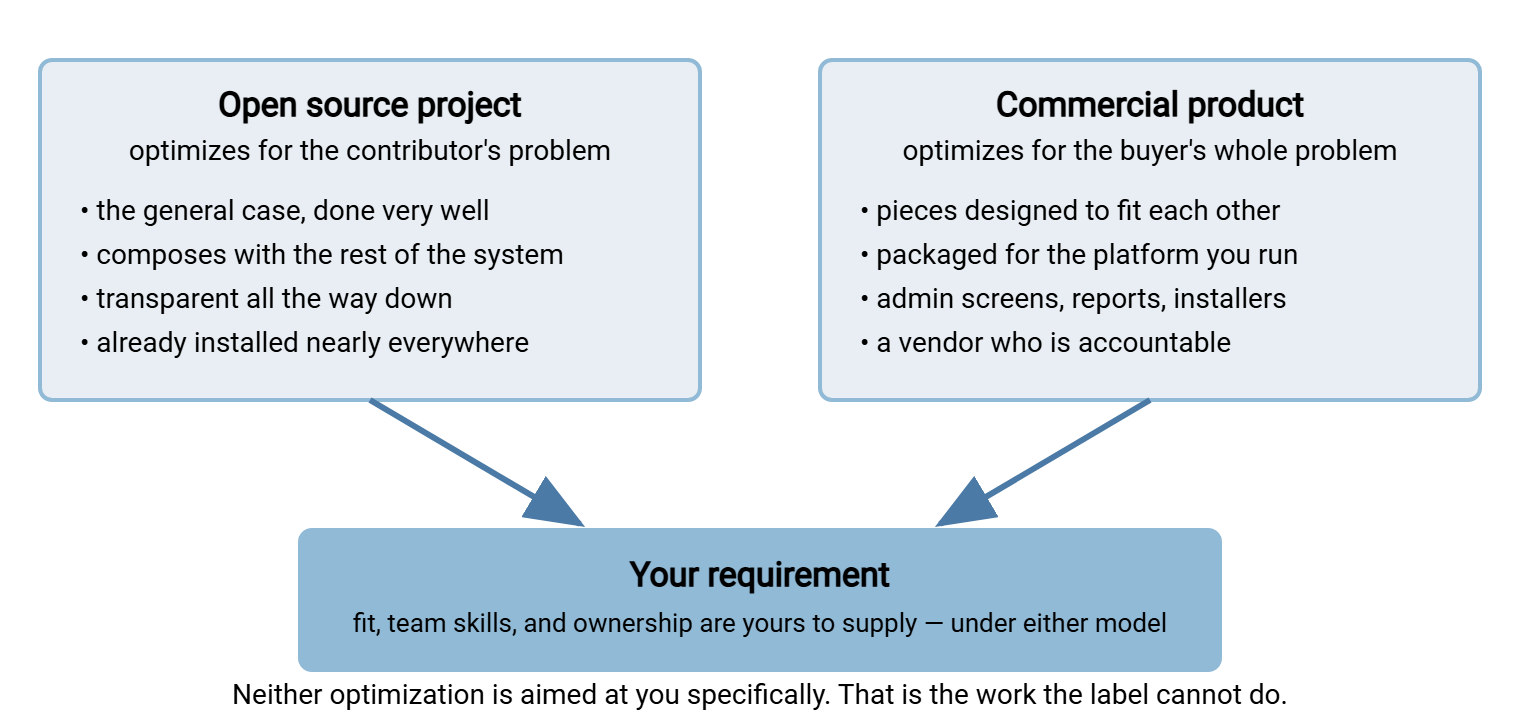
Open source optimizes for the contributor's problem. A feature exists because someone needed it badly enough to build it and was generous enough to share it. That produces tools that are excellent at the general case (moving files over SSH, mirroring a directory, fetching a URL). They are composable with everything else on the box, transparent all the way down, and installed nearly everywhere. It also produces gaps wherever nobody with the itch also had the weekend: administrative screens for non-experts, reports a manager would read, and the boring polish no volunteer enjoys writing.
Commercial software optimizes for the buyer's problem as a whole. A vendor gets paid when the entire job is done for the person signing the order. That means not just the protocol, but the account screen, the log viewer, the installer, and someone to call. That produces integration and packaging, pieces designed to fit each other with a vendor on the hook when they do not. It also produces the costs of being on the hook: a license meter and a roadmap you do not control. Those costs also include features you pay for and never open, and the chance that the vendor's interests and yours quietly part company.
The diagram below puts the two optimizations side by side and shows what neither guarantees: fit, a team that can run it, and an owner after the install.
The Axes That Matter More Than the License
If the label is the wrong axis, what are the right ones? The table below lists the questions experienced administrators actually decide on, with where each model tends to land. Tendencies are not verdicts; a specific tool can defy any row. The point is to give the meeting something concrete to argue about.
| Axis | The question to ask | Open source tends toward | Commercial tends toward |
|---|---|---|---|
| Control | Who can change the tool's behavior, and who must? | Total control, total responsibility | Control within the product's options; the rest waits on the vendor |
| Skills | Can the team you actually have run it at two a.m.? | Rewards command-line depth; punishes its absence | Lowers the floor with an interface; the ceiling is the product's |
| Support | Who answers, how fast, and are they obligated to? | Community, documentation, your own expert; no obligation | A contract with response terms; quality varies enormously |
| Platform fit | Is it native to the operating system and directory you run? | Native on Linux and BSD; often a port on Windows | Built for a target platform, frequently Windows |
| Breadth | How many protocols, auth methods, and admin tasks in one place? | One tool per job, composed by you | Many jobs in one product, integrated by the vendor |
| Evidence | Can you show an auditor who moved what, when? | Raw logs, superb detail; assembly is your job | Reports and log viewers built in, in the vendor's format |
| Exit | What does leaving cost, in hours and partner disruption? | Standard formats and protocols; low switching cost | Proprietary configuration and job definitions; a migration project |
| Cost shape | Invoices or hours, and does it grow with use? | Hours, front-loaded and ongoing; flat with scale | Recurring invoices; may grow with servers, users, or connections |
Four of those axes do most of the deciding in practice, so control, skills, support, and fit each get a closer look below. The others have their own articles.
Control: Who Can Change What, and Who Must
Control is the axis open source advocates lead with, and they are right to. With an open tool, every behavior is in a configuration file you can read. Every behavior that is not is in source code you could, in principle, change. When a partner demands something odd (a nonstandard listing format, a restriction the author never imagined), nothing stands between you and the fix but your own skill and time. There is no feature request queue.
What is said less often is that control and responsibility are the same thing wearing different clothes. If you can change anything, you must decide everything. The commercial product that "limits" you to its options has also made a hundred decisions on your behalf (defaults, a sane cipher policy, how accounts are jailed). It made them for a living. For a team without deep protocol knowledge, a smaller decision surface is a feature. For a team with it, the same surface is a cage.
The practical test is short. List the last five changes you made to your current transfer setup. If most were things a product would expose as a setting, control is not your deciding axis. If most were things no product would anticipate, it is. Open source (or a product with a real scripting layer) then goes to the top of your list.
Skills: The Tool Has to Match the Team You Have
Skills fit decides more real deployments than any other axis, and both camps discuss it badly. Open source transfer tools are mostly operated from the command line and configured in text files. A team fluent in that world will find them fast and precise. A team that is not will find them opaque. The opacity shows up at the worst time: during an outage, when the one person who understood the setup is on holiday.
Commercial products lower the floor. An administrative interface lets a junior administrator create an account, reset a partner's password, or check yesterday's transfers without knowing which file the setting lives in. That matters when the help desk does that work. But an interface also sets a ceiling: the product does only what its screens and scripting hooks allow. A team that outgrows it finds out abruptly, usually on a Friday.
Meridian Parts learned this the expensive way. Their partner SFTP server was a beautifully configured OpenSSH host built by one engineer who understood every line of it. That engineer took a job elsewhere in the spring. The next partner outage fell to a Windows administrator on call who had never opened sshd_config. Sensibly, that administrator did not want to start at two in the morning. The feed was down for a day; the review described the server as "well engineered and unowned." They did not replace it. They trained a second person and wrote the runbook, which is what the outage had been asking for.
Be honest about which team you are, and (the part people skip) which team you will be in a few years. If your organization is investing in Linux and automation, the open source floor rises toward you. If it is consolidating on Windows and a smaller infrastructure group, the commercial floor is where you will live. Our SFTP command-line guide is a fair test. If it reads as obvious, your team can run open source tooling. If it reads as intimidating, plan around that.
Remember: the tool the on-call team can actually operate beats the tool that is theoretically better. Skills fit is not a soft factor; it decides whether the two a.m. page gets resolved or forwarded.
Support: What You Are Actually Buying, or Not
Community support is a large number of people with no obligation to you, some of whom know more than any vendor engineer ever will. Contract support is a small number of people obligated to respond within a stated time, whose skill is whatever the vendor hires for. Either can be superb; either can be useless. The label tells you nothing, which is becoming a theme.
The questions that tell you something are specific. For an open tool: how active is the project (recent releases, security advisories, a maintained issue tracker)? Is the documentation written for operators? For a commercial tool: who exactly answers? Does the response promise cover acknowledgment or resolution? Can you talk to a support engineer during the trial? The support realities article turns those into a checklist. Either way, the internal expert is a single point of failure; support supplements documentation and never replaces it.
Fit: Platform, Protocols, and the People on the Other End
Fit is the least ideological axis and the most decisive.
Platform fit. On a Linux host, the transfer server that fits best is very often the one already installed: OpenSSH's SFTP subsystem, configured as in our SFTP server configuration guide. It uses the system's own accounts, logging, and service manager. A commercial product there is a second thing to patch and a second place accounts live. On a Windows host the native pieces are a directory service, Windows accounts, a service model, and an event log. A product built for that world fits the way OpenSSH fits Linux. The commercial example we know best, Sysax Multi Server, exists for that reason. It runs as a Windows service. It authenticates against Windows or Active Directory as well as its own users and public keys. It speaks FTP, FTPS, SFTP, and HTTPS from one configuration rather than four installs.
Protocol fit. SFTP only is the easy case, and open source covers it completely. FTPS, HTTPS uploads for browser users, and legacy FTP for the device that cannot be retired each add a separate open source component to run and secure. The other option is one commercial product that bundles them. The more protocols on one address, the more a bundle earns its keep.
People fit. Who administers accounts day to day, reads the logs, and answers the partner who cannot connect? If it is "the same two engineers who run everything," open source fits. If it involves a help desk, a business owner who wants a dashboard, or an auditor who wants a report rather than a grep, commercial packaging is doing real work. Neither is better; they are different organizations.
The Questions to Ask Before Anyone Says "License"
Here is the practical output of this article: a list to run through before the argument starts. Answer each line with a sentence, not a label. Teams that do this rarely argue about the label at all; the answers point somewhere specific.
TRANSFER TOOL SELECTION — QUESTIONS THAT MATTER MORE THAN THE LICENSE

FIT
 1. Which operating system and directory service will host this?
 2. Which protocols must be offered, from how many addresses?
 3. Who are the users: partners, staff, scripts, browsers, devices?
 4. What evidence must we produce, for whom, in what format?

SKILLS
 5. Who will administer this weekly?  (name them, not a role)
 6. Who will fix it at two a.m.?      (name them, not a role)
 7. Can those people read a config file and a raw log today?

CONTROL
 8. List the last five changes made to the current setup.
 9. Which of those would a product expose as a setting?
10. Which partner requirements are genuinely nonstandard?

SUPPORT
11. When this breaks, who is obligated to answer, and how fast?
12. Is the setup documented well enough to survive its author leaving?

EXIT AND COST
13. What would leaving this tool cost in hours and partner disruption?
14. Does the cost grow with servers, users, connections, or hours?
15. Who owns this tool internally, by name, after the install?

Answer every line in a sentence. Then look at the tools.
Question fifteen is the one most often left blank, and the one that predicts failure best. A tool without a named owner decays under either model. The open one stops getting patched. The commercial one stops getting renewed. Both become the mystery box the next administrator inherits along with a password on a sticky note.
Reading Your Answers, and Where to Go Next
Certain answer patterns point clearly one way, and naming them saves everyone from pretending the decision is hard.
- Linux hosts, SFTP only, a fluent team, a couple of partners. Use the SSH server you already have; buying anything here adds cost and surface for no gain. The next article explains why this case is so strong.
- Windows hosts, several protocols from one address, help-desk administration, auditors who want reports. A packaged product fits, and the question becomes which one: the domain of our choosing a transfer server series.
- Mixed platforms and mixed users. A Linux SSH server for internal automation, a Windows server for partners, open source clients on every desktop. Most real estates land here, and the mixing article lays out the interface points.
- Answers you cannot give yet. If you do not know who will own the tool or what evidence auditors need, you are not ready to choose. The do you need managed file transfer worksheet finds out whether packaged features are pressures you actually feel.
Two boundaries are worth marking. This series is about open source tools versus commercial tools. The adjacent question, your own scripts versus a dedicated tool of any kind, starts at build vs buy, asked honestly. And if the answer is "buy," someone has to approve it. Here, the one-page business case puts the open source option and the commercial one in the same columns, costed the same way. That lets the approver see you weighed both.
Gotcha: the most common mistake is choosing on the axis the loudest person cares about. The open source advocate optimizes for control; the manager for support and reports. Both are real. Weigh all four against your requirement; the weights are facts about your organization, not opinions about software.
The short version to carry back into that meeting: open source and commercial are labels about funding, not verdicts about quality. Open source optimizes for the contributor's problem: superb at the general case, thin where nobody volunteered. Commercial optimizes for the buyer's whole problem: integrated and accountable, also metered and vendor-shaped. Neither optimizes for you. Control, skills, support, and fit decide the question the label cannot. With luck someone will mention the partner before minute nine.
From here, read the two articles that argue each side at full strength: what open source transfer tools genuinely do well and the hidden costs on both sides. Then support realities settles who actually answers at two a.m.
Frequently Asked Questions
Is open source file transfer software less secure than commercial software?
If open source is free, why would anyone pay for a transfer server?
What is the single most important factor in choosing between them?
Can we run both open source and commercial transfer tools?
From the Sysax team: we build secure file transfer software for Windows. Sysax Multi Server is an FTP, FTPS, SFTP, and HTTPS server. Sysax FTP Automation handles scheduled, scripted transfers. Free trials are on the download page.