
Data Minimization: Send Less, Risk Less
The ticket said "just send them the customer table," and the export tool obliged: every column, every row, in the outbox by four o'clock. Every control you can apply to that file in motion — encryption, access restrictions, logging, retention limits — protects data that is present. There is exactly one control that works perfectly, costs nothing to operate, and can never be misconfigured: the data that was never in the file. A column you did not send cannot be breached at the recipient, cannot be misdirected, and cannot linger in a forgotten staging folder. It never appears in anyone's incident report.
That is data minimization: sending the fields, rows, and level of detail a purpose actually requires, and nothing more. This article — part of our Personal Data in File Flows series — turns the principle into practice. It covers the three minimization moves and a before-and-after export. It offers language for pushing back on "just send everything" requests without a fight. It also shows how to make the minimal version of a feed the automatic version.
Why Absence Beats Every Safeguard
Start with the risk arithmetic. When a transfer goes wrong — wrong recipient, compromised endpoint, file left on an open share — the damage is proportional to what the file contained. A misdirected file holding names and parcel addresses is a bad day. The same file with dates of birth, contact details, and account history is a serious incident with notification questions attached. Our article on personal data incidents spells this out. You choose the size of the future blast radius at design time, every time you approve a field list.
Minimization is also what privacy laws typically expect. The recurring formulation is that personal data should be adequate, relevant, and limited to what is necessary for the purpose. This principle appears in some wording in nearly every regime. Where exactly "necessary" ends for a given flow is a judgment your privacy or legal team owns. What you own as the administrator is making sure the question gets asked and the agreed answer is what actually leaves the server. This series stays educational rather than legal on such points, and this is one of them.
Minimization is one of the rare controls with no operational downside. Smaller files transfer faster and fail less. Narrow feeds are easier to document, easier to test, and easier to explain in an audit. Recipients benefit too: every field you withhold is a field they do not have to secure, retain, and answer for. It is the cheapest win in privacy engineering, which makes it strange how rarely it happens by default.
Where the Excess Comes From
Understanding why feeds are bloated helps you fix them without blaming anyone. Almost no one decides to over-share; over-sharing is the path of least resistance at several points:
- Export tools default to everything. "Export to CSV" means the whole table or the whole joined view. Selecting columns takes extra clicks, so under deadline, nobody clicks.
- Feeds are cloned, not designed. A new partner needs a file "like the one Example Couriers gets," so the old feed is copied. That includes every column the old recipient happened to receive, needed or not.
- Joins drag in neighbors. The order data genuinely needed lives one join away from the customer table, and the join brings the customer's whole record along for the ride. That is how a date of birth ends up in a shipping file.
- Nobody owns removal. Adding a field has a requester; removing one has only risk ("what if something breaks?"). So field lists grow monotonically for years.
Each cause has the same cure: a written field list per flow, owned by someone, measured against a stated purpose. Write the list. Name the owner. Yes, even for the feed that has run unchanged since before you joined.
The Three Minimization Moves
Every minimization decision is one of three moves, applied in order. First you cut columns — whole categories of information the purpose does not need. Then you cut rows — records about people the recipient does not serve. Then you cut precision — replacing exact values with coarser ones, up to and including aggregation, where individual records disappear entirely. The diagram shows the sequence as a shrinking pipeline from the full source table to the file that actually leaves.
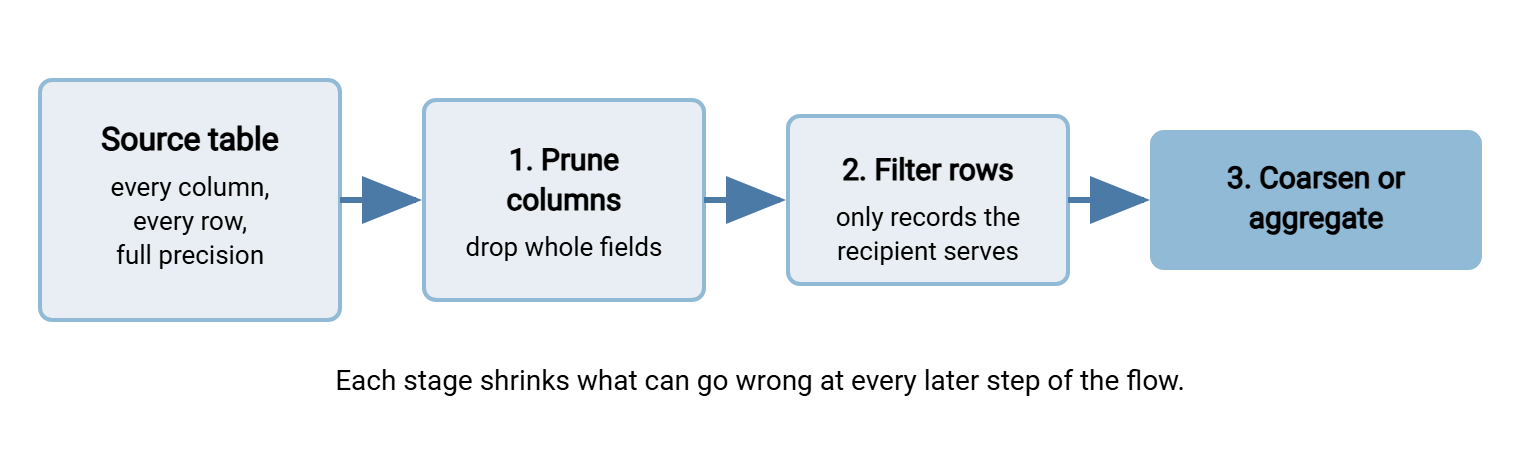
The moves are best applied in the export itself — in the query or report definition — because data excluded at the source never touches your transfer estate at all. When you cannot change the export, a pruning script between export and transfer is the fallback, and we will come back to how to automate that reliably.
Move One: Prune Columns — a Worked Example
Column pruning starts with a one-sentence purpose statement, because "necessary" is meaningless without a purpose to measure against. Our example: "Example Couriers Ltd needs a nightly file to deliver parcels for orders shipping the next day." Here is the feed as first requested — the export tool was pointed at the joined order and customer tables, so everything came along. All values are invented:
# BEFORE - fictional sample, all values invented
order_id,cust_name,email,phone,dob,street_address,postcode,items,order_total,loyalty_tier,support_notes
O-88231,Alex Sample,alex@example.com,555-014-990,03/12/88,"14 Example Way",ZZ1 4EX,"router; cables",149.90,gold,"asked us to gift-wrap"
O-88245,Jordan Example,jordan@example.net,555-020-113,11/30/91,"7 Placeholder Road",ZZ2 9QT,"desk lamp",39.95,none,"second delivery attempt last time"
Now hold each column against the purpose. Delivering a parcel requires knowing where it goes, who should receive it, and what is being carried in what quantity. Column by column:
- order_id — keep. The courier and you need a shared reference for queries and proof of delivery.
- cust_name, street_address, postcode — keep. They go on the label. Minimized does not mean anonymous; this file remains personal data and still needs protection.
- phone — keep, reluctantly. The courier calls when nobody answers the door. This is a genuine purpose-driven judgment call: if the courier's process never phones customers, it goes.
- email — drop. Delivery notifications are sent by your own systems; the courier has no use for it.
- dob — drop, emphatically. No parcel needs a date of birth. It arrived because the customer table has it. (Age-verified deliveries would need an age check flag — a yes/no — not the birth date itself. That is precision reduction, move three.)
- items — replace. The courier needs parcel count and weight, not contents. "One parcel, two kilograms" reveals less than "router; cables."
- order_total, loyalty_tier — drop. Payment and marketing data are not delivery data.
- support_notes — drop. Free text is where surprises live, as the recognizing personal data exercise showed. If couriers need instructions, add a dedicated, validated delivery_instructions field instead of shipping raw notes.
# AFTER - same purpose, a fraction of the risk
order_id,recipient_name,street_address,postcode,phone,parcels,weight_kg
O-88231,Alex Sample,"14 Example Way",ZZ1 4EX,555-014-990,1,2.0
O-88245,Jordan Example,"7 Placeholder Road",ZZ2 9QT,555-020-113,1,1.1
Eleven columns became seven. The ones that vanished — birth dates, contact details, purchase history, free text — are precisely the ones that would have turned a misdelivery into a reportable mess. The delivery works exactly as before; no parcel ever needed to know anyone's birthday.
Move Two: Filter Rows
Columns are only half the excess. The other half is rows about people the recipient has no business seeing. The courier file above should contain orders shipping tomorrow via that courier. It should not contain the full order history, other carriers' orders, or customers in regions this partner never serves. Common row filters worth demanding:
- Time-bounded: only this run's records. A surprising number of nightly feeds resend the entire table every night, meaning one captured file equals the whole dataset.
- Scope-bounded: only the recipient's region, brand, client list, or carrier assignment.
- Status-bounded: only active or relevant records — no closed accounts, no opted-out marketing contacts in a marketing feed.
In the export query, row filtering is one clause:
SELECT order_id, recipient_name, street_address, postcode, phone, parcels, weight_kg
FROM shipping_view
WHERE ship_date = :tomorrow
  AND carrier = 'EXAMPLE-COURIERS';
Row filtering pairs naturally with retention. A feed that sends only tomorrow's records gives the recipient nothing worth hoarding, and your own staging copies stay small and disposable. Our retention and deletion series picks up that theme. (Recipients hoard anyway, but at least it is a small hoard.)
Watch especially for the full-resend pattern: feeds that transmit the complete dataset every run because "it's simpler than working out what changed." Simplicity is real, but so is the cost. Every nightly file is now a complete copy of the population. Every place such a file lands (staging folders, partner archives, backup sets) holds the whole dataset forever. Where the receiving system can accept deltas, send deltas. Where it truly cannot, compensate with aggressive retention on both sides, so the pile of complete copies stays one copy deep.
Move Three: Reduce Precision, or Aggregate People Away
The third move asks of each surviving field: does the purpose need the exact value, or would a coarser one do? Coarsening keeps the field useful while shrinking what it reveals:
- Date of birth becomes an age band, or a single over_18 flag.
- A full address becomes a city or region when nothing is being delivered.
- A precise timestamp becomes a date; an exact salary becomes a salary band.
- An account number becomes a masked stub or a token — techniques covered properly in masking and pseudonymization.
Taken to its limit, precision reduction becomes aggregation: reporting about groups instead of individuals. If the finance team wants "how are deliveries performing by region," they need counts and averages — ZZ1, 412 parcels, 97.2% on time — not a row per named customer. Aggregated outputs are the only ones on the far side of the identifiability spectrum. Whole categories of privacy obligation stop applying when no individual appears in the file at all.
Aggregation anonymizes only when groups are big enough. A regional summary that includes a region with one customer is that customer's data wearing a disguise. The standard defense is a minimum cell size — suppress or merge any group smaller than an agreed threshold. Your privacy team can tell you the threshold they are comfortable defending.
Pushing Back on "Just Send Everything"
The request will come, usually phrased as flexibility: "easiest to send the full extract, then we have what we need if requirements change." Resist it without being obstructive by making the minimal option the easy option:
- Ask for the purpose in one sentence. Not to interrogate — because you literally cannot build the field list without it. Most requesters have never been asked and the answer instantly shortens the list.
- Propose the minimal list yourself. "For parcel delivery I would send these seven fields — anything your process needs that I missed?" People negotiate down from what you offer; offer the small list.
- Promise cheap additions. The fear behind "send everything" is that adding a field later takes a month. Commit to adding a genuinely needed field within days and the fear evaporates.
- Write the agreed list down. The field list, purpose, and owner go into the flow record. Now it is a documented agreement. The next "can you quickly add all the customer columns" becomes a change request with a reviewer, not a favor.
- Escalate honestly when needed. If the requester insists on the full table, do not fight alone. Route that request to the data owner and privacy team, whose call it is. A written file transfer policy that names this escalation path is what turns you from the awkward person into the person following procedure.
Here is the reply I have used to defuse a hundred versions of this conversation. Adapt freely:
Happy to set this feed up. To build it I need one sentence on what the
file is used for - that determines which fields we can include.

Based on what you've described, I'd propose: order_id, recipient_name,
street_address, postcode, phone, parcels, weight_kg.

If your process needs a field I've missed, tell me and I'll add it -
additions take a day or two, so we don't need to include extras "just
in case." Sending more than the purpose needs is something our transfer
policy (and the privacy folks) ask us to avoid.
Notice the shape: cooperative, concrete, and it quietly relocates the burden. The requester no longer has to justify the whole database. They only have to name a specific missing field, which either exists (add it) or does not (conversation over).
Remember: "might need it later" is an argument for being able to add fields quickly, not for sending them now. Data sent speculatively is risk carried daily for a benefit that usually never arrives.
Making the Minimal Version the Automatic Version
Minimization that depends on someone remembering is minimization that erodes. The durable version lives in the machinery:
- Best: minimize in the export definition. The query or report names exactly the agreed columns and filters. Nothing extra ever exists on disk.
- Fallback: a pruning script in the transfer job. When the source export is not yours to change, put a script between export and transfer that keeps only approved columns and rows. In Sysax FTP Automation this fits naturally as a pre-transfer processing step. The scheduled job runs your pruning script first, then transfers only the script's output. So the full extract never leaves the machine even though the source system produced it.
- Guard the field list. Keep the approved column list in version control or the flow record. Have the job's script fail loudly when the incoming file's header does not match. That means stopping the transfer and triggering an email notification. Upstream teams add columns without telling anyone; your job should notice before the recipient does.
- Deliver to a recipient-specific location. Row filtering is undermined if every partner can browse every partner's files. On the server side, per-account access control in Sysax Multi Server keeps the minimized file visible only to the party it was minimized for. That uses one account per partner, each jailed to its own folder.
This script-centric approach is the same philosophy as DLP without buying DLP: modest scripts, run reliably by your automation, enforcing decisions a human made once.
When you slim down an existing feed, treat it like any production change. Run the old and new exports side by side for a few cycles. Diff the outcomes that matter — parcels still delivered, invoices still reconciled — rather than the files themselves. Tell the recipient which columns are disappearing and when, in writing, with a named contact for surprises. Recipients almost never object; the common reply is that they had been quietly ignoring — or worse, dutifully storing — the extra columns all along. Then record the completed change in the flow record, or your transfer inventory if you keep one. That way, the minimized state is the documented state and drift back toward "everything" becomes visible. Left alone, a field list only ever grows; I have never seen one shrink by itself.
Meridian Parts found out what recipients do with extra columns when it reviewed a dealer feed ahead of a contract renewal. The feed had been cloned years earlier from an older one and carried twenty-six columns; the dealer's system read six. Asked what became of the other twenty, the dealer's contact checked. The contact reported that every nightly file had been kept in full, in a folder called archive. That was because nobody had ever said it could be deleted. Trimming the feed to six columns took one week of parallel runs. Persuading the dealer to delete the archive took a month, most of it spent finding someone on their side willing to own the folder. The twenty columns had cost nothing to send and a great deal to get back.
A Decision Checklist for Every Field
Run each proposed column through four questions, in order. The first "no" tells you what to do:
| Question | If yes | If no |
|---|---|---|
| Does the stated purpose use this field at all? | Next question | Drop the column |
| Does it need person-level records, or would group totals do? | Next question | Aggregate instead |
| Does it need full precision (exact date, full number, raw text)? | Next question | Coarsen, band, mask, or tokenize |
| Does it need the value in every run? | Keep, and record why | Send only in the runs that need it |
Ten minutes with this table at design time routinely halves a feed. It is the highest-leverage ten minutes in this entire series.
Less Data, Less Everything
Minimization is the rare control that improves security, compliance posture, performance, and clarity simultaneously. Prune columns against a written purpose, filter rows to the recipient's actual scope, and coarsen or aggregate what remains. Wire the result into the export or the transfer job so it happens without heroics. What survives minimization still deserves the full toolkit. That includes disguising identifiers with masking and pseudonymization. It includes the encrypted, locked-down, short-retention delivery pipeline described in privacy by design for batch jobs. But every one of those controls gets easier when there is simply less there to protect. The parcels still arrive.
Frequently Asked Questions
Is data minimization actually required, or just good practice?
Who decides which fields are "necessary"?
Won't minimization cause rework when requirements change?
If we encrypt the file anyway, does minimization still matter?
Does minimization apply to test and development data?
From the Sysax team: we build secure file transfer software for Windows. Sysax Multi Server is an FTP, FTPS, SFTP, and HTTPS server. Sysax FTP Automation handles scheduled, scripted transfers. Free trials are on the download page.