
When Personal Data Goes to the Wrong Place
"We received a file this morning that doesn't look like ours." Somewhere right now that email is being written. A nightly job uploaded a personnel file into the wrong partner's folder on the strength of one edited line in a configuration. Elsewhere a well-meaning analyst is attaching the unfiltered version of an export to an email. A staging folder that was supposed to be temporary is quietly readable by half the company. Misdirected personal data is not a rare catastrophe that strikes the careless. It is an ordinary failure mode of ordinary work, and it happens to careful teams too. It has happened to mine.
What separates organizations is not whether it happens but what the next few hours look like. This article — part of our Personal Data in File Flows series — is the calm version of those hours, prepared in advance. It covers the classic misdirection patterns, a worked incident narrative, and containment steps in order. It explains how to assess honestly what went where and what the notification conversation is about in plain words. It also covers how to convert each incident into prevention instead of blame.
The Three Classic Misdirections
Nearly every personal-data transfer incident is one of three shapes, and naming the shape early tells you what to do:
- Wrong destination. The right file goes to the wrong place. A payroll feed lands in a courier's pickup folder. An upload targets the wrong host. A person picks the wrong recipient from an autocomplete. The data is intact; the audience is wrong. The email-attachment version of this is so common it has its own literature — see attachment security.
- Over-shared payload. The right recipient gets too much. That might be the full table instead of the agreed columns, all customers instead of one region, the raw file because the masking step silently failed. The audience is right; the data is wrong.
- Lingering exposure. Transfer and recipient were both right, but a copy stayed behind where it should not. That might be a world-readable staging folder, an export parked in a personal download directory, an archive that never aged out. Someone eventually notices who should never have been able to look.
Deliberate exfiltration by an insider is a fourth shape with a different playbook. Containment overlaps, but intent changes everything about investigation and escalation. Our guide to insider risk in file transfer covers it. This article assumes the far more common case: honest machinery and honest people producing a dishonest outcome.
How an incident surfaces shapes its first minutes. The most common: the wrong recipient tells you ("we got a file that isn't ours" — treasure these partners). Next: you find it yourself, during log review, a permissions audit, or unrelated troubleshooting. Then: an automated control flags it — a DLP-style pattern match or an unexpected-column alarm firing after the fact. Rarest and worst: an affected person or an outsider reports it, which usually means the exposure has already traveled. Two of those four channels only exist if you built them — alerting and review habits are discovery infrastructure, not paperwork.
A Narrative: The Payroll File in the Courier's Folder
The story is synthetic, assembled from the ways this really happens, and every name and value is invented. An admin at Meridian Parts maintained two nightly partner feeds: benefits enrollment data to Example Benefits Ltd, and shipping manifests to Example Couriers. During an afternoon of config cleanup, a destination path was copied between the two job definitions and edited — almost. That night the benefits job ran flawlessly in every respect but one: payroll_enroll.csv landed in the couriers' pickup folder. It held staff names, staff IDs, salary bands, and bank account references. It was unencrypted because this legacy feed had never had its retrofit.
At 08:10 the next morning a coordinator at the courier emailed: "We received a file this morning that doesn't look like ours." By 08:25 the admin had confirmed the wrong path in the job config, paused the job's schedule, and deleted the file from the courier folder. The server's activity log answered the harder question: the courier's account had performed one download, at 06:32. That was when its automated sweep collected everything in the folder, as it did every morning. By 09:00 the privacy team had a two-paragraph summary with the timeline, the exact field list from the flow record, and the download evidence. They also had a copy of the misdirected file preserved in a restricted evidence folder by then. The courier — a long-standing partner — was asked to delete the swept file from their systems and confirm in writing. They did so by mid-morning. The privacy team assessed the risk, decided what notification duties applied, and handled that side. Discovery to full escalation took under an hour, because every question asked had an answer waiting in logs, flow records, and a runbook.
Hold onto three details. The partner reported it — friendly discovery, the most common kind, and a reason to keep partner channels warm. The activity log turned "did anyone see it?" from speculation into fact. And one design gap did all the damage. Had this feed encrypted its file to the benefits partner's key, the couriers would have swept an unreadable blob. The incident would have been a footnote. The retrofit had been on the list for two years; it was done by Friday.
The First Hour: Containment in Order
Containment is four moves, in a deliberate order — stop it getting worse, then preserve the ability to understand it:
- Stop the flow. Pause the job's schedule or disable the transfer so the next run cannot repeat the mistake. Misdirections created by configuration repeat by configuration.
- Cut off further access. Remove the file from the wrong location. If removal is not immediately possible, restrict access to it — temporarily disabling the account that can reach it, or tightening the folder's permissions. Minutes matter when automated sweeps run on schedules.
- Preserve evidence before it rotates. Copy the relevant activity logs, the job's run logs, and the job configuration exactly as it was, into a restricted location. Keep a copy of the misdirected file itself in that evidence folder — you will need to know precisely what was in it. Do not "clean up" your way into being unable to answer questions.
- Ask the wrong recipient to delete, in writing. A cooperative recipient deleting their copy — and confirming it — dramatically reduces ongoing exposure. Be factual and courteous; they did nothing wrong, and their goodwill is an asset.
The diagram lays these on a timeline, with the handoff point where the admin's containment work feeds the privacy team's decisions.
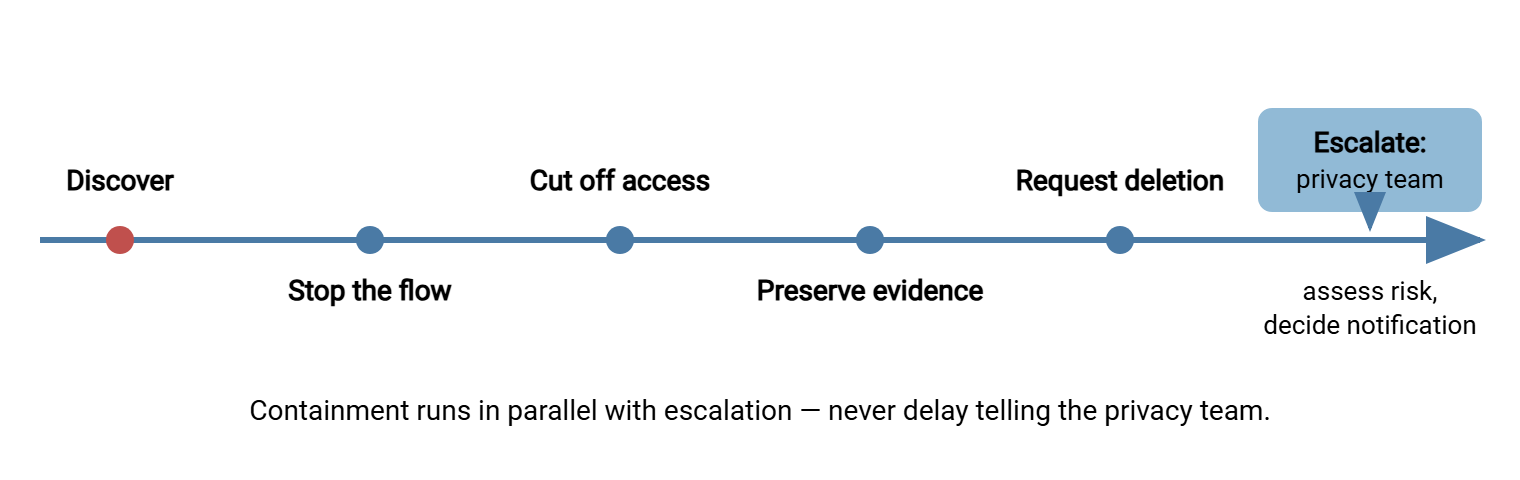
Remember: the instinct that ruins careers is the quiet fix — delete the file, correct the config, tell no one. A misdirection is a mistake; concealing one is a decision. The organization can defend a mistake that was contained and reported in an hour. It cannot defend a cover-up discovered by someone else.
Assess Honestly: What Went Where, and Who Could See It
With the bleeding stopped, build the facts the privacy team's decisions depend on. The questions are always the same:
- Exactly what data? Not "the payroll file" but the field list and row count — from the preserved copy and the flow record. This is where the screening habits of recognizing personal data pay off: you already know which fields are identifiers and which are sensitive.
- Whose data? How many people, which populations — staff, customers, minors? — and which regions, since that can decide which laws are in play.
- Who could have accessed it, and who did? Enumerate accounts with access to the wrong location, then read the actual access history. This is precisely what server-side activity logging exists for. In Sysax Multi Server, the activity log written to file and database records which account downloaded which file and when. This turns "we think their sweep grabbed it" into a timestamped fact.
- How long, and is it over? Exposure window from first landing to removal, plus confirmation that no other copies remain exposed.
- What protections held? If the file was encrypted to the intended recipient's key, the wrong recipient held ciphertext — a profoundly different incident. Channel encryption, by contrast, protected the journey but not the wrong destination; knowing the difference is why encrypt-before-send workflows matter.
Two honesty rules. State the limits of your evidence: "the log shows no downloads" is only meaningful alongside "and logging covers all access paths to that folder". If there is a gap, say so. And resist premature reassurance: "it was only there for an hour" and "it's a trusted partner" are risk-assessment inputs for the privacy team, not conclusions for the admin to broadcast. A trusted partner is a relationship, not a control.
Package the answers in a facts memo the privacy team can act on directly. A template worth keeping in the runbook:
INCIDENT FACTS MEMO (update as facts firm up; mark estimates as estimates)
What happened:   one line, no speculation about cause yet
Data involved:   field list + row count + populations (from preserved copy)
Where it went:   exact location(s), and who has access to them
Access evidence: downloads/reads observed, with timestamps; logging coverage
Exposure window: first landed HH:MM - removed/restricted HH:MM
Protections:     file encryption? channel? masking? which held, which did not
Containment:     actions taken, each with a timestamp and actor
Current status:  any copies still exposed? recipient deletion confirmed?
Evidence folder: path to preserved logs, config, and file copy
Escalation and Notification, in Plain Words
Escalate to your privacy or security contact the moment containment is underway — not after you have investigated everything. The reason is structural. Many privacy regimes require organizations to notify a regulator when a personal-data breach crosses a risk threshold, and sometimes the affected individuals as well. These notifications are typically required within a fixed period after the organization becomes aware. That clock is generally short, and it starts with awareness, not with your finished analysis. An admin who sits on an incident to "get the full picture first" is spending a legal deadline they do not own.
What happens next is genuinely not your call, and that is a feature. Whether this event is a notifiable breach, which regimes apply, what the notification says — those are judgments for the privacy team. They are informed by frameworks like the ones surveyed in our compliance frameworks series. Those judgments are the reason this article is education rather than legal advice. Your contribution is the thing only you can produce: a precise, unvarnished factual record — timeline, field list, access evidence, containment actions, current status. Deliver it fast and update it as facts firm up. Write it the way you would want to read it at a postmortem: no speculation, no minimizing, no adjectives.
A few things the admin should not do while the assessment runs. Do not contact affected individuals — communication to them, if required, is worded and timed by the privacy team. A well-meant informal heads-up can complicate the formal process. Do not discuss the incident in wide channels, name-and-shame threads, or with the press-adjacent. The facts memo has a distribution list and it is short. And do not let anyone talk you into softening the record. The version of events written on day one, plainly, is the version that ages well.
Turning Incidents into Prevention
Every incident is a free audit of one flow, paid for in adrenaline. Extract the lesson while it is vivid. The recurring mappings:
| Incident shape | Typical root cause | Prevention that actually works |
|---|---|---|
| Wrong destination | Config edit without review; look-alike paths and hostnames | Per-partner accounts jailed to their own folders; a test transfer after every config change; second-person review for destination edits; file-level encryption so the wrong audience reads nothing |
| Over-shared payload | "Export everything" defaults; masking step failing open | Minimized field lists under change control; header-guard scripts that stop the run; masking steps that fail closed |
| Lingering exposure | No retention on staging and archives; permissions drift | Purge steps built into jobs; periodic permission audits; short retention everywhere the file rests |
| Slow discovery | Nobody watching; no alerts on anomalies | Failure and completion notifications on jobs; log review habits; partner contacts who know who to call |
Almost every cell of that prevention column is a default from privacy by design for batch jobs. This is the deeper lesson: incident response and job design are the same discipline observed at different times. In the narrative above, the fix was not "be more careful with configs." It was per-partner folder jails, a test-transfer step after config changes, and finally giving the legacy feed its OpenPGP retrofit. In Sysax FTP Automation, that means adding the encrypt step to the job so every future misdirection carries ciphertext. Careful is a mood; defaults are a control.
Close each incident with a blameless review — blameless because the useful question is never "who slipped?" but "what allowed one slip to become an exposure?" Ask: how did we discover it, and how could discovery have been faster? Which control was missing, and is it missing from sibling flows too? Did our runbook hold up? Then fix the class of problem, not just the instance. The same config-review gap that misdirected payroll exists in every job built by copy-paste. A lingering copy found on a consumer sharing link is rarely the only one. The method for finding its siblings is triaging shadow shares. If your organization also handles deliberate-leak detection, feed the lessons into that program as well. The mechanics overlap with handling DLP hits, where a caught outbound file is essentially this article's incident intercepted in flight.
Practice the Bad Day
Runbooks are theories until exercised. Twice a year, tabletop one misdirection: pick a real flow and declare a fictional wrong-folder upload. Walk the room through discovery, containment, evidence, and escalation against the clock. Time each step honestly — how long to pause the job? to pull the download history? to produce the field list? Let every embarrassing pause become a runbook improvement. The drill also teaches the softer skills: who calls the partner, who writes the facts memo, who owns the evidence folder. An hour of pretending, and the real 08:10 email finds a team that has already done this once. In my first drill, pausing the job took twelve minutes, because nobody could remember which scheduler it lived in.
Rotate the scenario so each drill probes a different weakness. Try a wrong-destination upload once. Another time, try a masking script that failed open for a week before anyone noticed. Another time, try a lingering export found on an open share by an auditor. Each shape stresses different muscles. The first tests speed, and the second tests how you assess a long exposure window. The third tests whether you can even establish when the exposure began. Invite the privacy team to at least one drill a year. The handoff between admin facts and their legal clock is exactly the joint that rehearsal strengthens. Both sides are calmer once they have met before the bad day. (Introductions at 08:10 are possible. They are not recommended.)
The Incident You Are Preparing For
Personal data will eventually go somewhere it should not — through a config edit, a failed script, a folder that outlived its purpose. The response that protects people and the organization alike is boring by design. Stop the flow, cut access, preserve evidence, request deletion, escalate with plain facts, and let the privacy team run the legal clock they own. Then spend the incident's momentum on defaults — minimized payloads, jailed accounts, encrypted files, purged staging, watched logs. That way, the next slip lands on machinery built to absorb it. The best time to build that machinery is before the email arrives; privacy by design for batch jobs is where to start. The email does not send a calendar invite first.
Frequently Asked Questions
Is every misdirected file a reportable breach?
The wrong recipient says they deleted it. Is that the end?
Our logs show no downloads before we removed the file. Are we safe?
If the file was encrypted, was there even an incident?
Should the person who made the mistake be disciplined?
From the Sysax team: we build secure file transfer software for Windows. Sysax Multi Server is an FTP, FTPS, SFTP, and HTTPS server. Sysax FTP Automation handles scheduled, scripted transfers. Free trials are on the download page.