
Privacy by Design for Batch Transfer Jobs
At ten past two every morning a scheduled job wakes, exports a table, and sends it somewhere. It has done so since before anyone on the current team joined. A batch transfer job is a decision machine. Every choice its designer made replays automatically every night, unattended. That includes which fields to export, where the file lands, how long copies linger, who can read the folder. Often, those choices replay for years after the designer has left the company. When those choices were privacy-careful, the job quietly protects people run after run. When they were careless, the job quietly manufactures risk on the same schedule, and nobody is watching either way.
That is why privacy by design matters most exactly here, in the unglamorous world of scheduled jobs. The idea, in admin terms: protection comes from defaults built into the machinery, not from humans remembering to be careful. Humans stop remembering around the third quiet month. This article — part of our Personal Data in File Flows series — turns the idea into a concrete anatomy. It covers the seven defaults of a well-designed batch job and a checklist you can copy into your build procedure. It also covers a realistic retrofit pass for the inherited jobs already running in production.
Why Batch Jobs Deserve Special Attention
Interactive transfers at least have a human in the loop who might notice something odd. Batch jobs have three properties that amplify both good and bad design:
- They repeat. A one-off over-share is one incident. A nightly job that over-shares produces a fresh copy of the excess every day, multiplying what exists on disks, in archives, and in backups at both ends.
- They outlive their context. The purpose fades, the requester moves on, the recipient's project ends — and the job keeps running, because nothing stops it. Long-lived jobs whose reason nobody remembers are a staple of every audit.
- They get cloned. The next feed is built by copying the last one, so one job's design flaws become the site's design pattern.
Privacy regimes have converged on the same insight from the legal side. What privacy laws typically expect is often phrased as data protection "by design and by default". That means protective settings should be the starting position, not an upgrade. Interpreting that duty for your organization is your privacy or legal team's work; building jobs whose defaults do the protecting is yours. Conveniently, the same defaults that satisfy the privacy conversation also make jobs more reliable and easier to audit. So this is not a tax — it is just better engineering.
Acme's new administrator inherited a nightly job labeled hr_feed_old and, being new, opened it. It exported the entire staff table — bank details and home addresses included — to a benefits broker whose contract had ended some time before. It used plain FTP and a folder shared with two other vendors. There was no cleanup step, so several years of daily snapshots sat at the destination. No single decision had been malicious. The field list was the default "everything," the protocol was whatever worked at the time, the folder was whatever existed, and deletion was nobody's job. Switching the job off took a minute. Establishing that nobody had opened the folder since the contract ended took a week of phone calls and a written statement from the broker. Every article in this series has a control that would have caught it. This article is about wiring those controls into the job so they fire nightly whether anyone is paying attention or not.
The Anatomy of a Well-Designed Job
Seven defaults, applied in order, cover what matters. The diagram shows them laid along the path of a nightly feed from source database to partner, with each stage doing its part before the next begins.
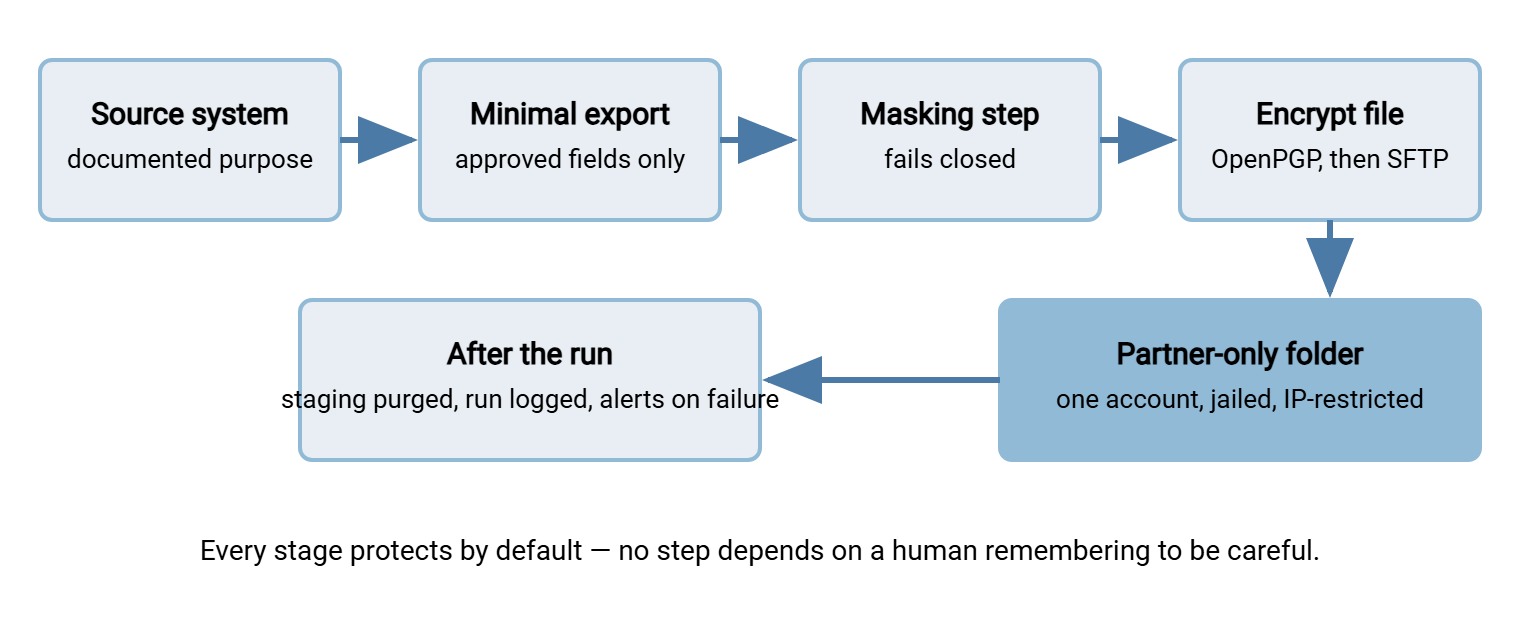
Default One: A Written Purpose
Every well-designed job begins with one sentence in its documentation: "This feed exists so that <recipient> can <do what> for <whom>." It feels bureaucratic and takes thirty seconds. It is also the keystone. The purpose sentence is what the field list is measured against and what the privacy team assesses. It tells a future admin whether the job can be retired. It turns "why does this feed exist?" from archaeology into a lookup. A job whose purpose nobody can state is a job nobody can defend — and a strong candidate for switching off.
Quality matters more than length. "Example Benefits Ltd receives current staff names, salary bands, and enrollment choices to administer the health plan" is a working purpose. It names the recipient, the action, and by implication the field list and the rows (current staff, not former). "HR data feed for the broker" is a label pretending to be a purpose. It justifies any column and any row, which is exactly why bloated feeds always turn out to have vague purposes behind them. (Ask what the broker does with the home addresses. The pause is the answer.)
Default Two: A Minimal, Guarded Payload
The payload is the agreed field list and row filter, nothing more — the discipline covered in data minimization. In a well-designed job that list is not folklore; it is configuration. Keep it in the flow record or version control, and make the job enforce it. Use a small pre-transfer script that checks the export's header row against the approved list and stops the run on any mismatch. Upstream systems grow columns without warning; a guarded job notices before the recipient does, instead of after.
Default Three: Disguise What the Purpose Allows
For each field that must flow, apply the strongest disguise the purpose tolerates. Use tokens for identifiers the recipient only needs for linkage, masking for values they only need to recognize, clear values only where genuinely necessary. The full toolkit, including its honest limits, is in masking and pseudonymization. The design point here is placement and failure behavior. The disguise runs inside the job, before the file touches shared staging, and it fails closed. If the masking script errors, the transfer must not run. A job that quietly ships the raw file when the masking step breaks has a privacy incident built into its error handling.
Default Four: Protect the File Itself
Two layers, both by default. The channel is encrypted — SFTP or FTPS, never plain FTP for personal data. And for payloads that matter, the file itself is encrypted to the recipient's key before it leaves. That way, it stays protected while resting in staging folders, mailbox-style pickup areas, and any backup that catches it along the way. This is the encrypt-before-send workflow. In Sysax FTP Automation the sequence lives in one scheduled job. Pre-transfer processing runs your minimization and masking scripts. The built-in OpenPGP step encrypts the result to the partner's public key. Only then does the transfer step move the file. File-level encryption is also your quiet insurance policy: a misdirected PGP-encrypted file is a non-story if the wrong recipient holds no key to it.
Default Five: Lock Down Both Ends
The job runs under a dedicated account that exists for this flow alone — never a person's account, never a shared "ftpuser." On the server side, give each partner their own account jailed to their own folder, applying the ideas from least privilege in practice. The payroll processor's account can see the payroll drop folder and nothing else, ideally write-only or read-only depending on direction. In Sysax Multi Server this is per-account access control. Accounts can be built-in, mapped to Windows or Active Directory identities, or authenticated with public keys. IP allow/block rules add a second fence, so the partner account only works from the partner's known addresses. A stolen password that cannot be used from anywhere else in the world is a much smaller emergency. Retire the shared "ftpuser" while you are there; it has been meaning to leave for years.
Default Six: Short Retention on Every Hop
A transfer creates copies: the export on the source, the staged file, the delivered file, and whatever archives and backups swallow along the way. A well-designed job treats every copy as scheduled for deletion from the moment it is created. Staging files are purged by the job itself once delivery is confirmed — a post-transfer cleanup step, so success and cleanup are one unit. The delivered copy gets an agreed lifetime in the partner arrangement ("deleted after processing, confirmed monthly"). Retention windows are numbers your data owners and privacy team set. Your part is making the deletion automatic. The whole discipline has its own series in retention and deletion of transferred data. The payoff compounds: fewer surviving copies also means faster, cleaner answers when access and deletion requests arrive.
Default Seven: Logs and Alarms That Mean Something
The job must leave a trail that answers, months later: what ran, what was sent, where, under which account, and who fetched it. Server-side activity logging — which Sysax Multi Server writes to a file and to a database — records the download half. The job's own run log records the production half. Follow the guidance in what to log, and remember from earlier in this series that logs themselves contain personal data and deserve access control. Then add the alarm: email notification on failure, including failure of the masking or cleanup steps, routed to a mailbox humans actually read. An unwatched batch job is not automated; it is abandoned with extra steps.
The Test That Finds Weak Defaults
Before declaring a job well-designed, run it through three what-if questions. Each probes whether a default is real or imaginary, and each takes five minutes with the job's configuration open in front of you:
- "What happens if tonight's run misfires?" Suppose the destination path is wrong, or the partner's folder mapping changed. Where does the file land, and who can read it there? If the answer is "an open share, readably, indefinitely," defaults five and six are missing. A well-designed job misfires into a restricted location, encrypted, with an alert raised — annoying, not reportable.
- "What happens if the masking step breaks?" Trace the job's error handling by hand: does a script failure halt the transfer, or does the job soldier on and ship whatever exists? Fail-open pipelines are shockingly common because success-path testing never exercises them. Break the script deliberately in a test run and watch what the job actually does.
- "What would I be able to prove three months from now?" Pick a run from the logs at random and try to reconstruct it: what was sent, to whom, fetched by which account, deleted when. If the reconstruction fails in your own test, it will fail harder during an incident or an audit, when the stakes are real and the timeline is not yours.
Jobs that pass all three are rare on first inspection. That is not a verdict on anyone's competence — it is what defaults inherited from convenience look like. Each gap the test finds maps directly onto one of the seven defaults above. The first job I ran through it was one I had built myself, and it failed two of the three.
The New-Job Checklist
Copy this into your build procedure and refuse to call a job "done" until every line is true:
NEW BATCH TRANSFER JOB - PRIVACY DEFAULTS
[ ] Purpose written in one sentence; owner named; recipient named
[ ] Personal data screened (see: recognizing personal data); verdict recorded
[ ] Field list + row filter approved and stored as config
[ ] Header-guard script stops the run on unexpected columns
[ ] Disguises applied where purpose allows; masking step fails closed
[ ] Channel encrypted (SFTP/FTPS); file encrypted to recipient key if warranted
[ ] Dedicated job account; partner account jailed to its own folder
[ ] IP restrictions on the partner account where addresses are known
[ ] Staging purge runs as part of the job, after confirmed delivery
[ ] Recipient-side retention agreed and written into the partner arrangement
[ ] Run logging + server activity logging verified end to end
[ ] Failure alerts (including masking/cleanup failures) reach a read mailbox
[ ] Flow record updated: purpose, fields, disguises, retention, contacts
[ ] Privacy team looped in if personal data verdict was "yes"
Retrofitting the Jobs You Inherited
Nobody gets to design their estate from scratch. You inherit a scheduler full of jobs built by predecessors, and rebuilding them all at once is neither possible nor wise. The retrofit pass below is ordered so the cheapest, least disruptive wins come first and the changes that need recipient conversations come later. Work one job at a time, highest-risk first — payroll and health-related feeds before newsletter lists. One job. Not two. Not "the three payroll ones together, since they're similar."
- Inventory and triage. List every scheduled job, what it carries, and where it goes — the approach in our guide to inherited FTP automation. Screen each for personal data and rank by sensitivity and volume.
- Write the missing purpose sentences. Interview whoever receives the file. Any feed with no identifiable purpose or recipient gets a stop date proposed to its supposed owner. Switching off an orphaned feed is the purest privacy win there is.
- Fix the transport. Move plain-FTP jobs to SFTP or FTPS. No recipient conversation is needed beyond connection details, and it removes the worst exposure first.
- Fix the accounts. Replace shared and personal accounts with dedicated per-flow accounts, jail folders, add IP restrictions. Invisible to recipients when done carefully.
- Turn on the trail. Verify run logging, server activity logging, and failure alerts. This costs an afternoon and instantly improves every future decision, because you can now see what the job actually does.
- Minimize the payload. Now the recipient conversation: propose the pruned field list, run old and new in parallel briefly, cut over, record the agreement. Slowest step, biggest risk reduction.
- Add disguises and file-level encryption where the purpose allows — key exchange with the partner takes a conversation, the pipeline change is small.
- Impose retention. Add the staging purge, agree recipient-side deletion, and schedule a cleanup of the historical accumulation the job left behind over the years.
Remember: a retrofit that stalls at step three has still removed cleartext transport, orphaned feeds, and shared accounts from your worst jobs. Partial privacy by design is not failure — it is progress in the order that matters.
Cloning is the retrofit dividend worth engineering deliberately. Since new jobs are built by copying old ones, make your first fully retrofitted job the official template. Give it a name that says so, and keep its checklist in the same folder as its configuration. Point every "can you set up a feed like X?" request at it. From then on, the cloning habit that used to propagate flaws propagates defaults instead — the cheapest scaling mechanism privacy by design has. The same logic applies to documentation. Take a flow record template — a row in the transfer inventory, if you keep one. With purpose, field list, disguise, retention, and contact slots pre-printed, it gets filled in far more often than a blank page ever would. Blank pages have a poor completion rate.
Defaults Outlive Diligence
The uncomfortable truth about unattended jobs is that no one's carefulness survives contact with years of quiet nightly success. People stop checking; that is what automation is for. So build the care into the job. Give it a stated purpose, a guarded minimal payload, disguises that fail closed, and encryption on file and channel. Give it jailed and IP-fenced accounts, deletion as part of delivery, and logs with an alarm bell attached. Do the same, gradually, to the jobs you inherited. The night your masking script breaks, or a partner's credentials wander, decisions you made once will separate an incident from a log entry. You made them at a desk, with time to think. That is the entire point of privacy by design, and the best preparation for the day described in when personal data goes to the wrong place. The job at ten past two runs tonight either way; the only question is which decisions it replays.
Frequently Asked Questions
What does "privacy by design" actually mean for an admin?
Do small internal transfers need all seven defaults?
If the file is PGP-encrypted, do the other defaults still matter?
How do I retrofit a production job without breaking it?
Who approves the purpose statement and retention period?
From the Sysax team: we build secure file transfer software for Windows. Sysax Multi Server is an FTP, FTPS, SFTP, and HTTPS server. Sysax FTP Automation handles scheduled, scripted transfers. Free trials are on the download page.