
A Working Retention Policy for Your Transfer Server
"What is your retention policy for this server?" The auditor asks it kindly, on a Tuesday, and the answer takes four days to assemble. It draws on an administrator's memory, a scheduler's task list, and an email from Finance that someone can probably find. There is also a folder called temp_DO_NOT_USE that nobody wants to discuss. By this point in the series you may already have all the real pieces. You may have a map of where transferred files pile up. You may have retention periods confirmed by the people entitled to set them. You may have purge jobs that enforce those periods on schedule. You may have a clear-eyed view of what deletion really does, and a runbook for the day a legal hold arrives. What most teams never do is the last step, which is writing it down as one short document. Without it, the answer to the auditor's question is an archaeology project.
The document this article builds is deliberately modest: one page of policy plus a table. Not a binder. A page. Length is the enemy here, because a policy nobody reads governs nothing. A page can say exactly what happens to every folder, on whose authority, with what evidence. That page gets read, followed, and handed to auditors whole. When the auditor asks about retention, you slide this across the table, and the meeting gets shorter. (Meetings that get shorter are the only kind anyone remembers fondly.)
This is the capstone of our Retention & Deletion series. Everything here assembles work from the earlier articles. Where a piece is missing in your environment, the links point to the article that builds it.
What This Document Is — and What It Isn't
Be precise about the document's job, because scope creep is how one page becomes forty. This is a server-scoped operational policy: it states how the transfer estate implements the organization's retention decisions. It does not make those decisions. The retention schedule is the master list of record classes and periods, owned by legal, records management, and the business. It remains the authority for how long information must live. Your page cites it and translates it into folders, jobs, and evidence. That split protects everyone. When an auditor challenges a period, the answer is "that comes from the corporate schedule, row such-and-such." When they challenge enforcement, the answer is yours, and it is strong.
Equally, this page is not your organization's whole file transfer policy. The rules about who may transfer what, by which approved methods, live in a broader document covered by our file transfer policy series. The retention page slots underneath it as an operational annex for one concern on one estate. Keep the boundaries and each document stays short enough to survive contact with readers.
One page per server, or one for the whole estate? Let the folder table decide. If two servers carry the same flows with mirrored folder trees, one document with both named in scope is simpler and stays consistent. The servers may serve different worlds — a partner-facing exchange in the DMZ and an internal distribution box, say. In that case, separate short pages beat one long one. Each page's owners, auditors, and review conversations are different people. The test is always the same: could the people responsible for this page sit in one room and confirm every row? If not, split it.
The Backbone: A Per-Folder Retention Table
The heart of the policy is a table with one row per governed location. It is the direct descendant of the inventory you built in where transferred files accumulate. It is upgraded from "what is here" to "what happens to it." A worked excerpt:
| Folder | Contents | Retention | Action & job | Exceptions | Owner |
|---|---|---|---|---|---|
inbox\acme |
Inbound order files (conveyance copies) | Thirty days from landing | Hold area, delete; job purge-inbox-acme |
None | Sales ops |
outbox\payroll |
Payroll extracts (record lives in payroll app) | Ninety days from landing | Hold area, delete; job purge-outbox-payroll |
None | Finance |
archive\regulatory |
Submitted filings — this folder IS the record | Six years per corporate schedule | Annual review, then delete; job purge-reg-archive |
Hold H-12 (see appendix) | Compliance |
staging\*, *.part |
Workflow debris | Fourteen days | Delete; job purge-staging |
None | IT |
| Activity + purge logs | Who did what, what was deleted | Two years | Rollover, archive, delete; job purge-logs |
Paused if logs in hold scope | IT + Compliance |
Each column earns its place. Contents names the record class in business language. Critically, it says whether the folder holds conveyance copies or is itself the record. That distinction (from retention basics) is what justifies short periods everywhere else. Retention states the period in words with its clock. Action & job is the traceability column: the named scheduled task that enforces the row. So anyone can walk from policy line to running job and back — no orphan rules, no mystery jobs. Exceptions holds named, dated departures — an active legal hold, a migration pause — never vague ones. Owner is the person or team whose written confirmation stands behind the period.
Notice the logs row governing itself: evidence has retention too. Putting it in the table ends the "how long do we keep logs?" debate, which has otherwise been running since logs were invented. Notice also the regulatory archive row wearing its hold openly. The table is exactly where the next administrator will look before cleaning anything, so active holds belong in it.
Remember: the table is the policy. Everything else on the page is framing for people who need context. If you maintain only one artifact well, maintain the table. A current table with a stale preamble beats eloquent prose over rows that no longer match the server.
The One-Page Skeleton
Around the table goes a page of framing — ten short numbered sections. Here is the complete skeleton, ready to copy and fill; square brackets mark your substitutions:
RETENTION POLICY — FILE TRANSFER SERVER [name]      version [n]

1 PURPOSE   Implement the corporate retention schedule for data
            passing through the transfer estate.
2 SCOPE     Servers: [names]. Storage: [D:\Transfer] and
            subfolders, activity logs, purge holding area.
            Out of scope: systems of record; backups (governed
            by backup policy; deleted data ages out of backup
            sets after [ninety days]).
3 ROLES     Retention periods, holds, release: Legal / Records.
            Contents and period confirmation: folder owners.
            Implementation, evidence, this document: IT admin.
4 DEFAULT   Folders not listed in the table receive no new data;
            contents are frozen pending classification; an owner
            is assigned within [thirty days] of discovery.
5 RULES     Per-folder table, appendix A. One row per governed
            location: folder, contents, retention + clock,
            action + job name, exceptions, owner.
6 ENFORCE   Scheduled purge jobs, dry-run tested before arming;
            two-stage deletion via holding area [path] with
            [seven days] grace. Job inventory: appendix B.
7 EVIDENCE  Purge logs and server activity logs retained
            [two years]; weekly oldest-file assertion report
            confirms every folder meets its promise.
8 HOLDS     A legal hold suspends this policy for its scope on
            receipt. Active holds and dated exceptions:
            appendix C. Hold runbook: [location].
9 REVIEW    Quarterly: jobs ran, assertions pass, exceptions
            still current. Annually: owners reconfirm periods;
            table reconciled against the real folder tree.
            Review log: appendix D.
10 APPROVAL [names, roles, sign-off date]
Resist the urge to elaborate. Every section is two or three lines because its details live somewhere better. The periods live in the corporate schedule, the job configurations in the scheduler, the hold procedure in the runbook. The page is a map of authorities, not a copy of them — that is what keeps it both short and durable. If a section wants a fourth line, it wants a link.
Implementation Notes: Wiring the Page to Reality
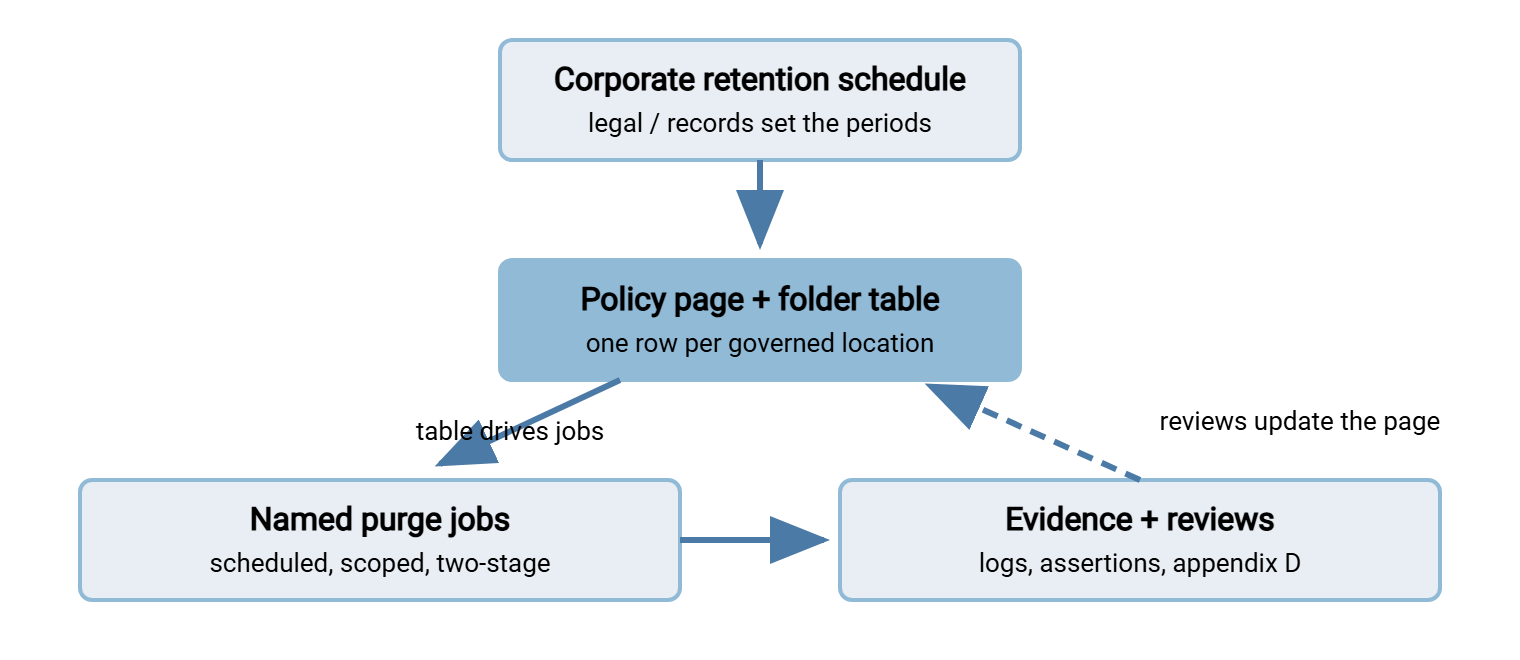
A policy differs from a wish only if every line corresponds to something that runs. The diagram below shows the loop the document lives in. Decisions flow down from the corporate schedule into the page and its table. The table drives named jobs, the jobs produce evidence, and the reviews feed corrections back into the page. Break any arrow and the policy starts describing a server that no longer exists.
Three of those wires deserve explicit notes.
Section six is a scheduler, not a sentence. Each job name in the table must exist as an actual scheduled task built the way automated purge policies describes — scoped, dry-run tested, two-stage, logged. If you build them in Sysax FTP Automation, name the scheduled tasks to match the table (purge-outbox-payroll). Let each task's file and folder operations do the moving and deleting. Turn on its email notification so every run reports its outcome. The job list in your automation console then reads as appendix B with no extra work.
Section seven already exists on a well-run server; the policy just claims it. A server like Sysax Multi Server logs session activity and file operations to file or database with rollover. Those records, together with your purge jobs' own logs and the weekly oldest-file assertion, form the entire evidence chain. It shows what landed, what was removed, and proof that no folder exceeds its promise. Presenting that chain to an auditor without a scramble is its own craft, covered by our audit-ready reporting series.
Section four is the net under the whole program. New folders appear — a partner onboards, a developer improvises. The default rule means an unlisted folder is never ungoverned: it is frozen until classified. That converts "we found a mystery folder" from a gap into a working procedure. Pair it with a habit: any new transfer flow adds its row to the table before it goes live. That is the same way it gets credentials and monitoring. If you inventory flows the way our file flow census describes, the census and the table stay in step naturally. A folder called test2 will still appear overnight; the difference is that it is frozen by breakfast.
Exceptions and Holds: The Column That Keeps You Honest
The exceptions column deserves its own discipline, because it is where policies quietly rot. Every entry needs three properties: a name (hold reference or requester), a scope (which files or subfolders), and an expiry or review date. "Finance asked us to keep these longer" is not an exception; "E-7: keep this quarter's extracts until reconciliation completes, owner J. Alvarez, review at quarter end" is. Legal holds enter the column the day they arrive. They leave it only on written release, exactly as the legal holds runbook prescribes. Business exceptions expire on their dates unless renewed in writing. The quarterly review reads this column entry by entry and asks one question of each: still true? An exceptions column that shrinks over time is a healthy program; one that only grows is a retention policy dissolving in slow motion.
Meridian Parts disabled purge-outbox-payroll "for a week" while a payroll migration settled. The week went into a chat message instead of the exceptions column. Nobody re-enabled the job. Fourteen months later a new administrator ran the oldest-file assertion because the page said to. It reported four hundred and thirty days against a ninety-day promise. Re-arming the job and working through the backlog took an afternoon; writing up the gap in the review log took longer. The exception had been perfectly reasonable. It had simply never been given a date.
Review Cadence: Keeping the Page True
Documents drift from reality at a speed proportional to how often reality changes and how rarely anyone looks. Two rhythms keep this one honest, and both are deliberately small:
- Quarterly, half an hour, by IT: confirm every job in appendix B ran on schedule (absence alerting should have told you already). Run or review the oldest-file assertion for every table row. Sweep the exceptions column for expired entries. Log the check in appendix D with date and initials.
- Annually, one meeting, with owners: each folder owner reconfirms their row — contents still accurate, period still right per the corporate schedule, exceptions still justified. Reconcile the table against the actual folder tree so additions and retirements are captured. Bump the version number, collect sign-offs, done.
The review log matters more than it looks. To an auditor, a policy with four dated, initialed quarterly entries is a living control. The identical text with no review trail is shelfware, and they will treat it accordingly. The cheapest compliance evidence you will ever generate is the two-line entry that says you looked.
From Blank Page to Signed Page in a Week
If you are starting from nothing, the assembly order matters less than starting small. But a realistic sequence for one server looks like this. Day one: run the accumulation walk and draft the table with whatever you can observe — folders, contents, ages, best-guess owners. Leave retention cells empty. Days two and three: short conversations with each owner, bringing a proposed period for them to confirm or correct. I have watched "would ninety days cover every dispute you have ever had?" get a yes in writing before the coffee arrived. Day four: build or rename the purge jobs to match the table (the mechanics of an age-based job are in age-based cleanup jobs). Keep dry runs on, and draft the page around the skeleton above. Day five: circulate the draft to the owners and whoever speaks for legal or compliance. Collect sign-offs, set the first quarterly review date, and publish the page where your team actually looks.
Two shortcuts are worth refusing. Do not copy retention periods from someone else's policy on the internet. The numbers must trace to your schedule and your owners, or the whole document is decoration with signatures. And do not wait for a perfect corporate retention schedule before writing the server page. A table of owner-confirmed periods, honestly labeled as such, is a working control today. It slots under the formal schedule whenever it arrives. I know the first shortcut is tempting because I once took it, and the periods I borrowed had been written for a dental practice.
Failure Modes to Design Against
The same handful of decay patterns kill most server retention policies, and each has a structural antidote already built into the skeleton. The unenforced policy — a beautiful page, no jobs — is prevented by the job-name column: any row that cannot name its job is visibly unfinished. The single-custodian policy — everything true, all of it in one admin's head — is prevented by keeping the page in the team's documentation system and by the review log. That log forces a second pair of eyes at least quarterly. The silent drift — flows change, table doesn't — is what the default rule and the new-flow habit exist for. And the exceptions graveyard — departures that never expire — is handled by refusing any exception without a date. None of these protections is clever; all of them are the difference between a control and a souvenir.
Answering the Auditor Before They Finish Asking
Run the assembled system through the questions any assessor, customer, or framework review will pose. Notice that each answer is now an artifact, not an essay. What is your retention policy? — the page. Who approved these periods? — the owner column and section ten. How is it enforced? — the named jobs, with their configurations in the scheduler. Prove it actually runs — purge logs, run notifications, and the weekly assertion reports. What about litigation? — section eight, the hold appendix, and a runbook you can produce. When did you last verify all this? — appendix D, most recent entry. That is the whole exchange, and it generalizes. HIPAA-oriented reviews, PCI DSS assessments, SOX walkthroughs and privacy audits phrase the retention question differently. But all of them are satisfied by the same five artifacts, which is why building them once is such good value.
The Short Version — and the Series in One Breath
Map where files accumulate. Get periods decided by the people entitled to decide them. Enforce each period with a named, tested, logged purge job. Understand what deletion does and does not destroy. Keep a hold runbook for the day deleting must stop. And bind it all into one page with a table at its heart, reviewed on a calendar. That is the entire discipline of retention on a transfer server — modest pieces, assembled deliberately. Start with the piece you are missing: the accumulation map if you have never looked. Try purge automation if cleanup still depends on memory. Or try the hold runbook if the word "litigation" makes your scheduler feel dangerous. The page at the end is small. What it replaces — the scramble, the guesswork, the archaeology — was not. Neither was temp_DO_NOT_USE, which finally has a row.
Frequently Asked Questions
Does a server retention policy need legal approval?
What happens to a folder that isn't in the table?
How detailed should the policy page be?
How often should the table be updated?
What will auditors actually ask for?
From the Sysax team: we build secure file transfer software for Windows. Sysax Multi Server is an FTP, FTPS, SFTP, and HTTPS server. Sysax FTP Automation handles scheduled, scripted transfers. Free trials are on the download page.