
Keeping the Front Door Up: Gateway Resilience
Consolidation has a bill, and this article is where it arrives. When external exchange ran through five scattered doors, any one of them failing inconvenienced a fifth of your flows. Now that everything enters through one controlled front door, that door's bad afternoon is everyone's bad afternoon. Every partner deadline, every customer upload, every overnight batch is waiting on the same service. Concentrating the risk was not an accident — it was the deliberate trade at the heart of the gateway pattern. It was made because one point defended and operated well beats five operated thinly. But that reason is load-bearing. Operated well now includes staying up.
This article — part of our Transfer Gateways and Reverse Proxies series — covers resilience for the front door in plain words. It explains what "down" actually means for a transfer gateway and the availability concepts (redundancy, failover, active-passive) without the vocabulary fog. It covers health checks that test what partners actually do, and how to run maintenance without partner-visible downtime. It explains how to monitor the door itself rather than only the files passing through it.
Concentrated Risk, Stated Honestly
Start by widening the definition of failure, because a transfer gateway can be "down" in more ways than a dead process. The door is effectively closed when any of these is true:
- The service is not listening — crashed, hung, or the machine is off. The obvious case, and not the most common one.
- The disk is full. A landing area that cannot accept another byte turns every upload into a confusing mid-transfer failure while the service itself looks healthy.
- A certificate expired or a key changed unannounced. Careful partners — the ones who verify fingerprints — are refused or refuse you; careless ones connect fine. The most selectively cruel outage there is.
- Authentication is broken. If the gateway checks a directory or database that is unreachable, every login fails while the port answers cheerfully.
- The network path changed. A firewall rule "cleanup," an address change, a passive port range narrowed by someone tidying up — the service runs, and nobody outside can reach it.
Now the honest mitigating fact, because resilience planning should use it: file transfer forgives short outages better than almost any other workload. Most external exchange is automated, and well-built automation retries. A fifteen-minute failover during which a partner's client retries three times and then succeeds is, to the business process, a non-event. This grace is real but it is not unconditional — it exists only for partners whose automation retries sensibly. That is worth stating in your partner expectations (the relationship side of that lives in our B2B partner exchange series). Resilience design for transfer gateways therefore aims at two numbers: keep unplanned closures shorter than partners' retry horizons, and keep planned closures invisible entirely.
Availability Concepts in Plain Words
The vocabulary is small, and plain English versions work fine. A single point of failure is any component whose failure alone closes the door. That includes the gateway machine, but also the one firewall, the one internet line, the one directory server that authentication depends on. Redundancy means having a second of the thing. Failover is the act of moving service to the second when the first fails.
The two standard arrangements, in plain words:
- Active-passive: one instance serves; a second stands ready as the understudy — same configuration, same accounts, same keys — and takes over when the primary fails. Simple to reason about, and the standby is idle capacity you pay for but do not use.
- Active-active: both instances serve at once behind a load-distributing tier, and each absorbs the other's traffic on failure. It gives better hardware utilization but is harder to reason about. For stateful transfer sessions the benefit is smaller than it sounds. A session lives on one node regardless, and dies with it.
That last point deserves its own paragraph, because it is the most common false expectation about gateway failover: failover does not rescue in-flight transfers. A file that was halfway up when the node died is a failed transfer on any architecture. What failover does is make the next attempt succeed, quickly, at the same address. Combined with partner retries, that is genuinely enough. But promise "no partner-visible impact from a node failure" and someone will hold you to a claim physics never signed.
The diagram shows the active-passive shape: one published address that partners connect to and two gateway nodes sharing replicated configuration and identity. The address shifts to the standby at failover.
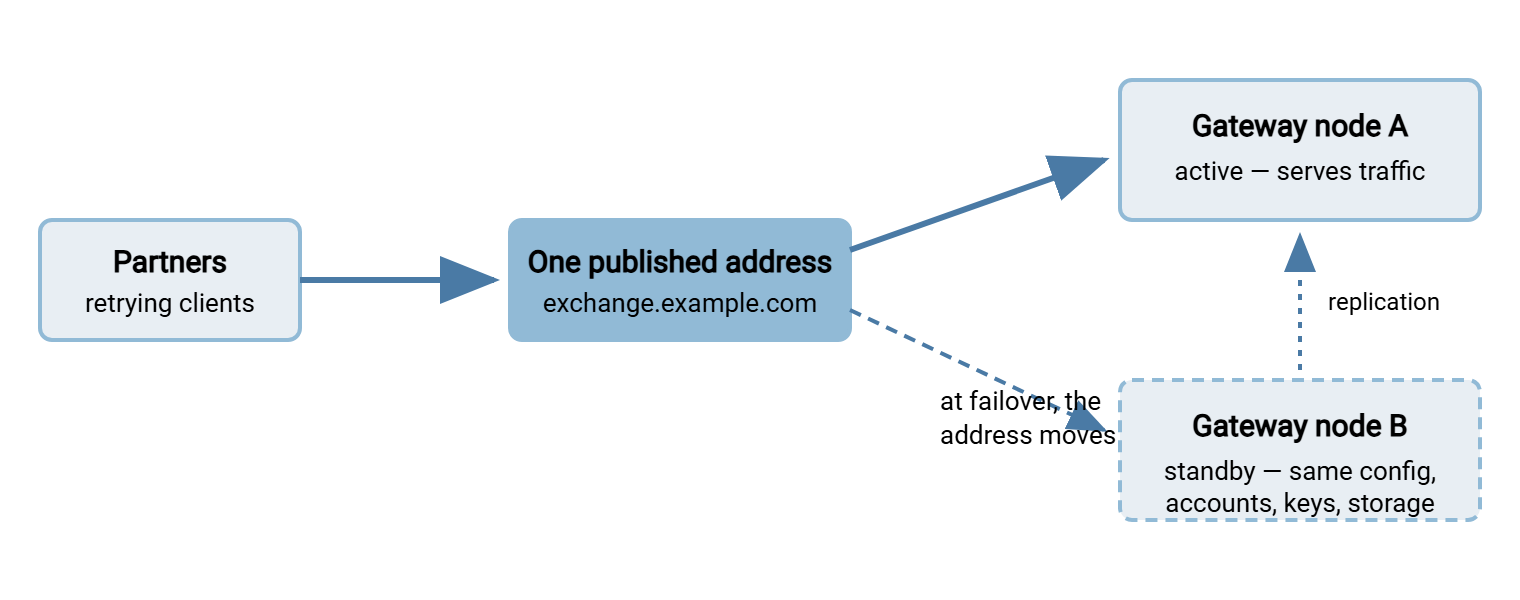
Two mechanics deserve honest footnotes. First, how the address moves matters: a floating address claimed by the standby on the same network moves in seconds. A DNS change moves at the mercy of every resolver cache between you and the partner. That can mean minutes to hours of partners connecting to the corpse. DNS is usable as a failover mechanism only with low time-to-live values set long in advance, and never as the fast path. Second, the standby is only a standby if it is truly identical. It needs replicated configuration and accounts, the same TLS certificates, shared or replicated landing storage — and the same SSH host key. Without that same host key, every pinned fingerprint breaks at the worst moment. The pinning mechanics are in host keys and known_hosts. A standby that drifted is not resilience; it is a second outage waiting behind the first.
The Dependencies Behind the Door
A redundant gateway pair behind a single internet line is resilience theater: the expensive component has an understudy while the cheap one everything rides on has none. Before buying tiers, trace the whole chain a partner's connection travels and ask, for each link, "what happens if only this fails?" The usual suspects:
- The internet connection and the firewall in front of the gateway — each a single device in many estates, each capable of closing the door alone.
- The authentication dependency. If the gateway checks a directory, that directory's outage is your outage. Decide the failure behavior on purpose: cached credentials, a local fallback store for critical partner accounts, or an accepted hard dependency. Any of the three can be right, but only one of them should be a surprise.
- DNS for your published name. Partners cannot connect to a name that will not resolve, no matter how healthy the gateway is.
- Accurate time. Certificate validation and log correlation both quietly assume it; a gateway with badly drifted time starts failing handshakes in ways that take embarrassingly long to diagnose.
- The storage the landing area lives on — shared storage serving both nodes is a convenience and a single point of failure in the same breath; know which trade you made.
The exercise takes an hour with a whiteboard. It pays for itself the first time it stops you from gold-plating the gateway while the actual weakest link stays single. Fix the chain in order of weakness, not in order of visibility.
Health Checks: Knowing the Door Actually Works
Everything above depends on noticing failure quickly and trusting the standby — both of which are health-check problems. The trap is checking what is easy instead of what partners do. A ladder of checks, each catching what the one below cannot:
Health-check ladder for a transfer gateway
 1. Machine answers        (ping)            - catches: dead host, routing
 2. Port accepts           (TCP connect :22) - catches: service down, firewall
 3. Handshake completes    (SSH/TLS banner,  - catches: broken crypto config,
                            cert validity)              expiring certificate
 4. Login succeeds         (canary account)  - catches: auth store unreachable
 5. Round-trip transfer    (upload, download,- catches: full disk, permissions,
    works                   compare, delete)            everything that matters
 6. Delivery reaches the   (expected-file    - catches: the bridge or mover
    far side                checks inside)              silently stuck
Levels one through four are standard monitoring fare. Level five — the synthetic canary transfer — is the one that separates transfer-aware monitoring from generic monitoring. A small file is uploaded, downloaded back, compared, and deleted through each external protocol, on a schedule. The check uses a dedicated canary account confined to a scratch folder. It exercises the same path partners use, so whatever breaks partners breaks the canary first. Run it from outside your network. A check that runs beside the gateway sees a healthy service while the firewall change that locked out the world goes unnoticed. Scheduling such a probe is ordinary client automation. A tool like Sysax FTP Automation can run the scripted round-trip on schedule and raise its error handling when the transfer fails. That turns "the door is closed" from a partner phone call into an alert you got first. Level six belongs to the flow-monitoring world — freshness checks for expected files — and closes the loop from "door open" to "files actually arriving where they should."
Maintenance Without Partner-Visible Downtime
Unplanned failure gets the attention, but most gateway downtime is self-inflicted: patching, certificate renewals, configuration changes. The goal is not "no maintenance" — the door must be patched promptly precisely because it is exposed — but maintenance partners never notice.
With a redundant pair, the pattern is drain-patch-verify-swap. Take the standby, patch it, run the full health-check ladder against it, then move the address so it becomes active. Watch the canary pass. Patch the former primary at leisure. Each node is serviced while the other holds the door, and the partner-visible service never blinks beyond the seconds of the address move. Retries absorb those seconds.
With a single node — a perfectly respectable economy for many estates — the discipline shifts to window selection and communication. Your own gateway logs tell you when each partner is quiet. Choose the window where observed traffic is lowest, and announce it through the channel agreed at onboarding. Keep it short by rehearsing: snapshot or backup first, pre-stage the change, run the health ladder immediately after, and hold a tested rollback. Partner automation retries past a twenty-minute window that was announced; it escalates past a three-hour improvisation that was not.
Rehearsal is what keeps the window short, so write the sequence down and run it the same way every time:
Single-node maintenance window, rehearsed shape
 T-3 days   announce window to partners via the agreed channel
 T-1 day    verify backup/snapshot completed and restorable; stage the change
 T+0        freeze other changes; snapshot again; apply the change
 T+10 min   run the health ladder locally, then the canary from OUTSIDE
 T+15 min   watch first real partner sessions land in the log
 T+20 min   declare done - or roll back to the snapshot, no heroics
 T+1 day    confirm overnight flows completed; close the change record
The last line is the one teams skip. A window that "went fine" and quietly broke one partner's cipher negotiation shows up in the next morning's flows, not in the post-change glow.
One more maintenance surface hides in plain sight: the internal systems behind the door. Here the gateway repays its cost directly. With a store-and-forward design, described in protocol bridging, partner uploads land at the door and the onward mover simply pauses while the internal tier is serviced. The internal transfer server might be a Sysax Multi Server instance holding the per-account folders and the real data. It can take its patch window with no partner impact at all. Files queue briefly at the landing area and drain when it returns. Decoupling planned internal downtime from external availability is one of the quietest, largest wins of the whole architecture.
Remember: certificate renewals and host-key rotations are maintenance events with estate-wide blast radius, not background chores. Rehearse them on a test endpoint, announce them like any other window, and never let a fingerprint partners pin change as a surprise.
Monitoring the Door Itself
Estates that monitor transfers religiously still get burned by not monitoring the gateway — the difference between watching the packages and watching the door. Flow monitoring asks "did last night's files arrive?"; door monitoring asks "is the front door in a state where tonight's will?" The door-level signals worth watching continuously:
- External availability per protocol — the health ladder, from an outside vantage, for each protocol you expose. Not just SFTP: the HTTPS portal and the legacy FTPS listener each fail in their own ways.
- Certificate and key countdowns — days-to-expiry as a monitored number with escalating alerts, per certificate expiry monitoring, because expiry is the most preventable outage in this article.
- Landing-area disk headroom — with the alert set at "enough time to act," not at ninety-eight percent full during the nightly peak.
- Authentication failure rate — a spike means an attack, a broken partner integration, or an expired credential; all three deserve a human promptly.
- Connection and session counts — a sudden zero at a normally busy hour is as loud a failure signal as any red light, and often earlier.
- The monitoring pipeline itself — silent monitoring death is how doors stay broken for days; the countermeasure discipline is monitoring the monitoring.
Route these by consequence: door-closed conditions page someone now; degradations and countdowns become tickets with deadlines. And keep the alert volume honest. A door that cries wolf trains the on-call to ignore the night it matters. That is the failure mode dissected in alerting that gets read.
Half of these signals only mean something against a baseline. So spend a week learning what normal looks like before trusting the alerts. Learn how many sessions a typical Tuesday evening carries, which partners connect at which hours, and how full the landing area runs at peak. "Forty-seven sessions at 21:00" is noise until you know the usual number is fifty — and then a sudden four is a siren. A short monthly review of the door's metrics — trends in volume, failures, and headroom — catches the slow drifts. Those include a partner ramping volume or a disk filling over weeks. Threshold alerts, tuned for sudden change, will never fire on those drifts.
How Much Resilience Do You Actually Need?
Resilience is bought in tiers, and each tier adds machinery that can itself fail. A misconfigured failover is a self-inflicted outage wearing a safety vest. Size by consequence, not by fashion. For each real deadline in your exchange calendar, ask what happens if the door is closed for one hour, four hours, a day. Then buy the cheapest tier that keeps every answer boring:
| Tier | What it is | Door-closed time on failure | Fits when |
|---|---|---|---|
| Documented rebuild | Backups + a tested restore procedure | Hours — however long the rehearsed restore takes | Deadlines are daily or looser; partners retry |
| Warm standby (active-passive) | Replicated second node, manual or automatic switch | Minutes | Intraday deadlines; customer-facing uploads |
| Active-active pair | Both nodes serving behind a distribution tier | Seconds for new sessions | Continuous high-volume exchange; contractual availability |
Whichever tier you choose, one rule is non-negotiable: a failover that has never been tested is a hope, not a design. Schedule the test — fail the primary on purpose, in an announced window, and watch the canary transfers succeed on the standby. The first rehearsal always finds something: the drifted config, the missing host key, the alert that never fired. Finding it on a Tuesday afternoon you chose is the entire point of the exercise. Put the drill on the calendar — after major changes and at least a couple of times a year — alongside the restore-from-backup rehearsal for the lowest tier.
The Short Version
One front door concentrates availability risk on purpose, and the response is engineering, not regret. Count all the ways the door can be closed — dead service, full disk, expired certificate, broken auth, changed network. Lean on transfer's native grace: retrying automation absorbs short outages. So aim failover at "shorter than the retry horizon" and planned work at "invisible." Active-passive in plain words is an understudy with identical everything — config, certificates, storage, and the same host key. It takes over one published address. Failover restores the door, not in-flight transfers. Trust nothing you have not checked from outside with a real canary transfer. Monitor the door's own vitals as seriously as the files. Service the internal tier behind the decoupling the gateway gives you, and test the failover before reality does.
Next in this series: the adoption path sequences how estates get behind one door in the first place. That includes standing up exactly this resilience before the traffic arrives. And the one-front-door concept holds the consolidation case that makes the whole trade worth it.
Frequently Asked Questions
Does failover keep in-progress uploads alive?
Do both gateway nodes really need the same SSH host key?
Can we use DNS changes as our failover mechanism?
How often should we test failover?
We can only afford one gateway server. Are we doomed?
From the Sysax team: we build secure file transfer software for Windows. Sysax Multi Server is an FTP, FTPS, SFTP, and HTTPS server. Sysax FTP Automation handles scheduled, scripted transfers. Free trials are on the download page.