
One Controlled Front Door for External File Exchange
Count the ways an outsider can hand your organization a file. There is the SFTP server the partner team stands behind and the HTTPS upload portal someone built for customers. There is the FTPS box a vendor insisted on and nobody has touched since. And — if your estate is typical — there is at least one service that shows up in the firewall rules but in nobody's documentation. Each of those is a door: a network service on your perimeter that outsiders are invited to connect to. And each door carries its own certificate to renew and its own accounts to create and retire. Each has its own firewall rules, its own patch schedule, and its own logs in its own format.
The gateway pattern is the standard answer to that multiplication. Route all external file exchange through one controlled front door, so that policy, authentication, and logging are applied in a single place instead of five. This article — the opening piece of our Transfer Gateways and Reverse Proxies series — explains the pattern from the ground up. It covers how estates end up with so many doors, how to inventory yours, and what a gateway actually is (and is not). It covers what consolidation genuinely buys you and the honest signals that tell you when one starts earning its keep.
How an Estate Grows So Many Doors
Nobody plans to run six externally exposed transfer services. Estates get there one reasonable decision at a time. A project needs to receive files from a supplier, and the fastest path is a new server with a new public address. An acquisition arrives with its own customer portal, which cannot be switched off because customers are using it. A large trading partner's security team will only send over FTPS with their settings, so a dedicated box appears just for them. A temporary workaround — an FTP service opened "for two weeks" during a migration — quietly becomes load-bearing. Ten quiet decisions later, the perimeter has ten doors.
If that trajectory sounds familiar, it is the external-facing edition of a broader story. Transfer estates sprawl internally too, and our FTP sprawl and consolidation series walks through discovering and merging the whole mess. This series concerns the subset that matters most: the services outsiders can reach, because those carry a cost structure all their own.
Every exposed door bills you continuously, whether or not files are flowing:
- Certificate work. Each TLS-speaking door has a certificate that must be obtained, installed, chained correctly, and renewed on time. Miss one and a partner's transfers stop at midnight.
- Account lifecycle. Each door has its own user store. Partners get onboarded into one, customers into another. Offboarding has to happen in every one of them — the step that is most often missed.
- Firewall surface. Each door is a set of inbound allow rules that must exist, be reviewed, and eventually be explained to an auditor.
- Patching. Each door runs software that will need an urgent update someday. The more doors, the more of those days.
- Monitoring and logs. Each door logs somewhere, in some format, and "who sent us this file?" means asking several systems that answer differently.
- Audit scope. Every door is in scope for every security review, questionnaire, and penetration test from now on.
Notice the asymmetry that makes this dangerous rather than merely untidy. You have to maintain every door correctly, forever. An attacker only needs one door where you slipped — the FTPS box that missed a patch cycle, the forgotten FTP service with a password from another era. Shrinking the number of doors is one of the few security moves that reduces work and risk at the same time. The reasoning is laid out in more depth in our article on the transfer attack surface.
Start With a Doors Inventory
Before any architecture discussion, get the current state onto one page. The exercise is simple to describe. List every service on your perimeter that an outsider can connect to for the purpose of moving files. Record who uses it, how it authenticates, what certificate it presents, and where its logs go. The sources that surface doors reliably:
- Firewall rules: every inbound allow rule pointing at ports like
21,22,443,990, or a passive port range is a door or a fossil of one. - DNS records: names like
ftp.,sftp.,files.,upload., orexchange.in your external zones. - Certificate inventory: every certificate issued for an external transfer hostname implies a service presenting it.
- Partner documentation: the hostnames and ports you have told partners and customers to use — including the ones from before your time.
- An external port scan of your own address space: the view an attacker starts with, and the fastest way to find the door nobody remembered.
A firewall excerpt from a fictional but recognizable estate shows what the sweep tends to surface:
# inbound allow rules, external interface (excerpt)
allow tcp any -> 203.0.113.10:22            # partner SFTP (added by J.M.)
allow tcp any -> 203.0.113.11:443           # customer upload portal
allow tcp any -> 203.0.113.12:990           # vendor FTPS (ticket 519)
allow tcp any -> 203.0.113.12:50000-50100   # FTPS passive data range
allow tcp any -> 203.0.113.14:21            # ??? predates current team
Then put what you find into a table. This is the single most persuasive artifact in the whole consolidation conversation — more persuasive than any diagram. It shows the duplication and the unknowns side by side:
| Door | Protocol & port | Used by | Accounts live in | Certificate | Logs & owner |
|---|---|---|---|---|---|
| sftp.example.com | SFTP, 22 | 7 trading partners | Local accounts on the box | SSH host key (no expiry) | Local file; partner team |
| upload.example.com | HTTPS, 443 | Customers | Portal database | Public CA, renews quarterly-ish | Web logs; app team |
| ftps.example.com | FTPS, 990 + data range | One vendor | Separate local store | Expired once already | Unknown; owner left |
| 203.0.113.14 | FTP, 21 | Unknown | Unknown | None (cleartext) | Unknown; unowned |
Read across the rows and the problem states itself. There are four doors, four separate account stores, three certificate or key arrangements on different clocks, and logs in four places. There is a whole row made of the word "unknown." Every one of those cells is recurring work or unmeasured risk. Now imagine the same table with one row in it. That is the gateway pitch, in table form.
What "One Front Door" Actually Means
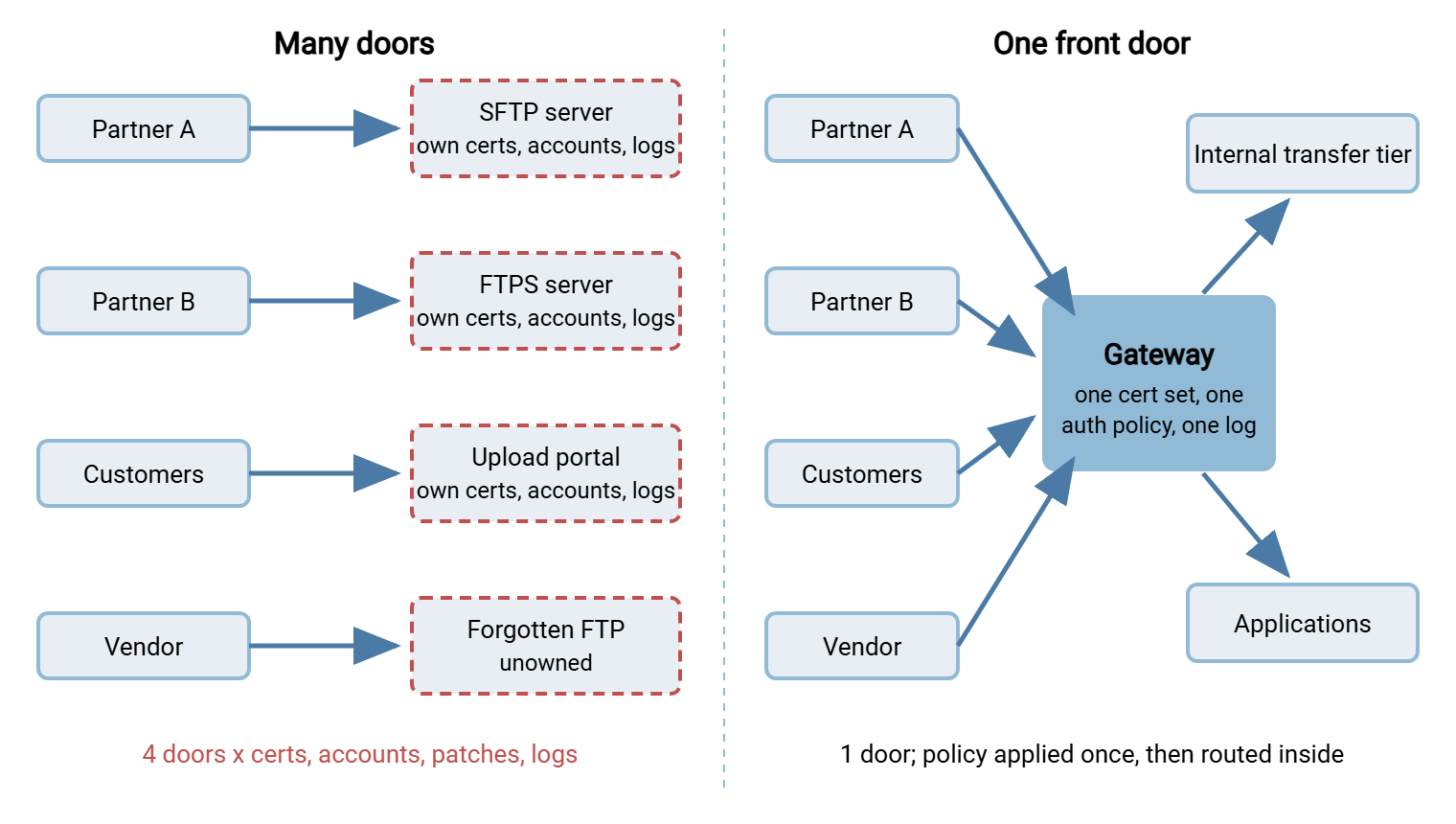
A transfer gateway is a single controlled entry point through which all external file exchange passes before anything internal is reached. Outsiders — partners, customers, vendors — connect to one address (or one small, deliberate set of addresses), authenticate against one policy, and are logged in one place. Whatever happens next happens behind that single point of control. That includes files landing on an internal server, being forwarded to an application, or being picked up by a scheduled job.
The diagram below contrasts the two worlds. On the left are four separate exposed services, each with its own certificate, account store, and log file. On the right are the same external parties entering through one gateway that applies policy once and passes traffic to the internal systems.
The word "gateway" describes a role, not one specific piece of software. In practice the front door takes one of three shapes, and later articles in this series treat each honestly:
- A reverse proxy — a service that accepts external connections and forwards them to internal servers, so outsiders never touch the internal systems directly. How well this works varies sharply by protocol; reverse proxies in front of transfer services tells that story straight.
- A consolidated multi-protocol server — one hardened server that simply is the external service for everything. It offers SFTP for partners, HTTPS for customers, FTPS for the stubborn vendor. No forwarding tier at all; the consolidation itself is the win.
- A protocol bridge — a gateway that speaks one protocol to the outside and delivers to something entirely different inside, such as a network share or object storage. See protocol bridging.
One clarification that prevents a common misreading: "one front door" means one logical control point, not literally one machine. A gateway can — often should — run as a redundant pair behind one address. It is still one door in every sense that matters: one policy, one account store, one log stream, one place to patch.
What Consolidation Buys You
The benefits all follow from a single mechanism — work that used to happen per-door now happens once. It is worth seeing them separately, because each one answers a different stakeholder.
Certificates and keys in one place. One door means one set of TLS certificates to obtain, chain, and renew, and one SSH host key for partners to trust. Renewal stops being a scavenger hunt across boxes; monitoring one expiry date is a solved problem — see certificate expiry monitoring. Partners also benefit: the fingerprints and certificates they pin stay stable even as you rebuild things behind the door.
Authentication in one place. Accounts for outsiders get created, disabled, and audited in a single store, with one password and key policy, instead of being scattered across every box. This is a large enough subject to deserve its own article — consolidating authentication at the gateway. But the headline is simple: offboarding a partner becomes one deletion, not a scavenger hunt.
Policy in one place. Allowed protocols, minimum TLS versions, cipher choices, IP allow rules, throttling and lockout behavior — set once, applied to everyone. When policy lives in five services from five product families, no two of them enforce quite the same thing. Nobody can state what "our policy" actually is.
Logs in one stream. Every external transfer event — connection, login, upload, download, failure — lands in one log, in one format, with one clock. "What did this partner send us last Tuesday?" becomes one query. Feeding a single stream into your central log platform is dramatically easier than normalizing five. The mechanics are covered in centralizing transfer logs.
Patching one system, urgently, once. When the next serious vulnerability lands in a protocol library, the question "where are we exposed?" has a one-line answer. The emergency change window touches one service instead of six.
A smaller, more honest attack surface. Every retired listener is a door removed from the internet. External scanners — attackers' and auditors' alike — see one deliberately hardened service instead of an archaeological dig. The security case is quantified in the transfer attack surface: fewer entry points, fewer distinct software stacks to keep secure, fewer unknowns.
Remember: a gateway does not make the per-door chores disappear — certificates still expire, accounts still need reviews, patches still land. It changes the multiplier. Six doors times five chores is thirty recurring obligations; one door times five is five, done properly.
What a Gateway Is Not
The pattern earns its reputation only when it is not oversold, so the boundaries matter as much as the benefits.
It is not a firewall replacement. The firewall still decides which packets reach the gateway at all. The gateway then applies transfer-level policy — who may log in, what they may do, what gets recorded. The two are layers, not alternatives.
It is not a DMZ, and it does not settle placement questions. The security-placement side of gateway design covers where the front door should stand — in a buffer network between two firewalls. It covers what may be stored there and whether credentials may live in that zone. That is the subject of a dedicated series: start with why transfer services belong in a DMZ. This series stays on the capability side: what a gateway does, how proxying and bridging work, and how to adopt the pattern. You will want both lenses; they answer different questions.
It is not automatic security. A neglected single door is worse than five tended ones, because now everything depends on it. Consolidation concentrates risk deliberately, betting that you will defend one point well rather than many points thinly. That bet only pays if the gateway is hardened, monitored, and kept available. The availability half of that gets its own article on gateway resilience later in this series.
It is not necessarily a product you buy. Sometimes the right front door is a dedicated gateway tier; often it is simply one well-run server doing the work of five. The next section is about telling those cases apart.
Consolidation Without a New Tier
Here is the honest fork in the road, and it is the most practical decision in this article. Ask what your actual problem is:
If the problem is "too many separately grown servers," the fix is consolidation, not additional architecture. Merge the external services onto one hardened, multi-protocol server and retire the rest. One box that speaks all the protocols your outsiders need is the front door — there is no rule that a gateway must involve a forwarding tier. This is precisely the lane a product like Sysax Multi Server occupies. It is a single Windows server that speaks SFTP, FTPS, FTP, and HTTPS at once. It offers per-account authentication (built-in accounts, Windows or Active Directory accounts, and public keys), per-account folder isolation, and IP-based allow and block rules. It offers activity logging to both file and database. Four doors collapse into one row of the inventory table, and every benefit from the previous section arrives without a new tier to design.
If the problem is "many internal systems must stay where they are, but the outside should see one address," then a true forwarding gateway earns its keep. That is a reverse proxy or protocol bridge in front of the internal estate. The same is true when placement policy requires that the externally reachable component stand in a buffer zone with nothing valuable on it. It also holds when you need to service internal systems with zero partner-visible downtime.
The two shapes compose naturally. A common target architecture is a slim gateway at the edge forwarding to a consolidated internal transfer tier. Beyond it, internal movement routes files onward from the landing folders to applications, on schedules or on arrival. That is handled by an automation tool such as Sysax FTP Automation watching the folders behind the door. The gateway takes the exposure; the internal tier holds the data and the business logic.
When a Gateway Starts Earning Its Keep
There is a size below which this pattern is over-engineering. One exposed service, one team, a handful of partners: a single hardened server with good logging is the right amount of architecture. Adding a forwarding tier would only add moving parts. The signals that the balance has tipped are concrete:
- Your doors inventory has more than two rows — or you could not complete it, which is a louder version of the same signal.
- Certificate renewals have been missed at least once because nobody knew which box was next.
- Onboarding one partner touches more than one system, or offboarding requires remembering which doors they had.
- An audit or questionnaire asks for transfer logs and the answer is assembled from several formats by hand.
- A firewall review finds inbound rules nobody can explain, and retiring them is blocked by not knowing who might still connect.
- A vulnerability announcement triggers a search for every place a transfer service runs, rather than a patch of one known place.
Three or more of those, and consolidation will pay for itself in reduced routine work before anyone even prices the security benefit. The move itself does not have to be a big bang. Doors migrate behind the gateway one at a time, partners keep their endpoints, and the old services are retired as they empty. That staged journey has its own article: from many doors to one.
Rule of thumb: consolidate first, then decide whether the consolidated service itself faces outward or stands behind a proxy. Merging five doors into two is most of the benefit; the last step from two to one is architecture, and it deserves its own decision rather than a reflex.
The Short Version
Every externally reachable transfer service is a door. Every door bills you continuously — certificates, accounts, firewall rules, patches, logs, audit scope. Each offers attackers one more place to find a mistake. The gateway pattern routes all external exchange through one controlled front door so that policy, authentication, and logging happen once. The front door can be a reverse proxy, a protocol bridge, or simply one consolidated multi-protocol server. One logical door may be a redundant pair of machines. It is not a firewall, not a DMZ, and not automatic security. It is a bet that one point defended well beats many defended thinly. It pays off as soon as the doors inventory stops fitting in your head.
From here, one natural next read is how reverse proxying actually behaves per protocol — where HTTPS is easy and SFTP and FTPS require honesty. Another is consolidating authentication at the gateway, which turns the account-store sprawl in your inventory table into one policy. When you are ready to move, the adoption path sequences the whole journey.
Frequently Asked Questions
Is a transfer gateway the same thing as a firewall?
Doesn't one front door create a single point of failure?
Is a gateway the same as a DMZ?
Do I need to buy special gateway software?
Will routing everything through one gateway slow transfers down?
How many exposed transfer services is too many?
From the Sysax team: we build secure file transfer software for Windows. Sysax Multi Server is an FTP, FTPS, SFTP, and HTTPS server. Sysax FTP Automation handles scheduled, scripted transfers. Free trials are on the download page.