
Monitoring the Monitoring: Keeping Alerts Trustworthy
"Nothing from the alerts channel in four months." It is said in a meeting, as good news, and everyone nods. By this point in the series you may have built the whole apparatus. That includes freshness checks watching for missing files and heartbeats proving jobs still run. It includes alerts written so a groggy human can act and a morning report verifying the quiet nights. Now face the awkward final fact: every piece of that apparatus is itself a scheduled script, a config file, and a mail path. It is exactly the kind of machinery this series has spent five articles proving can die without a sound. The monitoring system is made of the same stuff as the things it monitors.
A dead monitoring system is worse than none, because it keeps radiating reassurance. No alerts arrive, the habit of trusting silence returns, and the estate runs unwatched for months while everyone believes the watchers are on duty. Four quiet months is either a very good estate or a very dead checker, and from the meeting room the two look identical. This closing article of our Monitoring & Alerting series is about preventing that. It covers scheduled test alerts that prove the mail path and a canary flow that proves the whole loop end to end. It covers the alert-on-no-data principle applied everywhere and threshold reviews that keep the numbers honest. It also includes a quarterly audit checklist that keeps the pager worth believing.
How Monitoring Dies Quietly
What kills monitoring in the field is rarely dramatic, so start with a candid inventory. The checker script hits an unhandled edge case and has been crashing on startup for a month. The scheduler entry that runs it was disabled during a server migration and never re-enabled. The service account that sends alert mail had its password rotated, and every alert since has died with an authentication error nobody sees. The mail relay was replaced, and the old relay's name still sits in the checker's config. A spam-filter rule quarantines everything from the alerts address. The distribution list that receives alerts lost its last active member to a re-org. An alert muted during a noisy incident — "we know, stop paging" — stayed muted after the incident closed. Grace windows got widened during a bad month, and widened again, until the check can no longer fire before the business notices first. And the simplest of all: new flows went live this year, and nobody added them to the checks. The monitoring works perfectly on last year's estate. Every item on that list I have either found or caused.
Notice two things about that list. First, none of it announces itself: every one of these failures reduces the number of messages you receive, and fewer messages feels like good news. This is the fourth silent-failure mode — the safety net switched off — operating on the safety net itself. Second, the causes split into two families needing different medicine. There is breakage (crashed checkers, dead mail paths), which testing catches. There is rot (drifted thresholds, forgotten mutes, coverage gaps), which only periodic review catches. The rest of this article arms you against both.
The Principle: Demand Evidence of Life
The cure is the same inversion this series has applied twice already, now aimed one level up. Never infer monitoring health from the absence of alerts; require the monitoring to produce positive, scheduled evidence that it works. A monitoring system in good health should be observably alive on a rhythm you can set your watch by. That might be a daily report that lands at its promised minute or a monthly test alert that must be acknowledged. It might be a canary that completes its loop on schedule. The moment the evidence stops, you treat it as an outage of the monitoring, with the same urgency as an outage of the payroll feed.
A second, quieter half of the principle: every checker must distinguish "I checked and all is well" from "I could not check." A freshness checker whose target folder is unreachable has not found freshness — it has found nothing, and nothing must not report as green. Give every check three honest outcomes — OK, FAIL, and UNKNOWN — and make UNKNOWN alert. An unreachable folder, an unparseable config, or a crashed check is precisely the kind of infrastructure failure that takes many flows dark at once. This is alert-on-no-data: the alarm condition is the missing signal itself, not any particular bad signal. You met it as the dead-man's switch in status monitoring; here it becomes a design rule for every layer.
Scheduled Test Alerts: The Fire Drill
The mail path is the most failure-prone stretch of the whole system. The rule fires, the message is built, mail is sent, the relay forwards, filters pass, and the right phone buzzes. The only way to know it works is to use it. So use it on a schedule: a test alert, fired automatically once a month (weekly for page-tier paths you truly depend on). It travels the full production route with a subject that says plainly what it is: [TEST] Monthly alert-path check - acknowledge by end of day.
Three rules make the drill mean something. First, it must traverse the real path — same rule engine, same sender account, same relay, same recipient list as a genuine alert. A test that takes a shortcut proves the shortcut. Second, it must be acknowledged by a person — a reply, a click, a note in the ops channel. The acknowledgment must be checked. A test alert that nobody confirms receiving is a failed test. A failed test is an incident on the monitoring, investigated that day. Third, rotate the acknowledger, so the drill also quietly verifies that more than one person can see alerts and knows they own them. Schedule the page-tier drill in daylight hours — the point is proving the route, not sacrificing sleep. Log each drill's result where the quarterly audit will find it.
The Canary Flow: One Loop That Proves Everything
Test alerts prove the last mile. The strongest single instrument proves the whole road: a canary flow. This is a small, synthetic transfer that runs through your real infrastructure on a schedule, watched by your real monitoring. That way, any break anywhere in the chain surfaces as one unmistakable alert. Named for the miner's canary, its job is to be the first thing that stops singing.
Here is the design, concretely. A scheduled job — hourly for a busy estate, daily for a small one — writes a tiny file whose content is just a timestamp and host name. It transfers the file through the production path: the real protocol, the real transfer server, a dedicated canary account, into a dedicated canary folder. The filename follows your normal conventions, something like canary_YYYYMMDD_HHMMSS.txt. Then your ordinary freshness check watches the canary folder exactly as it watches any business flow. If the newest canary is older than the schedule plus grace — alert. The diagram shows the loop:
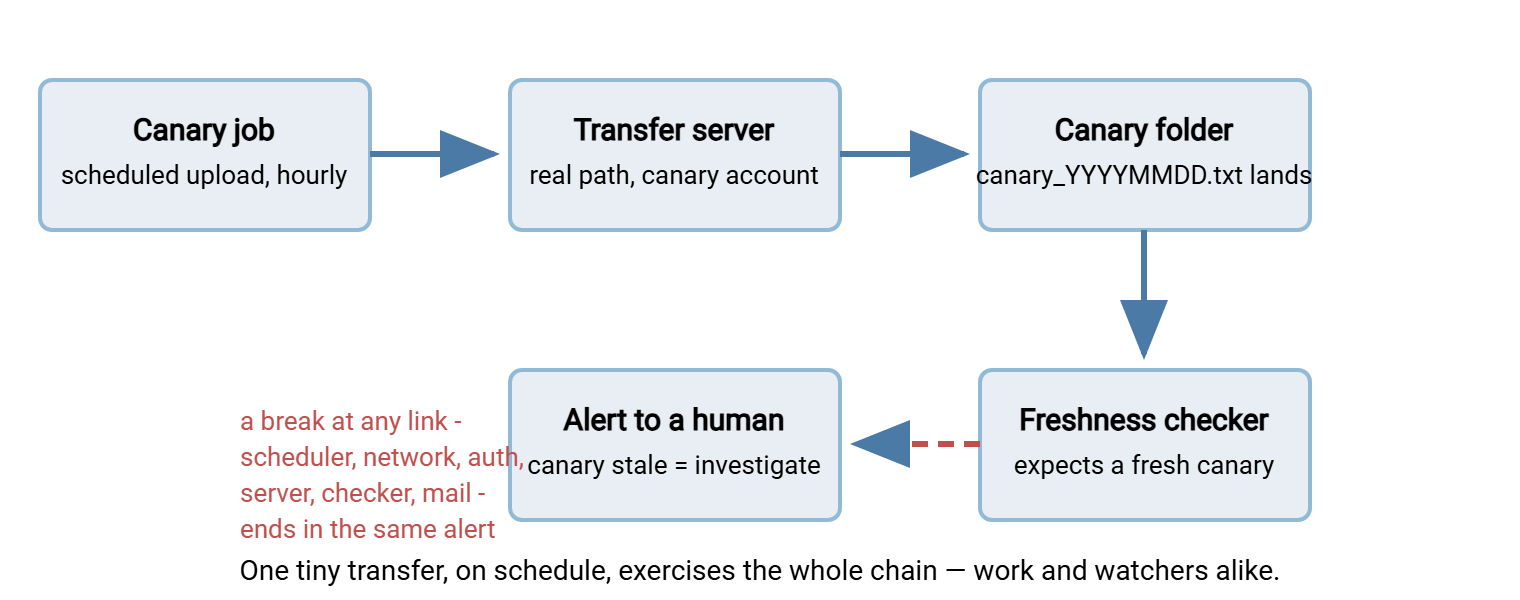
Count what one fresh canary proves, every single hour. The scheduler fires jobs; the network route is up; authentication works. The server accepts and stores uploads; the landing storage is writable. The freshness checker is running and reading its config. And — when the canary goes stale — it proves that the alert path can carry the bad news. It is the positive evidence of life the principle demands, produced by the system's own everyday machinery rather than by a parallel test harness. Its server-health cousin, a synthetic login that proves the service still answers, lives in service liveness and synthetic logins. A canary is a one-line file with a long list of references.
Practical design notes. Give the canary its own least-privilege account and folder so it can touch nothing else. Clean up after it — have the job or a daily sweep delete canaries older than a few days. Run the canary job from a different host than the checker if you can, so one machine's death cannot take out both the singer and the listener. Set its freshness deadline tight — schedule interval plus a few minutes — because the canary exists to be sensitive. If you run your automation through a tool, the canary should use it like any production task. Scheduled as a Sysax FTP Automation task with its success/failure email notification switched on, the canary exercises the same task engine and notification path your real jobs rely on. That is exactly the point. And the canary leaves an independent trail on the server side. A server that logs richly lets you confirm months of canary arrivals with one query when you want proof the loop has been healthy. Sysax Multi Server records all activity to both file and database, with rollover keeping growth bounded.
Two disciplines complete the canary. Document it — in the jobs register and in a comment at the top of its config. A tiny hourly job moving a one-line file to nowhere is precisely what a tidy-minded successor deletes. The write-up in your scheduled jobs hygiene should mark it as load-bearing. And run the kill test: once a quarter, deliberately disable the canary job and start a timer. Confirm the alert arrives within the expected window. Then re-enable and log the drill. The kill test is the only proof that the alarm side of the loop still works. A canary that has never been allowed to die is a smoke detector whose button has never been pressed.
Remember: the canary alert is never noise. When it fires, either a shared piece of transfer infrastructure is broken or the monitoring itself is — both are exactly the failures that otherwise stay invisible longest. Treat a stale canary with the same seriousness as a missed business file, and never "fix" a flapping canary by widening its deadline until it cannot speak.
Who Watches the Watcher? Two Legs and a Human
The obvious objection: if a checker watches the jobs, and something must watch the checker, does something watch that — turtles all the way down? In practice the regress stops at two independent legs plus a human ritual, and that is enough for estates far larger than most. Two turtles and a person is the whole stack.
- Leg one: the checkers are jobs, so treat them as jobs. Each checker writes its own heartbeat; the daily report generator flags any checker whose heartbeat is stale, as UNKNOWN rows the reader cannot miss.
- Leg two: the canary crosses the layers. The canary's alert depends on the freshness checker and the alert path. That means a silent canary catches watcher failures that leg one's self-reporting cannot — including the death of the host both checkers run on.
- The human backstop: the fixed-time report. The daily status report lands at its promised minute, and the team is trained on one rule: no report is an alert. A missing morning mail means the reporting stack — generator, its inputs, or the mail path — is down. People are unreliable at scanning forty green rows; they are extremely reliable at noticing that an expected daily email never came. That asymmetry is the cheapest dead-man's switch ever deployed.
Larger estates can add a fourth layer — a watcher on separate infrastructure. Or they can add a monitoring service pinged by your checkers so that its silence detection is somebody else's problem. But the design instinct stays the same: independence beats sophistication. Two simple watchers that share no host, no scheduler, and no failure modes outperform one clever watcher watching itself. A watcher watching itself is a mirror, not a monitor.
Threshold Reviews: Keeping the Numbers Honest
Breakage is only half the enemy; the other half is rot, and thresholds rot fastest. The grace window widened "temporarily" during a partner's slow month and never re-tightened. The duration warning set when the feed was half its current size, now firing weekly and duly ignored. The expected-by time that predates the sender's migration to a new export window. Every drifted number moves your monitoring toward one of the two failure poles. Too tight breeds noise and alert fatigue; too loose breeds silence. Both poles end in the same place: alerts nobody believes. "Temporarily" is the longest word in monitoring.
Two habits hold the line. Review on change: any time a flow is added, rescheduled, or re-pointed, its thresholds are re-derived as part of the change, not left to be discovered wrong. And review on rhythm: quarterly, re-derive expected-by, grace, and duration bands from the trend history your daily report has been quietly accumulating. Observed reality, not memory, sets the numbers. While you are there, settle the mutes. Every suppression should live in a mute ledger with an owner and an expiry date. The review clears the ledger — each entry re-enabled, extended with a reason, or deleted. An unexpiring mute is a disabled smoke detector with paperwork.
Acme's operations channel carried a mute on the archive-sync alerts that dated from a noisy weekend the previous year. The sync had flapped for two days and somebody sensible had said "we know, stop paging." The weekend ended; the mute did not. Three weeks before Acme's first quarterly audit, the archive sync stopped for real when its service account expired, and the channel, faithfully, said nothing. The gap surfaced at item 7 of the audit: an active mute with no owner, no expiry, and no memory of who had set it or why. The sync was restarted that afternoon, the mute was given an expiry, and the mute ledger got its first entry, eleven months late.
The Quarterly Alert Audit
All of the above compresses into one recurring calendar entry: the quarterly alert audit, ninety minutes to two hours in one sitting, checklist in hand. It covers every alert stream you own — the operational ones from this series and the security ones from alerts from transfer logs — because both rot the same way. The checklist:
QUARTERLY ALERT AUDIT
[ ] 1. List every alert rule (freshness, heartbeat, exit-code, canary,
       security). Each has a named owner. Orphans get one or get deleted.
[ ] 2. For each rule: did it fire this quarter? Never-fired rules get
       test-fired now - silent may mean healthy, or may mean broken.
[ ] 3. For each firing: was it acted on? Rules that were always ignored
       are demoted to the digest, tuned, or deleted. No exceptions.
[ ] 4. Routing check: every destination mailbox and list exists, has at
       least two active members, and no alerts go to personal inboxes.
[ ] 5. Test-alert drills: one per month, each acknowledged. Gaps
       investigated as monitoring incidents.
[ ] 6. Canary kill test: performed this quarter, alert arrived in time,
       job re-enabled afterwards. Drill logged.
[ ] 7. Mute ledger cleared: every active mute has an owner and expiry;
       expired mutes re-enabled or formally retired.
[ ] 8. Thresholds re-derived from this quarter's history: expected-by,
       grace windows, duration and volume bands still match reality.
[ ] 9. Coverage sweep: every flow in the current inventory has a
       freshness or heartbeat check; flows added this quarter included.
[ ] 10. Runbook and log links in alert templates still resolve; first
        diagnostic steps still correct after this quarter's changes.
Item 9 deserves the extra minute. Pull the flow list from your file flow census, transfer inventory, or jobs register and walk it flow by flow. Coverage gaps — the new feed everyone assumed someone else added to monitoring — are how well-run estates still get blindsided. Log the audit's completion and findings; the log itself becomes evidence that the monitoring is maintained, which future-you, successors, and auditors will each be glad of.
Trust Is the Deliverable
Step back and the theme of this article — and the series — is a single word: trust. Alerts only work if people act on them instantly and unquestioningly, and people only do that for a system with a track record of being right. Every mechanism here exists to protect that track record. The drill proves the mail path, and the canary proves the loop. UNKNOWN is treated as an alarm, thresholds are re-derived from reality, and the audit clears the rot. The pager stays honest, so the pager stays believed. That means the three-in-the-morning message gets ninety seconds of serious attention instead of a groan and a swipe. We learned that the slow way, one swipe at a time.
If you arrived here without the earlier machinery, build backwards. Read why jobs fail silently for the mindset. Read freshness checks for the highest-value first monitor. Read the daily report for the visibility that makes all the quiet days count. Then come back, schedule the drills, release the canary — and let the whole thing prove itself to you, every hour, on the hour. Four quiet months will then mean exactly what they say.
Frequently Asked Questions
How often should I run test alerts?
What is the difference between a canary flow and a freshness check?
If something must watch the watcher, where does it end?
What does "alert on no data" mean in practice?
An alert rule has not fired in a year. Should I delete it?
From the Sysax team: we build secure file transfer software for Windows. Sysax Multi Server is an FTP, FTPS, SFTP, and HTTPS server. Sysax FTP Automation handles scheduled, scripted transfers. Free trials are on the download page.