
Protocol Bridging: One Protocol Outside, Another Inside
The partner's security team is clear: they will deliver files over SFTP, full stop. The application that needs those files is equally clear, in its own way. It reads from a Windows share at \\appsrv\intake, and it has never heard of SFTP. Somewhere between those two immovable facts, a translation has to happen. The same gap appears in every direction. Customers upload over HTTPS while the data platform wants object storage. An internal system drops reports on a share while a partner insists on fetching them over SFTP. The component that closes the gap is a protocol bridge: a gateway that speaks one protocol to the outside world and something entirely different to the inside.
This article — part of our Transfer Gateways and Reverse Proxies series — explains bridging without the hand-waving it usually gets. It covers the two fundamental bridge shapes and their honest tradeoffs. It covers the semantic gaps between protocols that every bridge must paper over, and where the bridge and its temporary state should live. And — most neglected of all — it explains how to keep a translation observable. That way, a file cannot be "successfully received" and still silently never arrive.
Why Bridges Exist at All
External exchange runs on a contract: the protocol, endpoint, and credentials both parties agreed to, often in writing, often years ago. Internal delivery runs on reality: whatever the consuming system happens to read. That may be a share, a folder, an object store, occasionally a message queue carrying a pointer to a file. You control reality but not the contract; partners control the contract but cannot see your reality. Neither side can move to the other's side of the gap.
Nor should they. Exposing the internal share directly to a partner would mean stretching a chatty, trusting LAN protocol across the internet. Those problems are cataloged in shares versus transfers. And rewriting the application to speak SFTP is an integration project nobody funds for one partner. The economical answer is a component whose whole job is translation. That component is different in kind from a reverse proxy. A proxy keeps the protocol the same on both sides and forwards sessions, as covered in reverse proxies in front of transfer services. A bridge changes the protocol itself, which means the outside session must end at the bridge — there is no passthrough option here. Whatever arrives must be understood, held at least momentarily, and re-spoken inward.
One clarification about the "queues" that appear on the internal side of these diagrams. Message queues are excellent at telling systems that something happened and terrible at carrying large payloads — most queue platforms cap message sizes far below a real file. So when an internal consumer is queue-driven, the standard bridge design delivers the file to a store the consumer can reach. It publishes a small pointer message — the path or key, plus size and hash — to the queue. The bridge still does everything this article describes; the queue merely replaces polling as the way the consumer learns the file is ready.
The Two Bridge Shapes
Every bridge, whatever it is built from, is one of two shapes — and the choice between them decides most of your failure behavior.
Store-and-forward: the honest workhorse
In a store-and-forward bridge, the translation happens in two decoupled steps. First, the file arrives completely over the outside protocol and lands in the bridge's own storage — a landing folder. Second, a separate mover picks up the landed file and delivers it inward over the inside protocol. The partner's transfer succeeds or fails on step one alone.
The decoupling is the point. If the internal share is down at three in the morning, the partner's upload still succeeds. The mover retries delivery until the share returns, and nobody outside ever knows. Each segment can be retried, logged, and rate-limited on its own terms. The price is equally plain: latency — delivery happens after arrival, so a bridge that polls its landing folder every five minutes adds up to five minutes. Then there is state — there is now a copy of the file in the middle, which must be secured, cleaned up, and accounted for. That middle copy is not a triviality: where it may live is a placement question with real security weight. The answer is to keep the buffer zone free of lingering data and pull files inward promptly from the inside. It is argued properly in keeping data out of the DMZ and the pull-based designs in DMZ transfer patterns.
Streaming translation: faster, more tightly coupled
A streaming (or inline) bridge translates as bytes arrive. The incoming SFTP write is turned directly into a write on the internal store, chunk by chunk, with no complete middle copy. Latency drops to near zero and no landing storage is needed. The honesty bill arrives in coupling: the partner's transfer and the internal delivery are now the same event. If the internal store stalls mid-file, the partner's upload stalls or fails with it. The slower side sets the pace for both. A failure cannot be retried quietly behind the scenes, because the outside session already saw it. Semantic mismatches — resumed uploads, renames, multi-part object commits — also bite harder when there is no settled file in the middle to reason about.
The practical guidance is unfashionably simple: store-and-forward unless a hard latency requirement forces streaming. Batch and business-document flows — the overwhelming majority — tolerate minutes of latency and benefit enormously from decoupled retries. Streaming earns its complexity in genuinely time-critical feeds, and teams that choose it should do so on purpose, in writing.
The Semantic Gaps Every Bridge Must Paper Over
Changing protocols is not just re-plumbing bytes; protocols disagree about what a file is, and the bridge inherits every disagreement.
- When is a file finished? SFTP signals completion when the client closes the file handle; HTTPS when the request completes; a share when... the file stops growing, maybe? A bridge must translate completion explicitly, or downstream systems will read half-written files. The standard discipline — write under a temporary name, rename atomically on completion — is the arrival-contract pattern from temp names and atomic renames. A bridge should apply it on both of its faces.
- Interrupted and resumed transfers. SFTP clients can resume a broken upload; object stores commit large files in parts; a plain share copy restarts from zero. The bridge must ensure a resumed outside transfer does not trigger a duplicate or premature inside delivery. The file is done when it is fully done, once.
- Duplicates. Retries at any layer — partner clients, the mover, the far store — can present the same file twice. Downstream systems survive that only if someone thinks about it before it happens; the thinking is laid out in idempotency in plain words.
- Names and metadata. Character sets, case sensitivity, path separators, and length limits differ across protocols and stores, and timestamps and permissions rarely map one-to-one. A partner filename that is legal over SFTP can be unwritable on the internal side. Normalize deliberately, using rules like those in safe characters across platforms. Decide which metadata is worth preserving rather than discovering the answer in production.
- Hierarchies versus flat namespaces. Directories are real over SFTP and on shares; object storage has keys that merely look like paths. Mapping folder-per-partner conventions onto key prefixes is easy — as long as somebody writes the mapping down. The wider set of object-storage habits lives in our cloud and hybrid transfer series.
Remember: the bridge is where completion, resume, duplicates, and naming stop being the partner's semantics and start being yours. Every one of those four needs an explicit answer in the bridge's design. The default answer, silence, becomes a half-file or a double-file in some downstream system at the worst possible time.
Where the Bridge Lives, and What It Is Built From
The diagram traces the store-and-forward shape end to end. The partner delivers over SFTP to the bridge's landing area. The mover — running on the inside, reaching outward — collects the settled file and delivers it to the internal store. The file's identity is logged on both segments so the two halves can be reconciled.
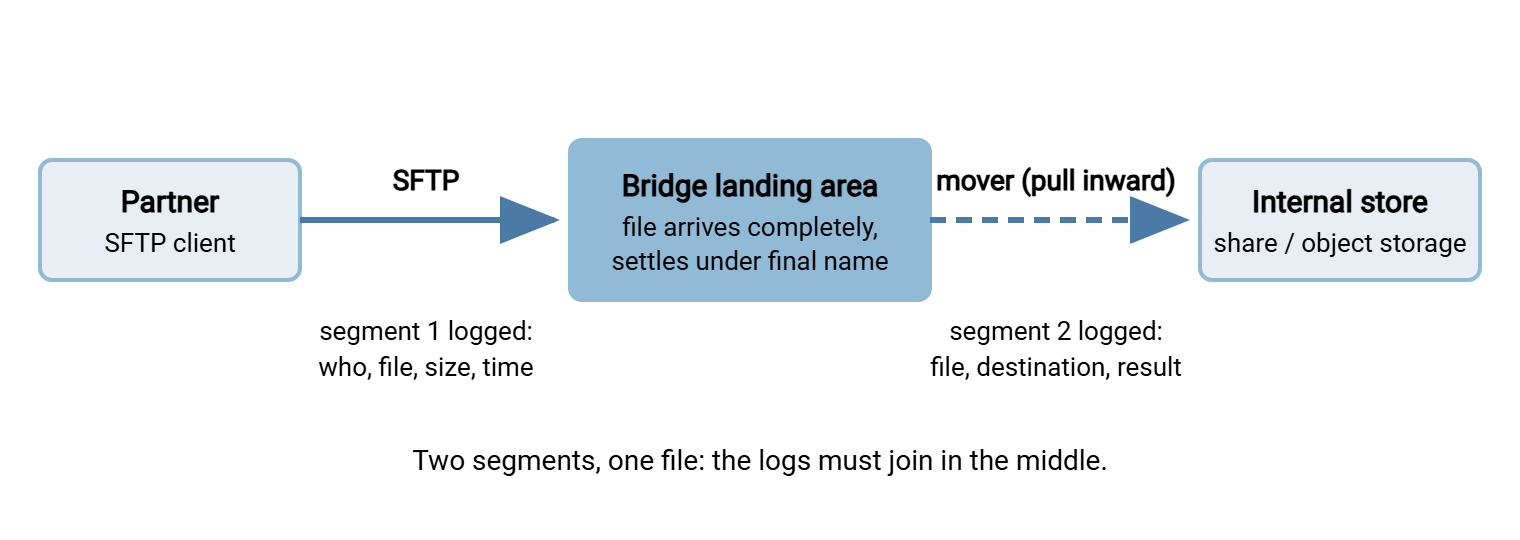
Notice what the picture does not contain: a single magic box labeled "bridge product." Protocol-aware gateways that translate inline exist as a category and earn their place in high-volume, low-latency estates. But the store-and-forward shape composes perfectly well from parts many Windows estates already run. The outside face is a multi-protocol transfer server that lands files into ordinary per-account folders. Sysax Multi Server does exactly this, speaking SFTP, FTPS, and HTTPS externally with per-account isolation and activity logging. So each partner's deliveries settle into a folder of their own. The inside face is an automation engine watching those folders. Sysax FTP Automation monitors the landing folders and carries settled files onward to shares and internal destinations on schedule or on arrival, with retries and error handling. It can decrypt OpenPGP-protected deliveries as a pre-processing step on the way. Composed this way, the "bridge" is a pattern you assemble and can reason about, not a black box you hope behaves.
Wherever the landing area stands — on a hardened edge segment or an internal transfer tier — two rules keep it defensible. The mover pulls from the inside so no inbound path from the edge into the network is needed. The landing area is transient by policy, emptied promptly, holding nothing older than its delivery lag. A landing folder that quietly accumulates a year of partner files has become an unplanned archive with an internet-adjacent address.
Bridges Run Both Directions
Everything above reads naturally as inbound — partner to internal — but outbound bridging is just as common and has one extra wrinkle. When an internal application drops reports on a share for a partner to fetch over SFTP, the bridge must decide when an internal file is ready to publish. Applications write files in place with no arrival contract at all. So the outbound mover needs the settle-check discipline: size stable across checks, or better, a rename or marker convention agreed with the producing team. That is described in size stability and settle checks. Publish half a report to a partner once and you will implement this the following week regardless; it is cheaper to do it first.
A Worked Example: One Partner, End to End
Abstractions settle fastest with a timeline, so here is one nightly flow through a store-and-forward bridge, with the semantics and observability wiring visible.
At 02:10 the partner's automation connects to exchange.example.com over SFTP and authenticates with its public key. It uploads invoices_daily.csv.tmp into its own landing folder and, on completion, renames it to invoices_daily.csv. That is the atomic-rename arrival contract, agreed at onboarding. Segment one is now logged at the bridge: account, filename, size, timestamp, and a hash computed on arrival.
At 02:12 the mover — watching the landing folder from the inside — sees the final name appear. It confirms the size is stable and delivers the file to \\appsrv\intake. It writes under a temporary name and renames on completion so the application never reads a half-copied file. Segment two is logged: same filename, same hash, destination, result. The conservation counter for the hour ticks one-in, one-out. The landing copy is deleted on confirmed delivery. The reconciliation report for the day will show the two log lines joined on the hash.
Now the failure variant. At 02:12 the intake share is offline for an unannounced reboot. The partner's upload has already succeeded — segment one is complete, and their side is done and green. The mover's delivery fails and retries on its backoff schedule. At 02:40 the age alarm fires — a file has sat in the landing area past the thirty-minute delivery promise. The on-call admin sees it before the business notices missing invoices. The share returns; delivery succeeds on the next attempt; the alarm clears; the report shows a late join rather than a hole. Had delivery kept failing, the file would have been parked as a dead letter with a louder alert, never silently dropped or retried into infinity. Every part of that story was built from the checklist in the next section.
Keeping the Translation Observable
Here is the failure mode that makes bridging dangerous rather than merely fiddly. A monolithic transfer either succeeds or fails, visibly, to the person who ran it. A bridge splits that one event into two segments with a gap in the middle. The gap can eat files. The partner's upload succeeded; the mover crashed before delivery, or delivered to the wrong folder, or is quietly failing every fourth file. Everyone's dashboard is green except the business process, which is missing Tuesday's invoices.
Observability for a bridge therefore has one organizing goal: make the two segments answer for each other. The checklist below is the practical core of this article; a bridge that satisfies every line cannot lose a file silently.
Bridge observability checklist
[ ] Correlation: one identity (filename + size + hash) logged on BOTH segments,
    so any file can be traced arrival -> delivery with two queries
[ ] Conservation: files-in equals files-out per window (e.g. hourly);
    alert on drift, investigate same day
[ ] Age alarm: nothing in the landing area older than the agreed delivery lag
    (an old file IS a stuck file - page on it)
[ ] Dead letter: files that repeatedly fail delivery are parked and alerted,
    never retried forever or deleted
[ ] Far-end freshness: the consuming system confirms expected files arrived
    by deadline, independently of the bridge's own logs
[ ] Reconciliation report: daily list of arrivals without deliveries
    and deliveries without arrivals - normally empty, read when not
Three of those lines lean on disciplines covered elsewhere in the library. Tracing one file across systems is the method of documenting a file journey. Parking repeat failures is the poison files and dead letter pattern. And far-end expectations are freshness checks for expected files. The bridge-specific work is the joining: both segments logging the same identity, and something — a report, a script, a scheduled query — that compares them.
Remember: a landing folder is a queue wearing a folder costume. Monitor it the way you would monitor a queue — depth (how many files waiting) and age (oldest file). Treat growth in either as an incident, not a curiosity.
The Short Version
A protocol bridge exists because external contracts (SFTP, HTTPS) and internal reality (shares, object storage) will not meet on their own. The outside session always terminates at the bridge. The only real choice is between store-and-forward and streaming. Store-and-forward is decoupled and retryable, with latency in minutes and state in the middle to manage. Streaming is immediate and stateless in the middle, but couples partner transfers to internal availability. Whichever shape you choose, the bridge owns the semantic gaps: completion signaling, resumes, duplicates, and naming all become your problem at the translation point. Compose the bridge from parts you can reason about, and keep its middle state transient and pulled from the inside. Make the two segments answer for each other with correlated logs, conservation counts, age alarms, and a dead letter. Do that, and one protocol outside with another inside stops being an architectural apology and becomes the estate's most dependable seam.
One natural next read in this series is the one-front-door concept for why the translation point should also be the only entry point. Read consolidating authentication at the gateway. The reason: the bridge that terminates every outside session is also the natural place to decide who those outsiders are.
Frequently Asked Questions
Is a protocol bridge the same thing as a reverse proxy?
What happens if internal delivery fails after the partner's upload succeeded?
Does bridging weaken encryption?
How much delay does a store-and-forward bridge add?
Can I bridge partner uploads into cloud object storage?
From the Sysax team: we build secure file transfer software for Windows. Sysax Multi Server is an FTP, FTPS, SFTP, and HTTPS server. Sysax FTP Automation handles scheduled, scripted transfers. Free trials are on the download page.