
Monitoring Job Status: Exit Codes, Logs, and Heartbeats
"Did the invoice job run last night?" "The scheduler says it did." Both statements are true, and neither tells you whether a single file moved. Nobody watches a transfer job run. That is the whole point of automation, and the whole problem of monitoring. Once a job runs unattended at three in the morning, the only way you will ever know how it went is through the evidence it leaves behind. That evidence comes in exactly three forms. There is the exit code the process returns, the log lines it writes, and the heartbeat it can be taught to emit. Everything a monitoring system does, from the simplest cron mail to the fanciest commercial platform, is built out of these three signals.
Each signal proves something different. Each one has a blind spot the others must cover (this is the part that separates working monitoring from decorative monitoring). This article takes the three in turn: what each actually proves and the specific ways each one lies. It shows how to combine them into a small, honest status system for a modest estate using nothing but scripts, a scheduler, and email. It is part of our Monitoring & Alerting series, sitting between why jobs fail silently (the problem) and alert design (what to do when a signal goes bad).
Three Signals, Three Different Proofs
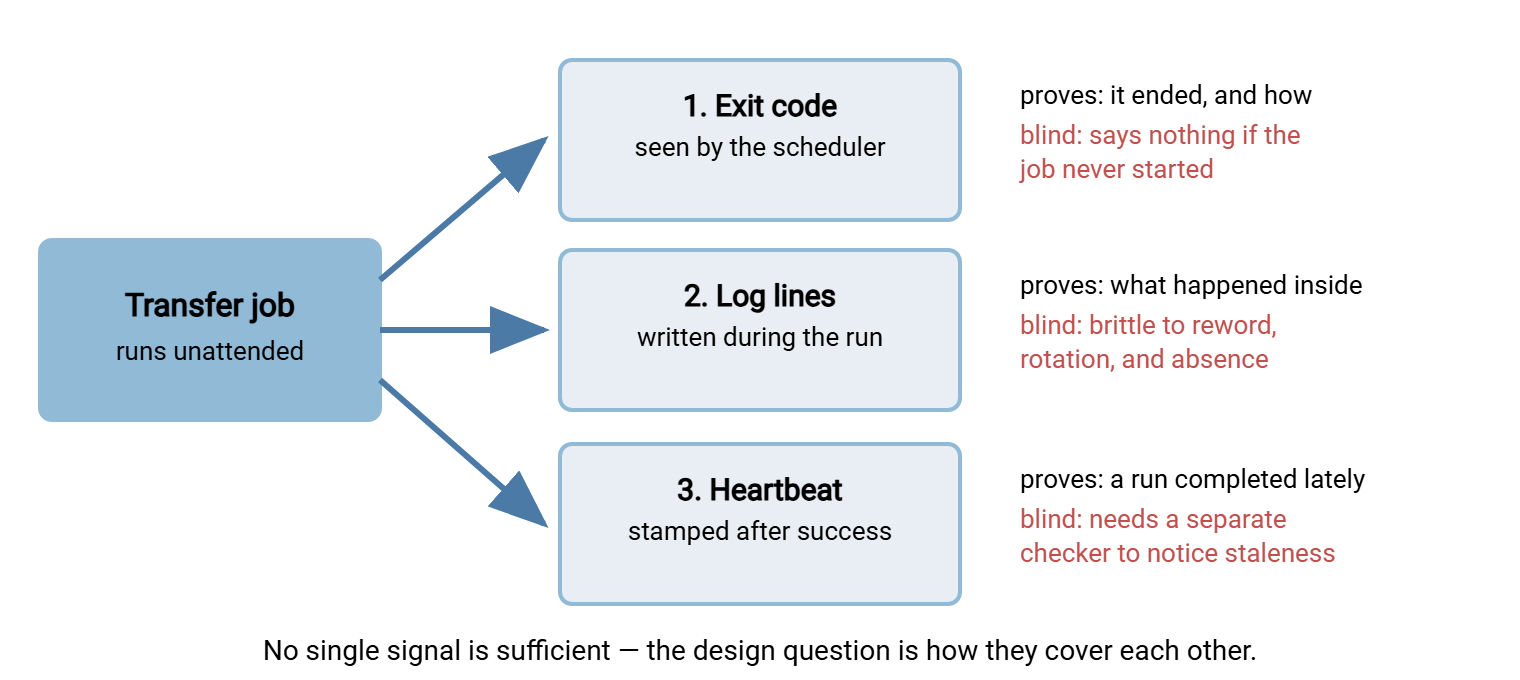
Before the details, fix the map in your head. The diagram below shows one scheduled transfer job and the three channels of evidence it can produce. There is the exit code reported to the scheduler and the log file written during the run. There is also the heartbeat file stamped at the end of a successful run. The diagram shows what each channel can and cannot tell you.
Signal One: Exit Codes — the Scheduler's View
An exit code is the single small number every program hands back to whatever started it when it finishes. Zero means "I claim success." Anything else means "I am reporting failure." It is the oldest status mechanism in computing and still the most load-bearing, because it is the one signal your scheduler natively understands. Windows Task Scheduler records it as the task's Last Run Result. Cron does not inspect it directly, but a script can. Cron's habit of mailing any output a job produces gives failures a route out. The mechanics live in our bash and cron series and the scheduled jobs series.
What an exit code proves is precise and narrow: the process ran to completion and assessed itself. Its value depends entirely on how honest that self-assessment is, which puts two obligations on you as the script author:
- Propagate failure upward. The classic sin is a wrapper script that calls the transfer client and ignores the client's exit code. It then exits zero because its own last command (an echo, a cleanup) succeeded. The scheduler sees success; the transfer failed. Every layer — client, script, scheduler — must pass the verdict up unmodified.
- Exit non-zero for hollow success. A run that completed but moved zero files when files were expected should exit non-zero, as covered in why jobs fail silently. The exit code is your chance to encode the business verdict, not just the mechanical one. Use distinct codes for distinct failure classes if your scheduler or checker can act on them.
Then make the code reach a human. Checking Last Run Result by hand every morning does not scale past about three jobs (I tried it with seven; it lasted a fortnight). The workable pattern is to have the outcome generate a message automatically. If your jobs run through an automation tool, this usually comes built in. Sysax FTP Automation, for example, can send an email notification when a task succeeds or fails. Because its tasks carry their own retry and error handling, a failure notification means the retries are already spent and a human is genuinely needed. That combination — honest verdict, automatic delivery — is the entire first layer of status monitoring.
The blind spots: an exit code exists only if the job ran, so it is structurally silent about the job that never started. And it compresses the whole run into one number, so it can tell you that the job failed but rarely why. The first blind spot belongs to heartbeats; the second belongs to logs. An exit code is a verdict without a transcript.
Signal Two: Logs — the Detail, Honestly Handled
The log is the job's diary: connection attempts, files transferred, byte counts, errors with their context. When an exit code says "failed," the log says "failed because the remote host refused the connection at the third retry." For diagnosis, logs are irreplaceable. The layered troubleshooting method starts by gathering exactly those facts. Our logging series covers writing them well — what to log — and reading them under pressure — reading transfer logs.
The tempting next step is to make logs a monitoring signal: a scheduled check that scans the log for ERROR and alerts on a hit. This is log scraping, and it works — with fragilities you must respect. Each one fails silently, and a silent failure in your monitoring is the worst place to have one:
- Format drift. Your matcher looks for
Transfer failed; an update or an edit rewords the message toUnable to complete transfer. The scrape now matches nothing, forever, and "no matches" is indistinguishable from "no errors." Any change to the software that writes the log can quietly disarm the check. - Rotation races. Logs get rotated — renamed and restarted — so they do not grow without bound. A checker that opens
job.logjust after rotation reads a nearly empty file and finds no errors. One that holds the file open across rotation keeps reading the old file while new lines land in the new one. Windows adds a twist: a checker holding the log open can block the rotation itself. Every log-scraping scheme needs an answer for the moment of rollover. - The absence trap. "No ERROR lines since midnight" is consistent with a perfect run — and equally consistent with a job that never ran and wrote nothing at all. Scraping for badness cannot distinguish silence from health.
- Parsing hazards. Multi-line error dumps, timestamps in local formats, messages containing the very keywords you match on ("checking for ERROR conditions: none") — free text is a hostile parsing target.
Bluewater Bank ran a log check of exactly this kind on their statement export. Every morning at seven it searched the previous night's log for Transfer failed and mailed "all clear" when it found nothing. A routine update to the transfer client reworded that message to Unable to complete transfer. The check went on mailing "all clear" every morning for the next nine days. During the last four, the export had spent its time failing on an expired password. The gap was found by a clerk who noticed the statements folder had stopped changing, which is what a freshness check looks like before you automate it. Bluewater kept the log check but rewrote it to require the night's RESULT: OK line, and the morning mail has been honest since.
The honest conclusions: scrape for the presence of success, not merely the absence of failure. Have each job write one final, machine-first verdict line, such as RESULT: OK files=12 bytes=48211. Let the checker require today's RESULT: OK rather than hunt for scary words. Treat a missing or stale log as a failure in its own right. And keep the matcher's contract written down, so whoever rewords a log message knows there is a dependent. If your logs are centralized, run the checks in one place against everything — the architecture is in centralizing logs.
Remember: a log check that searches only for error text reports "all clear" in three very different worlds. The job succeeded, the job never wrote a log, or the error message changed shape. Only a positive check ("today's OK line exists") collapses those three into one honest answer.
There is also a structural way around log parsing for the server side of your flows: query, don't scrape. A server that records activity to a database as well as a file gives you rows and columns instead of free text. Sysax Multi Server logs all activity to both, with automatic rollover. Consider a status question like "how many files did the partner account upload since midnight?" It becomes a small query with a numeric answer rather than a pattern match with failure modes.
Signal Three: Heartbeats — Proof of Life
The third signal fixes the blind spot the other two share: neither can report on a job that never ran. A heartbeat is a tiny file (or database row) the job rewrites at the end of every successful run — a timestamp plus a one-line verdict. Its meaning is deliberately minimal: a run completed at this time. Freshness of the heartbeat, not its content, is the signal. It is the job saying "still here" to nobody in particular.
# last line of the job, only reached on success
echo "OK $(date "+%a %b %d %H:%M") files=$count" > /var/status/invoices_pull.hb
Alone, a heartbeat file proves nothing — the point is the checker that watches it. This is a separate scheduled script that alerts when any heartbeat is older than its job's schedule allows. A nightly job's heartbeat should never be more than about twenty-six hours old; an hourly job's, never more than about ninety minutes. The checker is a dozen lines:
# heartbeat checker — runs every 15 minutes on a different host if possible
for each entry in heartbeats.conf:        # name | file | max_age_minutes
    if file is missing or older than max_age:
        alert "job [name] has not completed since [file timestamp]"
This inversion has a name worth knowing: the dead-man's switch, after the handle a train driver must hold. Release it, and the brakes apply on their own. Normal alerting fires when a bad signal arrives; a dead-man's switch fires when a good signal stops arriving. The job does not have to detect anything, announce anything, or even exist anymore. If it stops completing, the heartbeat goes stale and the alarm raises itself. That is why this pattern — also called alert-on-no-data — is the only one of the three signals that catches these failures. Those include a disabled schedule, a powered-off host, a locked-out service account, or a deleted task. The same principle applied to the files themselves, rather than the jobs, is the freshness check. Heartbeats watch jobs, freshness checks watch outcomes, and mature estates run both. It is the one alarm a missing job cannot talk its way out of.
Here are design notes that keep heartbeats trustworthy. Write the heartbeat only on genuine success — after the outcome assertion, never in a cleanup path that runs regardless. Keep all heartbeats in one status directory so the checker (and tomorrow's status report) has one place to look. And put the checker somewhere that does not share fate with the jobs. A checker on the same host as the jobs sleeps through the host's own death.
What Each Signal Catches: The Coverage Table
Put the three side by side against the failure modes that actually occur, and the design writes itself:
| Failure mode | Exit code | Log check | Heartbeat |
|---|---|---|---|
| Job never ran (schedule off, host down) | Silent — no code exists | Silent, unless checking for missing OK line | Caught — heartbeat goes stale |
| Job crashed mid-run | Caught, if the scheduler's result is watched | Partial — log ends abruptly, no verdict line | Caught — no fresh heartbeat written |
| Job failed and said so | Caught — non-zero code | Caught — error plus missing OK line | Caught — heartbeat stale by next window |
| Ran "successfully" but moved nothing | Caught only with an outcome assertion in the job | Caught only if the verdict line carries counts | Missed — a hollow run still beats the heart |
| Expected file never arrived from a sender | Silent — no job of yours failed | Silent | Silent — needs a freshness check instead |
Read the columns and the strategy is plain. Exit codes are the cheap, immediate failure signal; heartbeats are the only cure for "never ran". Logs carry the diagnosis and the counts. And the last two rows are why freshness checks exist as a fourth, outcome-facing layer. None of the signals is optional because none is complete. I once ran an estate on exit codes alone; it was restful, and wrong.
Wiring It Up for a Small Estate
You do not need to buy anything to monitor a dozen transfer jobs well. You need conventions, one checker, and email. The whole design fits in five lines:
- Every job ends with a verdict and a heartbeat. One machine-first
RESULT:line to its log, one heartbeat file to the shared status directory, exit code to match. Failures skip the heartbeat and exit non-zero. This is a ten-line change per job, and patterns for it live in our bash and scheduler series. - Failures notify immediately. Use scheduler-triggered mail, a mail step in the script's error path, or the automation tool's built-in success/failure notifications — whichever fits. Route it to a shared mailbox, with retries handled before the noise starts (see the retry and error handling series).
- One checker watches the heartbeats. Every fifteen minutes, staleness check across the status directory; alerts name the job and the last known good run.
- Freshness checks watch the critical outcomes. Per-flow deadlines for the files the business would phone you about.
- Everything also lands in a morning report. The same status directory that feeds the checker feeds a one-page daily summary — built in the visibility article — so quiet weeks stay visible too.
That system is two short scripts and a discipline, and it will carry an estate of a few dozen jobs for years. The signs you have outgrown it are organizational, not technical. They include multiple teams needing to see status and an on-call rotation that needs acknowledgement and escalation rather than a mailbox. They also include hundreds of jobs across many hosts. At that point a dedicated monitoring system earns its keep. Everything transfers, because commercial and open monitoring tools are built from exactly these primitives. Your heartbeat checker becomes their alert-on-no-data rule, your verdict lines become their check results, and your max-age values become their thresholds. Nothing you built was wasted; it was the specification.
Start here: if you do exactly one thing after reading this article, add the RESULT: line and heartbeat write to your three most important jobs. Schedule the fifteen-line staleness checker as part of that. That single afternoon closes the "job never ran" hole — the one failure mode that today has no signal at all.
The Signals, Braided
Exit codes tell the scheduler how a run judged itself; logs record what actually happened inside; heartbeats prove that runs keep completing at all. Each lies in a characteristic way — hollow zeros, drifting formats, hearts that beat through empty runs. The craft of status monitoring is arranging them so every lie is caught by a neighboring signal.
From here, take two directions. Head upward to alerts people actually read, because a perfect signal wasted on an unread message is still a silent failure. Head sideways to monitoring the monitoring, because the checker you just built is itself a job that can die quietly. It deserves a dead-man's switch of its own. "The scheduler says it did" will never again be the whole answer.
Frequently Asked Questions
What exactly is an exit code?
$? or $LASTEXITCODE. It is only as truthful as the script that produces it, which is why wrappers must pass the transfer client's code through instead of exiting zero unconditionally.Why isn't searching the log for "ERROR" good enough?
What is a dead-man's switch in monitoring?
What is the difference between a heartbeat and a freshness check?
Do I need a monitoring product for this?
What should a heartbeat file contain?
OK Mar 14 02:31 files=12 bytes=48211. The checker uses the file's age; the daily report and a human at a console use the line.From the Sysax team: we build secure file transfer software for Windows. Sysax Multi Server is an FTP, FTPS, SFTP, and HTTPS server. Sysax FTP Automation handles scheduled, scripted transfers. Free trials are on the download page.