
Provisioning Transfer Accounts Without the Back-and-Forth
The ticket says "Need SFTP access for new supplier, thanks." That is the whole ticket. Eleven emails later you know the supplier's name and that they want to upload rather than download. You know that the person who will actually use the login is a contractor at a third company. And you know that the go-live date was yesterday. None of that was hard to find out. It was just found out one email at a time, which is the most expensive way to learn anything.
Provisioning is the work of turning a request into a working account. It means deciding what it should be called, what it can reach, who approved it, and how the credentials get to the right person. This article gives you the pieces that make it a fifteen-minute job instead of a fortnight. There is a request form that asks everything once, a naming standard that documents itself, and access templates that replace negotiation. There is also an approval path that does not stall, and a ticket template you can paste into whatever system you use. It is the joiner stage of our User Lifecycle series.
Anatomy of the Back-and-Forth
The eleven emails are not a sign of a difficult requester. They are a sign that the request had no shape. So the requester supplied the only fact they had and waited to be asked for the rest. Every question you send back costs a day, because the requester has a job that is not answering your questions. Three rounds of that and the go-live date has passed, the business has found a workaround, and the workaround is now your problem too.
Watch what the emails are for. One asks who the account is for. One asks whether they send or receive. One asks how they will authenticate, which produces a reply asking what "authenticate" means. One asks for the source IP address, and the answer is a private address that only exists inside the requester's own office. One asks who approves this, and the reply names a manager on leave. The rest are chasers.
Every one of those questions is predictable, so every one can be asked in advance, on a form. The order can make sense to someone who has never requested a transfer account before. The form is not bureaucracy; it is the eleven emails compressed into one, sent before anyone is waiting.
The Request Form That Asks Everything Once
A good request form has three properties. It asks only for facts the requester can reasonably know. It explains each question in one line. And it never asks the requester to make a technical decision. The requester knows who the account is for and what it will move. They do not know which authentication method is appropriate and should not be asked to pick one from a dropdown. The form collects facts; the templates in the next sections turn facts into decisions.
The form below is the version I settled on after several iterations, each of which removed a question nobody could answer. Copy it into your ticketing system, a shared document, or an email template. The help text matters as much as the fields, because it is what stops the fourth email.
TRANSFER ACCOUNT REQUEST

1. Requester (you):            name, team, phone
2. Business owner:             the named person who will answer for this
                               account for as long as it exists (may be you)
3. Backup owner:               a second named person
4. Who or what will log in:
     [ ] A named employee      -> name and directory username
     [ ] A scheduled job       -> job name and the system it runs on
     [ ] An external partner   -> organization, technical contact name,
                                  email, phone
5. What moves:                 plain words, e.g. "weekly stock file from
                               Acme to our warehouse system"
6. Direction:                  [ ] they send to us   [ ] we send to them
                               [ ] both
7. Data type:                  [ ] contains personal data  [ ] financial
                               [ ] neither / unsure
8. How often and how big:      e.g. "one 5 MB file every weekday morning"
9. Where they connect from:    public IP address or range, if known
                               (ask the partner's IT contact)
10. Start date:                YYYY-MM-DD
11. End or review date:        YYYY-MM-DD (contract end, project end,
                               or 12 months from start if permanent)
12. Existing account?          if this replaces or extends an account,
                               its name
13. Anything else we should know
Notice what is not on the form: no question about protocol, port, folder path, or authentication method. Those are your decisions, made from the answers to questions four, six, and seven using the templates below. There is also no free-text "access required" box, because "full access please" is the only thing anyone ever writes in it.
Question seven is the one requesters skip, so make it mandatory. Whether a file contains personal data changes how the account is scoped, how long files are retained, and what the auditor asks later. The recognizing personal data article helps a requester answer honestly. Question eleven is the one that prevents orphans. An account with an end date is an account that will be reviewed. An account without one is permanent by default. And permanent by default is how the previous article's problems began.
A Naming Standard That Documents Itself
An account name is the only documentation guaranteed to survive. Tickets get archived, spreadsheets get lost, administrators leave, but the name is right there in the user list and in every log line. A naming standard is a fixed pattern every new account must follow. It makes the name carry the facts that matter most: what kind of account it is, who or what it belongs to, and what it is for.
The pattern I recommend has three parts and one rule per account type. Human accounts use the person's directory username unchanged, because inventing a second identity for a person creates two accounts to offboard. Service accounts — logins used by a scheduled job rather than a person — are named svc-<system>-<purpose>. Partner accounts are named <partner>-<direction>. The direction is in if they send to you and out if you send to them. Everything is lowercase, and words are separated by hyphens. The name is at most twenty characters so it fits in every log and every dialog box.
| Account type | Pattern | Good example | What to refuse |
|---|---|---|---|
| Human | Directory username | pnair |
priya_sftp, warehouse1 |
| Service | svc-<system>-<purpose> |
svc-erp-payroll |
batch, pnair2, ftpuser |
| Partner | <partner>-<in|out> |
acme-in, kestrel-out |
temp_acme, test, acme |
Three words are banned from account names: temp, test, and new. A temporary account gets an end date, not a prefix; a test account lives on the staging server; and every account is new once. A name containing any of the three is a promise that somebody will come back and rename it. I have never once seen that promise kept. Nor should a partner or service account ever carry a person's name, because that person will leave and the account will not.
Enforce the standard at creation, not afterwards. Renaming an account after partners have configured their scripts against it means coordinating a change on their side. That is a small project with its own emails. Getting the name right the first time costs nothing. The folder that goes with the account should follow a matching convention. Our folder taxonomy series covers that side of the naming problem.
Human, Service, and Partner: Three Provisioning Paths
The three account types on the form are not three flavors of the same thing. They have different owners, different authentication defaults, different expiry rules, and often live in different places on the server. Deciding the type first settles most of the remaining decisions automatically, which is the point.
Human accounts should be directory-backed wherever the server supports it, so the leaver process disables them without anyone remembering to. Service accounts are usually server-local, or a dedicated directory account barred from interactive login. The service account hygiene article covers keeping them safe once they exist. Partner accounts are almost always server-local, because the partner's people are not in your directory and should not be. A Windows server such as Sysax Multi Server supports both models. It offers Windows or Active Directory authentication for your own people, and built-in accounts with per-account folder permissions and IP allow lists for partners. This is exactly the split this section describes.
Expiry defaults differ too. A human account expires when the person leaves, which the directory handles. A partner account expires with the contract, which nobody handles unless the form captured the date. A service account has no natural expiry, so give it an artificial one: a review date twelve months out. At that review, the job's owner confirms the job still runs. Twelve months is arbitrary. It is also about eleven months sooner than the review would otherwise happen.
Which authentication method each type should use is a real decision with real trade-offs. The options are password, key, certificate, with or without a second factor. The decision is covered properly in authentication methods compared. For provisioning, the rule is simpler: pick the method per account type once, write it into the template, and stop deciding it per request.
Least Privilege by Template, Not by Conversation
Least privilege means an account can reach exactly what its purpose requires and nothing more. The partner who sends you stock files can write to their inbox folder and cannot list, read, or delete anything else. Least privilege is the most effective security control on a transfer server. It is also the one most often negotiated away in a phone call that begins "can you just give them access to everything for now".
The way out of that phone call is an access template: a named, pre-approved bundle of folder rights that matches one common purpose. Instead of deciding permissions per account, you decide them once per template, get the template approved once, and then assign accounts to templates. The requester's answer to question six on the form picks the template. Nobody has to have the conversation.
Four templates cover almost every request I have seen:
- partner-inbound — write and list on
/inbox/<partner>/, no read-back of other partners' files, no delete. The partner drops files; your process collects them. - partner-outbound — read and list on
/outbox/<partner>/, no write. Optionally delete-after-download if your retention design wants the partner to clear the folder. - internal-uploader — a human account with write access to a departmental folder such as
/internal/finance/, and read of its own uploads. - service-push — a service account with write to one outbox and read of one control folder. It is used by a scheduled job that delivers files. An example is a nightly job in Sysax FTP Automation pushing a payroll file to a partner's server.
Anything that does not fit a template is an exception, and exceptions get the conversation, the security review, and the extra approver. That is not obstruction; it is the point. Most requests fit a template and clear in a day, and the few that need thought get it. The mechanics of folder rights that actually enforce a template are in least privilege in practice. Here I only care that the template exists and is named.
Templates also make the folder skeleton predictable, which means you can create it with a command rather than by hand. On a Windows server, a new partner's folders take one line:
New-Item -ItemType Directory -Path "D:\Transfer\inbox\acme", "D:\Transfer\inbox\acme\processed", "D:\Transfer\inbox\acme\failed"
The three folders are the partner's drop point, the place your process moves files once handled, and the place it moves files it could not handle. Creating all three at provisioning time, empty, means the downstream automation never fails on its first run because a folder did not exist. The rights are then applied from the template. For a built-in account, they are applied through the server's per-account permission settings. For a directory-backed one, they are applied through the file system.
Approvals That Do Not Stall
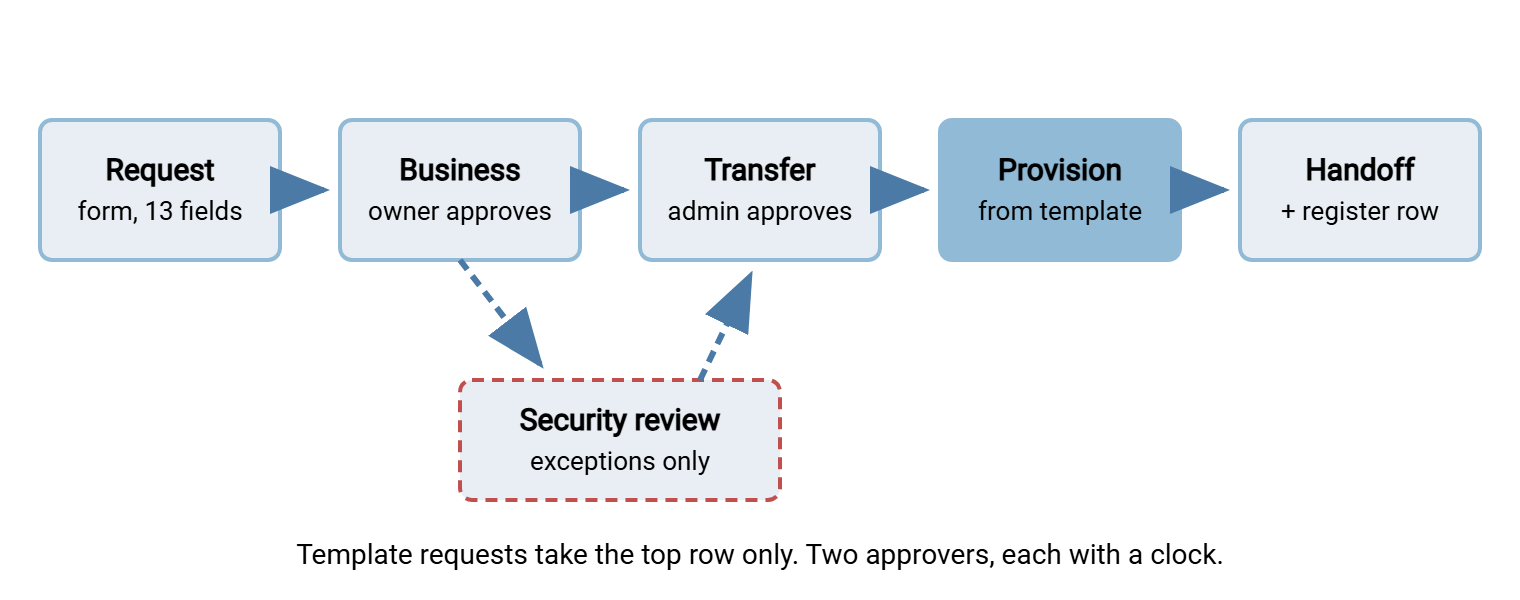
A request stalls for one of two reasons: nobody is sure who should approve it, or the approver has not been told they are waiting. Both are fixed by writing the approval path down once and putting it on the form. The path that works in most organizations has at most two approvers per request.
The business owner approves the need: yes, we are exchanging files with Acme, yes, this person or job should be doing it. The transfer administrator approves the technical fit: the request maps to a template, the name follows the standard, the IP address is plausible. That is the whole path for a template request. If the request is an exception, or question seven says personal data, add one security or data-protection approver, and only then.
Give each approver a time limit, in hours, and an escalation. Two working days for the business owner and one for the transfer administrator is typical. When the limit passes, the ticket goes to the approver's manager automatically, and the requester is told. Approvals do not stall because people are unwilling. They stall because nobody set a clock, so waiting is free.
Northgate Retail once routed every transfer account request through five approvers, including a change board that met fortnightly. A store systems manager needed a supplier to upload price files before a seasonal launch. Faced with a four-week approval path, the manager gave the supplier the login for an existing account instead. Two suppliers shared that account for the next three years. The change board, when it eventually heard, added a sixth approver.
The diagram below shows the whole provisioning path from the form to the register, with the two approvals in the middle. The template does the work that used to be done by email.
The Ticket Template
Once the request is approved, the administrator's work should be a checklist, not a memory test. The ticket template below is the internal half of the process. It has every step from account creation to closure, in order, with a place to record evidence. Paste it into the ticket when the approvals land and tick the steps as you go. An auditor who reads a closed ticket in this format has everything they need, which is a pleasant experience for everyone.
PROVISIONING TICKET  -  account: acme-in    template: partner-inbound
Request ref:        REQ-1108        Approved by: J. Smith (owner), P. Nair (admin)
Type:               partner         Lives in: server-local
Owner / backup:     Jo Smith / Priya Nair
Review date:        YYYY-MM-DD

[ ] 1. Name checked against naming standard
[ ] 2. Folder skeleton created: /inbox/acme, /processed, /failed
[ ] 3. Account created; template partner-inbound applied
[ ] 4. Source IP restriction set: 203.0.113.0/24
[ ] 5. Authentication configured per type (key for partner; see credentials article)
[ ] 6. Expiry / review date set on the account where the server supports it
[ ] 7. Test login performed from an external address; upload to /inbox/acme succeeded;
       write to /inbox/other-partner was refused   (paste log lines below)
[ ] 8. Register row added (account, type, owner, purpose, folders, auth, ticket, review_by)
[ ] 9. Credentials handed off out of band; recipient confirmed receipt
[ ] 10. Requester told: account name, host, folder, connection guide link
[ ] 11. Ticket closed with log lines from step 7 attached

Evidence:
  (log excerpt showing successful login and refused write)
Step seven is the one people skip, and the one that proves the template worked. A successful upload proves the account exists; a refused write to another partner's folder proves least privilege is enforced rather than assumed. Both take a minute with any client, and those two log lines are the only evidence an auditor will ever ask for. Step nine points to the next article, because how the password or key travels from you to the partner is a subject of its own.
Step eight is not optional. The register described in why transfer accounts outlive their owners is only useful if every account enters it at birth. The ticket is the moment that reliably happens. An account provisioned without a register row is an orphan with a start date.
Remember: the form collects facts, the templates make decisions, and the ticket records evidence. If a request needs a conversation, it is an exception, and exceptions are the only requests that should ever take more than a day.
Where This Leads
Provisioning done this way produces an account with a name that explains itself and rights that match a pre-approved template. It has an owner who will answer for it and a date on which someone will ask whether it should still exist. That is most of the lifecycle problem solved at the cheapest possible moment. The next stage is getting the credentials to the right person safely, which is the subject of issuing credentials and surviving the first login. The review date you set in question eleven comes due in role changes and permission creep. The day the owner leaves is handled in offboarding that actually closes the account.
The form, the standard, and the templates take an afternoon to write. The eleven-email ticket, by contrast, is free, and you will keep receiving it for as long as you are willing to answer it.
Frequently Asked Questions
Should a partner get one account or one per person at the partner?
What if the requester does not know the partner's IP address?
Is a review date really needed on a permanent account?
Can I skip the form for a quick internal request?
What happens to the request when it does not fit any template?
From the Sysax team: we build secure file transfer software for Windows. Sysax Multi Server is an FTP, FTPS, SFTP, and HTTPS server. Sysax FTP Automation handles scheduled, scripted transfers. Free trials are on the download page.