
Continuous Verification: Monitoring as a Zero-Trust Pillar
The login at 3 a.m. was perfect. Right key, right account, right folder. The server said welcome with exactly the warmth it shows at nine in the morning from the office. That is the trouble with a login: it is a snapshot. It proves that, at one instant, someone presented the right credential, and then it goes quiet. Trust does not hold still. A valid login can be a stolen credential in the wrong hands. A legitimate session can turn destructive halfway through. Access that was correct last quarter can be wrong today because the person left, the project ended, or the partner changed. If "always verify" stops at the door, it is not really always. It is once.
Continuous verification is the pillar that keeps the promise after the handshake. This article is about making verification a habit rather than a moment. You will see why a single check at login is not enough. You will see what "continuous" honestly means for file transfer (not the vendor fantasy of re-authenticating every packet). You will see the anomaly signals actually worth an alert. And you will see the distinctly zero-trust part: how to feed what monitoring learns back into your access policy. This article is part of our zero trust for file transfer series. It depends on the identities established in identity-centric access, because you can only watch what you can name.
Why One Check at the Door Is Not Enough
The perimeter mindset treats authentication as a turnstile: prove yourself once, and you are trusted for the duration. Zero trust rejects that for the same reason it rejects trusting network location — the proof at the door does not stay true. Three failure modes make the point concrete.
First, the credential was stolen. The password or key is genuine; the hands holding it are not. The login succeeds because the credential is valid, and nothing about that single event reveals the theft. Only behavior does — the genuine owner never logged in from that country, never pulled that much data, never connected at that hour. Second, the session goes bad after login. A legitimate user or a compromised automated job begins doing something it should not. For example, that user or job sweeps directories it has never touched, or downloads everything instead of the one expected file. The login was fine; the conduct is the tell. Third, the grant is stale. Nobody misused anything — the access was correct once and quietly became wrong, and only a recurring review will catch it.
In every case, the login told the truth and the truth still failed you. Continuous verification is the discipline of watching what happens after the login and revisiting whether the grant should still exist at all. The turnstile did its job. The job was smaller than advertised.
What "Continuous" Honestly Means Here
Marketing likes to imply that zero trust re-authenticates constantly, a pulse of little verifications every second. For interactive web sessions there are mechanisms that lean that way. But for file transfer the honest picture is different and worth stating plainly. Pretending otherwise sets you up to buy things you do not need. You cannot re-prompt an automated SFTP job for a password mid-transfer; there is no human there to answer. You cannot inject a second factor into a partner's overnight batch run. The batch run does not carry a phone.
So "continuous" for file transfer does not mean re-authenticating every packet. It means three achievable things working together. First, every session is logged. Second, every session is evaluated against what normal looks like. Third, access policy is revisited on a cadence as monitoring and circumstances teach you more. The continuity lives at the level of your estate, not inside a single TCP connection. You are continuously verifying that the population of sessions, identities, and grants still makes sense. You react when one stops making sense. That is entirely doable with logs, a little analysis, and a review calendar, none of which require a platform purchase.
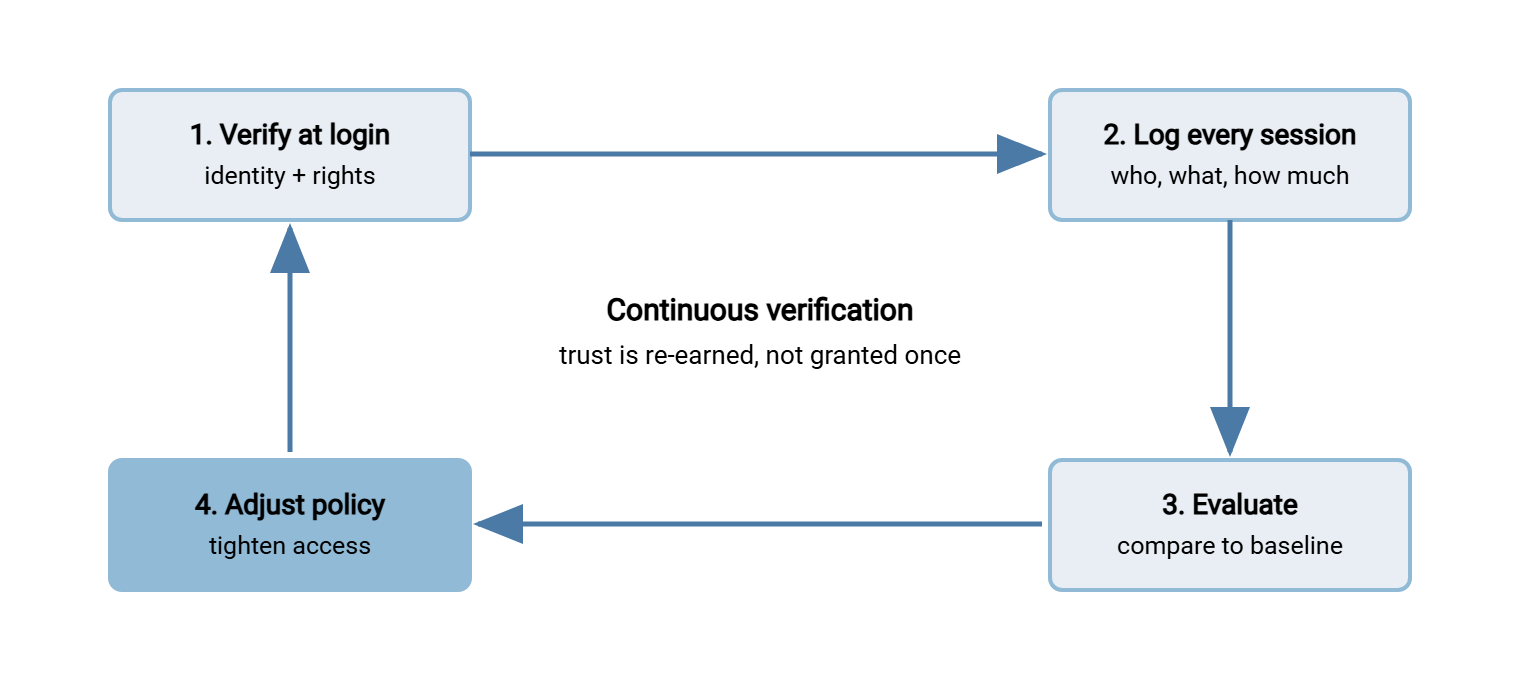
The diagram shows the loop this creates. Verify at login, log the session, evaluate it against normal, and adjust policy from what you learn. Then the tighter policy shapes the next login, and the loop turns again.
The Foundation: Log Every Session
None of this works without logs, and not just any logs — logs that name identities. A record that "an IP connected and moved data" cannot be evaluated, because there is no normal to compare it against. A record that "svc-billing-export connected, authenticated by key, wrote one file to /billing/in, 4 MB, and disconnected" can be evaluated against everything that identity has ever done. This is why identity-centric access comes first: it makes the log legible.
At minimum, capture the following per session. Capture the identity, the authentication method and result, the source address, and the timestamps. Capture the files and directories touched, the direction and volume of data, and any administrative or configuration change. A server that writes this natively hands you the raw material for continuous verification without a separate collection project. A Windows server like Sysax Multi Server does this with its activity logging across SFTP, FTPS, and HTTPS. The depth of what to record, and how to read it, is the subject of our transfer logging and audit series. Here the point is narrower: if it is not logged, it cannot be verified. So logging is the price of admission to this pillar.
One practical corollary: continuous verification needs history, so retention is part of the design, not an afterthought. You cannot know that 3 a.m. is abnormal for an identity if you keep only a day of logs. You cannot investigate an incident whose first step happened last month if last month is already gone. Keep enough history to establish a baseline and to reconstruct a session after the fact. The exact window depends on your obligations, but "a few days" is rarely enough. And "forever, on the same box" is neither safe nor necessary. History that lives only on the server it describes is history an attacker can erase. I have also seen it vanish with a failed disk, which is less dramatic and just as gone.
Signals Worth Acting On
A log you never read is just disk usage. The value comes from evaluating it. The goal is a short list of high-signal alerts rather than a firehose that trains you to ignore it. These are the signals that reliably earn their place for transfer services:
| Signal | What it may mean | First response |
|---|---|---|
| Burst of authentication failures | Password guessing or credential stuffing | Confirm lockouts are working; check the source; see brute-force defenses |
| Known identity, brand-new source or country | Stolen credential in use elsewhere | Verify with the owner; consider suspending the identity |
| Service account active outside its schedule | Job misuse or compromise | A job that runs at 2 a.m. connecting at noon is worth a look |
| Download volume far above this identity's normal | Mass exfiltration or a broken job | Compare to the baseline; pause if egregious |
| Outbound job connecting to a new destination | Tampered job or redirected exfiltration | Hold the transfer; confirm the job definition was not changed |
| Admin or configuration change | Legitimate work, or an attacker settling in | Record who and what; reconcile against change requests |
| Sustained hits on deny-and-log firewall rules | Lateral movement probing your segments | Investigate the source; the counter should sit near zero |
Each of these depends on knowing what normal looks like. That is why the first weeks of monitoring are mostly about learning baselines rather than firing alerts. An automated job is a gift here: it is predictable by nature. So a job managed in a scheduler like Sysax FTP Automation has a known destination, a known schedule, and a known rough volume. That means any deviation from those is a clean, low-noise signal rather than a guess. The more predictable the flow, the sharper the anomaly. Boring jobs make the best witnesses.
To turn the table into something operational, here is a compact set of starting thresholds. Treat the numbers as placeholders to tune against your own baselines, not gospel — the right value is whatever sits just above your normal.
MONITORING SIGNALS AND STARTING THRESHOLDS  (tune to your baseline)
  auth_failures_from_source    > 10 in 5 min        -> alert: possible guessing
  login_new_geo_for_identity   first time seen       -> alert: stolen credential?
  svc_account_off_schedule     outside its window    -> alert: job misuse
  bytes_out_per_session        > 5x identity normal  -> alert: mass pull
  outbound_job_new_destination not in job definition -> alert + hold transfer
  admin_or_config_change       any occurrence        -> alert: record who/what
  denied_eastwest_hits         > 0 sustained         -> alert: segment tripwire
  identity_unused              > 90 days idle        -> review: disable candidate
Remember: the enemy of monitoring is not too little data — it is too many alerts. Five alerts you read every time beat fifty you have trained yourself to ignore. Start with a handful of high-signal rules, tune them against your real baseline, and add more only once the existing ones are trusted.
A Session That Should Raise a Flag
To see the pillar working, follow one bad session. A partner identity, partner-acme, normally connects from a single European address every weekday morning. In a normal session, it authenticates by client certificate and downloads one modest file from its outbound folder. One Tuesday, partner-acme authenticates successfully at 3 a.m. from an address two continents away and begins listing directories it has never opened.
Every individual fact here is "allowed." The certificate is valid, the account is active, and the folder is permitted. The login gate sees nothing wrong, and a perimeter mindset would wave it straight through. But three signals fire at once. There is a new geography for a known identity and activity far outside the normal window. There is directory browsing that does not match anything in this identity's history. No single one is proof, and together they are more than enough to act. You suspend the identity, reach the partner through your out-of-band contact rather than the channel in question, and preserve the session log. The certificate may have been copied, or the partner's own system may have been compromised. Either way, you have caught in minutes what a login check would have passed. A monthly log review might have surfaced it weeks later — long after the files were gone. That gap, between a control that checks once and one that keeps checking, is the entire value of this pillar.
Closing the Loop: From Signal Back to Policy
Here is what separates continuous verification from ordinary monitoring. It is the genuinely zero-trust move: what you learn from watching should change what you allow. Monitoring that only produces alerts is a smoke detector. Monitoring that reshapes policy is a system that gets tighter over time. Every stable pattern you observe is a candidate to become an enforced rule.
- A partner that has only ever connected from one country becomes an allowlist entry. A login from anywhere else is then refused rather than merely flagged.
- A job that only ever runs in a two-hour overnight window becomes a time restriction, so a noon connection cannot even authenticate.
- An identity that has sat idle for months becomes a disable candidate, removing a credential an attacker could borrow before it is ever misused.
- A partner whose volume is steady and modest gets a rate expectation, so a sudden bulk pull trips a control instead of just a notification.
This is the loop the diagram drew: observe normal, encode normal as policy, and the next deviation meets a wall instead of a warning. It also connects continuous verification straight back to removing implicit trust. Every pattern you promote from "observed" to "enforced" is one more place where access rests on an explicit rule rather than an unexamined habit. Monitoring, done this way, is not a passive record. It is how your access policy learns, which is more than most policy documents manage.
A word of caution on the loop: tighten from observed patterns, not from single events. Promote a pattern to a rule only once it is genuinely stable, or you will encode a fluke. You might lock a partner to an address they happened to use once. Or you might lock them to a window they will predictably fall outside next month. The loop should make policy fit reality more snugly over time, not shrink-wrap it around noise. When in doubt, widen the observation period before you narrow the rule.
Anomaly Is Not Guilt
A signal is a question, not a verdict, and treating it as a verdict will cost you both accuracy and goodwill. The partner connecting from a new country may have opened an office there. The job running off-schedule may have been legitimately rescheduled. The volume spike may be a real, approved bulk transfer. The correct response to an anomaly is to verify before you conclude anything. Call the owner, check the change log, confirm the facts. This matters especially when a coworker is on the other end of the alert.
The discipline protects your credibility as much as your relationships. An admin who cries breach at every deviation gets tuned out, and a tuned-out alarm is worse than none. An admin who never checks misses the real event in the noise. The skill is triage. When the risk is high and the action is reversible — suspend an identity, hold a transfer — do it first and ask second. Otherwise, lead with the question. And every confirmed-benign anomaly feeds the loop in its own way. The new office address joins the allowlist, the rescheduled job's window updates, and the same event stops alarming twice. Verification that respects the people it watches is the only kind a small team can keep running for years.
Bluewater Bank's transfer team had one such alert fire on a quiet Thursday afternoon. The key for svc-ledger-pull had connected from the same address every night for as long as anyone had kept logs. Now it authenticated from an address nobody recognized. They held the identity, preserved the session, and telephoned the job's owner before concluding anything. The owner had moved the job to a new host the previous evening and had not yet filed the change. So the key had moved house without telling anyone. The new address went on the allowlist, and the old one came off a week later. The change form gained a line asking whether the source address would change. The alert cost twenty minutes and bought the certainty that it would fire when it mattered.
Keeping It Sustainable for a Small Team
A monitoring program that burns out its one operator protects nothing, so sustainability is a security requirement, not a nicety. A few honest constraints keep it alive on a small team. Logs rotate; operators should not have to.
Get the logs off the box. Local-only logs die with the server. An attacker who compromises it deletes them, and a hardware failure takes them with it. Forward logs to somewhere separate, even a modest central store, so the evidence survives the thing it is evidence about. The small-team version of this is covered in transfer logging and audit.
Automate the watching, not the judging. Let rules and thresholds surface the handful of events worth human attention, and reserve your scarce time for deciding what they mean. A person re-reading every log line is not a monitoring program; it is a person waiting to miss something.
Review on a calendar. The policy-tightening loop and the stale-access sweep both work only if they actually recur. Put a standing date on the identity review and the alert-rule tune-up. The part of continuous verification that catches stale grants is, by definition, not triggered by any event. It happens only because you scheduled it. We learned that the slow way, with a partner account that outlived the partnership by a year. An audit found it, rather than us. The sweep we should have been running is described in finding stale and orphaned accounts. And accept the honest limit: you will not catch everything in real time. The goal is not omniscience but a steadily shrinking gap between when something goes wrong and when you notice. Pair that with the segmentation and identity work that limits how much a missed signal can cost.
Bringing It Together
Continuous verification is what makes "always verify" honest past the login. Trust decays — credentials get stolen, sessions turn, grants go stale. So you log every session, evaluate it against what normal looks like, and revisit access on a cadence. For file transfer that continuity lives at the level of the estate, not inside a single connection. That means it is achievable with logs, a short list of high-signal alerts, and a review calendar rather than a product. The distinctly zero-trust part is the loop: feed what you observe back into policy, so your rules tighten as your monitoring learns. The server may go on saying welcome at 3 a.m.; now someone is listening.
The remaining article, the small-team roadmap, sequences monitoring alongside the rest into a plan you can actually execute. And because monitoring lives or dies on the quality of what you record, the transfer logging and audit series is its essential companion. The article on segmenting transfer paths supplies some of the sharpest signals — the deny-and-log tripwires — that this pillar acts on.
Frequently Asked Questions
Does continuous verification mean re-authenticating every few seconds?
Why isn't checking the credential at login enough?
What's the single most useful thing to monitor?
How do I avoid drowning in alerts?
What does "feeding monitoring back into policy" actually look like?
Do I need a SIEM or monitoring platform to do this?
From the Sysax team: we build secure file transfer software for Windows. Sysax Multi Server is an FTP, FTPS, SFTP, and HTTPS server. Sysax FTP Automation handles scheduled, scripted transfers. Free trials are on the download page.