
Finding and Removing Implicit Trust in Your Flows
"Who approved the finance drop accepting files from any host on the network?" Nobody, it turns out. Nobody sat in a meeting and agreed that any internal machine should be able to write into the finance folder with no login. The drop ended up that way one convenient shortcut at a time. Now it "works," so nobody touches it. Implicit trust is the trust you are extending without ever having decided to. That is what makes it dangerous: it is invisible precisely because it succeeds. The flow runs, the files arrive, and the absence of a check leaves no error in any log.
Zero trust is, at heart, the project of converting implicit trust into explicit decisions. This article gives you a way to find the implicit trust hiding in your transfer flows and a sequence for removing it without breaking things. You will learn the handful of shapes implicit trust reliably takes. You will get a worksheet to interrogate every flow, and a fix order that front-loads the quick wins. This article is part of our zero trust for file transfer series. This is where the series' guiding principle, stop treating network location as proof of identity, turns into a concrete to-do list.
The Shapes Implicit Trust Takes
Implicit trust is not random. In file transfer it shows up in a few recognizable forms, and learning to spot them by shape is most of the battle. Like weeds, they are easier to name than to pull.
- The trusted-IP assumption. A flow is allowed because of where it comes from — "packets from
10.0.0.5are our app server, so accept them." The address stands in for a login. As covered in identity-centric access, an IP is a location, not an identity. Anything that can send from that address inherits the trust. - Flat internal access. A resource is reachable by far more hosts than actually need it, usually because "it is all internal anyway." The finance file server accepts connections from the entire office subnet when only two machines have any business talking to it.
- Unauthenticated internal drops. A folder or service that accepts files with no login at all, on the theory that internal traffic is safe. Anonymous internal FTP, an open SMB share, a listener that takes whatever it is handed — these are the purest form. They trust everyone who can reach them.
- Granted-once, trusted-forever. Access was handed out for a reason that has long since expired, but it was never revoked. The contractor's account is still live, the partner key is still authorized, or the firewall hole remains from a project that ended. Time turned a reasonable grant into implicit trust in a decision nobody remembers making.
Notice the thread running through all four: in each, something other than a verified identity is deciding access. It may be a source address, a network location, a lack of any check, or a stale past decision. Removing implicit trust means putting a verified identity back in charge of every one of them.
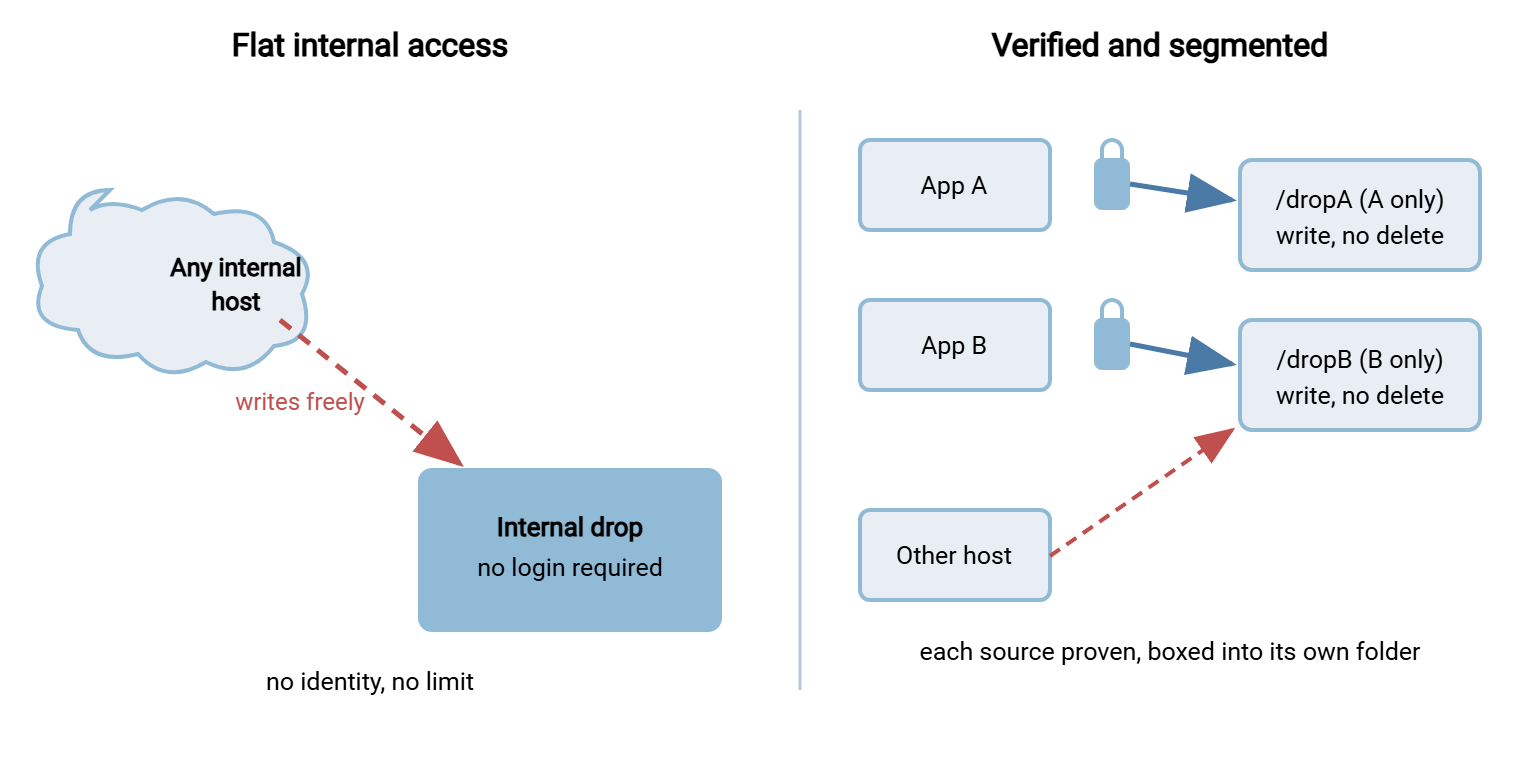
The diagram contrasts the worst of these — flat, unauthenticated internal access to a drop — with the verified, segmented version that replaces it.
Why Implicit Trust Hides So Well
If implicit trust were obvious, it would already be gone. It survives because of four properties that make it genuinely hard to see, and naming them helps you look in the right places.
It is invisible in success. A missing authentication check produces no error, no log line, no alert — the flow works. Your monitoring is built to notice things that fail, and implicit trust never fails; that is the whole problem. It is inherited. Much of it predates you, set up by someone who has left, for a reason nobody wrote down. It keeps running because turning things off is scarier than leaving them on. It is convenient. Every instance began as a shortcut that saved someone real time. That means removing it feels like adding friction to a working process. It is a hard sell without the framing that the friction is the point. And it is unmapped. You cannot see the trust you have granted if you have never listed your flows, so the first real step is not a fix at all. It is an inventory.
The Inventory Method
Finding implicit trust is detective work with a small number of reliable witnesses. Each of these tells you about flows, and cross-referencing them exposes the gaps:
- Firewall rules. Read them as a list of who is allowed to reach what. Any broad allow — a whole subnet, an "any" source, a rule whose purpose nobody can state — is implicit trust written down. The overly wide rules are your flat-access findings.
- Server accounts. List every account on every transfer server. Shared accounts, generic names (
ftpuser,data), and accounts nobody can attribute are findings. Anonymous or guest access enabled anywhere is a finding. - Scheduled tasks and jobs. Every scheduled transfer is a flow. Read each job's definition. What does it connect to? How does it authenticate? Does it rely on its source address instead of a credential?
- Connection logs. The logs show what actually connects, which often differs from what you think connects. Sources you cannot identify, and drops that record no authentication event, are findings.
None of this requires special tooling. A port scan of your own transfer servers from a couple of vantage points confirms what is actually listening. The built-in ability to list accounts and scheduled tasks on each box covers the next two witnesses. The transfer service's own logs are usually already being written, just never read. The gap between "what I believe runs here" and "what these four sources say runs here" is exactly where implicit trust lives. Closing that gap is most of the work; the transfer inventory shows how to keep the resulting list alive. Expect the exercise to surface flows you did not know existed. You might find an old integration, a forgotten partner test account, or a firewall rule from a migration that finished long ago. I once inherited one whose migration had finished before I was hired. Those surprises are not failures of memory; they are the normal harvest of a first real inventory.
Northgate Retail's first inventory turned up its best finding in the fourth witness, the logs. Cross-referencing accounts against connection records, the administrator noticed that partner-kestrel had listed a folder belonging to a different partner, twice, months apart. Nobody had granted that. The account had been created by copying an older partner's settings. The older partner had been given read on a shared outbound folder during a migration that nobody had unwound. The partner had never opened a file there; the listings were most likely a client browsing on connect. Each partner got its own root the following week. New accounts were thereafter built from a blank template rather than a copy. The administrator added "copied from" to the register as a question worth asking.
Work each flow through the same set of questions. To keep it honest and repeatable, use a worksheet — one block per flow. Fill it in with the uncomfortable true answers rather than the comforting assumed ones. Any flag is implicit trust to schedule for removal.
IMPLICIT-TRUST INVENTORY WORKSHEET
Fill one block per transfer flow. Every flagged answer is trust to remove.

  Flow name:            ______________________________
  Source (who / what):  ______________________________
  Destination:          ______________________________
  Protocol / port:      ______________________________

  Trust checks - answer honestly:
    1. Authenticates every session?              yes  /  NO   <- flag
    2. Encrypted end to end?                     yes  /  NO   <- flag
    3. Allowed by source IP alone (no login)?    no   /  YES  <- flag
    4. More hosts than necessary can reach dest? no   /  YES  <- flag
    5. Uses a shared or generic account?         no   /  YES  <- flag
    6. Unauthenticated drop (anyone can write)?  no   /  YES  <- flag
    7. Log names a real identity per action?     yes  /  NO   <- flag
    8. Access still needed / recently reviewed?  yes  /  NO   <- flag

  Flags counted: ____    Owner: ____________   Fix-by date: __________
Run every flow through those eight questions and you will have something most estates lack. You will have a list of exactly where you are trusting something other than identity, with an owner and a date against each. That list is the entire job made visible. I have run the worksheet on estates I was proud of and stopped being proud around question three.
A Real Flow, Interrogated
Walking one flow through the worksheet shows how fast the flags accumulate. The flow: a warehouse scanner uploads a nightly stock file to an internal folder. Source, the scanner appliance; destination, a share on the file server; protocol, plain FTP on port 21. Now the checks. Does it authenticate every session? No — it drops files anonymously. Flag. Encrypted end to end? No, plain FTP. Flag. Allowed by source IP alone? Yes, the firewall trusts the scanner's address. Flag. Can more hosts than necessary reach it? Yes, the whole warehouse subnet can hit port 21. Flag. Shared account? Worse — no account at all. Flag. Unauthenticated drop? Yes, by definition. Flag. Does the log name an identity? No, it records an address and nothing else. Flag. Recently reviewed? Nobody has looked in years. Flag.
Eight questions, eight flags. This single "it just works" flow is carrying nearly every form of implicit trust at once. It is also, tellingly, exactly the kind of flow people are most reluctant to touch, precisely because it has never once failed. The worksheet does not fix it, but it does something almost as valuable. It turns a comfortable blind spot into an eight-flag line item that is hard to keep ignoring. The scanner, for its part, has no idea it is famous.
Ranking What You Found
A full worksheet run produces more findings than a small team can fix at once, so ranking is not optional. It is how the list becomes a plan instead of a source of guilt. Two dimensions do most of the work. Exposure: is the flow reachable from the internet, or only from inside? An unauthenticated internet-facing drop outranks an internal one every time. Sensitivity: what actually moves through it — the finance export, or the cafeteria menu? Consider a flow that scores high on both: internet-reachable and carrying sensitive data with no authentication. It is a genuine emergency and jumps the queue no matter how long it has run quietly. Quiet is not the same as safe. It is just quiet.
Counting flags gives you a rough severity; exposure and sensitivity turn that count into an order. The goal is not a perfect score but a defensible sequence. Then, when leadership asks why you fixed one flow before another, you can say, "that one was internet-facing and carried customer data." That is an answer that ends the conversation. The fuller version of this scoring belongs to a proper risk assessment, covered in our transfer threat modeling series. But the two-axis version is more than enough to start moving.
Remember: the hardest part of removing implicit trust is not the fixing — it is the finding, because implicit trust never shows up as an error. Budget most of your effort for the inventory. Once a flow is on the worksheet with its flags counted, the remedy is usually routine.
The Fix Sequence
With findings in hand, resist the urge to fix them in the order you discovered them. Fix them in an order that front-loads risk reduction and defers the flows that need partner coordination. This sequence works for most estates:
- Add encryption where it is missing. Any cleartext flow — plain FTP, an unencrypted internal drop — is the top of the list. It exposes both data and credentials to anyone watching the wire. This is often the fastest high-impact win, and our retiring plain FTP series covers the mechanics.
- Add authentication where there is none. Turn unauthenticated drops into logins. A server that authenticates every session against its own accounts converts an open drop into an identity-checked one. A Windows server like Sysax Multi Server authenticates this way across SFTP, FTPS, and HTTPS. That conversion is the single biggest structural change on the list.
- Replace IP-only allows with identity plus an allowlist. Keep the source restriction as a filter, but require the flow to authenticate as a named identity behind it. In a scheduled-transfer tool such as Sysax FTP Automation, giving the job its own credential and destination is a configuration change, not a rewrite.
- Narrow the reach. Shrink flat access to named source-to-destination lanes, the segmentation work. That way, even an authenticated identity can only travel the routes it should.
- Split shared accounts. Give each person, job, and partner its own identity, so the log attributes actions and you can revoke one without breaking the rest.
- Turn on identity-aware logging. Make sure every action now records the named identity, feeding the continuous verification that keeps the trust from creeping back.
- Schedule the review. Put a recurring date against each flow so "granted once, trusted forever" cannot re-form. Access that is never re-checked becomes implicit trust again on its own.
The ordering matters because the early steps reduce the most risk for the least coordination. You can encrypt and authenticate your own internal flows without asking anyone's permission. The later steps protect the gains and keep them from decaying. If you only ever get through steps one and two across your whole estate, you have already removed the most dangerous implicit trust there is.
One discipline makes the sequence hold. Fix the flow, then delete the old path in the same change window, not "later" (how to plan that window is in change rollout and rollback). The most common way remediation quietly fails is leaving the insecure route in place beside the new secure one. The unauthenticated drop is still listening next to the new authenticated one, or the broad firewall rule is still present under the narrow one. An attacker takes the easy door every time. So a fix that does not remove the old door is not a fix; it is a second door. Prove the new path works, then close the old one before you move to the next finding.
The Ones You Cannot Fix Yet
Honesty requires admitting that some implicit trust cannot be removed on your schedule. The scanner that only speaks unauthenticated FTP, the instrument whose vendor vanished, the partner who will not move for another year — these are real. Pretending otherwise just drives the flow into the shadows where it is worse. The vendor who vanished is not coming back to read your policy.
For these, the answer is not to leave the trust implicit but to make it explicit and contained. Isolate the device on its own segment so its openness cannot be reached from the general network. Put a secure relay in front of it: let it drop files locally, then have an authenticated, encrypted job move them onward. And write down the exception as an accepted risk with an owner and a revisit date. That makes it a decision on the record rather than a gap in the dark. That documentation is itself a zero-trust act — it converts an unexamined assumption into an examined, time-boxed one.
The revisit date is the part that does the real work. An accepted risk with no expiry is just implicit trust with paperwork. An accepted risk that resurfaces on your calendar every few months keeps asking the questions. Has the vendor finally shipped a fix? Has the partner migrated? Can the device at last be retired? Most of these exceptions do eventually close. That happens not because you forced them shut, but because you kept the question alive until the world changed around it. The point is never to accept a risk and forget it. It is to accept it out loud, on the record, with a date that brings it back.
Bringing It Together
Implicit trust is the trust you never decided to grant: the trusted-IP shortcut, the flat internal reach, the drop with no login, the grant nobody revoked. It hides because it works, so the real effort goes into finding it. Read your firewall rules, accounts, jobs, and logs. Run every flow through a worksheet that asks the uncomfortable questions. Then you fix in an order that front-loads encryption and authentication. Next, narrow reach, split shared accounts, and schedule the review that keeps implicit trust gone. The finance drop will still just work. This time on purpose.
From here, continuous verification is what stops implicit trust from creeping back. The article on segmenting transfer paths is the reach-narrowing step in depth. If you are assembling all of this into a plan, the small-team roadmap sequences the whole effort.
Frequently Asked Questions
What exactly is implicit trust in a file transfer?
Why is implicit trust so hard to find?
Where do I actually look to find it?
What should I fix first?
What do I do about a device that only speaks unauthenticated FTP?
How do I keep implicit trust from coming back?
From the Sysax team: we build secure file transfer software for Windows. Sysax Multi Server is an FTP, FTPS, SFTP, and HTTPS server. Sysax FTP Automation handles scheduled, scripted transfers. Free trials are on the download page.