
Identity-Centric Access to File Transfer
"What authenticates that one?" "Nothing. It comes from 192.0.2.5, and the firewall knows it." Somewhere in almost every transfer estate is a flow like that one. A nightly job connects, and the firewall recognizes the address. Files move with no login, no key, and no proof of who is really on the far end. It has worked for years, so nobody questions it. That flow is trusting a location, and a location is the one thing an attacker can take without knowing a single password.
Identity-centric access is the fix, and it is the load-bearing principle of zero trust for file movement. Make the identity, not the IP and not the network segment, the thing that access hangs on. Every session proves who it is, and every identity gets only the rights it explicitly needs. This article shows what "identity" really covers and the three honest ways a session can prove one. It shows why authentication is only half the job. It shows how to convert a location-based flow into an identity-based one using the accounts and keys you already run. It is part of our zero trust for file transfer series. It builds directly on the idea from zero trust in plain words: stop treating network location as proof of identity.
What "Identity" Actually Means Here
The word "identity" sounds like it means human users with names and desks, and it does — but it means more than that. In a transfer context, an identity is anything that can be authenticated and held accountable for what it does. Three kinds show up constantly:
- People. An administrator logging in to manage the server; a partner's staff member uploading a file by hand. Human identities usually authenticate interactively and can carry a second factor.
- Service accounts. The non-human identity a scheduled job or application runs as. This is the one most often skipped, because "it is just a script." A service account is still an identity — it should have its own credential, its own rights, and its own name in the log.
- Partners. An outside organization that connects to your endpoint. Their identity is whatever credential you issued them: an account, a key, a client certificate. One partner, one identity, so their activity is distinguishable from everyone else's.
The unifying rule is short. If something can open a session and move a file, it needs an identity, and that identity needs to be provable. "The job from that IP" fails the test — a source address is not something the far end has to prove it possesses. A key, a certificate, or a password is. That is the entire distinction between a location and an identity. One is where you appear to be. The other is something you have to demonstrate you hold. Anyone can stand where you stand; not everyone can hold what you hold.
Three Honest Ways a Session Proves Identity
There are exactly three mechanisms in wide use for a transfer session to prove who it is. Matching the right one to each identity type is most of the practical work. Our transfer authentication series covers each in depth; here is how they map onto identity-centric thinking.
- Passwords. The weakest on their own, because a password is only as good as its length and secrecy, and both erode. They are real identity proof when the password is long, unique, and — for human and admin logins — paired with a second factor. For unattended jobs, passwords buried in scripts are a liability; prefer keys.
- SSH keys. The natural fit for automated SFTP and SCP. The private key stays on the machine that runs the job; the server holds only the public half. Nothing reusable crosses the wire, and a key can be scoped and revoked without touching a password. Generating, storing, and controlling these is the subject of our SSH key management series.
- Certificates (mutual TLS). For FTPS and HTTPS transfers, a client certificate lets the server verify the client the same way the client verifies the server. This is the strongest fit for partner identities, because a certificate is issued deliberately, carries a name, and expires on a schedule you control.
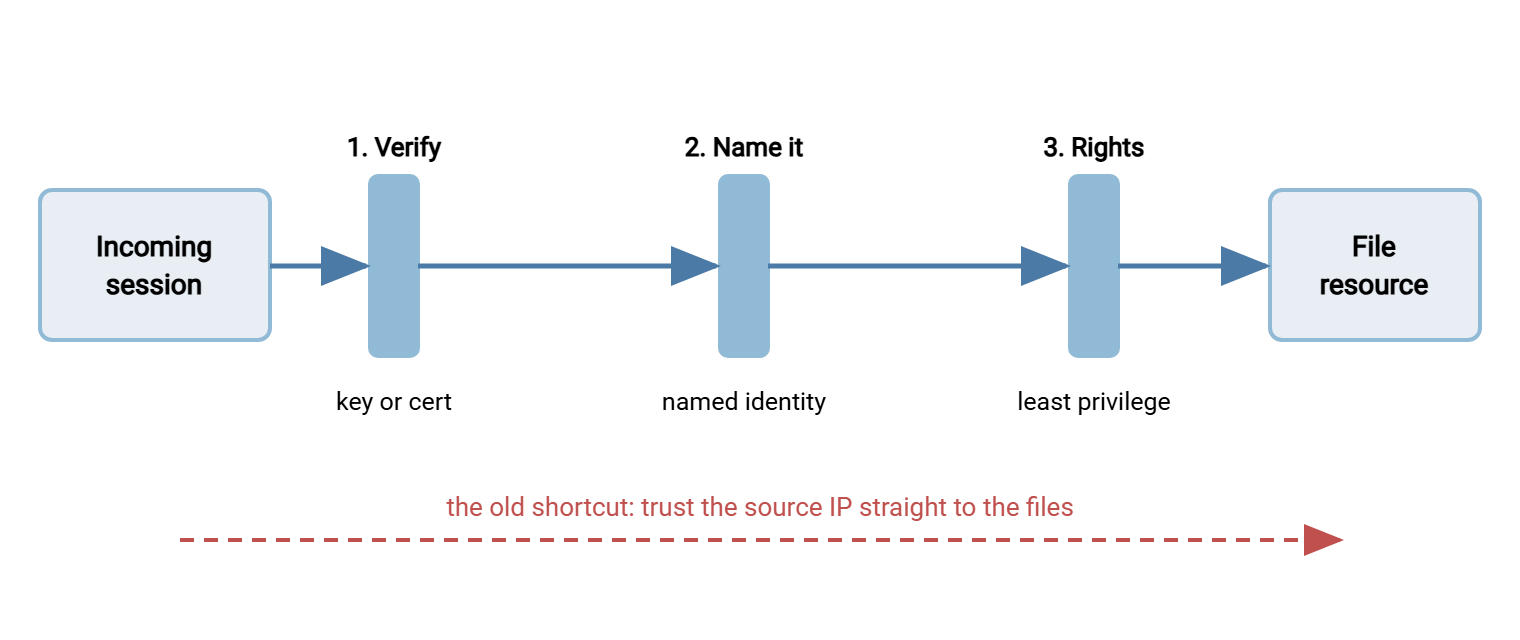
The diagram below shows what an identity-centric session looks like once a method is in place. The connection does not reach the files until it has passed three checkpoints in order.
Explicit Rights: Authentication Is Only Half
Proving who you are answers only the first question. The second — what are you allowed to do? — is where identity-centric access earns its keep. It is where a lot of "we require logins" setups quietly fall short. A verified identity that can read, write, and delete everything on the server is still a catastrophe waiting for one stolen credential. It is a catastrophe with a name badge.
Security people split the two questions into authentication (authn — proving who) and authorization (authz — what that identity may do). Zero trust demands both, and it demands the second be explicit and minimal. Every identity gets a specific answer to "which directories, which operations," and nothing beyond it:
- A partner who only sends you files needs write into their inbound folder — not read, not delete, not a view of anyone else's directory.
- A partner who only collects files needs read of their outbound folder — not write, not the ability to see what else lives on the server.
- A backup job that copies logs off the box needs read of the log directory and nothing else — certainly not the whole filesystem.
To see why this matters, picture the partner-inbound account being stolen. If it can only write into one folder, the attacker can drop a file there and do nothing else. That means no reading another partner's data, no deleting your records, no view of the rest of the server. The same theft against an account that can read, write, and delete everywhere is a breach of the entire estate. Same stolen credential, wildly different outcome, and the only variable is how explicitly you scoped the rights. That gap is what authorization buys you, and it is why authentication alone is never the finish line.
This is least privilege applied per identity. It is the difference between one compromised account being a contained incident and being a company-wide one. The mechanics of expressing these rights — permission bits, ACLs, per-user roots — live in our file server permissions series. The zero-trust point is that authorization is not optional polish on top of authentication. It is the other half of the same job.
Remember: a verified identity with unlimited rights is not identity-centric access — it is a location assumption wearing a login. Every identity needs an explicit, minimal answer to "what may this do?" or authentication has only told you the name of whoever is holding everything.
One Identity Per Person, Per Job, Per Partner
The single habit that makes identity-centric access real is refusing to share identities. Shared accounts feel efficient and quietly destroy the whole model, for two reasons that show up the moment something goes wrong.
First, accountability collapses. When three scripts and two people all log in as ftpuser, the log records ftpuser did everything. You can never say which of them actually did the thing you are investigating. The identity in the log points at a crowd, not a person or a process. Crowds are hard to interview.
Second, revocation becomes all-or-nothing. When a partner's contract ends or an employee leaves, you cannot disable the shared account without breaking everyone else who depends on it. So the credential lingers. Lingering credentials are exactly the orphaned access an attacker hunts for; why transfer accounts outlive their owners explains how common that is. A dedicated identity, by contrast, can be revoked the instant it is no longer needed, touching nothing else.
So the rule is one identity per person, one per automated job, one per partner. This is more accounts to manage, and that cost is real. But it is the cost of being able to answer "who did this?" and "can I safely turn this off?" with a straight face. Service-account discipline in particular is worth its own attention. Our transfer authentication series covers keeping those credentials out of scripts and documented well enough to survive staff turnover.
Meridian Parts learned the cost of sharing when a supplier contract ended. Two nightly jobs, the supplier, and one engineer who used it for "quick checks" all logged in as ftpuser. So the account that should have been disabled that afternoon could not be touched without breaking the other three. Meridian gave each a dedicated identity, one at a time, and left ftpuser alive while the log confirmed who had moved. The last thing still using it turned out to be a disk-space monitor nobody had listed, written by someone who had left the year before. It got an identity of its own. ftpuser was disabled the next morning, and nothing broke. The supplier's access ended about three weeks later than it should have, which was the whole lesson.
Turning "the Job From That IP" Into an Identity
The most common location-based flow is an automated one, so it is worth walking the conversion concretely. The starting state: a script on an application server pushes files to the transfer server. The transfer server accepts them because the source IP is on an allowlist. No authentication happens. The firewall vouches for the job, and the firewall has never met it.
The identity-centric version replaces the IP assumption with a named service account. The job authenticates as svc-billing-export using an SSH key whose private half lives only on the application server. On the transfer server, svc-billing-export is granted write into exactly one directory and nothing else. In a scheduled-transfer tool such as Sysax FTP Automation, this is a configuration choice rather than a rewrite. Each job stores its own destination and its own credential. So it authenticates as its named identity wherever it runs, instead of relying on the address it happens to run from. On the receiving side, the server authenticates every session against its own accounts and enforces per-account rights. A Windows server like Sysax Multi Server does this over SFTP, FTPS, and HTTPS. That is where svc-billing-export becomes a real, scoped identity rather than a trusted address.
Here is the conversion as a checklist you can apply to any location-based flow. Work it once per flow, and the IP assumption disappears a flow at a time.
CONVERT A FLOW TO IDENTITY-CENTRIC ACCESS
  1. Name the identity.   Who or what really performs this flow?
                          (a person, a job, a partner - be specific)
  2. Create a dedicated account for it. One identity, this flow only.
                          Never reuse an existing shared login.
  3. Pick an auth method that fits:
        automation  -> SSH key (no passphrase prompt) or client cert
        a person    -> password + second factor
        a partner   -> client certificate or issued key
  4. Grant explicit rights: the exact folders and operations needed.
                          Default to read-only or write-only, no delete.
  5. Remove the old implicit path: delete the bare IP allow / shared login
                          that let this flow skip authentication.
  6. Test end to end as the new identity. Confirm the file still moves.
  7. Record it in the access register (owner, purpose, method, rights,
                          review date) - see the template below.
  8. Confirm the log now names this identity on every action.
One caution on step 5: do not delete the old implicit path until the new identity is proven working. Run both briefly in parallel and watch the log confirm the flow now arrives as the named identity. Only then remove the bare IP allow or shared login. Pulling the old path first turns a routine change into an outage. Outages are how good security changes get rolled back and resented. The safe order is always add the identity, verify it, then close the shortcut — never the reverse.
Step 7's access register is the piece people skip and later regret. I skipped it once and rebuilt it from log files, which is a poor way to spend a weekend. It does not need a database. One line per identity in a spreadsheet or text file is enough, as long as every identity has a row. A workable format:
IDENTITY REGISTER (one row per identity)
identity            | type     | auth      | rights                  | owner        | review
svc-billing-export  | service  | ssh-key   | write /billing/in       | fin-ops team | quarterly
partner-acme        | partner  | client-cert | read /acme/out        | alex (IT)    | quarterly
alice.chen          | person   | pw + MFA  | admin console           | alex (IT)    | on staff change
A Method for Every Identity Type
Because the right authentication method depends on what kind of identity you are securing, it helps to keep the mapping in one place. Matching them well means strong proof where it is affordable and no fragile passwords buried where a human will never rotate them. Scripts do not rotate passwords; they keep them, like heirlooms.
| Identity type | Best-fit method | Why it fits |
|---|---|---|
| Automated job (SFTP/SCP) | SSH key, scoped | No password to leak in a script; revocable; nothing reusable crosses the wire. |
| Automated job (FTPS/HTTPS) | Client certificate | Mutual TLS proves the client; certificate carries a name and an expiry you control. |
| Interactive person | Password + second factor | A human can complete a second factor; MFA blunts stolen or guessed passwords. |
| Admin / console access | Password + MFA, separate account | Admin power is kept apart from transfer accounts, so one does not inherit the other. |
| Partner organization | Issued key or client cert | Deliberately issued, individually revocable, distinguishable from every other partner. |
The Overhead, Named Honestly
More identities mean more to manage, and pretending otherwise would insult anyone who has run a real environment. Each dedicated account is another credential to issue, another set of rights to get right, another entry to keep current. On a small team, that cost is the honest objection to identity-centric access. It deserves a straight answer rather than a slogan about "security posture."
Two things keep it manageable. First, the register above turns "a pile of accounts" into a list you can read in one sitting. The real management cost scales with how well you write things down, not with the raw number of identities. Second, most of the churn happens at the edges. You create an identity when a flow or partner is added and disable it when they leave. The steady state in between is quiet. In exchange for that bounded, predictable effort you get the ability to revoke cleanly, attribute confidently, and review at all. A heap of shared logins and IP rules cannot offer any of that at any price. The trade is real. For anyone who has ever tried to answer "who had access?" after an incident, it lands firmly on the right side. I have been asked that question with nothing to offer but ftpuser. Once was enough.
Where Location Still Helps
Making identity central does not mean throwing away the source IP. It means demoting it from a password to a filter. An allowlist that says "only these partner addresses may even attempt to connect" is genuinely useful. It shrinks the crowd at the door, cuts brute-force noise, and gives you a smaller set of expected sources. The rule is only that the allowlist sits in front of authentication, never instead of it. An allowlisted address still has to prove its identity; it has earned the right to try, and nothing more.
Held that way, location becomes one layer among several. Narrow who may knock with the network, then prove who is knocking with an identity. That layering is the bridge to the next article, segmenting transfer paths. That approach narrows the lanes themselves so that even an authenticated identity can only travel the routes it is supposed to.
The Payoff: Accountability You Can Actually Use
When every session is tied to a provable identity, a set of previously hard problems become straightforward. Offboarding a person or retiring a partner is a matter of disabling their identity. There is no hunting for which shared account they used (the full procedure is in offboarding that closes the account). An investigation has a real answer to "who did this," because the log names an identity, not an address. And access reviews become possible at all, because there is a register of identities to review against. It replaces a fog of IP rules nobody can attribute.
That last point connects identity-centric access to continuous verification. A log full of named identities is a log you can actually monitor. That is because "svc-billing-export logged in from a new country at 3 a.m." is a sentence that means something. The sentence "something connected from an IP" is not. The deeper practices for those logs live in our transfer logging and audit series.
Bringing It Together
Identity-centric access is the principle that makes the rest of zero trust possible. Put the verified identity, not the network location, at the center of every access decision. Give each identity only the rights it explicitly needs. You already own the tools — accounts, keys, certificates, per-user rights, and logs. The work is converting location-based flows into identity-based ones, one flow at a time, and refusing to share identities as you go. The nightly job finally gets a name. The log has been waiting.
Next, segmenting transfer paths narrows the routes those identities can travel. The article on finding and removing implicit trust hunts down the location assumptions still hiding in your flows. If you want the authentication mechanics in full, our transfer authentication and SSH key management series are the companions to this one.
Frequently Asked Questions
Is an IP allowlist enough to identify a partner?
Why can't automated jobs just share one service account?
Do automated transfers need multi-factor authentication?
What's the difference between authentication and authorization?
How do I keep track of all these separate identities?
Does identity-centric access replace my firewall?
From the Sysax team: we build secure file transfer software for Windows. Sysax Multi Server is an FTP, FTPS, SFTP, and HTTPS server. Sysax FTP Automation handles scheduled, scripted transfers. Free trials are on the download page.