
A Zero-Trust Roadmap for a Small IT Team
The roadmap ran to forty pages, and the timeline to eighteen months. The "core team" on page three was larger than the whole IT department it landed on. Every zero-trust plan written for a large enterprise assumes things a small team does not have. It assumes a dedicated security group, a six-figure tooling budget, and a year of runway. Read enough of them and you conclude zero trust is not for you. That conclusion is wrong, and this article is the correction. What a small team actually needs is not a platform or a consultant. It is a sequence: a short, ordered list of moves that reduce the most risk first, break nothing, and use tools you already own.
This is that sequence, assembled from the five articles before it and stripped of every buzzword. You will get a phased plan with quick wins at the front and a copyable checklist to work through. You will get a plain way to measure progress without a dashboard. You will get an honest accounting of what a small team cannot do and does not need to. This is the closing article of our zero trust for file transfer series. It turns the whole series into something you can start this week.
Principles for the Plan
Before the phases, five ground rules keep the effort honest and survivable. They are what separate a plan that ships from one that becomes a document nobody reads. Most roadmaps are the second kind, and beautifully formatted.
- Quick wins first. Order by risk reduced per hour spent, not by tidiness. The goal is to be meaningfully safer in week one, not perfectly safe in year two.
- One flow at a time. Zero trust is not all-or-nothing. Every flow you fix is a real gain whether or not you ever "finish," so progress is always bankable.
- Measurable steps. Each phase has a plain "done when" you can check with a yes or no, because a plan you cannot measure is a wish.
- Reversible and non-breaking. Never break production to look secure. Add the new path, prove it, then remove the old one — outages are how good security work gets rolled back and resented.
- Use what you own. The whole plan runs on accounts, keys, certificates, firewalls, and logs you already have. No purchase is a prerequisite for any step.
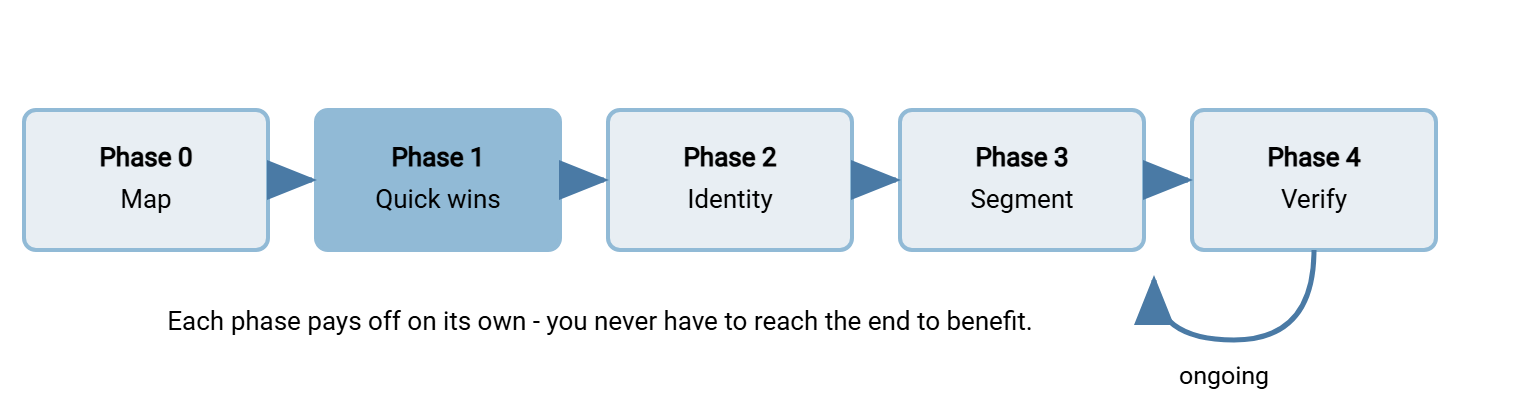
The diagram lays out the phases in order. Notice that the plan does not end so much as settle into an ongoing loop. The last phase keeps running for as long as the service exists.
Phase 0: Map Before You Move
You cannot sequence what you have not listed, so the plan begins with an inventory, not a change. Build the flow census: every transfer flow written as a source, a destination, a protocol, and a port. Then run each flow through the implicit-trust worksheet from finding and removing implicit trust. Rank the findings by exposure — is the flow reachable from the internet? — and sensitivity — what data moves through it? This is the same groundwork our transfer threat modeling series builds on. It is the phase most likely to surprise you, because the first honest inventory always turns up flows nobody remembered.
Done when: a written list of every transfer flow exists, each has been through the worksheet, and the findings are ranked. That list is your backlog for every phase that follows.
Do not let Phase 0 become a research project that never ends. Time-box it. A few focused sessions with your firewall rules, server accounts, scheduled tasks, and connection logs will surface the great majority of flows. The stragglers reveal themselves later as you work the other phases and something breaks or a log line puzzles you. A good-enough map today beats a perfect map next quarter, because every later phase can only act on what the map already contains. Treat the inventory as a living document you keep revising (keeping documentation current covers how). It is not a gate you must complete flawlessly before you are allowed to touch anything. The perfect map is a genre of fiction.
Phase 1: Quick Wins
The first changes are chosen for maximum risk reduction with zero partner coordination. These are things you can do to your own environment without waiting on anyone. This is the phase that makes the effort visibly worth it.
- Encrypt every cleartext flow you control. Plain FTP and unencrypted internal drops expose data and credentials to anyone on the wire. Retiring them, per our retiring plain FTP series, is the highest-value single move.
- Require MFA on all admin and interactive logins. A second factor blunts stolen and guessed passwords where a human is present to complete it.
- Turn on the host firewall with a default deny on every transfer server, allowing only the ports the service needs. This alone shrinks blast radius dramatically and costs nothing.
- Disable anonymous and guest access everywhere it is not deliberately required, closing the purest form of implicit trust.
- Forward logs off the box to a separate store, so the evidence survives the server it describes.
Done when: no flow you control carries credentials in cleartext, and admin logins require MFA. Every transfer server's host firewall denies by default, and logs land somewhere off the box. A server that authenticates every session and writes native activity logs makes several of these a settings change rather than a project. A Windows server like Sysax Multi Server authenticates and logs this way across SFTP, FTPS, and HTTPS.
Phase 2: Put Identity at the Center
With the fires out, make identity the thing access hangs on, following identity-centric access. Give every person, every automated job, and every partner its own identity, and retire shared accounts. Move automation onto SSH keys or client certificates so passwords stop living in scripts. Grant each identity explicit, least-privilege rights — write-only where it only sends, read-only where it only collects. Start the access register, one row per identity, so the set stays legible.
Done when: no shared accounts remain, and automation authenticates by key or certificate. Every identity has explicit minimal rights, and the log names an identity on every action. The keys side of this has its own depth in our SSH key management series, and the broader account discipline in transfer authentication.
Phase 3: Narrow the Paths
Now that sessions carry identities, narrow the routes they can travel, following segmenting transfer paths. Turn flat "any internal host can reach the server" access into per-flow rules: named source, named destination, single port. Set the transfer servers to deny east-west by default and log the denials as tripwires. Where the transfer service supports it, restrict accounts by source address too, so a network mistake alone cannot open a door. A scheduled-transfer tool such as Sysax FTP Automation helps here because each job is a defined flow with one destination. So the outbound lane is expressed in the job as well as the firewall.
Done when: each transfer server is reachable only by named sources on named ports. The east-west deny counter sits near zero, and outbound jobs have fixed, known destinations. The edge version of this boundary work lives in our DMZ and gateway architecture series.
Phase 4: Verify Continuously
The final phase never fully ends, because it is the loop that keeps the first four from decaying, following continuous verification. Stand up a short list of high-signal alerts tuned to your real baseline. Promote the stable patterns you observe into enforced policy. Put a standing calendar date on the identity review and the alert-rule tune-up. Document the exceptions you cannot fix yet as time-boxed, owned, accepted risks.
Done when: a handful of trusted alerts are live, and at least one observed pattern has become an enforced rule. The reviews are on the calendar, and every unfixable flow has a documented exception with a revisit date. The logging craft underneath this is in transfer logging and audit.
The Roadmap as a Checklist
Here is the whole plan as one copyable checklist. Work it top to bottom, but remember the first principle: each phase pays off on its own. So there is no wrong place to stop for a while.
ZERO-TRUST FILE TRANSFER ROADMAP - SMALL-TEAM CHECKLIST
Work top to bottom. Each phase is useful on its own; do not wait for "done."

PHASE 0 - MAP  (do this first, change nothing yet)
  [ ] List every transfer flow: source, destination, protocol, port
  [ ] Run each flow through the implicit-trust worksheet
  [ ] Rank findings by exposure (internet-facing?) and sensitivity (what data?)

PHASE 1 - QUICK WINS  (high impact, no partner coordination)
  [ ] Encrypt every cleartext flow you control (retire plain FTP)
  [ ] Require MFA on all admin and interactive logins
  [ ] Host firewall + default deny on every transfer server
  [ ] Disable anonymous / guest access wherever not required
  [ ] Forward logs off the box to a separate store

PHASE 2 - IDENTITY
  [ ] One identity per person, per job, per partner (retire shared accounts)
  [ ] SSH keys or client certs for automation; passwords out of scripts
  [ ] Explicit least-privilege rights per identity (write-only / read-only)
  [ ] Start the access register - one row per identity

PHASE 3 - SEGMENTATION
  [ ] Per-flow firewall rules: named source -> named dest -> single port
  [ ] Default deny east-west to transfer servers, with logging
  [ ] Source-restrict accounts in the transfer service where supported

PHASE 4 - CONTINUOUS VERIFICATION  (ongoing)
  [ ] Short list of high-signal alerts, tuned to your baseline
  [ ] Promote stable patterns into enforced policy (allowlists, time windows)
  [ ] Standing calendar: identity review + alert-rule tune-up
  [ ] Time-boxed, owned exceptions for what cannot be fixed yet
Remember: you are never "done" with zero trust, and that is not a failure — it is the shape of the thing. A small team that finishes Phase 1 across its whole estate has already removed the most dangerous risks it carries. Bank each phase, and treat the loop in Phase 4 as the new normal, not an unfinished task.
Common Sequencing Mistakes
A few ordering errors show up often enough to name, because avoiding them saves weeks. The first is segmenting before establishing identity. You carefully narrow the network lanes, but the sessions traveling them still cannot be attributed to anyone. So you have hardened the paths without knowing who walks them. Identity comes first for a reason. The second is buying a tool before mapping — spending on a product to solve a problem you have not measured. That almost always means paying for capabilities you do not need while missing the flows you do. Map first; you may find you need nothing new at all.
The third is trying to boil the ocean. You attempt every phase across every flow at once, stall under the weight, and conclude zero trust is impractical. Yet the entire design is meant to be taken one flow and one phase at a time. I have tried to boil it; the ocean was unmoved. The fourth is starting with the hardest partner, the one who will not move, and letting their resistance stall the whole effort. Start with what you control, bank those wins, and let the difficult exceptions wait in their documented, time-boxed holding pattern. None of these mistakes comes from laziness. They come from treating zero trust as a project with a single finish line instead of a sequence of independently valuable steps.
Northgate Retail's two-person IT team met the fourth mistake in the ordinary way. Their plan opened with the largest supplier, whose price feed still arrived over plain FTP, because that was the flow everyone worried about. Two months of polite emails later the supplier had not moved. Neither had anything else, since the whole plan was queued behind that one conversation. The team reordered: the supplier became a documented exception with a revisit date. The internal work was finished over the following six weeks: encryption between the store servers, host firewalls, keys for the nightly jobs. The supplier migrated the next spring on its own schedule. By then, its feed was the last plaintext flow in the estate rather than the first item on a stalled list. Nobody had been wrong to worry about it; they had only been wrong about where it belonged in the order.
Sequencing Around Partners
Partner-facing flows run on a different clock than internal ones, and mixing the two schedules is a common way to stall. Anything internal you can change on your own authority, today. That includes encryption between your own servers, host firewalls, identity on your own jobs, and segmentation of your own network. Anything that touches a partner's configuration needs their agreement, their testing, and their timeline, none of which you control. That includes a new endpoint, a switch from FTP to SFTP, or a client certificate. Partners have their own roadmaps, and yours is not on them.
So sequence the two tracks separately. Do all the internal work first and fully, because it needs no one's permission and removes real risk immediately. Batch the partner changes into a deliberate campaign with written notice, test windows, and a tracked list of who has migrated. That is the partner-credential-lifecycle discipline covered in our transfer authentication series. Above all, never let a slow partner block internal progress. Their flow becomes a documented exception with a revisit date while the rest of your estate moves ahead. The mistake is treating "we cannot move Partner X yet" as a reason to pause everything. It is only a reason to pause Partner X.
Measuring Progress Without a Dashboard
You do not need a monitoring product to know whether the plan is working. You need a handful of yes-or-no questions you can answer honestly at the end of each phase. Kept on a single page, they are the small-team version of a maturity dashboard. The only feature it lacks is a color scheme.
| Phase | The measure (answer yes / no) | How you check it |
|---|---|---|
| 0 Map | Is there a written, ranked list of every flow? | Open the inventory; count flows with no worksheet entry (should be zero) |
| 1 Quick wins | Are all controlled flows encrypted and admin logins MFA-protected? | Scan for cleartext ports; confirm MFA on each admin account |
| 2 Identity | Does every session name a unique identity? | Read a day of logs; look for shared or anonymous logins (should be none) |
| 3 Segment | Can only named sources reach each server? | Test from a non-allowed host; it should time out. Check the deny counter |
| 4 Verify | Are alerts live and reviews scheduled? | Confirm alert rules exist; check the calendar for the recurring review |
Honest Limits for a Small Team
A roadmap that overpromises is worse than none. So here is the straight talk about what a small team realistically cannot do. It also explains why that does not matter as much as the vendors imply. I have been handed a roadmap whose "core team" was bigger than my department; the straight talk would have saved us a quarter.
You will not run a 24/7 security operations center, and you do not need one to benefit. You need blast-radius reduction so that a missed signal costs less. You will not deploy full software-defined microsegmentation, and you do not have to. A host firewall with per-flow rules delivers most of the containment for none of the cost. You cannot re-authenticate an automated job mid-transfer, and no honest framework asks you to. Your continuity lives at the level of the estate — logs, baselines, and reviews — not inside a single connection. And you will not fix every flow, because some partners and devices are not ready. Those flows become documented, time-boxed exceptions rather than pretended-away gaps.
The compensating move behind all of these limits is the same: layer controls so no single one has to be perfect. You cannot watch every session in real time, so you reduce what a missed one can reach. You cannot re-authenticate mid-transfer, so you verify at the estate level and review on a schedule. You cannot fix every flow, so you contain the ones you cannot. Defense in depth is not a consolation prize for teams that cannot afford the "real" thing. It is the actual design, the same one the largest security teams rely on, just sized to what you run.
There is even an advantage hiding in being small. A large enterprise cannot hold its transfer estate in one person's head; you can. You know your flows, your partners, and your servers well enough to reason about each one. That is exactly the granularity zero trust asks for and exactly what a sprawling organization struggles to achieve. The principles were not written to be affordable only at scale. They are, if anything, a better fit for an estate small enough to understand completely. Three servers fit in one head; a thousand need a committee.
Bringing It Together
Zero trust for a small team is not a purchase or a transformation program; it is a sequence you can start this week. Map your flows and take the quick wins that need no one's permission. Put identity at the center, narrow the paths, and stand up the verification loop that keeps it all from decaying. Measure each phase by a plain yes-or-no. Each one is worth doing even if you never reach the next. You own every tool the plan requires. What it asks for is attention and order, spent in the right sequence. The forty-page roadmap was written for a bigger team. This one fits on a page.
That closes this series and, with it, the security group of our library. To revisit any piece in depth, follow the thread back through the four principles this roadmap sequences. They are identity, segmentation, implicit trust, and continuous verification. And if you have not yet decided what you are defending against, the transfer threat modeling series is the right place to begin the whole conversation.
Frequently Asked Questions
Where should a small team start with zero trust?
How long does this roadmap take?
Do I need to buy anything to follow this plan?
What if I can't fix a flow because a partner or device isn't ready?
How do I show progress to management without a security product?
Isn't zero trust overkill for a small organization?
From the Sysax team: we build secure file transfer software for Windows. Sysax Multi Server is an FTP, FTPS, SFTP, and HTTPS server. Sysax FTP Automation handles scheduled, scripted transfers. Free trials are on the download page.