
Segmenting Transfer Paths: Micro-Perimeter Thinking
An attacker's first hour inside a network is usually spent being pleasantly surprised. Most internal networks are flat: once a packet is inside the perimeter, it can reach almost anything else inside the perimeter. That includes the file server, the domain controller, the backup box, the printer nobody has patched since it was installed. That flatness is convenient right up until the day someone gets a foothold on one internal machine. They discover, as they always do, that "inside" is one big open room. Segmentation is the practice of dividing that room into small ones. Micro-perimeter thinking is segmentation taken down to the level of the individual flow.
This article shows how to narrow file transfer paths. The starting point is "any internal host can reach the file server." Narrow that to "this named source may reach this named destination on this one port, and nothing else." You will learn the difference between the traffic your firewall already watches and the traffic it usually ignores. You will learn how to express each legitimate flow as a rule you can copy. You will learn where those rules live when you do not own a rack of expensive gear. It is part of our zero trust for file transfer series and puts the plain-words principle, stop trusting network location, into firewall rules.
From One Big Wall to Many Small Ones
The perimeter model builds a single wall around everything and trusts the inside. Segmentation keeps that wall but adds interior walls, so that compromising one zone does not hand over the rest. A micro-perimeter is the smallest version of that idea. Instead of a wall around a zone, you draw one around a single flow. That means a specific source, talking to a specific destination, on a specific port, for a specific reason.
The payoff is blast radius. Suppose every internal host can reach your transfer server on every port. A single compromised workstation can attack that server directly and probe its every service. If it gets in, it can use the server as a springboard to the next box. When only two named machines can reach the transfer server, and only on the one port the service needs, that same compromised workstation finds a closed door. It cannot even knock. You have not made the workstation safer, but you have made its compromise far less useful. Usefulness is exactly what an attacker is shopping for.
This is the same boundary logic our DMZ and gateway architecture series applies at the edge, turned inward and made finer. A DMZ separates the internet-facing service from the interior; micro-perimeters separate each interior flow from every other. Same principle, smaller grain.
North-South and East-West: The Traffic You Forget
Two terms make segmentation easier to reason about. North-south traffic crosses the perimeter — coming in from the internet or going out to it. This is the traffic your firewall was bought to watch, and it usually is watched. Inbound rules are scrutinized, and outbound is at least considered. East-west traffic moves between hosts on the same side of the perimeter — server to server, workstation to server, inside to inside. This is the traffic almost nobody rules on, because historically there was no wall there to write a rule for. The firewall was bought to face the street, and it has never turned around.
East-west is where an intruder lives after the first foothold. The initial break-in — a phished credential, an exploited edge service — is north-south and noisy. Everything after it is east-west and quiet: the attacker moving laterally from the machine they landed on toward the data they actually want. A flat network is a gift to that movement, because every step east-west is unimpeded. Segmenting transfer paths is, more than anything, about putting walls in the east-west direction. That way, lateral movement toward your file servers meets resistance instead of open floor.
A concrete version makes it vivid. An attacker phishes a credential and lands on a marketing laptop. That machine has no business reason to touch the transfer server at all. On a flat network, that laptop can immediately scan the transfer server, hammer its login, and probe every open port. Nothing stands between the two. On a segmented network, the laptop sits in no allowed lane to that server. So its very first packet toward it is denied and logged. The attacker now has to find a machine that is in a lane before they can even begin working on the server. That is a slower, noisier task. Every wall they must climb is time you gain and noise you can hear.
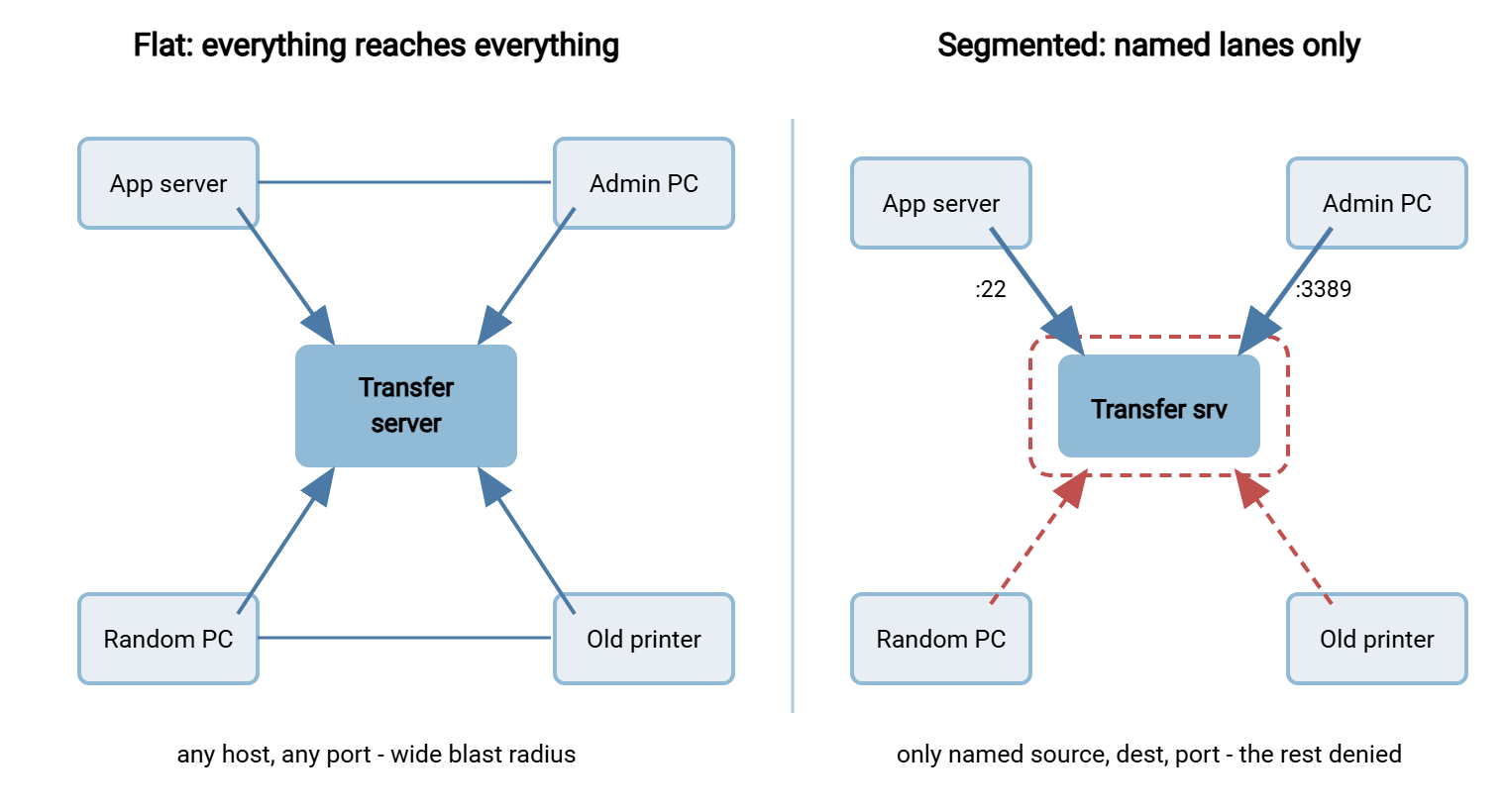
The diagram contrasts the two states. On the left, a flat internal network where every host can reach the transfer server. On the right, the segmented version: a tight micro-perimeter admitting only named sources on named ports, with everything else blocked.
Every Legitimate Flow Is a Triple
The building block of segmentation is noticing that every transfer you actually need can be written as a small, boring triple. That triple is a source, a destination, and a port. "The billing app server sends to the transfer server over SFTP" is APP_SERVER → TRANSFER_SERVER : 22. "The admin workstation manages the transfer server" is ADMIN_PC → TRANSFER_SERVER : 3389. Once you can list your flows as triples, the firewall rules write themselves. Just as important, everything not on the list becomes a candidate for denial. Boring is the highest compliment a firewall rule can receive.
So the method is: enumerate the real flows, express each as a triple, allow exactly those, and deny the rest by default. That inventory step is shared with the next article, finding and removing implicit trust. The flows you cannot account for are usually the implicit-trust flows you have been carrying without noticing. If listing your transfer flows feels hard, that difficulty is itself the finding — you cannot segment what you have never mapped.
A Worked Example: One Server's Lanes
Suppose you inherit a transfer server and want to segment it but do not yet know its flows. Start by watching what actually connects. The server's own connection log and a live look at established sessions show who is genuinely talking to it right now. Use netstat on the box, or the connection view in the transfer service, for that live look. Over a few days that list stabilizes into the real flows, and you translate each into a triple. I have inherited three such servers, and not one came with a list.
A typical result includes the billing app server on port 22 for the nightly export. It includes an ETL host on port 22 for a data pull you had half-forgotten existed. It also includes your own admin workstation on 3389, and a monitoring probe on 22. Four lanes. Then comes the surprise — there is almost always a surprise. There is an undocumented connection from a developer's laptop on port 22. It is left over from a one-off task months ago. That undocumented lane is exactly what segmentation surfaces. Under a flat "allow internal" rule it was invisible. The moment you try to write explicit allows, it has no home, and you get to ask whether it should exist at all. Nine times out of ten the answer is no, and you have just closed a door you did not know was open. This is why mapping precedes rule-writing. It is why dependency mapping for flows is worth doing properly: the map is where the ghosts appear.
Per-Flow Firewall Rules You Can Adapt
Here is a small but complete rule set for a transfer server, written in vendor-neutral syntax. You can translate it into any firewall or host-based rule engine. Replace the capitalized names with your own objects. The shape is the point: every allow names a source, a destination, and a single port. The last rule denies and logs everything else.
# ANTI-PATTERN - do not do this. One rule, unlimited blast radius:
# allow tcp  INTERNAL_NET  -> TRANSFER_SERVER : any        # "it's all internal"

# ---- Per-flow rules: one named lane at a time ----
allow tcp  APP_SERVER    -> TRANSFER_SERVER : 22      # SFTP: billing export push
allow tcp  ETL_HOST      -> TRANSFER_SERVER : 22      # SFTP: nightly data pull
allow tcp  ADMIN_PC      -> TRANSFER_SERVER : 3389    # management (RDP)
allow tcp  MONITOR_HOST  -> TRANSFER_SERVER : 22      # health check probe

# ---- Outbound flow (the server initiates to a partner) ----
allow tcp  TRANSFER_SERVER -> PARTNER_GW : 990        # FTPS control to partner
allow tcp  TRANSFER_SERVER -> PARTNER_GW : 50000-50100 # FTPS passive data range

# ---- Everything else east-west: denied and logged ----
deny  tcp  any -> TRANSFER_SERVER : any  log          # tripwire: should stay near zero
deny  tcp  TRANSFER_SERVER -> INTERNAL_NET : any  log # the server dials nobody inside
A few details reward attention. The SFTP lines need only one port each — 22. That is one of SFTP's quiet advantages and a big reason it segments cleanly. Our firewall's view of the protocols compares this to the multi-port sprawl of other options. The FTPS outbound flow needs a control port and a passive data range. That range must match what the partner's server offers. Sizing and matching passive ranges is covered in configuring passive port ranges. And note the final two rules: they deny by default and log. That is because a denied east-west packet toward your transfer server is not noise. It is either a misconfiguration or the first probe of an attack, and either way you want to see it.
Remember: the goal of per-flow rules is not just to block bad traffic — it is to make the deny counter meaningful. When only named lanes are allowed, every hit on the deny-and-log rule is a real event worth reading. A flat "allow internal" rule can never tell you that, because under it nothing is ever denied.
The Rules Live in More Than One Place
Segmentation is strongest when it is enforced in layers, so that a gap in one is caught by another. Depending on what you own, the same per-flow intent can be enforced at several points:
- The host firewall on the transfer server itself. This is available to everyone. Windows Firewall or its equivalent can enforce exactly the triples above, per server, with no network gear at all. It is the single highest-value segmentation step a small shop can take, because it does not depend on the network being cooperative.
- An internal firewall or VLAN boundary. Suppose you can place transfer servers on their own VLAN or behind an internal firewall. The per-flow rules move there and protect the whole segment, not just one host.
- The transfer service's own access controls. Many servers can restrict an account to specific source addresses at the application layer — a second, independent lane wall above the network. On a Windows server such as Sysax Multi Server, per-user rights and source restrictions are ordinary settings. So even if a network rule is someday loosened by mistake, the service still refuses a session from the wrong place as the wrong identity.
- The initiating side, for outbound flows. A scheduled-transfer job is itself a defined flow with one destination. In a tool like Sysax FTP Automation, each job names exactly where it connects. So the outbound lane is expressed in the job definition as well as the firewall. Those are two records of the same intent that should always agree.
You do not need all four to benefit. Even the host firewall alone converts "any internal host can reach this server" into "these four can, on these ports." That is most of the blast-radius reduction for none of the budget. Free is a price the budget committee rarely argues with.
Visibility: You Cannot Segment What You Cannot See
Segmentation and monitoring are two halves of the same idea. The per-flow rules define what should happen. The logs tell you what is happening, including the attempts your rules just blocked. This is why the deny rules log: a segmented network turns previously invisible east-west movement into visible events. In a flat network, a workstation scanning the file server is silent — the traffic is allowed, so nothing records it. In a segmented network, that same scan slams into deny-and-log rules and lights up.
That new visibility is a direct feed into continuous verification. The deny counter on your east-west rules should sit near zero in normal operation, so any sustained climb is a signal worth chasing. Treat those denials as tripwires, and keep the logs somewhere the attacker cannot reach. That is where segmentation stops being a static wall and becomes an alarm system, a theme our transfer logging and audit series develops.
Kestrel Payroll found out how useful that alarm is on the evening they turned it on. The per-flow rules went onto the transfer server's host firewall in a scheduled window. There were four named lanes and a deny-and-log rule beneath them. For twenty minutes the deny counter sat at zero. Then it ticked up, steadily, from a mailroom host nobody had listed. It turned out to be the nightly payslip print job, set up by a contractor years earlier and written down nowhere. It was trying to collect its file over SFTP as it had every night. The administrator recognized the host, confirmed the job with the mailroom by phone, and added a fifth lane. The payslips printed before midnight. The inventory gained a row, the rule set gained a comment, and the lesson stuck. The deny log is a discovery tool, and the rollout window is when you read it.
What Segmentation Does Not Do
Segmentation is powerful and partial, and being clear about its limits keeps you from over-trusting it. It reduces blast radius; it does not authenticate. A per-flow rule that lets APP_SERVER reach the transfer server says nothing about who is driving the app server. If that host is itself compromised, the lane you opened is the lane the attacker rides. That is precisely why segmentation and identity-centric access are two halves of one design. The rule narrows the network path, and the identity check proves the session traveling on it. Neither substitutes for the other.
Segmentation also does not encrypt. Narrowing a flow to one source and one port does nothing for the bytes in transit. That stays the job of SFTP or TLS. And segmentation offers little against a threat that never crosses a segment boundary. An attacker already on an allowed source, acting within its permitted lane, looks legitimate to the firewall. Segmentation raises the cost of lateral movement and shrinks what any single compromise can reach. It is a containment control, not a force field. Layered with identity and encryption, it earns its keep. Leaned on alone, it will disappoint you at the worst possible moment. I have leaned on it alone; the moment arrived on schedule.
Segmentation Without a Data-Center Budget
The honest objection to all of this is cost and complexity. Microsegmentation products, software-defined networking, and per-workload policy engines are real, expensive, and aimed at large estates. A small team does not need any of them to get most of the value. The pragmatic minimum, in order:
- Turn on the host firewall on every transfer server and add the per-flow allows plus a default deny. This alone shrinks blast radius dramatically and costs nothing.
- Restrict accounts by source address in the transfer service where the feature exists, giving you a second enforcement layer that survives a network mistake.
- Put transfer servers on their own VLAN if you have manageable switches, so the boundary protects the group rather than each box individually.
- Log and review the denies on a schedule, so the segmentation you built keeps telling you something instead of silently rotting.
Each step is independently useful, and the list is ordered so that the cheapest, highest-impact move comes first. You can stop at step one and still have meaningfully reduced the damage a single compromised internal host can do. That incremental quality is the whole spirit of zero trust: you are never "done," but every step is real. The roadmap slide disagrees. The roadmap slide is not on call.
Bringing It Together
Segmenting transfer paths means refusing the flat network's default of "everything reaches everything". It replaces that with named lanes: this source, this destination, this port, this reason. Micro-perimeter thinking takes that down to the individual flow, so that a compromised internal host finds closed doors instead of open floor. You express each real flow as a triple, allow exactly those, and deny and log the rest. Enforce it in as many layers as you own — starting with the host firewall that every server already has. The big open room gets doors. The unpatched printer, at last, is alone.
Next in the series, finding and removing implicit trust gives you the inventory method for discovering the flows you did not know you had. The article on continuous verification turns your new deny-and-log rules into an alarm system. For the edge version of this boundary thinking, the DMZ and gateway architecture series is the companion.
Frequently Asked Questions
What is east-west traffic, and why does it matter for file transfer?
Do I need expensive microsegmentation software to segment transfers?
Why log the deny rules instead of just blocking silently?
Isn't a per-flow rule set a lot to maintain?
How does segmentation relate to a DMZ?
Does SFTP really segment more cleanly than FTPS?
From the Sysax team: we build secure file transfer software for Windows. Sysax Multi Server is an FTP, FTPS, SFTP, and HTTPS server. Sysax FTP Automation handles scheduled, scripted transfers. Free trials are on the download page.