
Zero Trust in Plain Words (for File Transfer)
Forty minutes into the webinar, the slide says "Achieve Zero Trust" and the presenter has not yet mentioned a file. Zero trust may be the most marketed phrase in security. You have been pitched it in webinars, seen it stamped on product boxes, and watched it justify price increases. If your first reaction to the term is a tired eye-roll, that reaction is healthy. A great deal of what gets sold as "zero trust" is an old firewall with a new sticker. But underneath the marketing sits one genuinely useful idea, and it is worth rescuing from the people trying to sell it back to you.
This article does the rescuing. It states the one honest idea in a single sentence and shows where the assumption it corrects came from. It translates "never trust, always verify" into things a working administrator actually does. It separates the real principles from the parts vendors added to make a SKU. Every point maps to file transfer specifically, the accounts, keys, servers, and logs you already run, because that is where this series lives. It is the opening article of our zero trust for file transfer series, and the foundation the other five build on.
The One Sentence Under the Buzzword
Strip away every diagram, dashboard, and product tier, and zero trust reduces to a single sentence: stop treating network location as proof of identity. That is the whole idea. Everything else is elaboration or upsell.
Being on the LAN is not an identity. Arriving from a "trusted" IP address is not an identity. Having made it past the perimeter firewall is not an identity. Those are circumstances, and circumstances can be borrowed, spoofed, or inherited by an attacker. The attacker compromises one machine and now wears its network position like a borrowed badge. Zero trust says: verify who is asking and what they are allowed to do, every time, regardless of where the request comes from.
For file transfer this idea bites hard, because so much of the discipline runs on exactly the assumption zero trust rejects. Consider the sentence a thousand transfer setups are quietly built on: "this job comes from 10.0.0.5, which is our application server, so let it drop files." The IP address 10.0.0.5 is not an identity. It is a location. Suppose an attacker gets a foothold on that application server — or on anything that can send packets claiming to be it. The file drop opens without ever proving who is really on the other end. Zero trust is the habit of noticing that gap and closing it. The application server, for the record, never asked to be trusted.
Where "Trust the Network" Came From
The assumption zero trust corrects was not stupidity; it was a reasonable design for a world that no longer exists. Security people call it the perimeter model, or more vividly, castle-and-moat: build a hard shell around a soft center. The firewall is the moat, the internal network is the castle, and once you are inside the walls you are treated as family. Everything internal trusts everything else internal, because the dangerous part — the outside — has been walled off.
This worked when the network had a clear edge. Your machines sat in your building, your staff sat at your desks, and "inside" genuinely meant "owned, patched, and watched by us." The moat was a real boundary between us and them. I ran networks like that, and I would defend the design to anyone who was not there.
Three slow changes dissolved that edge. Remote access came first. A VPN, by design, takes someone who is physically outside and drops them inside the walls. So "inside" stopped meaning "in the building." Then cloud services and partners moved data and connections to places your firewall never guarded. Your files live on systems you do not own, and outside organizations connect into your transfer endpoints daily. Finally, attackers industrialized lateral movement. They learned that popping a single soft internal machine — one phished laptop, one unpatched server — hands them the run of a flat network. Everything there trusts everything. The moat still stops casual outsiders, but "inside equals trusted" became the single assumption attackers rely on most. It turns one compromised host into access to everything that host's network position can reach.
Zero trust is the correction. It shrinks the unit of trust from "the entire inside" down to "this one verified access, by this identity, to this resource, right now." The moat stays — you do not tear down the firewall. But you stop letting a machine's position behind it stand in for a login. The moat keeps its job. It loses its speaking role.
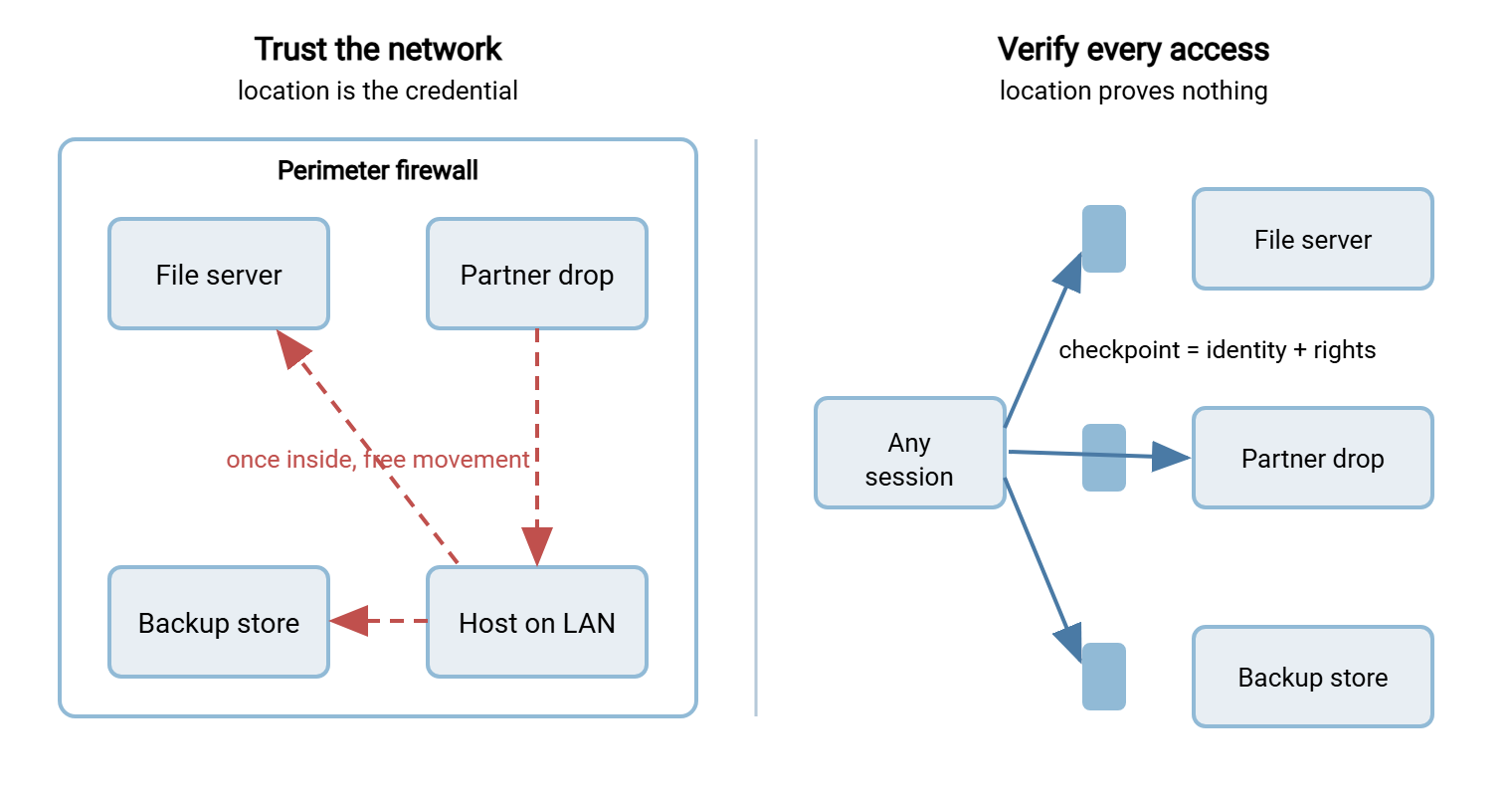
The diagram below contrasts the two mindsets. On the left, the perimeter model: one wall, and behind it free movement between every resource. On the right, the zero-trust reframe: no assumption of internal safety, and a verification checkpoint in front of each resource instead.
"Never Trust, Always Verify," Decoded
The slogan sounds absolute and slightly paranoid, which is why it makes skeptics wince; I winced the first time I heard it. Decoded into plain administration, it is neither.
"Never trust" does not mean block everything or suspect your coworkers. It means: hand out no free passes based on position. A connection does not earn access by being internal, by arriving from a familiar subnet, or by having connected successfully yesterday. There are no standing memberships — only verified sessions.
"Always verify" means every session proves three plain things before a single byte of file moves. First, it proves who (an authenticated identity — a person, a service account, a named partner). Second, it proves what (the explicit rights that identity holds for this specific resource). Third, it proves the channel is protected (encryption in transit and a verified endpoint on the other end, so nobody is reading or impersonating mid-stream). None of those three is exotic. You already do all of them somewhere — SSH keys, certificates, per-user accounts, TLS, logs. Zero trust says to do them everywhere, and to stop carving out "but it is internal, so we skipped it" exceptions.
Put plainly: verification is a verb you already perform. The change zero trust asks for is not a new tool but the removal of the exceptions. Those are the quiet spots where a flow was allowed to skip proving itself because of where it sat. The exceptions were never written down, which is how they survived.
The Actual Principles, Minus the Sales Deck
There is a vendor-neutral reference for all of this — the zero trust architecture guidance published by NIST, the U.S. standards body. The reason it is worth naming is that it is refreshingly boring. It sells nothing. Its principles, translated into file-transfer plain-speak, read like this:
- Treat every endpoint and share as a resource to be protected on its own. An internal SFTP server is not "safe because it is internal"; it is a resource that guards itself.
- Secure every connection regardless of where it sits. A transfer between two of your own servers deserves encryption exactly as much as one crossing the internet.
- Grant access per session, to the specific resource — not blanket admission to a network segment because one thing on it was needed.
- Base access on policy about identity and context, and enforce it before the transfer, every time — not once at setup and never again.
- Watch the health and behavior of the accounts and systems involved, and treat that watching as part of access, not a separate afterthought.
- Collect information about what is actually happening and feed it back to tighten the policy over time.
Read that list again and notice what is absent: no product names, no "buy the platform," no agent to install. These are design principles about how you configure and operate what you already own. That is the real zero trust, and it costs money only in attention. Attention, unfortunately, is the budget line that is always overspent.
Acme found out how cheap the principle is by accident. Leadership came back from a conference asking for zero trust. A platform evaluation was duly opened, with a demo scheduled and a spreadsheet of tiers. While that ran, one administrator spent an afternoon listing the transfer flows (the method in the transfer inventory). She found the application-server drop that trusted an address and asked for nothing else. She gave it a service account and an SSH key, and scoped the account to one folder. She removed the bare allow before she went home. When the evaluation reached its second quarter, that flow had already been zero trust for months. The report to leadership said so, politely. Nobody was wrong to look at the platform; the lesson was only that the sentence came first and cost an afternoon.
What the Vendors Added
Around that boring, useful core grew an entire product category, and honesty requires separating the two. The additions are real technologies with real names. They include ZTNA (zero trust network access) gateways that broker connections to individual applications. There are SASE bundles that fold networking and security into one subscription, and identity-aware proxies sold as tiers. There are agents that sit on every endpoint reporting posture, and dashboards that render all of it as green checkmarks. At genuine scale — thousands of users, hundreds of applications, a workforce scattered across continents — some of this earns its keep. The checkmarks are very green.
But three honest caveats matter for a normal IT team, and especially for a file-transfer estate:
- None of it is required to practice the principle. You can remove implicit trust from your transfers using the accounts, keys, certificates, firewall, and logs you already have. The principle is free; the products are a convenience layer for scale you may not have.
- "Zero trust in a box" is a contradiction. Zero trust is an approach to configuring and operating what you own. It is a property of a system, not a thing you install into it. A box cannot contain it any more than a treadmill can contain fitness.
- A product that promises to "achieve zero trust" is selling an outcome as a SKU. Treat that sentence exactly the way you treat every other vendor promise: as a claim to be verified, not a fact. Your skepticism is not cynicism here; it is the correct instinct.
Remember: zero trust is a way of configuring what you own, not a product you buy. If a pitch tells you a purchase will "give you zero trust," you are being sold the outcome as a SKU. The principle — stop trusting network location — costs attention, not a license.
What Genuinely Changes for File Transfer
Principles are easy to nod along to and hard to act on, so here is what applying them actually alters in a transfer environment. These are the concrete deltas the rest of this series works through in detail.
- Every session is tied to a named identity. The "job from that IP" becomes the job authenticated as a specific service account with a specific key. No transfer moves anonymously on the strength of its source address. This is the subject of identity-centric access to file transfer. It builds directly on the account, key, and certificate practices in our transfer authentication and SSH key management series.
- Internal transfers get the same protection as external ones. "It is just internal" stops being a reason to run plaintext FTP between two servers. The connection is encrypted and authenticated whether it crosses the internet or the rack.
- Flows narrow to explicit source-to-destination pairs. Instead of "any internal host may reach the file server," each flow becomes a named lane with its own firewall rule. That is the segmentation work. It leans on the same boundary thinking as our DMZ and gateway architecture series.
- Trusted-IP allowlists become one factor, not the whole gate. An allowlisted address still has to authenticate. Location can narrow who may knock; it can never be the thing that opens the door. Rooting out the places where it still is is the job of finding and removing implicit trust.
- Monitoring becomes part of access, not a report you read later. Every session is logged and evaluated, and what you learn tightens policy. That is the continuous-verification idea, monitoring treated as a zero-trust pillar rather than after-the-fact cleanup.
- Access is reviewed and revoked on a schedule. "Granted once, trusted forever" is itself a form of implicit trust — trusting a decision made by someone who may have left the company. Rights get re-checked, and stale ones get pulled.
What Zero Trust Is Not
Because the term has been stretched to mean whatever a given vendor is selling, it helps to nail down what it is not. Each of these is a misconception the marketing actively encourages.
- Not a product you buy. Covered above, but it bears repeating because it is the most profitable misconception. There is no single thing whose installation makes you "zero trust."
- Not all-or-nothing. You do not flip a switch on Monday. You remove implicit trust one flow at a time, and every flow you fix is a real improvement whether or not you ever "finish." Partial zero trust is not a failure state; it is the normal state.
- Not "trust nobody, block everything." The goal is not a fortress that stops work. It is to verify everybody and then grant them exactly what they need. That often makes legitimate access smoother, because it is explicit and documented rather than accidental.
- Not new. At its core it is the decades-old principle of least privilege, plus one addition: stop using the network as a password. If you already think in least privilege, you are most of the way there.
- Not only for large enterprises. The principles are, if anything, easier to apply to a small, well-understood transfer estate than to a sprawling one. You can hold every flow in your head; a Fortune 500 cannot. That is an advantage, not a limitation, and the small-team roadmap is built around it.
Old Assumption, New Reframe: A Translation Table
The quickest way to make zero trust concrete is to line up the assumptions a typical transfer setup makes. Compare each with the reframe zero trust asks for, and the actual thing you would do. This table doubles as a map of the series — each row is worked out in a later article.
| The old assumption | The zero-trust reframe | What you actually do |
|---|---|---|
| "It comes from a trusted IP, so let it in." | An IP is a location, not an identity. | Require authentication even from allowlisted sources; treat the allowlist as a filter, not a login. |
| "It is internal, so plaintext is fine." | Internal networks get breached too. | Encrypt and authenticate internal transfers the same as external ones. |
| "Any internal host can reach the file server." | Broad reach is broad blast radius. | Narrow each flow to explicit source-to-destination pairs with per-flow rules. |
| "The job authenticates once at setup." | Trust decays; people and systems change. | Re-verify every session and review rights on a schedule. |
| "We check the logs if something goes wrong." | Monitoring is part of access, not cleanup. | Log and evaluate every session; feed anomalies back into policy. |
The Pieces You Already Own
The encouraging part of dropping the marketing is realizing how much of the raw material is already on your servers. Consider a transfer server that authenticates every user against its own accounts, enforces per-account rights, and writes a real activity log. It is already doing the identity and verification work zero trust asks for. A Windows server such as Sysax Multi Server exposes exactly those pieces (per-identity authentication over SFTP, FTPS, and HTTPS, plus activity logging) as ordinary settings, not as a "zero trust module." On the automation side, consider the shift from "a script that trusts its network position". The result is "a defined job that authenticates as a named identity to a named destination". That is a configuration choice in a scheduled-transfer tool like Sysax FTP Automation. Each job carries its own credentials and target rather than relying on where it happens to run. Neither is a zero-trust product; both are ordinary tools you can operate in a zero-trust way. That is the whole point — the principle is in how you configure, not what you install.
Where This Series Goes From Here
You now have the honest version: zero trust means stop treating network location as proof of identity. Verify who and what on every session. Remove the exceptions where you used to skip that because something was "internal." It is an approach, not a purchase; incremental, not all-or-nothing; and older than its own buzzword. The eye-roll can stay. Keep the sentence.
From here the series turns each principle into work you can schedule. Identity-centric access ties every session to a verified identity. Segmenting transfer paths narrows the lanes. Finding and removing implicit trust hunts down the trusted-IP assumptions hiding in your current flows. And if you would rather start from a plan than a principle, the small-team roadmap sequences all of it into quick wins first. For the wider question of what you are defending against and why, our transfer threat modeling series is the natural companion.
Frequently Asked Questions
Do I have to buy a product to do zero trust?
What does "never trust, always verify" actually mean day to day?
Is zero trust only for big companies?
Does zero trust mean I should distrust my own employees?
Can I still use a firewall and a perimeter if I adopt zero trust?
Where should a file-transfer admin start?
From the Sysax team: we build secure file transfer software for Windows. Sysax Multi Server is an FTP, FTPS, SFTP, and HTTPS server. Sysax FTP Automation handles scheduled, scripted transfers. Free trials are on the download page.