
Anonymous FTP: Where It Came From, What It Risks Now
"It's been that way for twenty years and nothing bad has happened." The sentence comes from the colleague who has run the box longest, and it is offered kindly, as reassurance. You are looking at the word anonymous in a config file on a server you inherited, or at a scan report that says "anonymous login permitted." You are trying to decide how worried to be. Twenty quiet years is a real data point. It is not the data point you need, because the internet that server was built for is not the one it is plugged into now.
Two pieces of knowledge settle the question: why anonymous FTP exists at all, and what it actually risks on a modern network. This article supplies both. First comes the history, told properly, because anonymous FTP was not a mistake when it was invented. It was the distribution backbone of the early internet. Understanding that era explains why the feature is still present in every FTP server you will ever touch. Then the present: a concrete, no-fear-mongering list of what an open guest door costs you today, from strangers using your disk as free hosting to your company's name landing on blocklists.
This is the opening article of our Anonymous and Guest Access series. By the end you will be able to explain the risk in plain language to a manager and test your own servers in five minutes. You will know which article to read next depending on what you find. The five minutes includes typing a password the server will not read.
What "Anonymous" Means on a File Server
Anonymous FTP is a convention, not a separate protocol. An FTP server that supports it accepts a login with the username anonymous (many servers also accept ftp as a synonym) and any password at all. By longstanding courtesy, the visitor types their email address as the password. But the server does not check it, cannot check it, and most visitors long ago stopped bothering. The login succeeds for everyone, every time. It is, in that narrow sense, the most reliable authentication ever shipped.
Once inside, the anonymous visitor is mapped to a restricted account on the server: usually a dedicated system user with access to one directory tree set aside for public files. Everything about that mapping is covered in our guide to FTP account models. That includes how the server translates a protocol login into filesystem rights, and how anonymous compares with real per-user accounts. So we will not repeat the mechanics here. For this article, the essential point is simpler:
- Anonymous means unauthenticated. The server has no idea who is connected. Not a name, not an organization — nothing but an IP address.
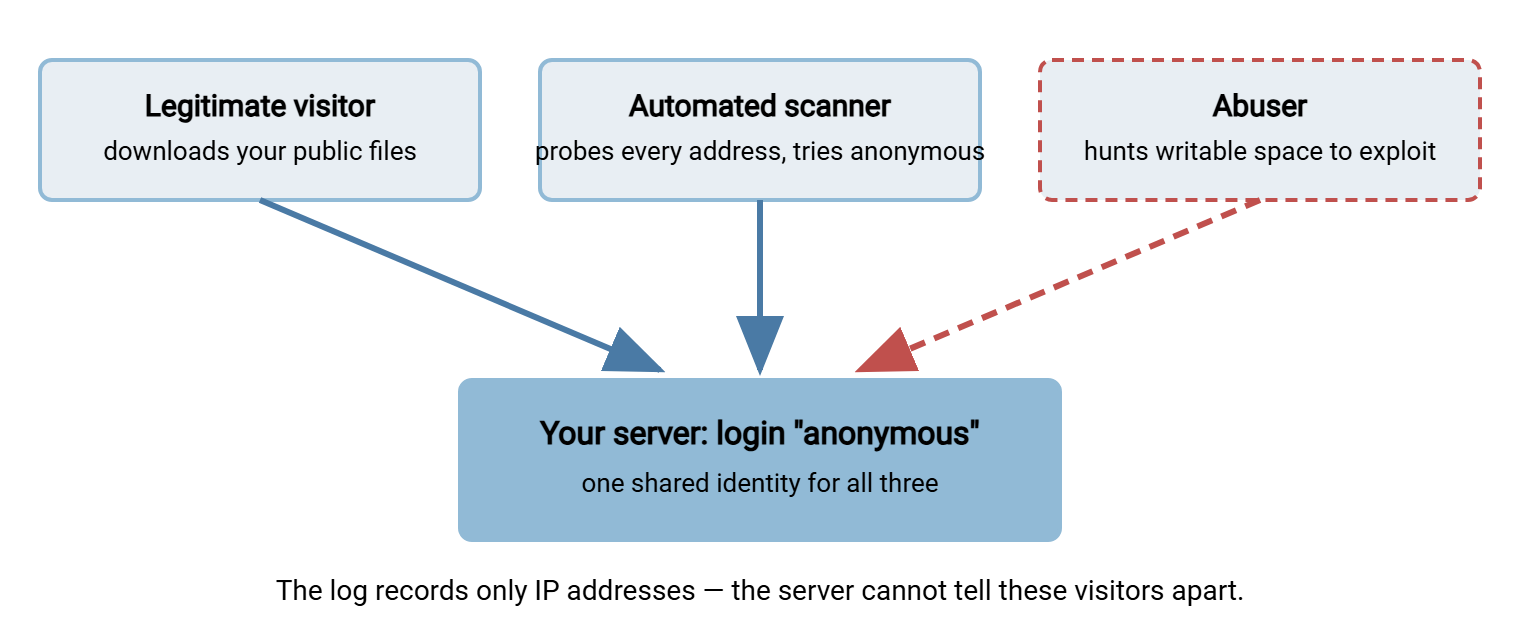
- Anonymous means shared. Every visitor in the world uses the same identity. Your logs cannot distinguish a customer downloading a driver from a stranger probing for writable space.
- Anonymous is a door, not a room. The risk depends entirely on what is behind the door: what the guest account can read, and — far more dangerous — what it can write.
Guest access is the same idea wearing different clothes: a shared account named guest or public, often with a well-known or blank password. Sometimes it is on SFTP or a Windows share rather than FTP. Everything in this series applies to those doors too. If a login does not identify one specific human or system, it is anonymous in every way that matters. Nobody owns the guest account, so nobody ever offboards it.
The Public-Archive Era: Why This Ever Made Sense
To a modern eye, "let anyone log in" sounds absurd. It was not absurd on the network where FTP grew up. Knowing that history stops you from dismissing the people who built these systems as careless. That matters when one of them is your predecessor. I have inherited two of these servers, and both were built by careful people solving the problem in front of them.
FTP is older than the web. In the early internet — a small neighborhood of universities, research labs, and technology companies — there were no websites to download things from, because there were no websites. If a lab wrote a useful program, published a paper, or maintained a collection of standards documents, it needed a way to share it with the world. That was a public FTP archive: a server anyone could log into anonymously and browse. The convention put public files under a directory called /pub. The great archives of the era were exactly that — enormous /pub trees full of free software, documentation, source code, and data sets. It was a simpler internet, which is not the same as a safer one.
The model worked because of three assumptions that were true at the time:
- The network was a community. Most connected machines belonged to institutions. If someone misbehaved, their university or employer could be told, and the behavior stopped. Accountability existed socially even though it did not exist technically.
- Resources were scarce enough to self-limit abuse. Disk was expensive and links were slow. Nobody could quietly dump a terabyte of pirated video onto your server, because neither the terabyte nor the bandwidth to move it existed.
- Publishing was the whole point. These servers held nothing private. The archive was the product, and anonymous access was a feature, not an oversight.
The era even solved distribution problems we now hand to content networks. Popular archives were mirrored — copied on a schedule to volunteer servers around the world, so that readers could fetch from somewhere nearby. Some archives ran an /incoming directory: a writable folder where community members could contribute a file, which a human maintainer would inspect and move into the public tree. That pattern — the write-only contribution drop — will come back later in this series, because it survives today in both legitimate and abused forms. There was even a search engine devoted purely to indexing anonymous FTP listings, years before web search existed. If you enjoy this kind of background, our history of FTP tells the protocol's whole story.
In short: anonymous FTP was the correct engineering answer to the question "how does a trusted community share public files?" The problem is that not one word of that question describes the internet your servers are connected to now.
What Changed
Every assumption that made anonymous FTP safe has inverted.
The community became a crowd of strangers — plus scanners. Today, any service listening on a public address is found quickly. Automated scanners sweep the entire address space continuously, cataloging open ports and trying well-known logins. And anonymous is the first login every FTP scanner tries, because it costs nothing and succeeds often. Whether a human ever "knows about" your server is irrelevant; the machines already do. They are, in their way, your most loyal users.
Abuse became profitable and free to attempt. Storage and bandwidth are now cheap for you and cheaper for an abuser using yours. Pirated media, malware payloads, and phishing kits all need hosting that cannot be traced to their owner. An open writable directory on someone else's respectable server is exactly that. The economics that once limited abuse now fund it.
Servers stopped being single-purpose. The classic archive held only public data. A modern file server that happens to allow anonymous login usually also carries business data — partner uploads, exports, backups. That data is separated from the public tree by nothing more than directory permissions that someone configured years ago and nobody has audited since. The blast radius of a mistake grew enormously; our file server permissions series exists for exactly this reason.
Legitimate anonymous traffic evaporated. The web took over public distribution, and mainstream browsers eventually dropped FTP support entirely. The honest users left long ago. What remains on a typical forgotten anonymous endpoint is a trickle of scanners, scripts, and opportunists — which means the door is now almost purely downside. It stayed open for guests who stopped coming years ago.
The diagram below shows the core structural problem: one shared identity serving everyone who knocks.
The Modern Risk List
Here is what an anonymous or guest door actually costs, stated concretely. Not every risk applies to every server — a strictly read-only archive escapes the first one, for instance — but every open door carries at least two of the four.
Risk 1: Your disk becomes someone else's free hosting
This is the classic abuse, and it targets any anonymous area that permits writing. Abusers scan for open FTP servers, test whether they can create files, and then move in. They bring pirated software and media, bootleg archives, files being swapped between parties who want no traceable connection to each other. The uploads typically hide in deeply nested directories with misleading or nearly invisible names, so a casual glance at the top-level folder shows nothing wrong while gigabytes accumulate below. A disk that fills itself is never filling with anything you wanted.
The costs are direct: your disk fills, your bandwidth serves strangers, and your server's address starts circulating in exactly the communities you least want to be popular with. Legitimate services then degrade — the partner upload that fails at month-end because an abuser consumed the volume is a real and recurring story. The full anatomy of this pattern, and the defensive design that prevents it, is the subject of our article on upload-drop abuse.
Risk 2: A malware relay with your name on it
A writable anonymous area is also a fine place to stage malicious files. The abuser uploads a payload to your server, then mails victims a link pointing at your legitimate, reputable domain. That link sails past filters that would have blocked a link to a shady one. Your infrastructure becomes a link in someone else's attack chain, and you find out when a security team somewhere reports you.
The consequences arrive as blocklisting: security vendors and mail operators maintain shared lists of hosts observed serving malware. Once your address or domain lands on one, your outbound email starts bouncing and your website starts triggering browser warnings. That affects every part of your business, not just the forgotten FTP box. Getting off those lists takes days to weeks of cleanup and appeals. Scanning inbound files helps contain this class of problem, which is why our malware scanning series pairs naturally with this one.
Risk 3: Exposure of things that were never meant to be public
Even a read-only anonymous tree is a standing exposure risk, because directories drift. Someone stages a database export "temporarily" in the public folder. A backup job is misconfigured by one path segment. A vendor support bundle full of config files — including credentials — gets dropped where the vendor can fetch it and never removed. The anonymous door faithfully publishes every one of these mistakes to the entire internet, and open directories get indexed, cached, and shared far faster than most teams expect. I once found a "temporary" export in a public tree that had outlived two audits.
Anonymity also destroys attribution. When you do discover that a sensitive file sat in the public tree for months, the investigation has almost nothing to work with. There are no usernames, just IP addresses in the transfer log — if transfer logging was even enabled. You cannot answer the first question every incident report asks: who accessed it? The log says "anonymous," which is the log's way of shrugging.
Risk 4: Legal and reputation damage
When strangers store and distribute content through your server, some of it will be content that attracts lawyers. Copyright takedown demands are the mild end. At the severe end, servers have been seized as evidence because of what third parties stored on them. And "we didn't know it was there" is a sentence you want never to say to an investigator, an auditor, or a journalist.
Compliance frameworks treat unauthenticated access as a straightforward finding: most security questionnaires and audits ask directly whether anonymous access exists on systems in scope. An anonymous door you forgot is therefore also a failed audit answer you did not mean to give. And reputation damage compounds quietly — partners who learn that your estate hosted pirated files or malware do not usually complain. They just tighten their own controls against you or take their business somewhere more careful.
"Nobody Knows It's There" Is Not a Defense
The most common objection to closing an old anonymous door is that it is obscure: not linked from anywhere, not in DNS, not documented. That defense fails on arithmetic. The public IPv4 address space is small enough that scanning all of it for one port is a routine, hours-long job for freely available tools. It is being done, continuously, by many parties at once. If your server listens on a public address, it has been found, its banner has been recorded in searchable databases of internet-wide scan results, and its anonymous login has been tested. Obscurity determines only how long ago that happened.
The honest version of the objection is "nobody legitimate knows it's there" — and that is an argument for closing the door, not for keeping it. An anonymous endpoint with no legitimate users has a risk list and no benefits column. Even inside a private network the logic mostly holds: internal anonymous services are reachable by every workstation, and therefore by every piece of malware that lands on one.
Northgate Retail learned this from a disk alarm rather than a scan. The alarm fired on a store-systems file server when a volume crossed its quota threshold. The volume was one nobody had touched in a year. The account filling it was guest, a shared login created for a signage project that had finished long before, with write access to a folder nobody had documented. The engineer on call made the folder read-only that afternoon and preserved the contents for the security team to review. The engineer put the account on the offboarding list it had never been on. The alarm had been the only thing in the building that knew the account existed.
Remember: an anonymous door is found by scanners in hours, not years, no matter how obscure the server. The only real questions are what the guest account can read, what it can write, and whether anyone legitimate still uses it. Those three answers decide everything that follows.
A Five-Minute Self-Check
You can settle the question for any server you administer right now. This check runs against your own estate only — the servers you are responsible for or have explicit authorization to test. Probing other people's servers for open logins is illegal in most places and unprofessional everywhere.
From any machine that can reach the server, try the guest login by hand. The built-in Windows command-line client is enough — it struggles with transfers through firewalls, but a login test needs no transfers:
C:\> ftp ftp.yourcompany.example
Connected to ftp.yourcompany.example.
220 FTP Server ready
User: anonymous
331 Guest login ok, send your email address as password
Password: audit@yourcompany.example
230 Guest login ok, access restrictions apply.
ftp> quit
The reply codes tell the story. A 230 after the password means the door is open. A 530 Login incorrect means anonymous is disabled — test the username ftp too before concluding you are clean. On a machine with curl available, the same test is a one-liner you can script:
curl -sS -m 10 --user anonymous:audit@yourcompany.example ftp://ftp.yourcompany.example/ && echo "ANONYMOUS LOGIN OPEN"
If the login succeeds, check two more things while you are connected. Check whether the listing shows anything that looks non-public, and whether you can create a file. For that second check, upload a tiny test file to see if writing is allowed, then delete it. Write access turns a moderate finding into an urgent one. Check the server's configuration as well — a login test proves the door's state today, while the config shows whether it was deliberate. On a Windows server such as Sysax Multi Server, authentication is organized around defined user accounts. So a guest door shows up plainly in the account list rather than hiding in a text file.
Scope rule: run this check only against servers you own or administer, with a change ticket or your manager's knowledge if your organization expects one. The estate-wide version of this test — sweeping every server you are responsible for, on a schedule — is covered step by step in the auditing article.
Where to Go From Here
The one-paragraph summary: anonymous FTP was the right design for a small, trusted, resource-scarce network that needed public archives. Every one of those conditions has since reversed. Today an anonymous or guest door offers four concrete risks: free-hosting abuse, malware staging, accidental exposure, and legal or reputation damage. It offers them in exchange for a user population that has mostly dwindled to scanners. It is not a panic item; it is an audit item with a clear playbook. Twenty quiet years is a fine record. It is not a control.
The playbook is the rest of this series. Start by finding every anonymous and guest door in your estate, because the one you know about is rarely the only one. Then weigh each find against the short list of legitimate anonymous-access cases — a few uses do survive scrutiny, with safer designs. Everything that fails the test goes through a careful lockdown rather than an abrupt shutoff. And if the anonymous door exists because the server itself is a relic, the broader retiring plain FTP series covers the whole migration.
Frequently Asked Questions
What does the password actually do in an anonymous FTP login?
Is running an anonymous FTP server illegal?
My anonymous area is read-only. Is it still a risk?
How do attackers find an anonymous server nobody links to?
Does renaming the account from "anonymous" to something else help?
What should replace anonymous FTP for public downloads?
From the Sysax team: we build secure file transfer software for Windows. Sysax Multi Server is an FTP, FTPS, SFTP, and HTTPS server. Sysax FTP Automation handles scheduled, scripted transfers. Free trials are on the download page.