
Validating and Sanitizing Customer Uploads
The nightly move script stopped at eleven minutes past two, on a file called claim photo's (1).jpg, and stayed stopped until someone came in. Nobody at the customer's end meant anything by it. Every file a customer uploads arrives from a device you do not manage, prepared by a person you cannot train, over a connection you do not control. In security terms that has a name: untrusted input. It does not matter that the customer is friendly, longstanding, or contractually bound; the file itself carries no proof of any of that. It might be exactly the signed contract it claims to be. It might be a virus the customer's compromised laptop attached without their knowledge. It might be a two-gigabyte video where a document was expected. Or it might be a file whose very name breaks the script that tries to move it, which is where this paragraph came in.
The answer is not suspicion of customers; it is an intake pipeline. This is a fixed sequence every upload passes through before any internal system or colleague touches it. Enforce, scan, quarantine when in doubt, normalize, and only then hand onward. This article designs that pipeline for the customer-facing case, where a second requirement stands beside safety. When a file fails, the rejection must land kindly on a person who made an honest mistake. This article is part of our customer-facing file exchange series, picking up at the moment the upload portal says "received."
Hostile Files, Innocent Senders
Two facts have to be held at once, and the whole design falls out of them. First: the file is untrusted, always, with no exceptions for familiar names. That is because the upload path is reachable from the internet, because customer machines get compromised, and because your pipeline cannot see intent. Second: the sender is almost certainly innocent. The overwhelming majority of "bad" uploads are mistakes — the wrong file grabbed from a folder, a photo where a PDF was wanted, an archive because someone thought it would help, a file inherited from a machine infected long ago. Malice is rare. The wrong file from the downloads folder is weekly.
Most intake designs honor only one of these facts. A pipeline built on the first alone is a fortress with rude doors: silent rejections, jargon errors, customers punished for mistakes they do not understand. One built on the second alone waves everything through to keep customers happy — until the day the happy customer's invoice attachment encrypts the case-management share. The designed position is strict machinery with gentle manners: every check runs, every failure is explained in customer words, and no failure is treated as an accusation. Fortresses with rude doors get entered through the window, and the window is email.
And do not let the sender's innocence blur into the channel's. An internet-facing upload endpoint is found by scanners within days of existing. Some of what arrives will not be from customers at all: scripted probes, junk uploads testing what sticks, and the occasional deliberately crafted file aimed at whatever parses uploads. The pipeline cannot interview senders, which is precisely why it does not have to. The same checks that catch a customer's honest mistake catch the attacker's deliberate one. Strictness is not cynicism about customers; it is the property that makes the front door safe to leave open for them. I have watched the first probe arrive before the first customer did.
The Intake Pipeline, End to End
The pipeline below is the article's map. An upload lands in an isolated landing zone. Enforcement checks run first because they are cheap. Scanning gates everything. Suspect files divert to quarantine rather than deletion. Survivors are normalized and handed to processing. Rejections at any stage flow back to the customer as a kind, actionable message.
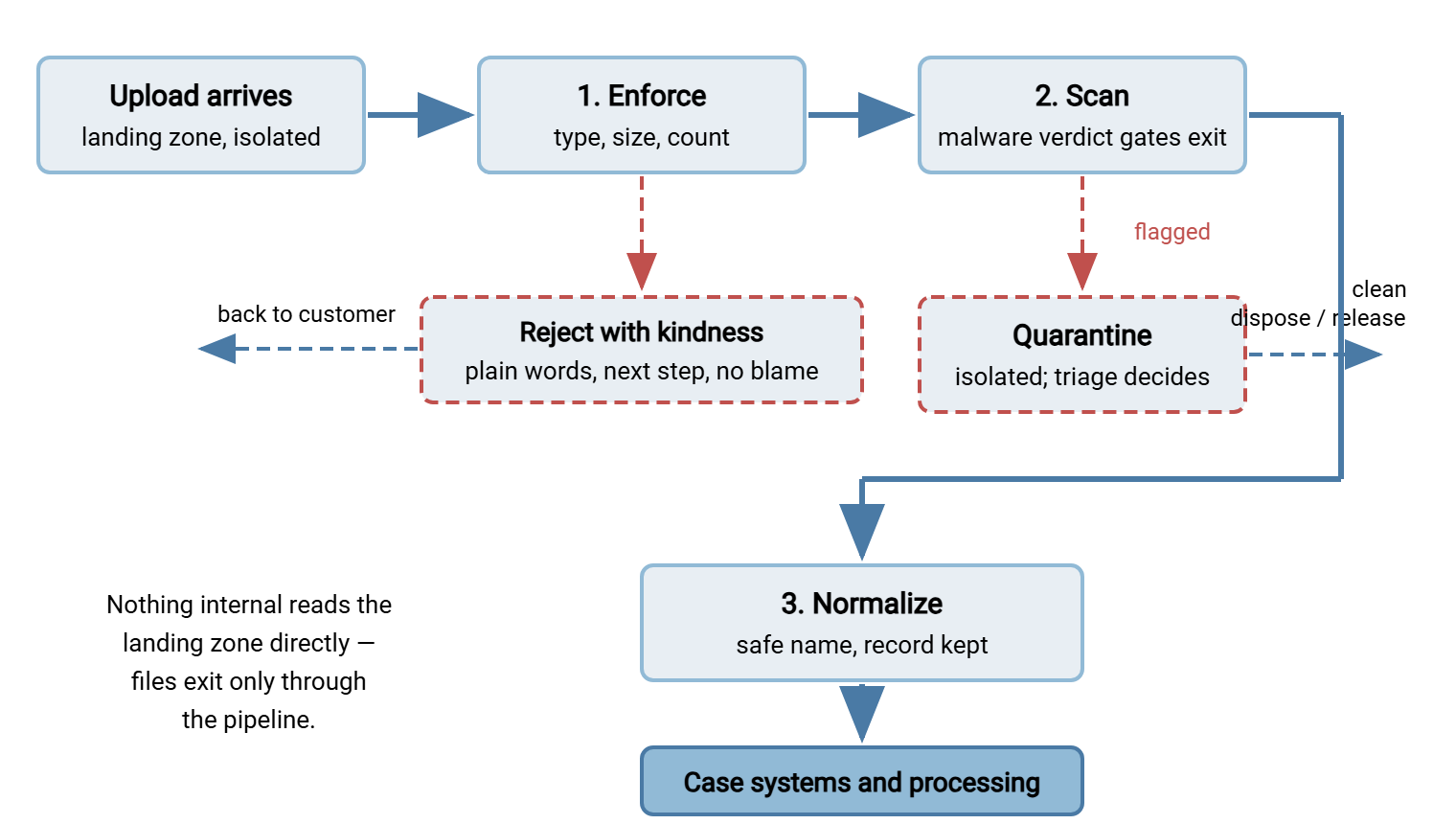
The architectural rule that makes the rest enforceable: the landing zone is a dead end. Uploads land in a folder — per-customer, isolated, upload-only from outside — that no case system, no colleague, and no downstream job reads directly. Files leave it only by passing the pipeline. The moment any consumer is allowed to "just grab it from the uploads folder," every check below becomes optional, and optional checks are skipped exactly when they matter. This is the same arrival-point placement argument made for transfer flows generally in where to put scanning — the customer landing zone is the textbook arrival point.
The server side of this comes cheap. Per-account isolated folders are standard transfer-server configuration. On a Windows deployment, Sysax Multi Server gives each customer account its own folder with its own permissions. It logs every upload to file and database. So the "received" entry of the audit trail below, with sender, time, and size, exists before the pipeline lifts a finger. The pipeline's zones (landing, quarantine, accepted) are then just folders with deliberately different access lists, on infrastructure you run.
Stage One: Enforce Type, Size, and Count
Enforcement runs first because it is cheap, fast, and catches the honest majority of bad uploads before the expensive stages. Three families of checks:
- Type. The portal stated what it accepts; the pipeline verifies it, and not by extension alone. A file's opening bytes betray its real format. A renamed executable should not pass as a PDF because of its name. The mechanics of checking declared type against actual content are the same as validating any file before it enters a flow, covered in validating files before sending. At intake you are validating before accepting, but the checks are identical.
- Size. Use a ceiling (the portal's stated limit, enforced server-side regardless of what the page checked) and a floor. A zero-byte file is always an error, usually a failed upload the customer believes succeeded. Accepting it silently plants a future "but I sent it!" dispute.
- Count and rate. A claim expecting five photos receiving five hundred files is malfunction or abuse either way; per-account and per-case ceilings keep one sender from flooding the intake.
Kestrel Payroll's intake caught one of these the week the pipeline went live. A client's timesheet arrived as timesheet_final.csv, the extension the automation expected. The type check rejected it because the opening bytes were those of a spreadsheet workbook, saved under the wrong name by a helpful export button. Before the pipeline, that file would have reached the payroll import, which would have failed halfway through a run at the worst available hour. Someone would have spent the evening finding out why. Instead the client received a message naming the file and asking for the comma-separated export. The corrected file arrived within the hour, and the run started on time. The pipeline's first catch was not malware. It rarely is.
Archives deserve an explicit policy rather than an inherited default. Customers send archives helpfully — everything zipped into one file. But an archive is a container the pipeline must open to inspect, expanding one accepted file into many unknown ones. A password-protected archive cannot be scanned at all. The honest options are laid out in scanning limits and encrypted files. For customer intake the defensible defaults are either "no archives — upload the files individually, the portal makes that easy" or "archives accepted, opened and rescanned item by item, password-protected ones rejected with an explanation." What is not defensible is passing an unopened archive to a case worker because the outer file looked fine. The outer file always looks fine. That is what outer files are for.
Stage Two: Scan Before Anything Touches It
Why scanning belongs in the transfer path at all — rather than being left to whatever desktop protection the eventual reader runs — is argued in full in why transfer flows need scanning. Customer intake is that argument at its sharpest: files from unmanaged internet-connected machines, delivered straight toward your most sensitive internal systems. The placement rule is absolute here. No file reaches processing, a case, or a colleague's hands without a clean verdict.
Treat the scanner itself as a design consideration for whatever you build or buy. Organizations standardize on different scanning engines, so the intake design question is not "which scanner". It is "is the pipeline wired so the scanner's verdict gates the file's exit from the landing zone?" Practically that means the pipeline invokes the scan (or watches for its verdict) as a step. It records the verdict alongside the file and physically moves files between zones only on a pass. A scan that runs "eventually, on the whole disk, overnight" is not an intake control — by then the file has been opened. The overnight scan is an autopsy, not a checkpoint.
Quarantine, Not Delete
When the scanner flags a file, the wrong moves are deletion and hesitation. Deletion destroys evidence, and destroys a customer's legitimate file if the flag was false. Hesitation leaves a flagged file sitting in the landing zone, a live grenade in a busy hallway. The right move is quarantine: an isolated area that nothing consumes, with tight access, logging on every touch, and a triage-and-release process with named humans. That whole discipline — the area's properties, alerting, accountable release, false-positive handling — is designed in quarantine workflow design and applies here unchanged.
What customer intake adds is a relations problem the internal case never has: the sender is a customer, and their file just vanished into silence. Decide, as policy, what a customer is told when their upload is held. The working answer: tell them promptly that the file could not be accepted and what to do — resend, or contact support — without a malware accusation. "Our system couldn't accept this file" is true whether the flag was a real infection or a false positive. It neither alarms the innocent nor tips off the rare malicious sender that their payload was noticed. Internally, treat a confirmed infection on a customer upload as an incident with a customer dimension. In that case, the customer's machine is compromised. Someone with the right role should tell them so, through account-owner channels, as a service. Meanwhile, the file follows the incident process in responding to an infected file. We learned the cost of silence the slow way: the first held file we never explained came back by email, twice.
Remember: quarantine before processing is the pipeline's insurance policy, and its customer-facing half is communication. A held file with a prompt, blame-free "please resend or contact us" costs one message. A held file with silence costs a support ticket, a duplicate upload, and a customer who now distrusts the portal.
Normalize the Names
Customer filenames are chaos with a keyboard: spaces and apostrophes, emoji, characters illegal on your filesystem but legal on theirs, names four hundred characters long, and the immortal scan (1) - Copy FINAL(2).pdf. Chaos is not just ugly — filenames flow into scripts, case systems, and archive paths, where a stray quote or path character becomes a parsing bug or worse. The pipeline's last stage gives every accepted file a canonical name and keeps the original as metadata:
NORMALIZATION RECIPE

  canonical name:
    <CASE>_<YYYYMMDD>_<SEQ>.<ext>
    e.g.  CL-8146_YYYYMMDD_03.pdf
          |        |        |  +-- extension verified in stage one
          |        |        +----- per-case sequence, zero-padded
          |        +-------------- arrival datestamp token
          +----------------------- case / account identifier

  rules:
    - characters: A-Z a-z 0-9 dash underscore dot; nothing else
    - length capped well under filesystem limits
    - sequence number guarantees uniqueness on collision
    - ORIGINAL name stored in the intake record, never trusted
      in paths: {original: "scan (1) - Copy FINAL(2).pdf",
                 stored_as: "CL-8146_YYYYMMDD_03.pdf"}
The safe character set and the cross-platform reasoning behind it are detailed in safe filename characters across platforms. The way a perfectly good name turns to gibberish between one system's encoding and another's is in filename encoding problems. Two points bear repeating for intake. Keep the original name — case workers recognize files by it, and disputes are settled by it. But keep it as recorded data, displayed where useful, never as a path component. And never overwrite on collision. The customer who uploads a corrected version of invoice.pdf must produce a second stored file, not silently replace the first. That is because "which version did they send first?" is a question someone will eventually ask with a lawyer present.
Reject With Kindness
Every enforcement failure produces a message to a customer, and that message is part of your security design. A confusing rejection drives the customer to the unscanned fallback (email), while a clear one brings a corrected file back through the safe path. The craft is separating strict decision from gentle delivery. A rejection should name the file, state the rule in customer words, give the exact next step, and offer a human — and never blame, never jargon, never security internals. A copyable template:
REJECTION MESSAGE TEMPLATE  (adapt tone to your voice)

  Subject: One file needs another try - case CL-8146

  Hello <name>,

  Thanks for sending your documents. Two arrived safely
  and are with your case handler. One we could not accept:

    holiday-video.mov (1.9 GB)
    Why: this upload accepts photos and PDF documents
    up to 200 MB. This file looks like a video, and is
    larger than we can take through this page.

  What to do: if the video is part of your claim, reply
  to this message and we will arrange another way to
  receive it. If it was attached by mistake, there is
  nothing to do - the rest of your documents are in.

  Your uploads page: <link>   Reference: UPLOAD-8146
  Questions? Reply here or call <number>.
The template never says "invalid file," "policy violation," "malware suspected," or anything about scanners and pipelines. It also never asks the customer to email the file instead — the fallback is a conversation, not an unscanned channel. For messages about held (quarantined) files, the same shape applies with the "why" softened to "our system couldn't accept this file as sent." The full art of writing customer-facing failure text — and designing away the need for most of it — continues in reducing the support load.
Timing matters as much as wording. The kindest rejection is the one delivered while the customer is still on the page. That means the portal's own checks catching an oversized or wrong-type file before the upload even starts, as designed in the portal article. The after-the-fact message above is for what only the pipeline can know: content that contradicts its extension, a scan verdict, an archive that would not open. Aim for that division deliberately — everything knowable at the page, said at the page; everything else, said within the hour by message. A rejection the customer discovers days later, after the deadline the upload was for, has failed at kindness no matter how warmly it is worded. A warm rejection after the deadline is a condolence card.
Automation Carries the Pipeline
None of this survives as a manual procedure. A pipeline may depend on a person noticing arrivals, running checks, and moving files. Such a pipeline runs during business hours, when that person is in, minus the days they are busy. And customer uploads arrive at midnight before the deadline. The load-bearing pattern is the hot folder. Automation watches the landing zone, reacts to arrivals, runs the stages, and moves files between zones. The pattern's mechanics, including the settle checks that keep a half-uploaded file from being grabbed mid-write, are in the hot folder pattern. This is a natural fit for a folder-monitoring tool such as Sysax FTP Automation. It can watch the upload area, move arrivals onward on schedule, and send notifications — the staff-alerting half of the portal's confirmation promise. So quarantine events page a human while clean files flow untouched.
Log every stage while you are at it: received (original name, size, account, time), enforcement verdict, scan verdict, normalized name, handoff. That per-file trail is what turns "what happened to the customer's upload?" into a lookup. It is the evidence spine the governance article will lean on when the auditor asks how intake is controlled. The trail is dull right up to the day it is the only thing anyone wants.
Strict Machinery, Gentle Manners
The intake pipeline is where the two sides of the customer-exchange counter finally cooperate instead of fighting. The auditor's side gets an unbroken rule — nothing reaches processing unchecked, unscanned, or unnamed — enforced by architecture rather than vigilance. The customer's side gets something subtler: mistakes that are caught early, explained plainly, and cheap to fix, which is more respect than most upload systems ever show them. Build the dead-end landing zone and order the stages cheap-to-expensive. Quarantine rather than delete, and normalize rather than trust. Write every rejection as if a decent person made an honest mistake — because they almost always did. The support desk feels this design most directly, and the next article measures exactly how much ticket volume it removes. The nightly move script, for what it is worth, has not met an apostrophe since.
Frequently Asked Questions
Why can't downstream systems just read the uploads folder directly?
Checking the file extension is easy — why isn't it enough?
Should we accept ZIP files from customers?
What should we tell a customer whose file was quarantined?
Why keep the customer's original filename if we rename everything?
From the Sysax team: we build secure file transfer software for Windows. Sysax Multi Server is an FTP, FTPS, SFTP, and HTTPS server. Sysax FTP Automation handles scheduled, scripted transfers. Free trials are on the download page.