
Transfer Evidence Auditors Accept — and the Evidence They Reject
The folder held nineteen screenshots, each cropped to the checkbox that mattered. The auditor's reply began "Thanks for these." Anyone who has been audited knows what follows "Thanks for these." You had answered the question well — how transfer access is granted, how sessions are encrypted, how failures get noticed. The auditor had nodded through all of it. Then came the sentence that defines the whole engagement: "Can you send evidence of that?" A week later the screenshots came back with polite follow-up questions. You began to suspect that "evidence" means something more specific than "proof I found convincing."
It does. Auditors apply consistent, learnable standards to the material you hand them. Once you know the standards, producing acceptable evidence the first time is not much harder than producing weak evidence. It is mostly a matter of where the material comes from and what travels with it. This article covers the four properties that make evidence credible and why the settings screenshot fails so reliably. It explains how populations and sampling work, and how to organize an evidence folder that answers requests in minutes instead of days.
This is the second article in our Audit-Ready Reporting series. The first, what auditors actually ask about file transfers, decoded the questions; this one is about the answers that hold up.
Why Evidence Beats Testimony
Start with the auditor's problem. They must sign an opinion that strangers will rely on, so they are professionally forbidden from taking your word for things. That is not because you seem dishonest. It is because "the administrator told me so" persuades nobody who was not in the room. Everything you say in an interview is, in audit terms, testimony: useful for understanding the system, nearly worthless for concluding about it. What converts understanding into conclusions is evidence — records that exist independently of what anyone says. The server is a better witness than any of us: it only remembers what happened.
Not all records are equal, though. Auditors weigh evidence roughly like this:
| Evidence offered | What it can prove | Typical reception |
|---|---|---|
| System-generated export with parameters, timestamp, and record count | Design and operation, for the whole period | Accepted; samples drawn from it |
| Log extract or database query output | That specific events occurred | Accepted when scope and source are shown |
| Screenshot with hostname, date, and full window visible | A setting existed at one moment | Accepted for design only, often corroborated |
| Cropped, undated screenshot | Very little | Follow-up request for something better |
| Hand-built spreadsheet, no source shown | What its author believes | Treated as testimony, not evidence |
| Policy document alone | Intent, not practice | "And evidence it operates?" |
Evidence ranks higher the less human judgment sits between the system and the page. That is the pattern behind the table. The four properties below are what put material in the top rows.
The Four Properties of Convincing Evidence
System-generated. The record was produced by the system itself — an export, a query result, a log — not typed, summarized, or "tidied" by a person. A hand-edited spreadsheet is testimony wearing a spreadsheet costume, and auditors are quick to ask where each number came from. If a human must transform data (merging two exports, say), keep the raw inputs and the transformation visible so the chain from system to conclusion stays intact.
Timestamped and attributed. Good evidence carries its own provenance: when it was pulled, by whom, from which system, with what parameters. A file named accounts.csv answers none of those questions. A file whose header rows record the source server, the query, the run date, and the operator answers all of them. Provenance is what lets an auditor rely on the item months later without re-interviewing you about it. It is also what lets you rely on it, because by then you will not remember either.
Complete. The evidence covers the whole scope claimed — every account, the entire period, all servers — and demonstrates that coverage rather than asserting it. Record counts, date boundaries visible in the data, and parameters shown alongside output all serve completeness. An export that quietly covers one of your two transfer servers is worse than no export, because it invites conclusions the missing half may contradict.
Reproducible. If the auditor asked you to run it again, the same query against the same records would produce the same answer. Reproducibility is why you keep the query text with the output, and why evidence should come from retained logs rather than from ephemeral screens. It is also the honest team's best friend: reproducible evidence cannot be quietly wrong in your favor.
Remember: the test an auditor applies is roughly "could I re-derive this from the system without trusting the person who gave it to me?" Evidence that passes needs no defense; evidence that fails generates follow-up requests no matter how true it is.
Why the Settings Screenshot Convinces Nobody
The screenshot deserves its own section because it is the most common evidence submitted and the most commonly bounced. A screenshot of your server's settings page fails the standards above in three distinct ways. It speaks only to design — the setting at one instant — when most questions also need operating evidence across the period. That distinction is unpacked in the previous article. The screenshot usually lacks provenance: cropped to the interesting checkbox, it shows no hostname, no date, no context proving which system it even depicts. And it is trivially editable. Auditors do not accuse anyone, but they weight evidence by how easily it could be wrong. A cropped image is as easy as evidence gets.
Screenshots are not banned; they have two legitimate roles. First, consider a live walkthrough — the session where the auditor watches you operate the system, covered in surviving the transfer audit walkthrough. A screenshot taken together during that session documents what both parties saw. The auditor's own observation supplies the credibility. Second, for settings that genuinely have no exportable form, a screenshot is the only option; make it a good one. The rules for a screenshot worth submitting:
- Capture the full window, never a crop — context is the point.
- Ensure the system identity is visible: hostname in the title bar, server name in the interface, or the connection address.
- Include the date — the system clock on screen, or at minimum a stated capture date in the evidence notes.
- Pair it with a config export or log line that corroborates the same fact, whenever one exists.
- Never annotate by editing the image; put commentary in an accompanying note.
One absolute rule outranks every other in this article: never fabricate, backdate, or "reconstruct" evidence, however small the gap it would paper over. Not the date on a screenshot you are sure of. Not the one missing row. A missing record is a finding; a manufactured record, discovered, poisons every other item you submitted and can end careers. Gaps are handled honestly, and the awkward cases at the end of this article show how.
Populations and Samples: How Your Evidence Gets Tested
Audit fieldwork mostly follows a two-step shape, and it pays to understand it. First the auditor obtains a population: the complete list of whatever is being tested — all transfer accounts, all leavers in the period, all configuration changes. Then they select a sample — a handful of items from that population — and ask you to produce detailed evidence for each one. That means the approval behind this account, the disable date for that leaver, the change record for this setting. The sample is small; the population is where the work is.
Two practical consequences follow. The first: population quality is everything. Every conclusion inherits the completeness of the list it was drawn from, so auditors test the list itself. They compare your account export against a second source such as a directory listing or an HR roster. They check that period boundaries are included and ask how the export was produced. Handing over a population you have not verified is volunteering to fail publicly. A worked example makes the check concrete. Suppose your transfer server export lists forty-one accounts. Before submitting it, reconcile it against the other places accounts live. Those are the directory group that grants transfer access, the partner list the business maintains, and the automation configs that hold service credentials. If the directory group has forty-three members, you have found two accounts your export misses — or two group members who should have been removed. Either discovery is far better made by you than by the auditor. Note the reconciliation in the evidence itself: "forty-one records; matches directory group after two documented removals." That one sentence converts a bare list into a tested population. The second consequence: one bad sample item is expensive. A single missing approval typically triggers an expanded sample — "let's look at ten more" — and repeated misses convert into a finding. This is why the periodic self-checks described in periodic access reviews are so valuable: they walk the same population-and-sample path before the auditor does.
Where Good Transfer Evidence Comes From
Almost everything convincing about a transfer system traces back to three sources. The first is logs — the system's own contemporaneous record of sessions, operations, and administrative changes. Logs are system-generated and timestamped by nature, which is why they anchor most operating-effectiveness answers. Their value depends on care taken long before the audit. Capture the right events (what to log) and keep a copy beyond the server's reach (centralizing logs). Protect the logs from alteration (tamper resistance). The last one matters doubly here, because evidence from tamper-resistant records simply weighs more. A server that logs to both file and database helps in a specific way. Sysax Multi Server writes activity to a log file and to a database with rollover. The database side means an "all access to this folder for the period" request becomes a query with a record count, not an afternoon of grepping.
The second source is configuration: exports or captures of settings, account lists, and permissions, which carry the design half of most answers. The third is job and delivery records: schedules, run histories, notifications, and receipts that show routine operations actually happening. Scheduled jobs in Sysax FTP Automation produce these as a side effect. The job runs on its calendar. The email notification of success or failure is itself a dated, system-generated record that monitoring exists. For flows where you must prove a specific file reached a specific party, receipts and signed timestamps add a stronger layer, covered in timestamps and evidence.
The flow worth building is short. The transfer system generates records continuously, a scheduled job exports them on a calendar, and the exports land in a structured evidence folder. So an auditor's request is answered by opening a folder, not by starting a project.
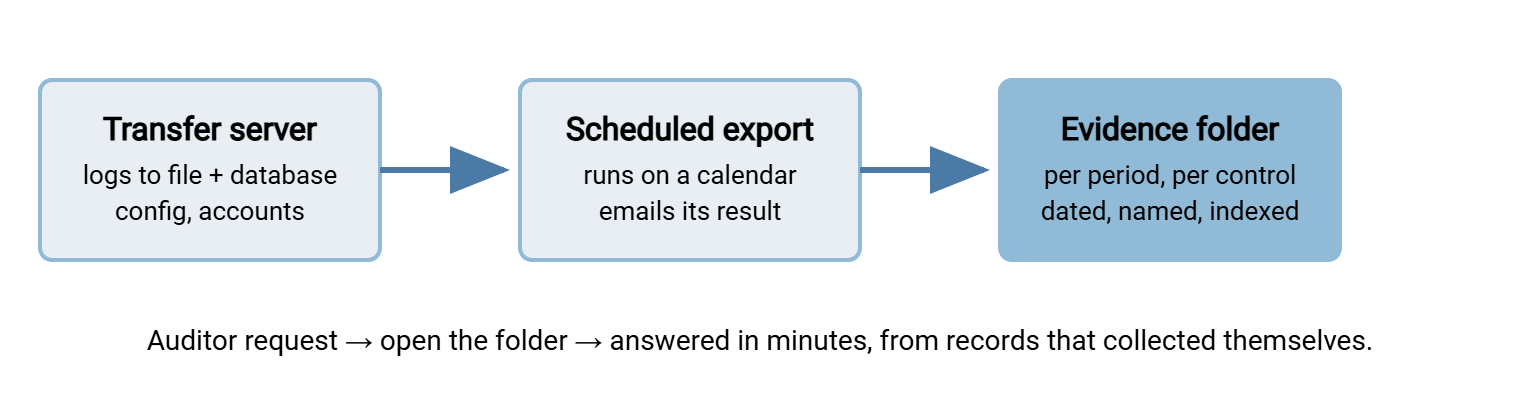
The Evidence Folder That Answers in Minutes
Evidence you cannot find is evidence you do not have. The fix is a boring, disciplined folder structure: one tree, organized by period and by control, where every item lands the day it is produced. A layout that works:
evidence/
  README.txt                     <- index: control list, naming rules, owner
  q2/
    AC-01-account-inventory/
      accounts-full-export_pulled-30jun_rm.csv
      export-query.txt           <- the exact query or steps used
      notes.txt                  <- source system, record count, oddities
    AC-02-access-review/
      review-record_q2_signed.pdf
      removals-verified_08jul_rm.csv
    EN-01-protocol-settings/
      protocol-config-export_30jun.txt
      cleartext-refused-test_30jun.txt
    LG-01-activity-reports/
      transfer-activity_apr.csv
      transfer-activity_may.csv
      transfer-activity_jun.csv
    RV-01-review-traces/
      failed-job-tickets_q2.csv
      alert-email-thread_19may.pdf

naming rule:  what-it-is_period-or-date_who-pulled-it
never:        final2.xlsx, screenshot(3).png, New folder
Three habits make the structure live. Give every control a short stable identifier (the AC-01 style above) and use it in folder names, so requests translate to paths instantly. Put provenance in the filename and a notes file — date pulled, who pulled it, source — because six months later nobody remembers. And write the README index once: which controls exist, what evidence each produces, on what schedule. When the audit request list arrives, that index becomes your response plan, and most rows are already satisfied. The reports that fill folders like LG-01 on a schedule are the subject of the transfer reports worth automating. Filing as you go, rather than excavating annually, is the habit the rest of this series keeps returning to.
Protect the folder itself, too. Evidence about your controls is only as trustworthy as its storage. Keep the tree on a share where few people can write. Once a period closes, make that period's folder read-only. If anyone later asks whether the evidence could have been quietly revised, "the quarter is locked and the file dates show it" is the answer you want available. The same instinct that makes logs credible — records that nobody can silently rewrite — applies to the exports you made from them. Lock the quarter. Yes, from yourself too.
Before You Submit: A Thirty-Second Self-Test
Run each item through this checklist before it leaves your hands. It catches nearly every bounce.
EVIDENCE SELF-TEST  --  all yes, or fix before sending

[ ] Generated by the system, not assembled by hand?
[ ] Shows when it was pulled, by whom, from which system?
[ ] Shows the parameters (period, scope, query) used?
[ ] Covers the full population -- count stated, boundaries visible?
[ ] Could be regenerated to the same result on request?
[ ] Matches the specific question asked -- no more, no less?
[ ] Sensitive data handled -- minimized or redaction agreed?
[ ] Filed in the evidence tree under the right control and period?
The Awkward Cases, Handled Honestly
Evidence containing sensitive data. Transfer logs and account lists can include personal data, partner names, and file paths that reveal business activity. The answer is rarely refusal: export only the columns needed, redact unrelated fields, or arrange for the auditor to inspect on screen without taking a copy. Agree handling up front — auditors work with sensitive material constantly and typically have a process. Your compliance team defines what may leave the building; your job is producing the minimal export that still passes the completeness test.
Evidence that does not exist. Sometimes the honest answer is "we did not keep that." Say exactly that, say what you have instead (partial records, adjacent corroboration), and say what changed so the gap does not recur. Auditors have well-worn machinery for gaps — noted exceptions, qualified conclusions, remediation follow-ups. None of it is as bad as a gap discovered behind a confident claim. I have said "we did not keep that" to an auditor, and it was a much shorter conversation than the one I had been dreading.
Evidence spanning a system change. If you migrated transfer servers mid-period, the period's evidence comes from both systems. Export and file the old system's logs, account lists, and configuration before decommissioning; retrofitting evidence from a dead server ranges from painful to impossible.
Bluewater Bank replaced its transfer server five months into a twelve-month period and switched the old one off the same week. It felt tidy at the time. The request for session logs covering the full period arrived four months later. The old server's disks were in a cupboard. Its database would only open with software nobody had an installer for anymore. The export that would have taken ten minutes in month five took two administrators most of a week in month nine. They now export everything before the power goes off, and the decommissioning checklist says so in capitals.
Evidence for a chain, not a system. When the question is "prove this file went from A to B intact," single-system evidence is not enough. You are assembling a custody trail across hops — hashes, receipts, and logs that corroborate each other. That discipline has its own series: chain of custody for sensitive files.
Evidence Is a Habit, Not a Project
The difference between teams that dread evidence requests and teams that shrug at them is not tooling. The second group treats evidence as a byproduct of normal operation. Records come from systems, carry their provenance, demonstrate their completeness, and land in a folder tree the day they are made. Do that for a few months and the audit's arrival changes character. The request list becomes a set of paths you already know, and nineteen screenshots become three file names.
From here, read the transfer reports worth automating to make the folder fill itself. Read surviving the transfer audit walkthrough for the live session where your evidence gets its first audience.
Frequently Asked Questions
Are screenshots ever acceptable audit evidence?
What does "system-generated" actually mean?
What is a population, and why do auditors test it?
How long should we keep audit evidence?
Do we have to give auditors direct access to the transfer system?
What if the evidence shows the control failed sometimes?
From the Sysax team: we build secure file transfer software for Windows. Sysax Multi Server is an FTP, FTPS, SFTP, and HTTPS server. Sysax FTP Automation handles scheduled, scripted transfers. Free trials are on the download page.