
What Auditors Actually Ask About File Transfers
The spreadsheet has two hundred rows and a due date. Row 14 says "provide a list of all users with access to the file transfer system." Row 15 says "provide evidence that data transmissions are encrypted." The Status column is blank all the way down. If you have never been through an audit, the list reads as vaguely threatening. It has unfamiliar vocabulary, unclear expectations, and the nagging sense that a wrong answer has consequences you cannot see.
The good news is that the questions are remarkably predictable. Whether the audit is driven by a financial-reporting review, HIPAA, PCI DSS, or a big customer's security assessment, the questions about a transfer system land on the same five themes. They are who has access, how they authenticate, whether data is protected, what gets logged, and who reviews it. Auditors ask the same things in different words because every framework worries about the same risks. The words change; the worries do not.
This article decodes the standard question set, theme by theme. It explains the two-part pattern hiding inside every question — the distinction between how a control is designed and how it operated. That is why a single answer never satisfies an auditor. By the end, that spreadsheet should read less like an interrogation and more like a checklist you have already prepared for. It is the opening article of our Audit-Ready Reporting series.
Who Is Asking, and What They Are Really After
"Auditor" covers several different visitors, and it helps to know which one you have. An external auditor examines your organization on behalf of someone else — shareholders, a certification body, a regulator. When the audit is financial, your transfer system gets attention because file feeds into accounting systems fall under IT general controls. Those are the controls over the systems that produce the numbers. A certification assessor tests you against a published framework such as SOC 2 so you can hand customers a report instead of answering every questionnaire from scratch. An internal auditor works for your own organization, finding problems before an external party does. And increasingly, customer security reviews ask audit-style questions before signing a contract. These are a close cousin of the vendor assessments covered in our vendor security assessment series, with you on the receiving end.
Notice the division of labor, because it keeps your job sane. Regulators and frameworks define what must be true. Your compliance team or management interprets those obligations and decides which controls the organization commits to. The auditor tests whether the commitments are being kept. Your role is narrower and more honest than any of those: implement the controls, and produce evidence of what is actually happening. You are not expected to interpret regulation text — you are expected to know your own system cold.
What an auditor is really after is not perfection. An auditor's product is an opinion — a signed statement that your controls are (or are not) adequate. Their professional obligation is to back that opinion with evidence. That makes them professional skeptics, not enemies. A claim without evidence is, to an auditor, not a fact. The working rule you will hear is some version of "if it is not documented, it did not happen." Once you accept that rule, most audit behavior stops being mysterious. (I spent two audits resisting it.)
Every Audit Question Is Really Two Questions
Every audit question is two questions, and that is the single most useful idea in this series. When an auditor asks "are transfer sessions encrypted?", they are asking two separate things, and they need both answered.
The first is design effectiveness: is the control set up so that, if it works as configured, the risk is addressed? For encryption, that means showing the server's settings — secure protocols enabled, plain FTP disabled. Design is checked at a point in time: the auditor looks at the configuration as it stands today and judges whether it would do the job.
The second is operating effectiveness: did the control actually operate, continuously, across the whole audit period — the window of months the audit covers? A setting that is correct today proves nothing about February. For encryption, operating evidence means session logs from across the period showing which protocol every connection used. Then the auditor can verify that no cleartext session slipped through — or pick a handful of sample dates and check each one.
The diagram shows the two tests side by side: one look at the configuration, against samples drawn from the entire period.
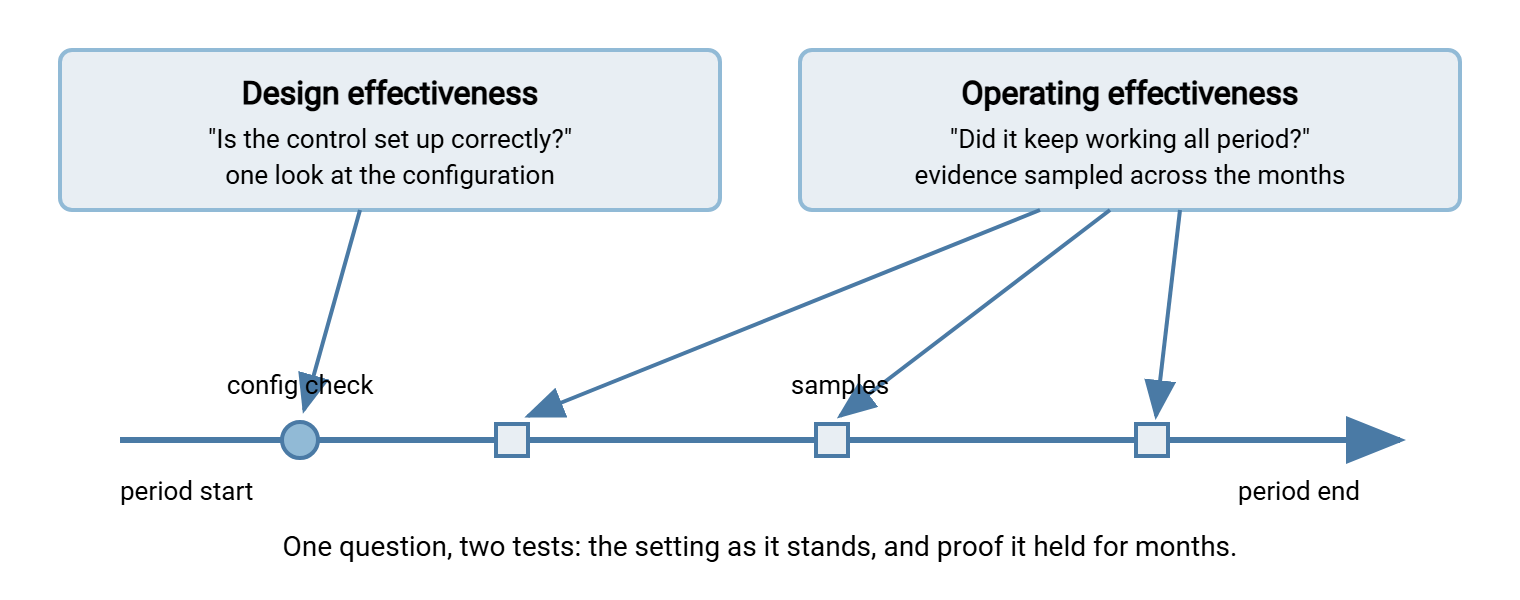
This distinction explains almost everything that puzzles first-time auditees. Why does a screenshot of a settings page not satisfy them? Because it only speaks to design, and only for the moment it was taken. Why do they keep asking for "the period" versions of things you already showed them? Operating effectiveness. Why do they care so much about logs? Because logs are usually the only witnesses to what actually operated, and unlike the rest of us they do not improve the story in the retelling. What separates convincing evidence from weak is the subject of the next article, transfer evidence auditors accept and reject.
Remember: every audit question is two questions. "Show me the setting" proves design. "Show me it held for the whole period" proves operation. Prepare both answers and you will rarely be caught flat-footed.
Theme One: Who Has Access?
Access questions come first because access is where most real-world trouble starts. The auditor typically wants four things. First, a complete account inventory lists every account that can sign in to the transfer system, what it can reach, and who owns it. The inventory includes partner accounts and the service accounts that automation signs in with. Second, provisioning: when an account is created, who approved it, and is the approval recorded? Third, deprovisioning: when someone leaves or a partner contract ends, how quickly is the account disabled — and can you prove it happened? Fourth, least privilege: does each account see only the folders it needs, and who holds administrator rights?
Expect this theme to be tested by sampling. The auditor takes a list of leavers from HR, picks a handful, and asks you to show each account's disable date. They pick a few active accounts and ask for the approval that created them. This is why the account list itself matters so much: it is the population the samples come from. A list with gaps undermines everything tested from it. Two practices carry most of the weight here. One is the recurring account recertification described in periodic access reviews for transfer accounts. The other is the folder-permission checkups covered in auditing permissions.
Theme Two: How Do They Authenticate?
Knowing who should have access leads directly to how the system verifies who is connecting. The typical asks: what is the password policy, and is it enforced by the system or just written down? Are stronger methods — SSH keys, client certificates, multi-factor where the protocol supports it — used for sensitive or administrative access? How are service accounts (the non-human accounts used by scripts and scheduled jobs) secured? They cannot answer a second factor, and their credentials tend to live in config files. And what happens after repeated failed sign-ins — is there lockout or throttling, and would anyone notice a brute-force attempt? (The log will notice. Whether a human does is theme five.)
One practical wrinkle: the account inventory must cover every authentication source, because the forgotten source is where stale access hides. If your server is Sysax Multi Server, for example, the honest inventory has three parts. Those are accounts built into the server itself, accounts that come from Windows or Active Directory, and SFTP users who authenticate with public keys. An auditor who asks "is this list complete?" is really asking whether you checked all three. Service accounts deserve special preparation, because they are the accounts most often found with decade-old passwords and no owner. Our guide to service account hygiene covers the practices auditors typically probe for.
Theme Three: Is the Data Protected?
The encryption theme sounds technical but the questions are blunt. Is data encrypted in transit — always, or only usually? Which protocols are allowed, and is plain FTP possible even in principle? Are the server's certificates valid and maintained, so encryption is not silently undermined by clients trained to click through warnings? And what protects files while they sit on the server between transfers — permissions, at-rest encryption, or nothing?
The trap in this theme is the word "always." Many teams encrypt their main flows but keep one legacy cleartext endpoint for an old device or a stubborn partner. That single exception turns a clean yes into an awkward conditional. Auditors typically ask the question in a way designed to surface exceptions, so know your honest answer before the interview. If you have retired cleartext FTP, be ready to demonstrate the negative — configuration showing it disabled, plus a refused connection attempt. Our article on proving FTP is gone walks through that task. For the underlying concepts, the encryption in transit series is the reference.
Meridian Parts wrote "always" in good faith, because neither administrator who filled in the questionnaire had ever heard of the label printer. The auditor's log sample turned up a plain FTP login from the warehouse at ten past eleven every night. It came from a device that had been collecting a dispatch file that way since before either of them joined. The finding was minor and the fix took an afternoon. The awkward part was the follow-up question — how many other endpoints had "always" not counted? — and answering it honestly took a week.
Theme Four: What Gets Logged?
Logs get their own theme because they are the raw material for every operating-effectiveness test. The questions: which events are recorded — sign-ins, failed sign-ins, uploads, downloads, deletions, permission and configuration changes? Where do the logs go, and how long are they kept — long enough to cover the audit period and whatever retention your policies promise? And could an attacker, or an administrator, quietly alter them?
What auditors typically want to see is that logging is deliberate rather than incidental. Someone decided what to capture, the capture is complete, and the records survive. A server that writes every session to both a log file and a database — as Sysax Multi Server does, with rollover keeping files manageable — gives you a queryable record to answer from. That matters when the request is "all access to this folder in March." The decisions about coverage belong to what to log. Protecting records from alteration is the subject of tamper resistance. Both are part of the logging series that this pillar builds on.
Theme Five: Who Reviews It?
This theme separates organizations that merely collect records from organizations with working controls, and it is the one first-time auditees most often fail. A log nobody reads, an alert nobody receives, a report nobody opens: to an auditor these are controls that exist on paper only. So the questions come: who reviews transfer activity, and how often? Would you notice a failed transfer, a burst of failed sign-ins, a sign-in at three in the morning from an unfamiliar address? And — the crucial follow-up — can you show evidence that the review happened, not just that it was supposed to? This is where the log from theme two finds out whether anyone reads it.
Review evidence is humbler than it sounds. It can be an initialed report, a ticket opened from an alert, or a short email thread that says "saw the failure, re-ran the job, verified the file." What matters is that a named person looked, and left a trace. Automation helps you here rather than replacing you. Scheduled jobs in Sysax FTP Automation can send email notifications when a transfer job runs or fails. The notification plus the person who acts on it is a monitoring control an auditor can actually test. Alerting design is covered in alerts from transfer logs. The standing reports that make review routine are the subject of the transfer reports worth automating.
The Standard Question Set, In One Place
The five-theme question set follows in copyable form, with the evidence each question typically expects in parentheses. Walk through it once before any audit and you will have rehearsed the interview that matters.
THE STANDARD QUESTION SET  --  and the evidence each expects

ACCESS
 1. Who has access to the transfer system, and at what level?
      (system-generated account list with permissions, dated)
 2. How is access granted, and who approves it?
      (provisioning requests and approvals for sampled accounts)
 3. How quickly is access removed when someone leaves?
      (leaver list matched to account disable dates)
 4. When was access last reviewed, and by whom?
      (most recent access-review record with sign-off)

AUTHENTICATION
 5. What must users do to prove who they are?
      (password/key policy plus the enforcing settings)
 6. How are service and partner accounts controlled?
      (inventory with named owners; credential rotation records)
 7. What happens after repeated failed sign-ins?
      (lockout settings; a sample lockout event from the logs)

DATA PROTECTION
 8. Is data encrypted in transit -- always?
      (allowed-protocol settings; session logs showing protocols)
 9. Is plain FTP possible, even for one endpoint?
      (config showing it disabled; a refused connection test)
10. What protects files at rest on the server?
      (folder permissions; at-rest encryption where used)

LOGGING
11. Which events are recorded, and where do records go?
      (logging configuration; sample extracts)
12. How long are logs kept, and could they be altered?
      (retention policy and practice; tamper protections)

REVIEW
13. Who reviews activity, alerts, and reports, and how often?
      (review traces: initials, tickets, email threads)
14. Would you notice a failed or unauthorized transfer?
      (alert configuration; a handled event or a test)
15. Who watches administrator activity?
      (admin change log; review of it by someone else)
The Questions Around the Edges
Three more topics appear often enough to prepare for. Change management: when the transfer server's configuration changes — a new partner account, a protocol turned off, a folder restructure — was the change requested, approved, and recorded? Auditors typically sample changes from the config log and ask for the paperwork behind each. Third parties: if transfers run through a vendor's product or service, what assurance do you hold about them? If a partner receives your data, what did you check before connecting them? Incidents: when a transfer failed, or a file went to the wrong place, what happened next — is there a path from "something went wrong" to "someone handled it"?
Which of these gets emphasis depends on the framework driving the audit. The mapping from specific regimes to transfer controls is the business of our compliance frameworks series. None of these edge questions introduces a new kind of answer, which is the comforting part. It is always design plus operation, always evidence over assertion, and always due on a Friday.
How to Answer: Short, True, and Evidence-Backed
Knowing the questions is half the preparation; answering well is the other half. A few habits distinguish teams that audit smoothly.
- Answer the question asked. "Is plain FTP disabled?" deserves "yes, here is the configuration," not a tour of your protocol history. Volunteered tangents create follow-up requests, and follow-up requests create work.
- Never guess. "I will confirm and follow up" is a respected answer. A confident wrong answer, discovered later, damages your credibility on every other answer you gave.
- Lead with the evidence, not the narrative. The strongest answers have the shape "yes — and here is the export that shows it." If you find yourself explaining at length why something is effectively true, you have found a gap to fix before the audit, not during it.
- Keep a request log. Track every question and request, who answered, and what was delivered when. Audits span weeks; the log prevents duplicate work and contradictory answers.
- Be consistent across interviewees. Auditors often ask two people the same question separately. That is not a trap so much as a test of whether your process is real — real processes get described the same way twice.
These habits matter most in the live sessions where auditors watch you operate the system in real time — a distinct skill covered in surviving the transfer audit walkthrough.
Remember: auditors test claims, not people. The goal is not to look impressive; it is to make true statements you can back with records. A modest control that verifiably operates beats an impressive control that exists mostly in the interview.
From Questions to Readiness
The question set is stable: who has access, how they authenticate, whether data is protected, what gets logged, who reviews it. Each is asked twice, once for design and once for operation. Since the questions are known in advance, preparation stops being a scramble and becomes a checklist. Keep the account list exportable, and know your protocol story including the label printer. Make sure logs cover the period, and leave traces when you review. Two hundred rows, and most of them answered by the same five reports.
The next two steps in this series turn that idea into mechanics. The article transfer evidence auditors accept and reject explains what makes an answer convincing. The article the transfer reports worth automating builds the standing reports that answer most of the fifteen questions before they are asked.
Frequently Asked Questions
What is a PBC list?
What is the difference between design and operating effectiveness in plain words?
What if a control only started partway through the audit period?
Do small organizations really get asked all this?
Should I mention problems the auditor did not ask about?
Can I refuse to hand over evidence that contains sensitive data?
From the Sysax team: we build secure file transfer software for Windows. Sysax Multi Server is an FTP, FTPS, SFTP, and HTTPS server. Sysax FTP Automation handles scheduled, scripted transfers. Free trials are on the download page.