
Network-Level Shaping and QoS for Transfer Traffic
Throttling a transfer in the tool works until there are twenty tools, six partners, and a colleague who never reads the runbook. At that point the only place that sees every packet leaving the building is the network itself. The network can be told a simple rule: when the link is full, bulk transfers wait and everything else goes first. That rule is quality of service, and unlike a fixed throttle it costs nothing when the link is idle.
This article explains QoS for someone who runs transfers, not routers. You will learn where along the path QoS can actually help and how transfer traffic is recognized and marked. You will learn the difference between policing and shaping, and what a fair queue does to a bloated buffer. You will learn how to set a mark on Windows and Linux so the network can act on it. There is a short, copyable Linux example, and the article ends with the one-page brief that gets a network team to say yes. It is part of our Bandwidth Management series and builds on throttling at the client and server.
QoS in Plain Words
Quality of service is the set of techniques a network uses to treat some traffic better than other traffic. It does this when there is not enough capacity for all of it. That condition matters. When a link has room for everything, QoS does nothing, because there is no queue and nothing to reorder. QoS only acts at the moment a link is congested — more packets want to leave than the link can carry. It acts at the exact place where the queue forms.
That place is almost always one interface: the egress (outbound side) of the router or firewall that connects the site to the WAN. Inside the building, links are fast and never fill; beyond the edge, the carrier's network is not yours to configure. So "QoS for transfers" in practice means one device, one interface, one direction — a smaller job than the word suggests.
The other direction is the awkward one. Packets arriving from the internet have already crossed the carrier's link by the time your router sees them. You cannot reorder a queue that formed somewhere else. Inbound bulk includes a partner uploading to your server or a download from a cloud service. It can only be tamed by slowing the sender, by throttling on your server, or by a crude trick called ingress policing, covered below. This is why the previous article pushes so hard on limits at the source.
Whatever the equipment, QoS is always the same four steps. First, classify each packet (which kind of traffic is this?). Then mark it so later devices know without re-inspecting it. Next, queue it in a lane with others of its kind. Finally, schedule the lanes onto the link according to a policy. Each step has a name your network team will use, and each is explained next.
Classifying Transfer Traffic
A router recognizes traffic by what it can see in the packet headers: source and destination addresses, protocol, and port numbers. For transfer traffic that gives three handles, in decreasing order of reliability.
Source or destination host. The most robust rule. Suppose the backup runs from 10.20.5.40 and the transfer server is 10.20.5.41. A rule that says "everything from these two addresses is bulk" catches every tool and protocol they use, now and in future. Dedicated transfer hosts make QoS easy for precisely this reason; if bulk jobs share a machine with the payroll application, the rule cannot tell them apart.
Port and protocol. SFTP is TCP port 22, which is clean unless the same hosts also use interactive SSH. In that case, the administrator's terminal session gets classified as bulk and feels sluggish under load. FTPS is harder: the control connection is port 21 but the data flows use a passive port range that only the server administrator knows. Give the network team that range explicitly; our article on configuring passive port ranges explains where it comes from. HTTPS uploads on port 443 are the worst case, since port 443 also carries every web application in the building — classify those by host instead. The firewall view of transfer protocols lists every port each protocol uses.
A mark set by the sender. The sending host labels each packet as bulk before it leaves, and the router only has to trust the label. This is the most flexible method and the subject of the next section. But it only works if the network is configured to honor marks from your hosts. That is a question to ask, not assume.
Marking with DSCP
Every IP packet carries a small field in its header reserved for exactly this purpose. The six bits used for it are called the DSCP (differentiated services code point), and the number written there is the packet's mark. Routers and switches can read it in a single operation. So once a packet is marked at the source, every device along the path can treat it consistently without inspecting ports or addresses again.
Only a handful of values matter here. Zero is the default: ordinary "best effort" traffic. The value 46, written EF (expedited forwarding), is the conventional mark for voice, and networks that run phones already handle it. The value 8, written CS1, is the conventional "lower than normal" mark, often called the scavenger class. That traffic gets whatever is left after everyone else. Bulk transfers belong in CS1. Marking them scavenger says, honestly, "this can wait."
On Windows, the same policy engine that throttles can mark. This example marks everything sent to TCP port 22 as CS1 without limiting its rate:
# Mark outbound SFTP as scavenger (DSCP 8 = CS1); no throttle
New-NetQosPolicy -Name "BulkSFTPMark" -IPProtocolMatchCondition TCP `
  -IPDstPortMatchCondition 22 -DSCPAction 8 -NetworkProfile All

# Confirm the policy exists
Get-NetQosPolicy -Name "BulkSFTPMark"
Two gotchas. First, consider a machine that is not joined to a domain. Windows may silently skip the mark unless a registry value under the QoS service key named "Do not use NLA" is set to 1. If the mark never appears on the wire, check that first. Second, verify on the wire rather than trusting the policy list: capture a few packets and look at the type-of-service byte. DSCP 8 appears as tos 0x20, because the six DSCP bits sit at the top of that byte.
On Linux, mark in the firewall's mangle table as packets leave:
# Mark outbound SFTP as CS1
iptables -t mangle -A OUTPUT -p tcp --dport 22 -j DSCP --set-dscp-class CS1

# Watch for it on the wire (tos 0x20 = DSCP 8)
tcpdump -ni eth0 -v tcp port 22 | grep -m 3 "tos 0x20"
One honest limitation: marks survive only as far as the devices that respect them. Your own routers and a private WAN between your sites usually honor them; the public internet strips or ignores them. That is fine, because the queue you care about is on your own edge router, before the internet. Mark for your edge, not for the world.
Policing Versus Shaping
Once traffic is classified, the router can enforce a rate on a class in two ways, and the words are used carelessly enough that it is worth being precise.
A policer measures the rate and drops (or re-marks) packets that exceed it. It holds nothing back; the excess is simply thrown away. TCP interprets the drops as congestion and slows down. So the sender does end up at roughly the policed rate, but by a rough path. It overshoots, loses a burst of packets, halves its speed, climbs again, and repeats. The result is a sawtooth rather than a flat line, and retransmissions waste some of the link.
A shaper measures the rate and delays excess packets in a queue until there is room to send them at the configured rate. Nothing is dropped unless the queue overflows. The sender sees a slightly longer round trip rather than loss, settles smoothly at the shaped rate, and the link carries useful data rather than retransmissions. Shaping is what you want for bulk transfers whenever the equipment offers it.
Both are built on the token bucket described in the throttling article: tokens drip in at the configured rate and each packet spends its size. The only difference is what happens when the bucket is empty — a policer drops, a shaper waits. One consequence: shaping is only possible on the sending side of an interface (you cannot delay a packet that has already arrived). Policing can be applied to arriving traffic. That is why ingress policing exists as the one blunt tool for inbound bulk: drop enough of a partner's upload and their TCP slows down. It works, but it burns part of the link you were trying to protect, so treat it as a last resort.
Remember: shape on the way out, police only when you have no other choice on the way in, and never set either at one hundred percent of the link. The carrier's own equipment has a queue too. Shaping at ninety to ninety-five percent of the circuit rate keeps that queue empty and moves the bottleneck to a device you control.
Queues: Priority, Fair, and Weighted
Shaping controls how much a class may send. Queueing decides the order when several classes want the link at once. Three designs cover nearly every network, and the diagram below shows them combined at the WAN edge. Voice is in a strict priority lane, with interactive traffic and bulk in weighted lanes. There is a fair queue inside each lane.
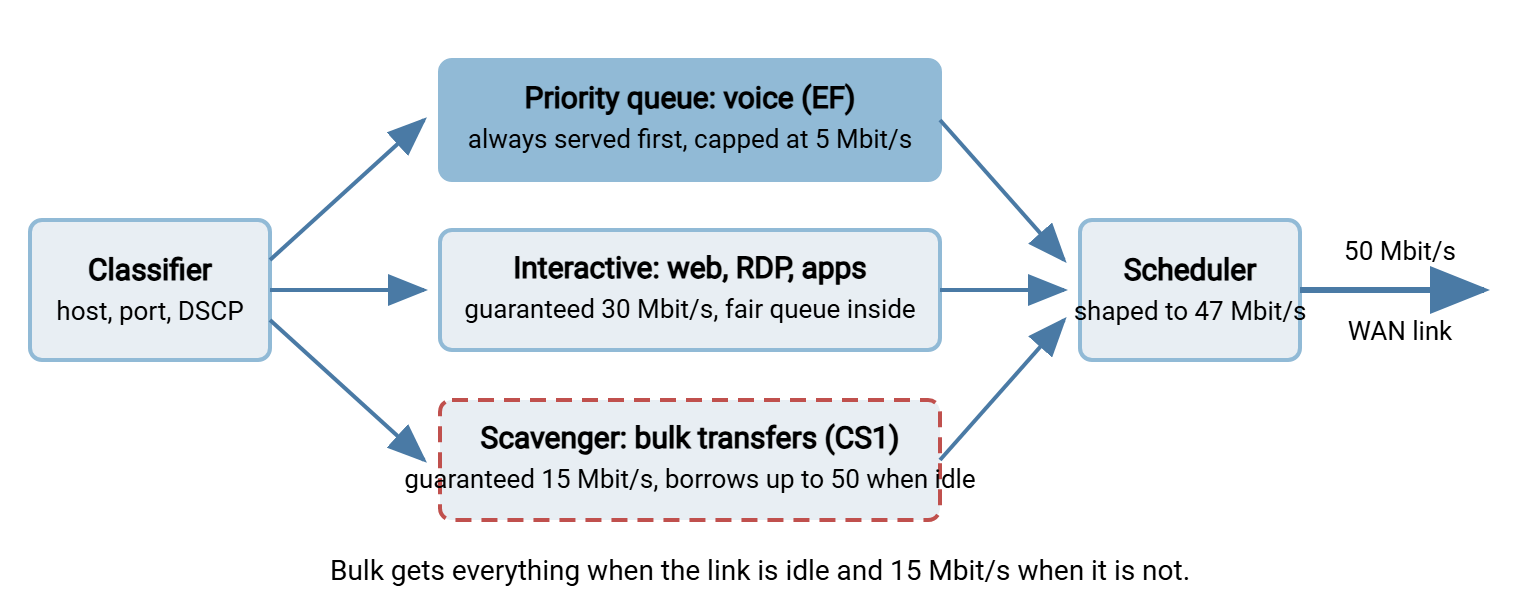
A priority queue is served before all others whenever it has a packet waiting. It is perfect for voice, which sends small packets at a steady rate and cannot tolerate delay. It is dangerous for anything else, because a busy priority queue starves every other lane. That is why priority lanes are always capped at a small fraction of the link.
A weighted queue (the names vary by vendor: class-based, weighted fair, hierarchical) gives each class a guaranteed share of the link when it is congested. The queue lets classes borrow each other's unused share when the link is not congested. This is the design that makes QoS better than a static throttle. In the diagram, bulk transfers are guaranteed 15 Mbit/s so they always make progress, but at two in the morning they borrow the whole 50. Nobody has to switch a limit on and off with the clock.
A fair queue works inside a class. Instead of one line where a big transfer's packets sit in front of everyone else's, it keeps a separate short line per flow (per connection). It serves them in turn, so a single bulk flow can no longer monopolise the class. Modern fair queues, such as Linux's fq_codel, also keep each line short by dropping a packet early when delay starts to build. That is the direct cure for the bufferbloat described in why bulk transfers crush the WAN. If the network team offers exactly one change, "enable fair queuing on the WAN egress" is the one to ask for.
A Copyable Linux Example
Suppose the edge is a Linux router. Or suppose a Linux transfer host is the only bulk sender and you want it to shape itself. In either case, the whole design above fits in a few tc commands. This uses HTB (hierarchical token bucket) for the weighted classes and fq_codel inside each. Interface eth0 is the WAN-facing side.
# Root: HTB, unclassified traffic goes to class 1:10
tc qdisc add dev eth0 root handle 1: htb default 10

# Parent class: shape the whole interface just under the 50 Mbit/s circuit
tc class add dev eth0 parent 1: classid 1:1 htb rate 47mbit ceil 47mbit

# Interactive (default): guaranteed 32 Mbit/s, may borrow to 47
tc class add dev eth0 parent 1:1 classid 1:10 htb rate 32mbit ceil 47mbit prio 0

# Bulk: guaranteed 15 Mbit/s, may borrow to 47 when interactive is quiet
tc class add dev eth0 parent 1:1 classid 1:20 htb rate 15mbit ceil 47mbit prio 1

# Fair queue with early drop inside each class
tc qdisc add dev eth0 parent 1:10 fq_codel
tc qdisc add dev eth0 parent 1:20 fq_codel

# Classify: anything to TCP port 22 is bulk
tc filter add dev eth0 parent 1: protocol ip prio 1 u32 \
  match ip dport 22 0xffff flowid 1:20

# Inspect, and undo everything
tc -s class show dev eth0
tc qdisc del dev eth0 root
Line by line: the root qdisc says "use HTB and send anything unmatched to 1:10." The parent class 1:1 sets the total shaping rate a little under the circuit so the queue forms here rather than in the carrier's equipment. The two child classes get a guaranteed rate and a ceil (ceiling) they may borrow up to; prio decides who borrows first. The filter puts port 22 traffic in the bulk class. Add a second filter matching ip src for a transfer server's address, or match the DSCP mark if your hosts set one. Voice is left out because most sites carry it on a separate path; if yours does not, add a small priority class for EF-marked traffic.
This shapes what eth0 sends; on a router that is site-to-WAN traffic, the direction you wanted. How efficiently a single flow uses whatever share it gets is a different subject, covered in TCP tuning first.
Working with the Network Team
Most transfer administrators do not configure the edge router; they ask someone who does, and the request succeeds or fails on how well it is specified. Network engineers say no to "can you make the backup not kill the phones" and yes to a one-page brief with numbers in it. Here is the brief.
| Item | What to write | Example |
|---|---|---|
| Flows | Each bulk flow: source host, destination, protocol, ports, direction | 10.20.5.40 to sftp.example.com, TCP 22, outbound |
| Volume and timing | Bytes per run, run frequency, current start time, deadline if any | 30 GB nightly, 16:00, must finish by 08:00 |
| Minimum acceptable | The floor the job needs under congestion to meet its deadline | 15 Mbit/s guaranteed |
| Marking | Whether your hosts will mark, and with what | CS1 (DSCP 8) from both transfer hosts |
| The ask | Shaped scavenger class with a floor and full borrowing; fair queuing on egress | "Bulk class, 15 floor, borrow to line rate" |
| Evidence | Utilization graph and idle-versus-loaded ping from the previous article | 18 ms idle, 340 ms during backup |
| Test plan | When you will run the job under the new policy and what you will measure | Tuesday 14:00, ping and job runtime |
A few things make the conversation go better. Ask for a scavenger class, not a block or a hard cap. A class with a floor and borrowing gives the network team a policy they can reuse for the next bulk application. Offer to mark at the source, which saves them maintaining port lists, and ask explicitly whether they trust marks from your hosts. Bring the passive port range if FTPS is involved. On a Windows server such as Sysax Multi Server it is a setting in the server configuration. The network team needs the exact numbers. And agree on the test. Run the job under the new policy at a busy time, with someone watching the ping and someone watching the job's runtime. Then keep both numbers as the baseline for measuring transfer impact.
Finally, be clear about what the carrier can and cannot do. On a private WAN between your own sites the carrier may honor your marks end to end; ask. On an ordinary internet circuit they will not, and the inbound direction remains the sender's problem. For traffic arriving from partners, the levers are per-account limits on your own server and the rules in fairness between flows.
The Version to Tell a Colleague
QoS only acts where a queue forms, which for transfers means the outbound side of the site's edge router. Traffic is classified by host, port, or a DSCP mark the sender sets; bulk transfers get the scavenger mark CS1. Shaping delays excess packets and is what you want; policing drops them and is the blunt tool for inbound traffic. A weighted queue gives bulk a guaranteed floor and lets it borrow the whole link when nobody else needs it. That beats any static throttle. Fair queuing inside each class stops one big flow from bloating the buffer for everyone. Bring the network team hosts, ports, volumes, a floor, and a test plan, and ask for a scavenger class with borrowing.
One companion read is throttling at the client and server, for the limits you can apply without the network team. The other is fairness between flows, for what to do when the competing traffic is other transfers.
Frequently Asked Questions
If QoS only works at the edge router, why would I set marks on my transfer server?
What is the difference between policing and shaping in one line?
Why is a scavenger class better than throttling the backup to 30 Mbit/s?
Will my DSCP marks survive across the internet to the partner?
Can QoS slow down a partner who is uploading to my server?
From the Sysax team: we build secure file transfer software for Windows. Sysax Multi Server is an FTP, FTPS, SFTP, and HTTPS server. Sysax FTP Automation handles scheduled, scripted transfers. Free trials are on the download page.