
Fairness Between Flows: Priorities and Parallelism Limits
Once the bulk jobs are out of business hours and the network has a scavenger class, a quieter problem remains: transfers competing with each other. Three partners upload at the same time and one of them, with a client set to sixteen simultaneous connections, takes nearly the whole link. Two overnight jobs share a window and the unimportant one, because it uses parallel streams, finishes first while the critical one misses its deadline. Nobody outside the transfer team notices, which is why it goes unfixed for years.
This article is about sharing a link fairly among transfers. You will learn how TCP divides a link between flows and why that makes parallel streams a way of taking bandwidth from other people. You will learn how to limit parallelism in the common tools and how to stop one partner starving the rest. You will learn how to define a small set of priority classes so that "important" means something measurable. You will also learn how to add a simple admission rule so that only a fixed number of bulk jobs run at once. It is part of our Bandwidth Management series and assumes the throttles from throttling at the client and server.
How TCP Shares a Link
When several TCP connections cross the same congested link, each one probes upward, backs off on loss, and probes again, exactly as described in why bulk transfers crush the WAN. Because they all play by the same rules, they settle into roughly equal shares. Ten long-running flows on a 50 Mbit/s link get about 5 Mbit/s each. This is per-flow fairness, and it is the only kind of fairness a plain network provides. It is not exact. Flows with a shorter round trip grab a little more, and short flows never reach their share before they finish. But for bulk transfers it is close enough to plan with.
The important word is flow. TCP does not know about jobs, users, partners, or importance. It knows about connections. A job that opens eight connections is, to the network, eight flows, and it gets eight shares. On our 50 Mbit/s link, a job with eight streams competing against a job with one stream takes eight ninths of the link, about 44 Mbit/s. It leaves the single-stream job with about 5.5. The single-stream job is not slow because the link is small; it is slow because the other job is wide.
That is the whole mechanism behind every fairness problem in this article. A parallel-stream setting is not a speed setting. It is a setting that decides how many shares of a shared link a job claims, at the direct expense of every other flow on it.
The Self-Inflicted Congestion of Too Many Streams
Parallel streams have a legitimate use: on a link with high latency, a single TCP flow often cannot fill the pipe, and several flows together can. That case, and how to tell when you are in it, is covered in parallel streams. Many small files are another legitimate case, because each file carries a fixed overhead that parallelism hides; see the many-small-files problem.
Everywhere else, parallel streams do not create bandwidth. On a link that a single flow can already fill, adding streams just divides the same capacity into more pieces. Each piece is now competing with the others as well as with everyone else. Loss goes up, because more flows are probing at once. Retransmissions go up with it. The total useful throughput is often slightly lower than a single well-behaved flow would achieve. Meanwhile the router's queue is fuller than ever, and the latency other users feel is worse. A job set to sixteen streams on a 50 Mbit/s branch link is congesting itself and the site for no gain at all.
You can see this on the transfer host. Run the job once with one stream and once with eight, and compare the retransmission counters. On Linux, ss -ti shows retrans per connection. The command netstat -s on either platform shows the totals. The eight-stream run will show far more retransmitted segments for the same bytes delivered, and usually a total time that is no better. That comparison, kept with the job's documentation, is the evidence that stops the setting creeping back up.
The practical rule: one stream per job by default. Allow two to four only where a measurement on that specific path shows a benefit. Write the measured benefit next to the setting so the next administrator does not "optimize" it back up to sixteen. Our Benchmarking Transfer Performance series shows how to take that measurement fairly.
Limiting Parallelism Per Job
Each tool has its own dial, and several have a default that is higher than you would choose. Here are the ones that matter, each set to a modest two streams:
# lftp: cap connections per site, and parallel files in a mirror
lftp -e "set net:connection-limit 2; \
  mirror --parallel=2 --reverse /data/out /inbound; bye" sftp://acct@sftp.example.com

# lftp segmented download of one file: pget -n opens n connections. Keep it small.
lftp -e "pget -n 2 /pub/dataset.tar; bye" sftp://acct@files.example.com

# curl: fetch a list of URLs with at most 2 in flight
curl --parallel --parallel-max 2 -O https://files.example.com/pub/part[1-40].bin

# robocopy: /MT is threads (default 8 when given bare); 2 is plenty on a WAN
robocopy D:\out \\filesrv.example.com\inbound /E /MT:2

# rsync: always one stream. To limit *jobs*, see the admission rules below.
rsync -av /data/out/ acct@sftp.example.com:/inbound/
In lftp, net:connection-limit is the hard ceiling on connections to one site, and it constrains everything else. The option mirror --parallel transfers that many files at once, and pget -n splits one file across that many connections. Set the limit first and the other options cannot exceed it. In curl, --parallel-max defaults to fifty, which is fine against a local server and a disaster across a branch link. Always set it when you use --parallel. In robocopy, /MT without a number means eight threads, each with its own connection to the share. The default of no /MT at all is single-threaded and usually right for a WAN. rsync is single-stream by design, which is one reason it behaves so well on shared links. People who run several rsyncs at once to "speed it up" are adding streams by another route. The admission rules later in this article are the fix.
Graphical clients hide the same dial under "maximum simultaneous transfers" or "transfer queue" settings, and it is often set to a default of two or more. FileZilla, for instance, exposes it in its transfer settings. Set it per site where the client allows, and set it to one for any site reached over a thin link.
Two tools have no dial because they are single-stream by nature: scp and the OpenSSH sftp client move one file at a time over one connection. That is a virtue on a shared link. The way people accidentally parallelise them is by launching several copies from a loop or from separate scheduled tasks. That is the job-count problem rather than the stream-count problem, and is handled by the admission rules below.
Remember: a stream count is a share count. Every parallel connection a job opens is one more slice of the link taken from every other flow. Default to one, justify two to four with a measurement, and treat anything higher as a bug.
One Partner Starving the Rest
Turn the problem around and look at it from the server. Three partners upload during the same hour. Partner A's client is set to sixteen simultaneous transfers; partners B and C use one each. Per-flow fairness gives A sixteen of eighteen shares, about 44 Mbit/s of a 50 Mbit/s link, and B and C about 2.8 Mbit/s each. B's daily file, which used to take four minutes, now takes over an hour and misses its cut-off. Nobody at partner A has done anything wrong by their own lights; they turned up a setting that made their upload faster.
The diagram below shows the split before and after the server caps each account at four connections. The cap does not make the shares equal — A still has four flows to B's one. But it moves B and C from starvation to a workable rate. It does so on a control the server administrator owns.
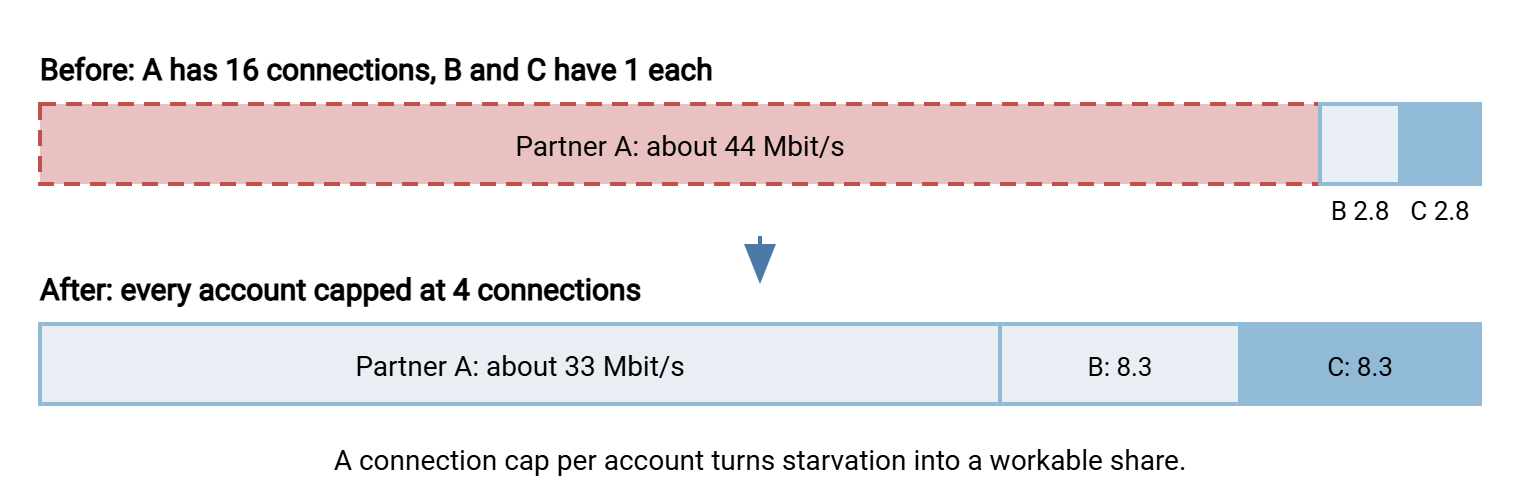
Three server-side controls do the work, in order of usefulness. A connection cap per account (and, for partners who use several accounts, per source address) limits how many shares any one partner can claim. The capacity side of that setting is covered in our Server Capacity and Concurrency series. A per-account rate limit, from the throttling article, caps the total regardless of connection count and is the stronger control where the server offers it. And fair queuing at the network edge keeps the queue short for everyone, though it is per flow, not per partner. So it does not by itself stop a sixteen-stream partner taking sixteen shares. That needs the account cap.
Finding the wide partner is a log question. Every transfer server records session opens with the account name. So count concurrent sessions per account over the busy hour — the log-reading techniques in reading transfer logs apply directly. That shows who is opening sixteen at once. Do that before capping anything, because the cap should be set just above what well-behaved partners actually use, not at a round number chosen in a meeting.
Then tell the partner. Most "aggressive" partners are simply unaware. A line in the onboarding document — "please limit your client to two simultaneous connections; the server enforces four" — prevents the problem for the life of the relationship. Partner SLAs and expectations covers where that line belongs.
Priority Classes That Mean Something
"This transfer is important" is not a setting. To make priority real, define a small number of classes, decide what each is allowed, and put every job in exactly one. Three classes are enough for almost any site; more than four and nobody can remember the difference.
| Class | What belongs here | Streams | When and how |
|---|---|---|---|
| Deadline | Files with a business cut-off: partner orders, payroll, regulatory submissions | Up to 4 | Any time; first wave in the window; normal (unmarked) network class; may run daytime unthrottled if small |
| Standard | Routine daily exchanges, reports, replication with a next-morning expectation | 1 or 2 | Off-peak window; throttled to a daytime rate if it must run in hours |
| Bulk | Backups, archives, re-seeds, anything measured in tens of gigabytes | 1 | Off-peak only; last wave; scavenger mark (CS1); hard stop or throttled landing at window end |
Notice what the table controls: the stream count, the window, the throttle, and the network mark. Those are the four levers this series has described, and a class is simply a named bundle of settings for them. Putting a job in a class means applying that bundle. When a job's owner asks for a higher class, the question is not "is your job important?" Ask "what is the deadline, and who depends on it?" The answer goes in the transfer inventory next to the job.
The classes also settle the order inside a window. Deadline jobs go first, standard second, bulk last, which is exactly the wave order in off-peak scheduling. If a bulk job starts before a deadline job on the same link, the schedule is wrong, whatever the clock says.
A worked example makes the classes concrete. On the 50 Mbit/s branch link from earlier articles, the partner order pull is a deadline job. It may open two streams, runs in the first wave at 01:00, and carries no scavenger mark. The regional report bundle is standard: one stream, second wave, throttled to 12 Mbit/s on the rare occasion it has to run during the day. The 30 GB backup is bulk: one stream, last wave, marked CS1 so the edge router treats it as scavenger. It has a hard stop at 06:00 and a resume the next night. Written that way, three lines in the inventory answer every "why is my transfer slow" question before it is asked.
Simple Admission Rules
Stream limits control how wide each job is. They do not control how many jobs run at once, and that is where the last fairness problem hides. Six well-behaved single-stream jobs that all start at 01:00 are six flows competing exactly as one job with six streams would. Admission control is the rule that says how many bulk jobs may be running on a link at the same time, and makes the rest wait their turn.
The simplest form is one slot per link: only one bulk job at a time. Any other bulk job that starts while the slot is busy waits for it. On Linux, flock gives you that in one line. The lock file represents the link; a job takes the lock before transferring and releases it when done; a second job waits, up to a limit, rather than competing:
# Wait up to 90 minutes for the link's bulk slot, then run; give up otherwise
flock -w 5400 /var/lock/bulk-link-london \
  rsync -av --partial /data/backup/ backup@sftp.example.com:/inbound/

# Two bulk slots: try each lock without waiting, run in the first free one
#!/bin/bash
for i in 1 2; do
  exec {fd}>"/var/lock/bulk-slot-$i"
  if flock -n "$fd"; then
    "$@"; exit $?
  fi
  exec {fd}>&-
done
echo "no free bulk slot, try later" >&2; exit 75
The first form is the one most sites need. Every bulk and standard job on the same link wraps its transfer in flock against the same lock file. The jobs serialize themselves in whatever order they arrive. The -w 5400 makes a job give up after ninety minutes of waiting rather than queue into the morning; its next scheduled run will try again. The second form allows two jobs at once. A job that finds no free slot exits with code 75, the conventional "temporary failure," so a wrapper or the scheduler can retry it later. The lock mechanics, including why flock beats a hand-made lock file, are in locking and overlap prevention.
On Windows there is no flock, but the same effect comes from structure. Put all the bulk jobs for a link in one place and run them one after another. A single "dispatcher" scheduled task that calls the jobs in sequence is the one-slot rule by construction. It has the side benefit that the order is written down. When the jobs run from an automation tool such as Sysax FTP Automation, they already originate from one host on one schedule. So that host is the natural dispatcher. The discipline is to keep every bulk job for a given link in that one place rather than letting a second machine start its own.
Whichever form you use, admission control needs one companion: a limit on how long a job may wait, and a log line when it gives up. A queue that grows silently is a window that has already overflowed, and the weekly report in measuring transfer impact should count the deferrals.
The Version to Tell a Colleague
The network shares a link equally between connections, not between jobs or partners. So every parallel stream a job opens is a share taken from everyone else. Default to one stream, justify two to four with a measurement, and cap connections per account on the server so that no partner can claim sixteen shares. Define three classes — deadline, standard, bulk — each a bundle of stream count, window, throttle, and network mark. Put every job in one. Then add a one-slot admission rule per link with flock or a dispatcher task so that jobs queue instead of compete. Fairness is not a feature you buy; it is four settings applied consistently.
From here, network-level shaping and QoS shows how the classes map to marks and queues on the edge router. The article on measuring transfer impact shows how to see, from the server logs, which partner or job is taking more than its share.
Frequently Asked Questions
Does using more parallel streams make my transfer faster?
Why does one partner's upload slow every other partner down?
Isn't fair queuing on the router enough to fix this?
How many priority classes should I define?
What is admission control, in plain words?
From the Sysax team: we build secure file transfer software for Windows. Sysax Multi Server is an FTP, FTPS, SFTP, and HTTPS server. Sysax FTP Automation handles scheduled, scripted transfers. Free trials are on the download page.