
Costing Failed Jobs, Manual Transfers, and Firefighting
Nobody has ever been asked to justify twenty minutes. A job fails overnight, you rerun it before anyone notices, and the twenty minutes vanish into the day. The purchasing assistant drags three files onto a server every morning, and the ten minutes vanish into hers. Multiply by forty flows, two administrators, three business teams, and a year. The vanished minutes add up to a number nobody has seen, because nobody was ever asked to count it.
This article is about counting it. It gives you a time-and-motion worksheet. That is simply a table of activities, how often each happens, and how long each takes. It is filled in from your own logs and your own calendar rather than from anyone's estimate of what a failure "typically" costs. Then the article works the sheet through for Meridian Parts, a spare-parts distributor with forty flows and two administrators. That lets you see what a year of small failures looks like when it is finally added up. It is part of our Business Case series. The total it produces is the second of the three legs the one-page business case stands on.
Why Small Failures Never Get Counted
Each small failure is below the threshold at which anyone writes anything down. A rerun takes less time than a ticket would. A manual upload is quicker than explaining why it should be automated. A morning check of six folders is a habit, not a task. None of these are recorded, so none of them appear in any report, so none of them cost anything, as far as the budget can see.
They are also spread across people who never compare notes. The administrator sees the reruns. The purchasing team sees the manual uploads. The account manager sees the apology calls to the dealer whose invoice file was late. Each person's share is small and each person assumes theirs is the only share. The total lives nowhere, and a cost that lives nowhere is, for budget purposes, zero.
There is a third reason, and it is the uncomfortable one: competent administrators hide the cost by being competent. You rerun the job at seven in the morning before purchasing arrives, and purchasing never learns there was a failure. This is good operations and terrible evidence. The better you are at absorbing failures, the less funded you will be to prevent them. I did this for years and was proud of it, which in hindsight was the wrong emotion.
The fix is not to stop absorbing failures. It is to count them while you absorb them, in a form the budget can read. That is the whole purpose of the worksheet.
Where the Counts Come From
Every number on the worksheet should come from a record you can show someone. Estimates are allowed for the duration of an activity; they are not allowed for how often it happens. Frequency comes from evidence, and the evidence is usually already there.
- The scheduler's history. Whatever runs your jobs keeps some record of what ran and whether it succeeded, even if it is only a log file. Count the failures over the last full quarter, then over the last year if the history goes back that far. If the scheduler cannot tell you, that fact goes in the case too. The article job status monitoring basics explains what a scheduler ought to be able to tell you.
- Silent failures. Failures nobody was told about are found by looking for their consequences. Those include the email thread that starts "did the price file come in?", the ticket raised by the warehouse, and the rerun at an odd hour in the log. Why jobs fail silently lists the usual places they hide. Count them separately, because they cost more per incident than the ones that were noticed.
- The ticket queue and your sent mail. Search for the partner names and the words "resend," "missing," "late," and "again." Each hit is an incident with a timestamp.
- The people doing manual work. Ask the purchasing assistant how many files she uploads by hand each day and how long each takes. Then watch her do one, because the answer to "how long" is usually optimistic by half. (The folder has to be found. The last file has to be checked. Someone asks a question.)
- Your own calendar and habits. The morning check. The Friday look at the disk. The time spent re-issuing a shared password every time a supplier's staff change.
If you have none of these records, keep a tally for four weeks before writing the case. A text file with one line per event, the date, what happened, and minutes spent, is enough. Four weeks of honest tally is worth more than a year of remembered impressions. It produces a case that can survive the question "where did these numbers come from?" with the answer "I wrote them down as they happened."
Template: The Time-and-Motion Worksheet
The worksheet has one row per recurring activity and seven columns. The last column is deliberately empty. It is where finance multiplies your hours by the loaded hourly rate. That is the cost to the organization of one hour of a person's time including salary, tax, benefits, and overheads. Finance has that number for each grade of staff; you do not need to guess it, and you should not.
TIME-AND-MOTION WORKSHEET: TRANSFER WORK                     (one row per activity)

Activity                                  Evidence          Per year   Who         Time each   Hours/yr   x loaded rate
----------------------------------------  ----------------  ---------  ----------  ----------  ---------  -------------
Failed job: notice, diagnose, fix,        scheduler log     [count]    admin       [hours]     [c x h]    [finance]
  rerun, tell people
Silent failure: business-team cleanup     tickets, email    [count]    business    [hours]                [finance]
  after late discovery
Manual upload or download a job could do  observed          [per day   business    [minutes]              [finance]
                                                             x days]
Routine "did it arrive?" checking         your calendar     [days]     admin       [minutes]              [finance]
Missed partner cutoff: resend,            sent mail,        [count]    admin +     [hours per             [finance]
  apologize, reconcile                    complaints                   business +  role]
                                                                       senior
Escalation to a manager or director       meeting invites   [count]    senior      [hours]                [finance]
Credential re-issue, script rebuild       change log        [count]    admin       [hours]                [finance]
  after a change, planned maintenance
----------------------------------------
Totals by role                                                         admin [ ]   business [ ]   senior [ ]
Three rules for filling it in. Count each hour once: an incident that appears in the failed-job row must not reappear in the escalation row with the same hours. Keep the roles separate, because finance applies a different rate to an administrator, a purchasing assistant, and a director. A single blended figure will be questioned. And write the evidence column honestly; "estimated" is an acceptable entry for a duration, and a fatal one for a count.
Worked Example: Meridian Parts' Year
Meridian Parts runs forty flows on a scheduler with no retry and no alerting. It has two administrators and a purchasing team that uploads three supplier order files by hand every working day. Their year, from the scheduler log, the ticket queue, and a four-week tally, came out like this. The hours are rounded to the nearest five; the roles are kept separate.
| Activity | Per year | Time each | Admin hours | Purchasing hours | Senior hours |
|---|---|---|---|---|---|
| Failed jobs (60, of which 22 in the bad quarter) | 60 | 3 h | 180 | ||
| Silent failures: purchasing cleanup | 15 | 4.5 h | 70 | ||
| Manual order-file uploads (3 a day, 240 days) | 720 | 10 min | 120 | ||
| Morning check of six inbound folders | 240 | 20 min | 80 | ||
| Missed dealer cutoffs: resend, apologize, reconcile | 8 | 2 + 1 + 1 h | 16 | 8 | 8 |
| Escalations to the operations director | 4 | 3 h | 12 | ||
| Shared-password re-issue when supplier staff change | 6 | 1.5 h | 9 | ||
| Script rebuilds after a path or password change | 4 | 6 h | 24 | ||
| Planned maintenance of scripts and scheduler | 12 | 4 h | 48 | ||
| Totals | 357 | 198 | 20 |
Five hundred and seventy-five hours a year. Against the roughly seventeen or eighteen hundred working hours in a full-time year, that is about a third of a person. That time is spread across two administrators, a purchasing team, and a director so thinly that none of them had noticed. The administrators' share alone, 357 hours, is a fifth of one of them. That is the "day a week between us" they had been mentioning in passing for two years, now with a log behind it.
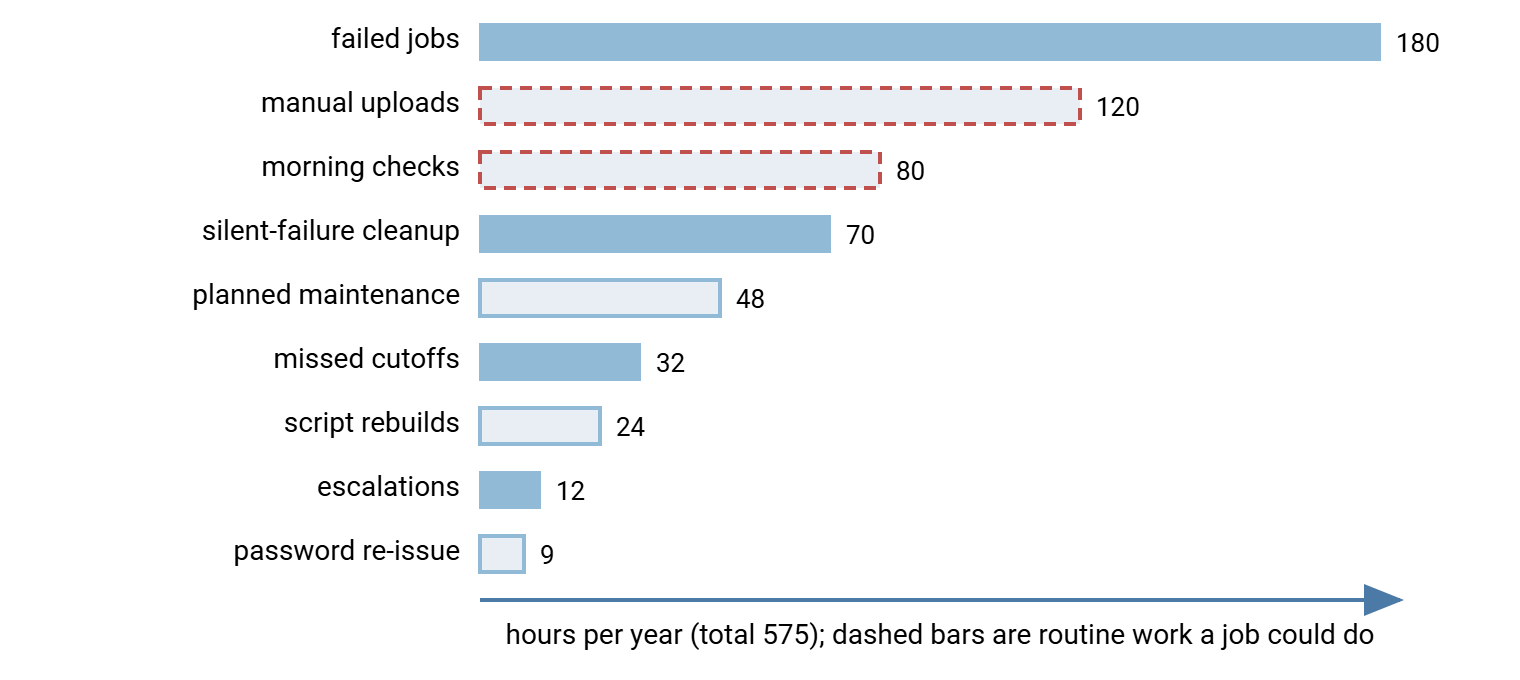
The diagram below shows where the hours go. The largest bar is the one you would expect. The second and third are the ones nobody expected, and they are not failures at all. They are routine work that a job with retry and alerting would simply do.
Kestrel Payroll found the same shape with a larger surprise. A payroll bureau with sixty clients, it had four staff. Each spent "five minutes" a day uploading the day's output to each of their fifteen clients. Nobody had multiplied. Sixty uploads at five minutes is five hours a day, which is a whole person. The bureau was about to advertise for exactly one more member of staff. The tally, kept for three weeks on a whiteboard, replaced the advertisement with a scheduled job.
Partner Penalties and Missed Cutoffs
A cutoff is the time by which a partner must receive a file for it to be processed that day. Examples are the bank's payment window, the dealer's order deadline, the supplier's dispatch time. Miss the cutoff and the file is processed tomorrow, and everything that depended on it moves with it. Cutoffs are where a twenty-minute transfer failure becomes a business consequence. They are the part of the worksheet finance will read first, because a missed cutoff is the kind of failure they already understand. The mechanics of cutoffs and why they cluster are in cutoff times and deadlines.
Some partners attach a penalty to a missed cutoff, in a contract clause your account manager knows about and you may not. Do not try to state the penalty as a figure in the case. State it as the contract does: "a percentage of that month's invoice," "loss of the preferred-supplier discount," "a written notice that counts toward termination." Finance can convert the percentage; they cannot argue with the clause. If your organization has a formal service agreement with the partner, the expectations it sets are described in partner SLAs and expectations. In that case, the case should quote those expectations.
Missed cutoffs also carry a cost the worksheet can capture directly: the resend, the apology, and the reconciliation afterward. Meridian's eight missed dealer cutoffs cost thirty-two hours across three roles, which is modest. The clause in two of the dealer contracts is not modest. It entitles the dealer to a small percentage off that month's invoice after the third missed cutoff in a quarter. It belongs on the one-pager as a sentence rather than a number.
Turning Hours Into Money Without Lying
We make transfer software, so read this section with that in mind; the arithmetic works whatever you buy or build. Hours become money in one multiplication, and it is finance's multiplication to do. That is hours by role, times the loaded hourly rate for that role. Give them the hours and the roles and let them do it. When the number comes back it is theirs, and a number that is theirs is a number they defend in the meeting instead of attacking.
The honest complication is that hours saved are capacity, not cash. If the worksheet says the fix frees a fifth of an administrator, the organization does not receive a fifth of a salary back. That only happens if someone leaves, a hire is avoided, or the freed time is spent on something with a value the reader agrees with. Say which. "This frees about 240 administrator hours, which we would spend on the backlog of forty-one open change requests" is a claim a director can weigh. "This saves the equivalent of a fifth of a person" on its own is the kind of sentence finance has learned to ignore. I have seen soft-savings slides which, added together, would have emptied the building.
The exception is manual work done by business teams. Kestrel's five hours a day of uploads were about to become a real hire. Meridian's 120 hours of purchasing uploads are real capacity in a team that measures itself in orders processed. When the freed hours land on a team that is visibly short of them, the saving is not soft, and you should say so plainly.
Then build the "after" column: the same worksheet, with each row re-estimated once the control is in place, and a reason for each change. For Meridian, the rows change like this with a scheduler that retries transient failures automatically and alerts a person on the permanent ones. That scheduler also runs the purchasing uploads as jobs. Failed jobs drop from 60 to about 20, because most of the 60 were the transient kind. Examples are a partner's server being briefly unavailable or a lock on a file still being written. A retry with backoff clears those without a human. The article transient versus permanent failures explains the split and retry strategies and backoff the mechanism. Silent failures go to zero, because alerting is the definition of not-silent. Manual uploads go to zero, because a scheduled, scripted job such as Sysax FTP Automation runs them, with retry and notification built in. A well-written script under the operating system's scheduler can do the same if someone maintains it. Morning checks go to a glance at an alert inbox. Missed cutoffs fall with the failures that caused them.
| Role | Hours today | Hours after | Freed | Nature of the saving |
|---|---|---|---|---|
| Administrators | 357 | 120 | 237 | Capacity: redirected to the change backlog |
| Purchasing | 198 | 30 | 168 | Real: the team is measured on orders processed |
| Senior | 20 | 5 | 15 | Small in hours, large per hour |
That is four hundred and twenty hours a year freed. Of those, the 168 in purchasing are the ones the operations director will care about. That is because purchasing is the team that asked for another person last year. The cost side of the same sheet, for comparison, includes the one-off migration (Meridian estimated two weeks of one administrator, about 80 hours). It also includes whatever the ongoing cost of the option turns out to be, expressed as a fraction of the existing support line. That comparison is the heart of the one-pager, and it is made from two columns of hours and one honest sentence about which savings are real.
Remember: the operational-cost total is the most defensible number in the whole business case. That is because every line of it came from a log, a ticket, or a tally the reader can inspect. Protect that by never blending roles, never counting an hour twice, and never calling capacity cash. A smaller number the finance director believes is worth more than a larger one they have to take on trust.
What the Total Buys You
The worksheet gives the business case its second leg: a routine, recurring cost, in hours by role, that exists whether or not anything ever goes badly wrong. The first leg, from translating breach risk into numbers, is what happens when something does. The third is what the auditor has already written down. On the one-pager the worksheet appears as three lines: hours today by role, hours after by role, and one sentence about which savings are real.
If your estate is still at the stage where most transfers are manual, the worksheet is also the argument for the first rung of automation. The article why automate file transfers makes that argument in operational rather than budget terms. Either way, start the tally today. The case you write next quarter will be built from what you write down this week, and twenty minutes, counted, is worth more than a week, remembered.
Frequently Asked Questions
What is a loaded hourly rate, and where do I get it?
My scheduler keeps no history. How do I count failures?
Can I claim the freed hours as a cost saving?
Should I include the cost of the big outage in this worksheet?
How accurate do the durations need to be?
From the Sysax team: we build secure file transfer software for Windows. Sysax Multi Server is an FTP, FTPS, SFTP, and HTTPS server. Sysax FTP Automation handles scheduled, scripted transfers. Free trials are on the download page.