
Documenting a File's Journey from Origin to Destination
"Walk us through exactly what happened to the June benefits file." The email is four lines long and copied to three people you have never met. Maybe it comes from a partner disputing totals, maybe from an auditor sampling one transfer, maybe from your own compliance team. Either way, the person asking does not want reassurance. They want a document: every hop, every actor, every timestamp, with evidence behind each line.
You almost never need new tooling to produce one. A usable custody record is assembled from materials your systems already generate — transfer logs, job histories, hash values, receipts. The other ingredient is the discipline of connecting them in time order. The skill is knowing what to pull from where, and what the finished document should look like. The four-line email is the easy part.
This article, part of our Chain of Custody series, does the assembly once, end to end, on a realistic multi-hop flow. We follow one file from the application that created it to its final archived copy. We collect the evidence at each checkpoint and finish with a custody record you can copy as a template. If the concept of custody itself is new, start with the foundation article and come back.
The Flow We'll Document
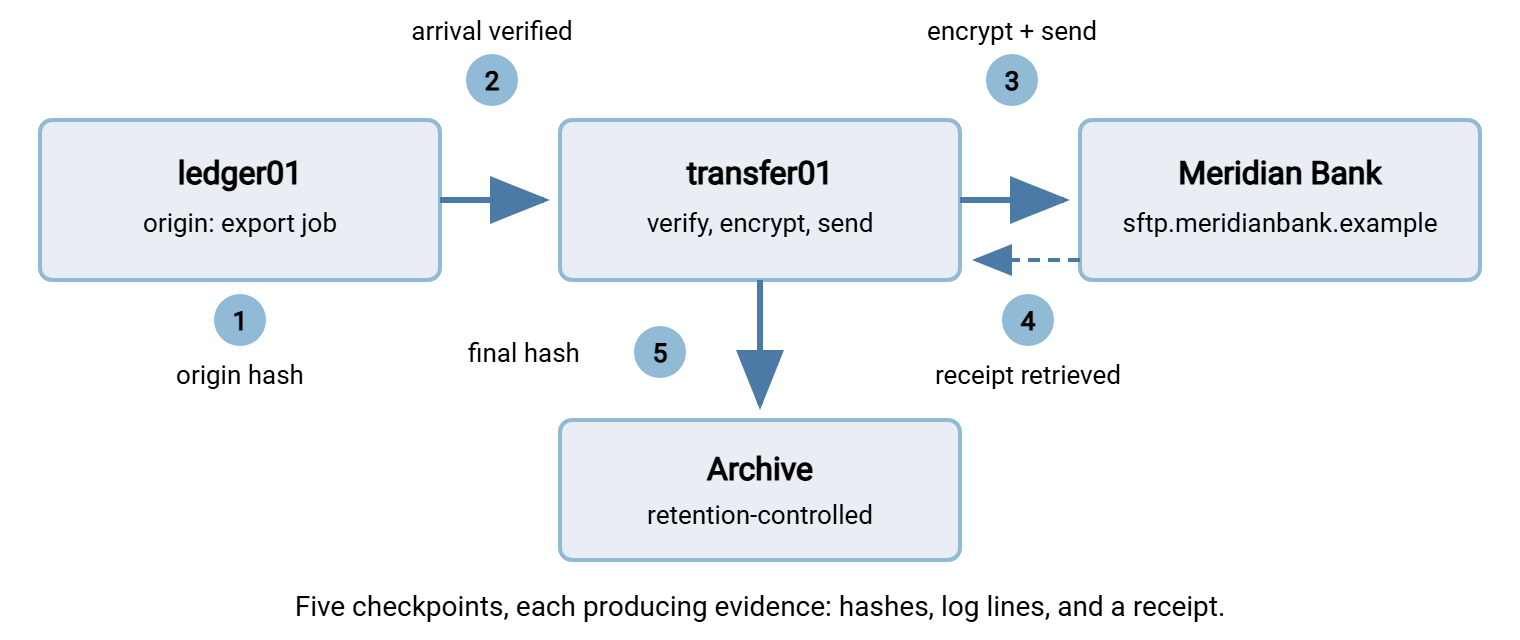
Our synthetic example: Northfield, a mid-sized employer, sends a monthly benefits contribution file to its benefits administrator, Meridian Bank. The flow has more hops than a beginner would guess, which is exactly why it makes a good worked example. Most real flows look like this. (The ones that look simpler usually have a hop nobody has drawn yet.)
- The finance application on
ledger01.northfield.exampleexportsbenefits_jun30.csvat month end. - An export post-step uploads it over SFTP to the internal transfer server,
transfer01.northfield.example. - A scheduled job on
transfer01verifies the file, encrypts it with OpenPGP, and uploads it to the partner's endpoint,sftp.meridianbank.example. - The partner's system processes it and drops an acknowledgment file, which our side retrieves.
- The original is moved to an archive folder under a retention rule.
The diagram below shows the journey with its custody checkpoints — the five points where evidence gets created. Each checkpoint answers, for its own hop, the three custody questions: who, when, and what changed.
The Raw Materials, and Where They Live
Before touching the specific file, know your sources. A custody record draws on four of them. Writing down where each lives turns a stressful request into an unhurried one. The flow's runbook is the natural place.
- Application and job logs at the origin — the export job's own history: when it ran, as which account, what it wrote. Often the most overlooked source, and the only one that covers the file's birth.
- Transfer server activity logs — every session, login, upload, and download, with account, address, byte count, and result. What belongs in these logs is covered in what to log. How to read them fluently is covered in reading transfer logs.
- Hash logs — output of the small scripts that compute and compare fingerprints at each checkpoint. These rarely exist by default; they exist because someone decided custody mattered and scripted the checks around the transfers.
- Receipts — the far side's confirmation, in whatever form the partnership produces: an acknowledgment file, a signed receipt, a log extract they share on request.
One property matters more than any formatting concern: all four sources must be contemporaneous — written by machines at the moment of the event. A record assembled later from these sources inherits their credibility. A record typed from memory after a dispute begins has almost none, which is a distinction legal teams typically care about a great deal.
Walking the Journey, Checkpoint by Checkpoint
The walk goes one checkpoint at a time, pulling the actual evidence each one produced — the same walk you would do with your own logs open in another window.
Checkpoint one: origin
Custody begins when the file does. The export job's log establishes creation — when, by what process, running as which account:
Jun 30 20:58:12 UTC  ledger01  job benefits-export (svc_ledger): run started
Jun 30 20:58:13 UTC  ledger01  wrote D:\exports\benefits_jun30.csv (61,448 bytes, 1,207 rows)
Jun 30 20:58:14 UTC  ledger01  post-step hash-and-log completed
Jun 30 20:58:16 UTC  ledger01  job benefits-export: success
That hash-and-log post-step is a two-line script that computes the file's SHA-256 fingerprint and appends it to a hash log. On a Windows origin it is typically PowerShell:
Get-FileHash -Algorithm SHA256 D:\exports\benefits_jun30.csv

Algorithm  Hash                                                              Path
---------  ----                                                              ----
SHA256     7B42E09C1D5A88F0342AC6B91E0D4F773A5518C2B6E9D00F14A7C83B52961EDA  D:\exports\benefits_jun30.csv
This value — recorded before the file moves anywhere — is the anchor for the entire journey. Every later "did it change?" question is answered by comparing against it. The next article covers the reasons SHA-256 is the right choice here, and exactly what a match does and does not prove. It is hashes as custody evidence. For now, treat the origin hash as the file's recorded fingerprint at birth.
Checkpoint two: arrival on the transfer server
The export's final step uploads the file over SFTP to transfer01. Here the evidence changes hands: the server's activity log takes over as the primary source. Log layouts vary by product, but the events are universal — connection, authentication, transfer, disconnect:
Jun 30 21:02:44 UTC  session 5417 opened from 10.20.4.15 (SFTP)
Jun 30 21:02:45 UTC  session 5417 user svc_ledger authenticated (public key)
Jun 30 21:02:47 UTC  session 5417 upload /inbound/benefits/benefits_jun30.csv 61,448 bytes OK
Jun 30 21:02:48 UTC  session 5417 disconnected
Three details in those four lines quietly do custody work. The account is svc_ledger — a named service identity, not a shared login, so "who" has an answer. The byte count matches the origin log. And the session number lets you pull the complete session if anyone asks what else that connection did. This is why server-side logging is the backbone of custody. A server like Sysax Multi Server records every session, login, upload, and download to its activity log. The log is written to file and optionally a database, with rollover. So this checkpoint exists whether or not anyone was thinking about custody that night.
Arrival is also the first re-verification point. A scheduled task on transfer01 hashes the received file and compares it to the origin value. The technique is the standard end-to-end verification ritual, with one addition — the result is logged, not just glanced at:
Jun 30 21:03:05 UTC transfer01 verify benefits_jun30.csv sha256=7B42E09C...52961EDA MATCH origin
Checkpoint three: the outbound leg
At ten past the hour, the outbound job wakes up. In our flow it is a scheduled task in Sysax FTP Automation. It watches the /inbound/benefits/ folder. When a new file lands, its pre-processing step runs the hash check. Its OpenPGP step then encrypts the payload for the partner's key, and it uploads the result over SFTP. The job's run log is your evidence for the entire hop:
Jun 30 21:10:00 UTC  job benefits-outbound started (runs as NORTHFIELD\xferbot)
Jun 30 21:10:01 UTC  pre-process verify_hash.cmd: MATCH against recorded origin value
Jun 30 21:10:03 UTC  pgp encrypt: benefits_jun30.csv -> benefits_jun30.csv.pgp (62,112 bytes)
                     sha256(benefits_jun30.csv.pgp)=C08F44D2...19AB recorded
Jun 30 21:10:09 UTC  upload to sftp.meridianbank.example /drop/ as northfield-payroll: OK
Jun 30 21:10:10 UTC  notify: run summary emailed to transfers@northfield.example
Jun 30 21:10:10 UTC  job benefits-outbound finished: success
The upload happened under northfield-payroll — the named account the partner issued to your organization. Their logs will show that name, which means your record and theirs can be joined later. Then look at line three.
Gotcha: encryption changes the bytes, so it changes the hash. The .pgp file's fingerprint will never match the origin value — and that is fine, because the transformation was intentional and recorded. The custody rule applies to any deliberate change (encryption, compression, renaming with content edits). Log the event, the actor, and both the before and after hashes. An unexplained hash change is evidence of a problem; an explained one is just another link in the chain.
Checkpoint four: the far side
Your own evidence has an honest limit: your logs prove what you sent and that the far end's server accepted it. They cannot prove what happened inside the partner's systems afterward. For that, you need the partner to hand you evidence — a receipt.
In our flow, Meridian Bank's intake process decrypts the payload, verifies it, and writes an acknowledgment file to a pickup folder. Our automation retrieves that file on its next poll:
Jun 30 21:41:22 UTC  retrieved /ack/benefits_jun30.ack from sftp.meridianbank.example

contents of benefits_jun30.ack:
  RECEIVED   benefits_jun30.csv.pgp  62,112 bytes
  DECRYPTED  benefits_jun30.csv
  SHA256     7B42E09C1D5A88F0342AC6B91E0D4F773A5518C2B6E9D00F14A7C83B52961EDA
  STATUS     ACCEPTED
Read that SHA256 line again: the partner decrypted and computed the fingerprint of the plaintext, and it equals your origin value. That single line closes the loop — the file Meridian accepted is byte-for-byte the file the finance system exported, on the partner's own testimony. Not every partnership produces receipts this good. The patterns for getting them — confirmation files, signed acknowledgments, correlated logs — are covered in proof-of-delivery patterns. B2B setups that use AS2 get the formalized version, the MDN, explained in MDNs and proof of delivery. Whatever form the receipt takes, the custody rule is the same: retain it with the record, verbatim, as received. Verbatim. Not summarized, not reformatted, not "the important bit."
And when a partner offers no receipt at all? Your fallback is the transfer transcript from your own client side. The job log's upload ... OK line proves the remote server accepted every byte. That is real evidence, just weaker than an application-level acknowledgment. It proves arrival at their doorstep, not processing inside the house. If the flow matters enough to document, it matters enough to raise receipts with the partner at the next review. The middle of a dispute is the worst possible time to discover the loop was never closed. I have made that discovery mid-dispute twice, and do not recommend it.
Checkpoint five: archive and disposition
Custody does not end at delivery — it ends at documented disposition. The post-processing step moves the original into an archive folder, verifies the hash one last time, and logs it:
Jun 30 21:41:25 UTC archive: benefits_jun30.csv -> /archive/benefits/ sha256 MATCH origin
The archive copy lives under a retention rule — in this flow, kept for seven years, then purged. The custody record should say so. "Where is it now, and when will it stop existing?" is a question the record must answer for its whole retention life. Retention decisions and the machinery that enforces them are their own subject; our retention and deletion series covers it.
The Copies You Almost Forgot
A careful reader of your record will eventually ask: the archive holds one copy — how many others exist? Walk the journey again counting copies instead of hops. The export wrote one in D:\exports\ on ledger01. The upload created a second in /inbound/benefits/ on transfer01. Encryption produced a third — the .pgp artifact. Delivery placed a fourth on the partner's server, and archiving made a fifth. Five copies of a sensitive payroll file, and the custody record so far only narrates the fate of the one that traveled. Nobody draws the ones that stay home.
A complete record accounts for the stragglers. In our flow, the job's post-processing cleans up as it goes. The staging copy and the .pgp artifact are deleted after successful delivery. Each deletion is a logged event with an actor and a timestamp, exactly like every other custody event. The origin copy on ledger01 is overwritten by the next month's export, and the record says so. Copies that linger unmanaged in staging folders are both a custody loose end and a data-exposure problem. If that sentence describes your servers, the copy-mapping exercise in our retention series is the place to start.
Assembling the Record
The assembly step, done with sources like these, is mostly transcription. Order every event by UTC time; give each line an actor and an evidence source; note every hash result. Format matters less than people fear: plain text or a simple table both work, and plain text ages best. It opens on anything, diffs cleanly, and cannot hide a formula or a stale cached value the way a spreadsheet can. What matters is that the record cites its sources line by line, so any reader can trace every claim back to a log they can inspect. Plain text has also never once auto-corrected a hash.
Here is the finished custody record for our file, in a plain-text format you can copy as a template:
CUSTODY RECORD
File:            benefits_jun30.csv (61,448 bytes, 1,207 rows)
Origin sha256:   7B42E09C1D5A88F0342AC6B91E0D4F773A5518C2B6E9D00F14A7C83B52961EDA
Flow:            ledger01 -> transfer01 -> Meridian Bank; original archived
Prepared by:     P. Rao, infrastructure team, from sources listed per line

#  When (UTC)       Event                                Actor              Evidence source
1  Jun 30 20:58:13  created by benefits-export job       svc_ledger         ledger01 job log
2  Jun 30 20:58:14  origin sha256 recorded               svc_ledger         ledger01 hash log
3  Jun 30 21:02:47  uploaded to transfer01 (SFTP)        svc_ledger         transfer01 activity log, session 5417
4  Jun 30 21:03:05  arrival hash verified: MATCH         xferbot            transfer01 hash log
5  Jun 30 21:10:03  encrypted to .pgp; new hash recorded xferbot            benefits-outbound job log
6  Jun 30 21:10:09  delivered to partner endpoint        northfield-payroll benefits-outbound job log
7  Jun 30 21:41:22  partner receipt: decrypted sha256    Meridian Bank      ack file, retained verbatim
                    MATCHES origin; status ACCEPTED
8  Jun 30 21:41:25  original archived; hash MATCH        xferbot            job log + archive hash log
Disposition:     /archive/benefits/, retained seven years per retention schedule
Gaps:            none identified between events 1 and 8
Notice the last line. Stating "no gaps identified" — or honestly listing the gaps you found — is part of the record. It tells the reader you checked continuity rather than assuming it, and it is the difference between a timeline and a chain.
The Checks Before You Call It Complete
Before the record leaves your hands, walk it against four failure points. These are the places where custody records fall apart under a skeptical reader.
- Clock agreement. Events 3 and 4 came from different machines. If their clocks disagree, your timeline can show effects before causes, and a challenger will use that. All sources here log UTC from synchronized clocks. If yours don't, fix that before the next dispute, not during it. The article on timestamps and evidence explains how much skew matters and why.
- Attribution. Every actor in the record is a singular, named identity. If any line says
ftpuseror "someone in finance," you have an attribution hole where a custodian should be. - Source survival. The record cites logs — so the logs must still exist when questions arrive, which can be months later. Check that log retention outlives dispute windows, and that the cited extracts are preserved with the record itself.
- Coverage. Scan the intervals between events. Between 21:03 and 21:10 the file sat on
transfer01— who could touch it there? If the folder's permissions restrict it to the two service accounts, say so; that closes the interval. If thirty people can write to it, the record has a soft spot even though every event line is true.
Bluewater Bank assembled a record like this one for a client dispute, and it read beautifully until event 3. That event's evidence source was an activity log that rolled over at ninety days. The dispute arrived on day one hundred and twelve. The origin hash and the client's receipt bracketed the missing hop and settled the content question. But the record went out with "session log no longer available" where a session number should have been. Log retention was changed to two years the same afternoon, a four-minute ticket. The sentence it replaced took a good deal longer to live down. How rollover and log growth behave, and how to keep them from eating evidence, is the subject of log growth and service logs health.
If a check fails, resist the urge to quietly smooth it over. A documented weakness is survivable; a discovered concealment is fatal. What breaks in real custody chains, and how to handle a genuine gap honestly, is the subject of breaks in custody.
Putting It Together
Documenting a file's journey is an assembly job. Origin log and hash anchor the start. The transfer server's activity log carries each hop. The automation job's history covers transformations and delivery. The partner's receipt closes the loop. The archive entry ends the story. Ordered by UTC time with named actors and cited sources, those materials become a custody record that answers "walk us through exactly what happened" in a page.
The deeper skill is noticing that every checkpoint in this article existed because someone configured it in advance. That includes the hash steps, the named accounts, the logging, and the receipt handling. None of it can be conjured after the fact. That is the case for building flows where the record assembles itself, which is exactly where this series ends up: designing flows that keep custody automatically. The four-line email, it turns out, was answered months before it was sent.
Frequently Asked Questions
Do I need to document every file this thoroughly?
What if one hop has no log at all?
Does the partner have to cooperate for the record to work?
Why record hashes in a log instead of just checking them?
Who should assemble the custody record when a request comes in?
From the Sysax team: we build secure file transfer software for Windows. Sysax Multi Server is an FTP, FTPS, SFTP, and HTTPS server. Sysax FTP Automation handles scheduled, scripted transfers. Free trials are on the download page.