
Why Transfers Get Interrupted (and Why Starting Over Hurts)
A transfer that runs for three minutes almost always finishes. A transfer that runs for three hours is a different animal. For every one of those minutes it is exposed to everything that can go wrong between two machines. That might be an idle timer somewhere, a router that forgets the connection, a patch reboot at the other end, or a disk that fills up. When one of those things happens, most tools do the simplest thing they can. They stop, print an error, and leave you to run the whole transfer again from byte zero.
That "again from byte zero" is the expensive part, and it is what this series is about. Resume means picking a transfer up from where it stopped rather than from the beginning. It is an old capability that almost every transfer protocol supports and most automation quietly ignores. This article is the foundation. It catalogs what actually interrupts transfers and shows what each interruption looks like in a log. It puts a number on the cost of restarting. It gives you a way to decide, flow by flow, whether resuming or restarting is the right response.
It is part of our Resume & Restart series. The companion articles explain the mechanics per protocol and how to verify a resumed file. The causes of dropped sessions have a whole series of their own — timeouts, keepalives, and dropped sessions — so here they are cataloged rather than dissected.
Five Terms Before We Start
Resume is built on a handful of small ideas. Once they are clear, the rest of this series reads easily.
- An offset is a position inside a file, counted in bytes from the start. Offset 0 is the first byte. If a transfer stopped "at offset 1,125,000,000", the first 1,125,000,000 bytes arrived and everything after them did not. Every resume mechanism, in every protocol, is a way of telling the other side "start at this offset".
- A partial file is what an interrupted transfer leaves behind: the bytes that arrived, sitting on disk under some name, with nothing to mark them as incomplete.
- To resume is to continue from a non-zero offset, reusing the bytes already on disk. To restart (or "restart from scratch") is to discard the partial and begin again at offset 0.
- A checkpoint is a saved record of progress that survives a crash. For a single file it is really just the offset. For a job that moves two hundred files, it is the list of which ones are finished. That lets the job restart where it stopped instead of at file one. That is the subject of checkpointing in automated jobs.
- An operation is idempotent if running it twice produces the same result as running it once. Retries and resumes happen, so any step you cannot safely repeat will eventually hurt you. Our plain-words guide to idempotency goes deeper.
The Interruption Catalog
Interruptions feel random when you are the one receiving the alert, but they come from a short list of causes, and each leaves a recognizable fingerprint. Where a cause deserves its own article, the last column points to it.
| Interruption | What triggers it | What the client usually reports | Read more |
|---|---|---|---|
| Idle timeout | A timer on the server, the client, or a device in between expires because a connection has been silent too long. Classic case: the FTP control connection idles while a long data transfer runs. | 421 Timeout, "Connection closed by remote host", or a 426 on the data connection |
Timeouts and keepalives |
| Network blip | A brief loss of the path: a link flap, a Wi-Fi roam, an ISP hiccup, a VPN rekey. | "Connection reset by peer", "Broken pipe", 426 Connection closed; transfer aborted |
Timeouts and keepalives |
| Address-table expiry | A NAT device or stateful firewall forgets the connection's table entry, usually after it idles too long. Packets are then dropped silently. | A long hang with no error, then an eventual timeout | Firewalls and NAT |
| Reboot or patching | Either end reboots, planned or not. Scheduled jobs on the rebooted side may or may not run again. | Reset or timeout, then "Connection refused" until the service is back | Surviving reboots and misfires |
| Far-end maintenance | The partner restarts their service, rotates a certificate, or fails over. Often at a predictable hour. | 421 Service not available, or a clean disconnect followed by refused reconnects |
Partner SLAs and expectations |
| Process death | The process is killed: out of memory, a scheduler's run-time limit, a user logging off, a laptop lid closing. | Nothing. The log simply stops mid-transfer. | Why jobs fail silently |
| Destination full | The disk or the account's quota fills while the file is being written. | 452 Insufficient storage space on FTP; a write "Failure" or "No space left on device" on SFTP |
Quotas and cleanup |
| Deliberate cancellation | Someone kills a transfer that is saturating a shared link, or a bandwidth policy cuts it off. | Whatever the killing tool reports; often "Killed" or a signal exit code | Bandwidth management |
Only two of the eight are "the network". The rest are timers, policies, reboots, and disks, which keep happening no matter how good the cabling is. That is the first argument for resume: you cannot engineer interruptions away, so you had better be cheap to interrupt.
Reading the moment it happened
Here is an FTP client log for a download that died part-way through. Lines beginning Command: are what the client sent; lines beginning Response: are the server's three-digit reply codes and text.
Mar 14 02:10:33  Command:  TYPE I
Mar 14 02:10:33  Response: 200 Type set to I
Mar 14 02:10:33  Command:  PASV
Mar 14 02:10:33  Response: 227 Entering Passive Mode (10,20,30,40,195,89)
Mar 14 02:10:33  Command:  RETR nightly-backup.tar.gz
Mar 14 02:10:34  Response: 150 Opening BINARY mode data connection for nightly-backup.tar.gz (1500000000 bytes)
Mar 14 02:18:04  Error:    Connection reset by peer
Mar 14 02:18:04  Response: 426 Connection closed; transfer aborted.
Mar 14 02:18:04  Status:   Transfer failed after 450 seconds, 1125000000 of 1500000000 bytes received
Line by line: TYPE I switches the session to binary ("image") mode, which matters enormously for resume and is explained below. PASV asks the server where to connect for the data connection — the separate connection FTP uses for file contents. RETR requests the file, and the server's 150 reply says the data connection is open and, helpfully, states the file's size. Seven and a half minutes later the operating system reports that the other side reset the connection. The server confirms with 426 Connection closed; transfer aborted — the FTP reply that means "the data connection died before the transfer was complete".
The last line is the one that matters for resume. The client received 1,125,000,000 of 1,500,000,000 bytes: three-quarters of the file, and exactly the offset a resumed download would start from. One caution: the log shows what the client counted; the on-disk size shows what was actually written, and the on-disk size is the truth. Every resume-capable tool checks the file, not its own memory.
The Arithmetic of Starting Over
The cost of an interruption is easy to underestimate because the interruption itself is instant. The cost is what you throw away afterwards. A worked example makes it concrete.
Suppose a site sends a 40 GB nightly archive to headquarters over a 50 megabit-per-second WAN link. Forty gigabytes is 320,000,000,000 bits. At 50,000,000 bits per second that is 6,400 seconds, or about 1 hour 47 minutes, ignoring protocol overhead. The job starts at 01:00 and should finish around 02:47.
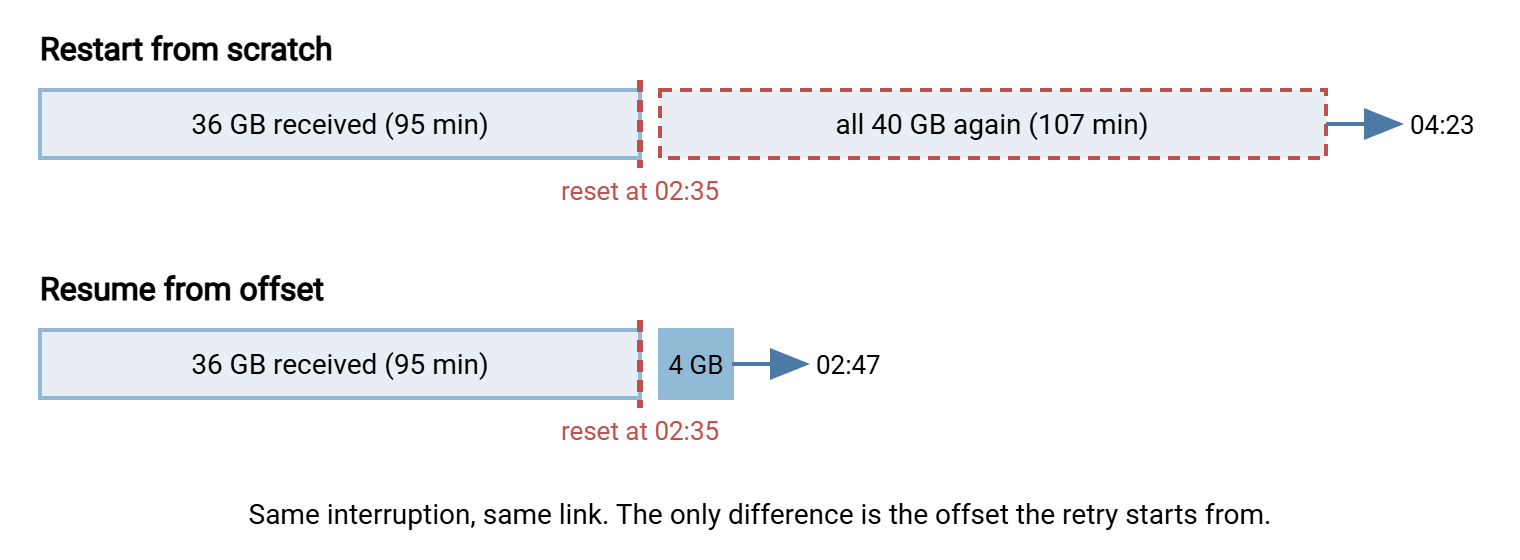
- At 02:35 the VPN renegotiates and the connection resets. About 36 GB — 90% of the file — has arrived.
- Restart from scratch: the retry begins at 02:36 and needs another 1 hour 47 minutes, finishing around 04:23 if nothing else goes wrong. The 95 minutes before the reset are gone.
- Resume: the retry begins at 02:36 and needs only the remaining 4 GB, about 11 minutes. It finishes around 02:47, essentially on time.
Same interruption, same link, same file. The only difference is whether the second attempt started at offset 0 or at offset 36,000,000,000. The diagram shows the two timelines side by side.
Now add probability. Interruptions arrive at random, and the longer a transfer runs the more of them it is exposed to. Say the path between two sites drops, on average, once every eight hours. That is not unusual for a WAN with the occasional VPN rekey and a nightly firewall policy reload. The chance that a transfer of a given length gets through untouched then looks roughly like this:
| Transfer length | Chance of no interruption | What restart-from-scratch means |
|---|---|---|
| 30 minutes | about 94% | One night in sixteen, the job runs twice. |
| 2 hours | about 78% | One night in four you lose about an hour of work, and the retry faces the same odds. |
| 4 hours | about 61% | Two nights in five the job overruns; some retries fail too. |
| 8 hours | about 37% | Most nights it never completes in one piece. Without resume, the flow does not work. |
The pattern matters more than the exact percentages. Restart-from-scratch means every failure re-rolls the dice for the entire file. Resume means you only ever have to survive the part that is still missing. Each drop costs seconds of in-flight data rather than hours of finished work. Multiply by scale — sixty branch sites sending nightly. The 22% figure for a two-hour transfer means thirteen sites restarting from zero every night, each consuming WAN capacity the other forty-seven need.
Remember: the cost of an interruption is not the interruption. It is the work you throw away afterwards. Resume changes the cost of a drop from "the whole transfer" to "a few seconds of data". That is why long transfers without it are a bet you will eventually lose.
The Hidden Costs on the Other Side
Restarting from scratch is not only slow. It creates problems at the destination that have nothing to do with speed, and those are the ones that generate incidents.
- Partial files left in place. An interrupted upload leaves a file on the server that looks finished: a normal name, a plausible size. Anything that consumes files from that folder may process three-quarters of a ledger. Our partial-file safety series explains why partial files happen. It covers the temp-name-and-rename pattern that keeps them from being mistaken for complete ones. That pattern matters twice as much when you resume, because a resumable partial must be kept on disk deliberately.
- Reconnect storms. A blip that drops fifty sessions is followed by fifty clients reconnecting at once, each restarting a large transfer from zero. Resume shortens the storm because most of them need only a little more.
- The "did it actually finish?" ambiguity. Sometimes the transfer completes but the client never sees the final reply because the connection died in the last second. The client reports failure, the server has a complete file, and a naive restart uploads a duplicate. Our guide to why duplicates happen covers that family.
- Batch deadlines. Nightly flows have cutoffs: the ledger must be there by 06:00 or the morning run starts without it. One restart may fit; a second drop will not. See cutoff times and deadlines.
- Human cost. Somebody gets paged at 03:00 for a job that, with resume and a sensible retry, would have healed itself.
What Resume Buys You, and What It Does Not
Resume is a precise tool, and it helps to be exact about its limits. What it does: it lets the second attempt skip the bytes that already arrived. That is all. For that to be safe, several things must be true at once.
- The transfer must be in binary mode. FTP has two transfer types. ASCII mode rewrites line endings on the fly so text files look right on the receiving operating system. Binary mode (
TYPE I) sends bytes exactly as they are. In ASCII mode the number of bytes sent is not the number of bytes on disk. So an offset means different things on each side and a resumed file ends up subtly wrong. Our ASCII and binary corruption series has the full story; for resume, the rule is: binary, always. - The partial must be an exact prefix of the source. The first 1,125,000,000 bytes on disk must be byte-for-byte the first 1,125,000,000 bytes of the file being sent. If the source was regenerated, appended to, or edited between attempts, the join is silently wrong.
- Both ends must support it for that protocol. Most do, but not all, and not in every configuration. Resume support compared shows how to check before you need it.
- You must verify afterwards. A resumed file has a seam in it. Checking the final size and, for anything that matters, a hash is not optional. Verifying a resumed transfer covers the specific ways resumed files go wrong.
What resume does not do: it does not fix whatever caused the interruption. It does not notice that the source changed, and it does not prove the result is correct. It is a way to waste less work, not a substitute for keepalives, retries, and verification.
The Resume-or-Restart Decision
Not every interrupted transfer should be resumed. The decision is cheap if you make it in advance, per flow, and write it down. Here is the checklist we use.
Restart from scratch when:
- The file is small. Below a few megabytes, a restart costs seconds. Resume logic costs more to get right than it will ever save.
- The source may have changed since the partial was written. Live log files, exports regenerated on every run, anything whose modification time is newer than your partial. A changed source makes the partial worthless at best and corrupt at worst.
- The transfer was in ASCII mode. The offsets do not line up. Start over in binary mode.
- The partial is stale or oversized. Older than your flow's trust window (a day is a common choice), or larger than the source, which means it is not a prefix of anything.
- Either end lacks support for resume in that protocol, or the server disallows it for that account.
Resume when:
- The file is large enough that restarting hurts — hundreds of megabytes and up, or anything on a slow or unreliable link.
- The source is stable between attempts: an archive that was written once and will not change.
- The transfer is in binary mode and both ends support resume.
- The partial is fresh, smaller than the source, and you will verify the result before anyone uses it.
In automation, the decision should be made by the job, not by a person at three in the morning. A scheduled-transfer tool such as Sysax FTP Automation has retry and error-handling settings. They let a failed run be retried and reported rather than silently abandoned. There are decisions about what to keep between those retries, and how to restart a multi-file job where it stopped. Those are what checkpointing in automated jobs and the closing article on resume strategy are about. The retry logic itself — how long to wait, how many times, how to back off — lives in retry strategies and backoff. A good first step is learning to tell a transient failure from a permanent one, because only transient ones are worth resuming.
Rule of thumb: resume large, stable, binary files on both-ends-supported protocols, then verify. Restart everything else. If you cannot say which category a flow is in, that flow does not yet have a resume strategy.
Where This Series Goes Next
The short version: transfers get interrupted by timers, blips, forgotten NAT entries, reboots, maintenance, killed processes, and full disks. The cost of an interruption is the work you discard afterwards, which grows with the length of the transfer. Resume turns that cost from "the whole file" into "a few seconds", provided several conditions hold. The partial is a true prefix of an unchanged source, the transfer was binary, both ends support it, and you verify the result.
From here, read how resume works in FTP, SFTP, HTTP, and rsync to see exactly what goes over the wire when a client says "start at this offset". Then read resume support compared to find out whether your tools and servers will honor it. If interruptions are frequent enough to be a pattern rather than bad luck, the timeouts and keepalives series is where to cure the cause rather than the symptom.
Frequently Asked Questions
My transfer failed part-way. Is the partial file on disk useless?
How do I find the byte at which the transfer stopped?
Why did my transfer hang for ten minutes before failing instead of failing at once?
Does resume work for uploads as well as downloads?
Is it safe to simply rerun the same job after a failure?
Why do interruptions seem to happen right at the end of a big FTP transfer?
From the Sysax team: we build secure file transfer software for Windows. Sysax Multi Server is an FTP, FTPS, SFTP, and HTTPS server. Sysax FTP Automation handles scheduled, scripted transfers. Free trials are on the download page.