
Disaster Recovery Scope: More Than the Server
"It's backed up nightly. We can rebuild it from the image in an hour." I have said that sentence myself, in a meeting, with a straight face, and I believed it. It is a plan for recovering a machine. Nobody in the room was asking about the machine. After a real disaster the rebuilt server boots, the service starts, and then the phone rings. Forty partners cannot log in because the server's identity changed. The overnight jobs never fired because their schedules were never on the image. Nobody can say which files were in the inbox when the storage died. The image restored perfectly. It just was not the service.
This article is about drawing the boundary in the right place. A transfer workflow is a server plus everything that made it yours. That includes accounts, the keys and certificates partners trust, jobs and schedules, and partner configurations. It includes data in flight and the logs that prove what happened. By the end you will have a scope list to hand to whoever writes the backup job. You will also have two numbers per flow — recovery time and recovery point — that say how much protection each one needs. This is the first article in our Disaster Recovery for Transfer Workflows series. Every later article assumes you have done this part, which is the polite way of saying do not skip it.
Outage, Disaster, and the Line Between Them
Two words get used interchangeably and should not be. An outage is a period when the service is unavailable but the environment is intact. The power failed, a switch died, a service crashed, or a certificate expired. Fix the cause and the same server comes back. A disaster is when the environment itself is lost or can no longer be trusted. The storage array corrupted, ransomware encrypted the volumes, the data center flooded, or an attacker had administrative access for a week. After a disaster you are not waiting for the server to come back — you are rebuilding it somewhere, from copies. The copies, ideally, exist.
That distinction also separates this series from its neighbor. High availability (HA) is the discipline of staying up through a single failure — a second node takes over when the first dies, ideally without partners noticing. That is a different problem with different tools, covered in our High Availability for Transfer Services series. Disaster recovery (DR) is what you do when HA was not enough or was never there. Both nodes are gone, or what broke was shared by both. The service must be reconstructed from backups. HA buys minutes of downtime. DR is measured in hours or days, and its job is to make sure those hours are not weeks.
Three more terms will come up. A cold site is a place you could rebuild into — space, power, network — with nothing installed. A warm site has the operating system and transfer software installed and configuration restored periodically. So the final recovery is "restore the latest backups and switch DNS." A hot site is a running replica ready to take over immediately, which is really HA wearing a different hat. Most transfer teams recover into a warm site that is just a spare virtual machine and a folder of backups. That is fine, as long as the folder contains everything. "Everything" is doing a great deal of work in that sentence.
Two Numbers That Define Every DR Plan: RTO and RPO
The recovery time objective (RTO) is the maximum acceptable time between the disaster and the service being usable again. A four-hour RTO means that if the storage dies at ten in the morning, partners must be able to connect by two in the afternoon. RTO drives how fast your restore has to be, and so how much you pre-build (a warm site) versus rebuild from scratch (a cold one).
The recovery point objective (RPO) is the maximum acceptable data loss, expressed as time. A one-day RPO means you can tolerate losing up to a day's worth of changes. That is another way of saying your newest usable backup may be up to a day old. RPO drives backup frequency: a one-day RPO needs at least a nightly backup; a one-hour RPO needs hourly snapshots or replication.
The mistake that makes both numbers useless is setting them once, for "the server." A transfer server carries many flows — a flow being one regular movement of files between two parties for one purpose. They do not all matter equally. Consider three flows on the same machine:
| Flow | RTO | RPO | Why |
|---|---|---|---|
| Payroll export to the bank (outbound, nightly) | Four hours | One day | The bank's cutoff is six in the evening; miss it and people are not paid. The file can be regenerated upstream, so a day-old copy of the server is acceptable. |
| Insurance claims from partners (inbound, all day) | Eight hours | Near zero for the inbox | Partners hold the originals and can resend — but only if you know what arrived. The log of arrivals needs a tighter RPO than the files. |
| Marketing asset pickup by an agency (outbound, weekly) | Two days | One week | A short delay harms nobody, and the assets live in the design team's system anyway. |
The server's RTO becomes the tightest RTO of any flow it carries — four hours here. But the RPO is not a single number: the payroll flow tolerates a day, the claims log almost nothing. That is the first practical result of scoping per flow. The activity log must be shipped off the box continuously even if the rest of the server is only backed up nightly.
What "The Workflow" Actually Contains
Picture the service as a set of rings around the machine. The server is the center. Each ring outward is something the service cannot function without, and something an image of the center alone does not capture. The diagram shows the rings from the server outward to the partners who depend on it.
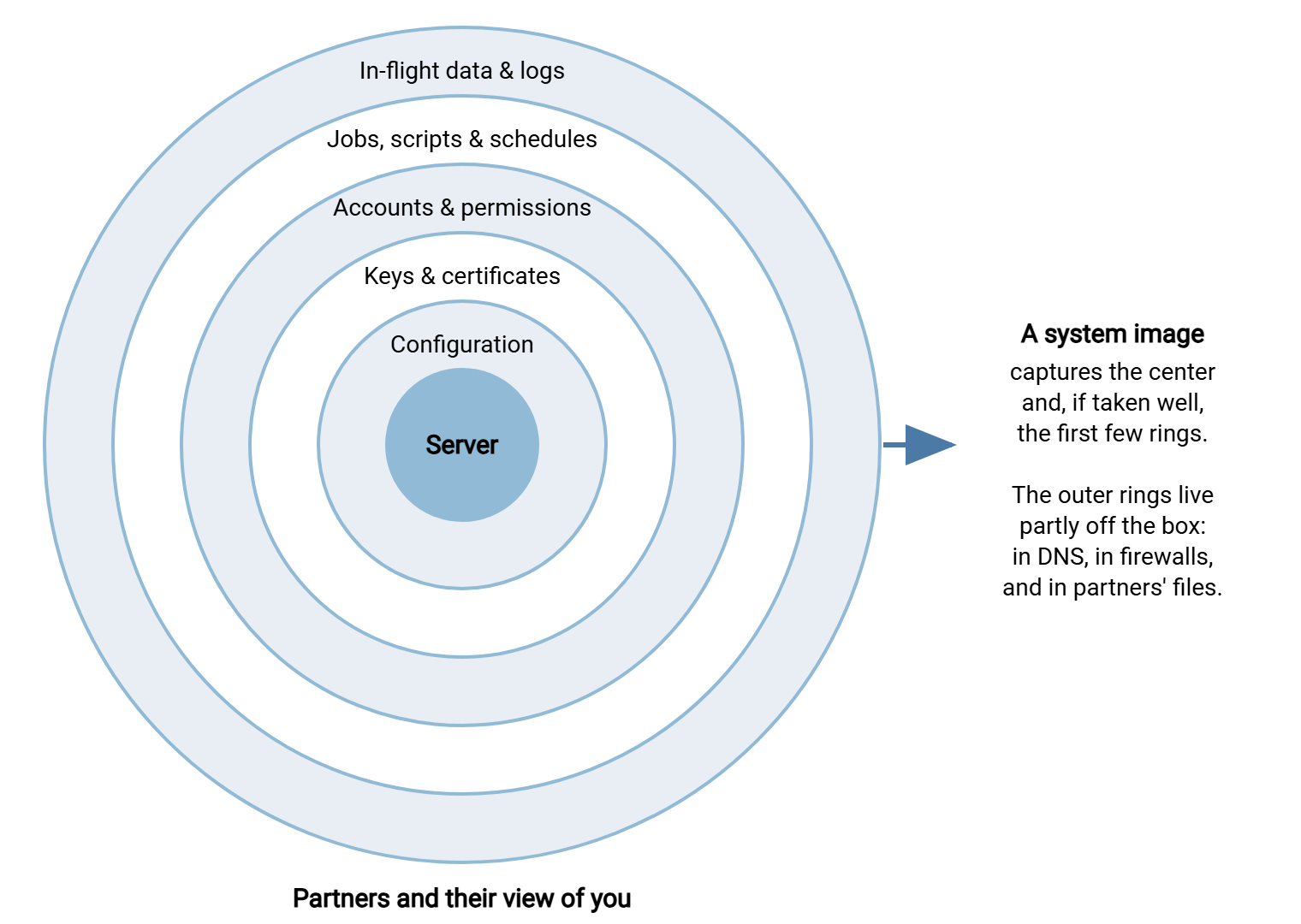
Walk the rings from the inside out and ask of each, "if the restored server had everything inside this ring but nothing in it, what would break?" The answers are the scope list.
Ring 1: the server itself
The operating system, patches, the transfer software, and the service that runs it. This is the part everyone backs up and the easiest to recreate. A bare-metal restore — rebuilding from a full system image onto blank hardware or an empty virtual machine, with no operating system pre-installed — gets you this ring and usually the next one. If this were all DR required, this would be a short series.
Ring 2: configuration
Which protocols are enabled, on which ports; the passive port range and external address announced to FTP clients; TLS settings; connection limits; the root folder; logging destinations. Some products keep this in files, some in the registry, some in a database. If it lives inside the system image, an image restore brings it back. If it lives in a database on another server, that database is now in scope. On a Windows server product such as Sysax Multi Server, the listeners, user definitions and activity logging settings are all server-side state. They must be on the list. They are not something a fresh install will rediscover.
Ring 3: keys and certificates
This ring is different from every other, because it cannot be recreated from memory. The SSH host key is the key pair that identifies your server to every SFTP client. Clients remember its fingerprint and refuse to connect if it changes. The TLS certificate and its private key identify your FTPS and HTTPS listeners. Then there are the keys you use to log in to partners' servers, the partners' public keys you have authorized, PGP keys, and any tokens used by jobs. Restore the server with fresh keys and, to every partner, a stranger is impersonating you. The detail is in Protecting Keys and Certificates for Recovery.
Ring 4: accounts and permissions
Every partner and internal account, its authentication method (password, key, certificate), its home folder, and what it may do there. If accounts are local to the transfer product, they live with the configuration. If they come from a directory such as Active Directory, the directory is in scope. A plan may restore the transfer server into a network where the domain controller is also gone. That plan has a dependency it never wrote down. Folder permissions are their own item: the directory tree and its access control lists are easy to lose when someone restores "just the files." Nobody who says "just the files" has ever wanted just the files.
Ring 5: jobs, scripts, and schedules
The scheduled tasks that push the payroll file at half past five, the scripts they call, the connection profiles those scripts use, and the folder-watch rules that fire when a file arrives. On Windows these are scattered across the Task Scheduler library, script folders, and the automation product's own store; on Linux, crontabs and home directories. They are almost never in the transfer server's own backup, because they often run on a different machine — the single most common gap in transfer DR plans. I have never once found the job host on a first-draft scope list.
Meridian Parts found this ring the cheap way, on paper. Their first scope walk listed the transfer server, its configuration, and its keys, and stopped there, satisfied. Then someone asked where the nightly price-list push to their distributors actually ran. The answer was a scheduling host in another rack that had never been backed up because it "only ran scripts." The scripts were the flow. The host went on the scope list that afternoon and into the backup job the following week. That was a much better week than the one they had been quietly heading for.
Ring 6: in-flight data and logs
The inbox where partners drop files, the outbox where your systems stage files for pickup, and the staging, archive, and quarantine folders. This is the ring where RPO really bites: configuration changes rarely, but the inbox changes every minute. Separately, the activity logs — who connected, what they transferred, when. During a disaster the logs answer "which files arrived after the last backup?" Afterwards they are the evidence that retention and audit obligations were met. Our legal holds and retention exceptions article explains why a disaster does not suspend those obligations.
Ring 7: partners and their view of you
The outermost ring is not on your server at all. It is what each partner has recorded about you. That includes your IP address in their firewall allowlist and your host key fingerprint in their known_hosts. It includes your certificate in their trust store, your public PGP key on their keyring, and the phone number of the person to call. If recovery changes any of those, the partner has work to do before files flow again. The relationship side is in SLAs and expectations for partner exchange; the DR-day mechanics are in Partner Communication During a Disaster.
Remember: to a partner's automation, your service is its host key, its IP address, and its certificate. Restore the server with a new identity and you have not recovered the service — you have launched a new one that every partner must be re-taught to trust.
The Inventory Is the Scope List
If you have a transfer inventory — a list of every flow with its partner, protocol, account, schedule, folders, and owner — you already have the DR scope list. The inventory is the artifact that says "these flows exist, and here is everything each one touches." Our Documenting Transfer Flows series covers building and maintaining it; if you have not started one, the file flow census is the quick first pass.
For DR the inventory needs a few extra columns. Here is a worksheet you can copy, filled in for one flow so the level of detail is clear:
DR SCOPE WORKSHEET — one row per flow

Flow name ........: payroll-out
Direction ........: outbound (we push)
Partner ..........: First Example Bank
Protocol/port ....: SFTP, port 22, to sftp.firstexamplebank.example.com
Our identity .....: key pair svc_payroll_ed25519 (fingerprint SHA256:9tQ2...)
Their identity ...: host key fingerprint SHA256:Lm4x... (pinned in known_hosts)
Account used .....: svc_payroll (on their side)
Job ..............: Task Scheduler \Transfer\PayrollPush on JOBS01, 17:30 daily
Script ...........: D:\Jobs\payroll\push.ps1 + profile payroll.conf
Source folder ....: \\ERP01\exports\payroll\ (upstream system regenerates)
Staging folder ...: D:\Transfer\outbox\payroll\
Archive folder ...: D:\Transfer\archive\payroll\ (kept 90 days)
Partner cutoff ...: 18:00 our time, every business day
RTO ..............: 4 hours
RPO ..............: 1 day (file is regenerated upstream)
Business owner ...: payroll manager (contact sheet entry P-03)
Partner contact ..: bank file-services desk (contact sheet entry B-01)
Restore notes ....: partner allowlists our public IP 203.0.113.40 —
                    DR site IP must be added BEFORE cutover
"Restore notes" is where the outer-ring dependencies go — the allowlisted IP, the job on a different machine, the upstream system that must be working first. A flow with an empty restore-notes line has usually not been thought about hard enough. It has, however, been thought about optimistically.
Dependencies Outside the Box
Walking the rings surfaces most of the scope. What it can miss are the things the service depends on that belong to somebody else. The article on dependency mapping for flows is the full exercise, and this is the DR-day short list. Write down which of these apply:
- DNS. Partners connect to a name. Recovery to a different address means changing the record, and its time-to-live decides how long partners keep going to the old one. Who can change it, and from where, if the primary site is gone?
- Public IP address and partner allowlists. Many partners only accept connections from, or to, your specific address. If the DR site has a different one, each of those partners must update a firewall rule before their flow works. Find out now which partners allowlist you.
- Firewall and NAT rules. The rules that publish port 22, the FTPS control port and passive range, and the HTTPS listener live on the firewall, not the server.
- Directory services, upstream and downstream systems. The domain that authenticates accounts, the payroll system that produces the file, the claims system that consumes the inbox. A perfectly restored transfer server with no ERP behind it delivers nothing.
- The job host. If scheduled transfers run from a separate automation server, that machine has its own scope list and its own place in the restore order.
- Notification paths. The mail relay for failure alerts and the monitoring that watches for expected files. Without them, a half-working recovery looks like a full one.
- The backup system, the escrow, and install media. Backups and installers must be readable from the DR site. The passphrases protecting the key escrow must be held by people who can be reached. A backup on the storage array that just died is not a backup.
Setting RTO and RPO Per Flow: A Worked Example
Return to the payroll flow and follow the reasoning through. The file must reach the bank by the six o'clock cutoff every business day, and it can be regenerated from the payroll system at any time. So the server must be usable within four hours of any business-day disaster. A disaster at two in the afternoon is the worst case, since four hours lands exactly on the cutoff. That is why the runbook will treat this flow as first priority. RPO for the server's copy of the file is a day, because the upstream system is the real source. But the job definition and the key used to log in to the bank have an RPO of "whenever they last changed." They must be backed up on every change, not just nightly. One flow has produced three backup requirements.
The inbound claims flow reasons differently. Partners keep their originals, so the inbox is recoverable by asking them to resend — but only if you can tell each partner which files you did not receive. That makes the activity log the critical asset, with an RPO of minutes. It also creates a duplicate-handling problem, because some partners will resend everything to be safe. Cutoff times and deadlines explains why partner deadlines decide which files to chase first.
Done for every flow, three things fall out automatically. The server's RTO is the tightest on the list. The backup schedule for each ring is the tightest RPO that touches it. And the restore order — which flows to verify first when the clock is running — is the RTO list sorted ascending. Automatically, that is, once the very manual part is finished.
A Scope Checklist to Copy
Before writing backup jobs, confirm the scope is complete. Every "no" here is a gap that will be found on the worst possible day.
- Every flow appears in the inventory, with a business owner and a partner contact.
- Every flow has an RTO and an RPO that someone outside IT agreed to.
- You know where the transfer software stores configuration and accounts, and whether an image captures it.
- Every key, certificate, and token is listed, on both sides of every flow, with fingerprints.
- Every scheduled job and script is listed, including those on other machines.
- In-flight folders and archive folders are distinguished, each with an RPO.
- Activity logs are shipped off the server more often than the tightest RPO.
- You know which partners allowlist your IP and which pin your host key or certificate.
- DNS, firewall, directory, upstream, downstream, and notification dependencies are written down.
- Backups, escrow passphrases, install media, and this document are stored somewhere that survives the loss of the primary site.
From Scope to Plan
A transfer server is easy to rebuild; a transfer service is not. Most of what makes it a service lives in the rings around the machine and in what partners have recorded about it. Scoping DR means listing those rings for every flow. It means agreeing an RTO and RPO per flow with the people who depend on it, and writing down the dependencies outside the box. The rest of the plan is then mostly mechanical. "Mostly" is doing some work there, but less than "everything" did earlier.
The next step is turning the scope list into backup jobs: Backing Up Transfer Configuration, Keys, and Jobs covers what to capture and how often. The ring that needs special handling gets its own article in Protecting Keys and Certificates for Recovery. The restore order derived from the RTO list becomes The Transfer Disaster Recovery Runbook.
Frequently Asked Questions
What is the difference between an outage and a disaster?
What do RTO and RPO mean in plain words?
Why should RTO and RPO be set per flow instead of per server?
Do I really need to include partners in my DR scope?
From the Sysax team: we build secure file transfer software for Windows. Sysax Multi Server is an FTP, FTPS, SFTP, and HTTPS server. Sysax FTP Automation handles scheduled, scripted transfers. Free trials are on the download page.