
Restore Drills: Proving the Plan Works
"Where is the second custodian?" "On a flight. Lands at four." It is twenty past two on the day of the drill, and the escrow needs both halves of its passphrase to open. Until this morning the plan was in excellent shape. The backup job had reported success for two years, the escrow was in the safe, and the runbook was printed. Now the PFX file will not import because the key was never marked exportable. The archive folder — three hundred gigabytes nobody needs today — is being restored before the inbox. That is because that is the order the backup system lists them in. None of these are exotic. All of them are found, for free, by the first drill, which is the only place finding them is free.
A restore drill is a rehearsal of the DR plan. You restore the transfer service from its real backups and escrow, on a network where it can do no harm, against the clock. This article covers the kinds of drill and what each proves. It explains how to build the isolated network the live ones need, and supplies a verification script the drill's verifier can run. It covers how to measure the result against the recovery time and recovery point objectives. It covers the findings log and calendar that turn one drill into a better plan. This article is part of our Disaster Recovery for Transfer Workflows series. It assumes the runbook from The Transfer Disaster Recovery Runbook exists in at least draft form. A draft is fine. Drilling is how a draft becomes a runbook.
Why Untested Plans Fail in the Same Ways
The failures a first drill finds are so consistent that they can be listed in advance. The backup is complete but was never restored, so nobody knows the configuration references a path that only existed on the old server. The escrow exists but its passphrase has never been reassembled from its halves. The host key was backed up, but from the wrong location — the product's own key store, not the OpenSSH folder, was the one partners trusted. The scheduled tasks import, but every one of them fires immediately because the "run after missed start" option was on. The recovery site's address is not in any partner's allowlist. The contact sheet has a phone number for someone who left. I have personally contributed three of those to a findings log.
Each of these is a plan defect, and a plan defect discovered during a drill costs an afternoon. The same defect discovered during a disaster costs the RTO. That arithmetic is the entire argument for drilling. It is why the measure of a good drill is not "did it pass" but "how many findings did it produce that we then fixed." A drill with no findings has usually not been looking.
Three Kinds of Drill
Drills come in three sizes, and a mature plan uses all three at different frequencies.
| Kind | What happens | What it proves | Cost |
|---|---|---|---|
| Tabletop | The team walks through the runbook around a table against a written scenario, saying what they would do at each step. Nothing is touched. | The runbook is complete and understood; roles and decision points make sense; contacts are current. | Two hours, no infrastructure |
| Component restore | One part of the plan is restored for real on a scratch machine: the configuration snapshot, or the escrow, or the scheduled tasks. | That backup is restorable and the steps for it are right. | An hour, one throwaway VM |
| Full live restore | The whole runbook is executed from declaration to partner verification, on an isolated network, with the clock running and a stand-in partner. | The service can actually be rebuilt within the RTO, from the real offsite copies, by the people who would do it. | A day, an isolated network, three or four people |
Tabletops are cheap and catch the human and documentation defects. Component restores catch the technical ones piece by piece. The full live restore is the only one that produces a real number to compare with the RTO. This is different from the failover drills in our high availability series (HA testing and failover drills has the detail). Those test whether a second node takes over. A DR drill assumes there is no second node and rebuilds from nothing. "Nothing" is meant literally, and it is a surprisingly long list.
Building the Isolated Network
An isolated network is a network segment with no route to production and no route to the internet. It is typically a virtual machine network on the hypervisor with no uplink, or a physically separate switch. A live restore must run there, for a reason that is easy to underestimate. A correctly restored transfer server is, by design, indistinguishable from the real one. It has the production host key, the production certificate, the production accounts, and — if the drill is faithful — the production IP address. Put it on the production network and you have two machines claiming the same identity. Restore its jobs enabled and they will connect to real partners and push real files, possibly for a second time. The drill that sends the bank a duplicate payroll file has found a defect in the drill, not the plan.
Four things make the isolated network usable:
- A DNS override. The restored server should be reachable by its production name, so that
known_hostsentries, certificates, and job profiles match without editing. A hosts-file entry on the verifier's machine, or a small DNS server inside the segment, mapssftp.example.comto the drill address. - A stand-in partner. A second small SFTP server inside the segment plays the role of the bank or the claims partner. So outbound jobs have somewhere to deliver and inbound flows can be simulated. The stand-in server's host key goes into the drill's
known_hosts; nothing about it touches production. - Access to the real backups. The offsite copies must be readable from the segment — ideally by copying them in on media. That also rehearses the "primary site is gone" case. Restoring from a convenient copy on the production backup server proves less than it appears to.
- A verifier's workstation inside the segment with the SSH and OpenSSL tools, the escrow register, and the scope worksheet.
Never bring a restored server carrying production keys and addresses onto the production network, and never restore jobs in the enabled state during a drill. The isolated segment exists so that the drill can be completely faithful to the runbook without a single packet reaching a real partner.
Running the Drill
The full live drill follows the runbook exactly — that is the point — with three additions. A timekeeper (usually the recovery lead) writes down the clock time at the start and end of every runbook step, and at every gate. The team uses only the artifacts the runbook says exist: the printed copy, the offsite backups, the sealed passphrase halves. And the verifier runs each gate with the same commands a real recovery would use, plus a script that checks the restored server as a whole. The script below is one such check, run on the restored server itself as an administrator:
# verify-restore.ps1 — run ON the restored server; expected values come from the escrow register
$expectedHostKey = "SHA256:Uq3nR8b0Yp2vT6kLm9xWc4dJf1sHa7eQz5tNo3iBg0M"
$expectedThumb   = "A1B2C3D4E5F60718293A4B5C6D7E8F9012345678"
$expectedPorts   = 22, 21, 443
$expectedTasks   = 12
$fail = 0
function Check($name, $ok, $detail) {
    $tag = if ($ok) { "PASS" } else { $script:fail++; "FAIL" }
    "{0}  {1,-12} {2}" -f $tag, $name, $detail
}

$svc = Get-Service -Name "TransferServer" -ErrorAction SilentlyContinue
Check "service"   ($svc.Status -eq "Running") $svc.Status

$listening = (Get-NetTCPConnection -State Listen).LocalPort
$missing   = $expectedPorts | Where-Object { $_ -notin $listening }
Check "listeners" (-not $missing) ("missing: " + ($missing -join ","))

$fp = (& ssh-keygen -lf "C:\ProgramData\ssh\ssh_host_ed25519_key.pub") -split " "
Check "hostkey"   ($fp[1] -eq $expectedHostKey) $fp[1]

$cert = Get-ChildItem Cert:\LocalMachine\My | Where-Object Thumbprint -eq $expectedThumb
Check "tlscert"   ($cert -and $cert.HasPrivateKey) "private key present: $($cert.HasPrivateKey)"

$tasks   = Get-ScheduledTask -TaskPath "\Transfer\"
$enabled = ($tasks | Where-Object State -ne "Disabled").Count
Check "tasks"     ($tasks.Count -eq $expectedTasks -and $enabled -eq 0) "$($tasks.Count) imported, $enabled enabled"

$acl = (Get-Acl "D:\Transfer\partners\acme\inbox").Access.IdentityReference -contains "SFTP01\acme"
Check "acl"       $acl "acme inbox grants SFTP01\acme"

"`n$fail check(s) failed"
exit $fail
Reading it from the top: the expected values are copied from the escrow register. So the script is checking the restore against the same sheet a human would. Each Check line prints PASS or FAIL with a detail. The script's exit code is the number of failures, so it can be run repeatedly until it exits with zero. The service check confirms the product is running. The listener check confirms every expected port is open. The host key check runs ssh-keygen -lf on the restored public key file and compares the fingerprint. If your SFTP product keeps its own host key rather than OpenSSH's, substitute the product's way of showing the fingerprint. The certificate check confirms the PFX import brought the private key with it. The task check confirms the right number of jobs were imported and that none are enabled. The ACL check samples one partner folder for the permission that matters most.
The external half of verification runs from the verifier's workstation: the fingerprint seen over the wire and the canary login, exactly as the runbook's gates describe. If the jobs live in an automation product such as Sysax FTP Automation, the drill also imports its scheduled tasks. In that case, it runs one by hand against the stand-in partner. That matters because the job side of the platform is where drills most often find that a profile still points at a path from the old server.
Measuring Against RTO and RPO
The timekeeper's log becomes a table. The one below is from a first full drill of the worked example in this series. That example has a four-hour RTO, a one-day RPO, and a payroll cutoff at six in the evening:
| Step | Planned (elapsed) | Actual (elapsed) | What happened |
|---|---|---|---|
| Declare and assemble | 0:20 | 0:45 | Second escrow custodian unreachable for twenty-five minutes; no alternate on the sheet |
| Network, server, configuration | 1:45 | 2:15 | Image restore from offsite media slower than planned |
| Keys and accounts | 2:15 | 3:05 | PFX import failed until the original issuance bundle was located in the escrow |
| Data | 3:00 | 4:10 | Archive folder restored before inbox; fifty minutes spent on files nobody needed that day |
| Jobs and partner verification | 4:00 | 5:20 | Payroll job profile referenced a drive letter the restored server did not have |
Five hours twenty against a four-hour RTO: a fail, and a useful one. Read the table for where the time went rather than the total. Two of the five overruns were waiting (the custodian, the media) and would have been invisible in a tabletop. One was a plan-order defect (archive before inbox) that a single line change in the runbook removes. Together they account for more than the entire overrun. That means a second drill with those three findings fixed would likely land inside the RTO with nothing else changed. The number is embarrassing for about a week, and then it is a baseline.
The RPO is measured separately, and with less ceremony. Note the timestamp of the newest data backup the drill actually used and the scenario's disaster time; the difference is the gap. In this drill the backup was from one in the morning and the scenario's storage failure was at twenty past two in the afternoon. That is a gap of thirteen hours twenty minutes, inside the one-day RPO. But the activity log copied off the server showed thirty-seven partner files arriving in that window. That is the concrete number the catch-up request to partners would carry. If the newest backup had been two days old because the offsite copy job had been silently failing, the drill would have found the plan's most dangerous defect of all.
Kestrel Payroll's first component restore found exactly that defect. The configuration snapshot they copied onto the scratch machine carried a date, and the date was three months old. The nightly job had been failing since a storage path changed. Its failure emails had been going to a mailbox nobody read. Every partner added in those three months was missing from the restored user list. The fix took an afternoon. The path was corrected, the alerts were rerouted to the team queue, and a manifest comparison was added so the next silent failure would be loud. The drill had cost an hour. It had bought back three months.
The Findings Log
Every surprise, delay, and workaround goes into a findings log, with a severity, an owner, and a due date. Severity is defined by consequence. A severity of high means it would have breached the RTO or RPO or blocked recovery entirely. A severity of medium means it cost time; low means it was untidy. Here is the log from the drill above:
DRILL FINDINGS LOG — drill D-07, full live restore, isolated segment

ID    Sev   Finding                                                     Owner        Due       Status
F-31  High  Custodian B unreachable 25 min; no alternate on sheet       ops lead     30 days   open
F-32  High  PFX export impossible (key not exportable); original         security     14 days   open
            issuance bundle now in escrow; register updated
F-33  Med   Archive restored before inbox; runbook step 6 reordered      restorer     done      closed
F-34  Med   Image restore from media 30 min slower than planned;         backup admin 60 days   open
            re-time step 2 or pre-stage OS at warm site
F-35  Med   Payroll profile hard-codes E:\ — change to UNC path          job owner    14 days   open
F-36  Low   Contact sheet phone for DNS admin out of date                communicator done      closed
F-37  Low   verify-restore.ps1 expected 12 tasks; there are now 13       verifier     done      closed

Result: 5 h 20 min against 4 h RTO — FAIL.  RPO gap 13 h 20 min against 1 day — PASS.
Next drill: component restore of keys within 30 days; full drill after F-31, F-32, F-34 closed.
Two habits make the log work. First, fix the runbook during the drill, while the defect is in front of you. F-33 was closed by editing step 6 on the spot, and that edit is the drill's most valuable output. Second, the log carries forward. The next drill starts by checking that the open items were closed, and the one after that tests whether the fixes held. The tone matters as much as the format; a log that blames people produces fewer findings next time. We learned that the slow way, across two drills that found suspiciously little. Our article on running a blameless postmortem is the model, applied to a disaster that did not happen.
The Drill Calendar
Drills decay in value if they are irregular, and they become theater if they are always the same. The cycle below is the working shape: plan, drill, log findings, fix, and around again. Each pass makes the next drill harder rather than easier, because the easy findings are gone. A drill that gets easier every year is being memorized, not tested.
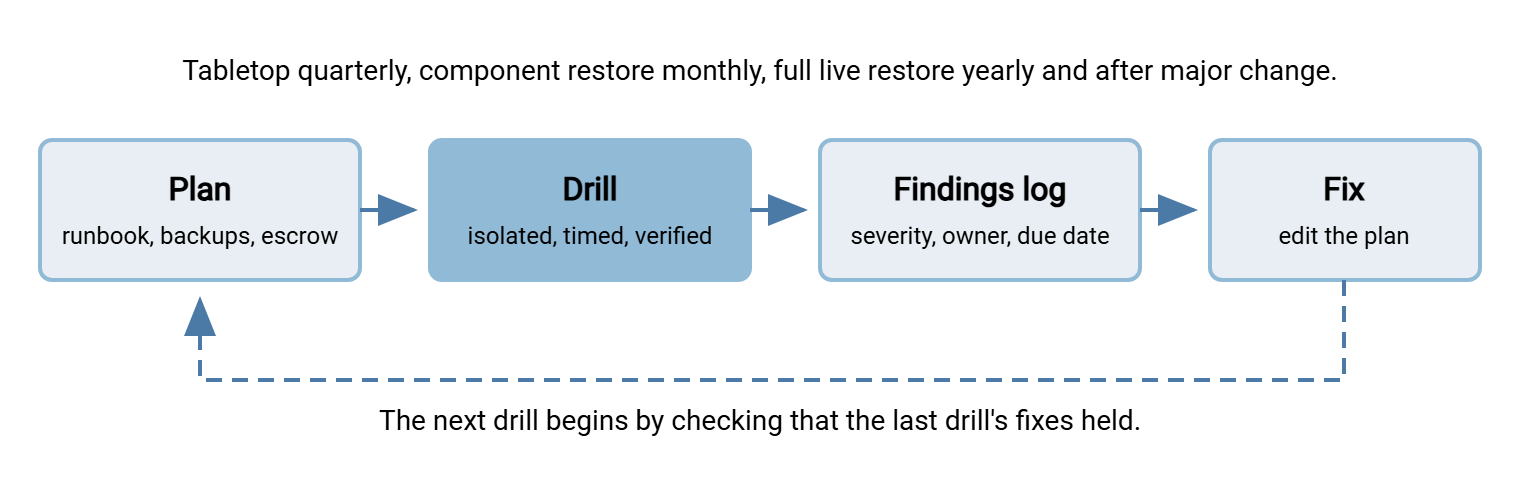
A calendar that works for most transfer teams:
- Monthly: a component restore, rotating through the parts — configuration snapshot one month, scheduled tasks the next, a data folder the next. The monthly restore test in Backing Up Transfer Configuration, Keys, and Jobs is this item.
- Quarterly: a tabletop against a different scenario each time — site loss, ransomware, a compromised escrow — so the decision points get exercised, not just the happy path.
- Twice yearly: escrow reassembly. Both custodians produce their halves, the archive is decrypted on an isolated machine, hashes are verified, and it is re-sealed. This is the drill from Protecting Keys and Certificates for Recovery, and it is the one most often skipped.
- Yearly: the full live restore, and additionally after any change large enough to invalidate the last one. Such changes include a new platform version, a new certificate, a new site, a new automation host, or more than a handful of new partners.
If you already maintain a staging environment for testing changes, it is the natural home for component restores. It can also double as the isolated segment for the full drill. Our testing and staging series covers building one, starting with building a staging environment. And a drill is a good moment to check the monitoring that would tell you a real disaster had happened. The expected-file checks in freshness checks for expected files turn "the server is gone" into an alert rather than a partner's phone call.
What a Drill Proves
A drill is the only evidence that a DR plan is more than a document. Tabletops prove the plan is understood, and component restores prove the backups are usable. The full live restore on an isolated network proves — with a number — that the service can be rebuilt by the people who would rebuild it. It proves they can do it inside the RTO, from the real offsite copies, with its identity intact. The findings log is the product. The fixes it drives are what make the next drill faster. The calendar is what keeps the plan from quietly going stale as the platform changes. Plans do not announce that they have gone stale. They wait.
The one part of recovery a drill cannot fully rehearse is the partners, because they are not on your isolated network. The next article, Partner Communication During a Disaster, covers the notices, the catch-up plan, and the all-clear that the communications track sends while the technical steps run.
Frequently Asked Questions
What is the difference between a tabletop drill and a live restore?
Why must the drill run on an isolated network?
Our first drill failed the RTO badly. Is the plan useless?
How often should we drill?
What goes in the findings log?
From the Sysax team: we build secure file transfer software for Windows. Sysax Multi Server is an FTP, FTPS, SFTP, and HTTPS server. Sysax FTP Automation handles scheduled, scripted transfers. Free trials are on the download page.