
Running a Blameless Postmortem for a Transfer Incident
The meeting after the incident has a familiar shape. Someone is found to have made the mistake. That person promises to be more careful. Everyone else leaves relieved it was not them. The estate is exactly as fragile as the morning before, minus one person's willingness to speak up next time. The other familiar shape is no meeting at all: fix the problem, close the ticket, never mention it again. I have sat through both more times than I would like. Neither is a postmortem.
A postmortem is the third option: a structured review. Its purpose is not to decide who was at fault. It is to understand precisely how the incident happened and what would have prevented, detected, or shortened it. The five stories in this series were each written as one. They are the deleted inbox, the looping job, the leaked credential, the file that never arrived, and the misdirected file. This article is the method behind them, part of our War Stories series. It ends with the template to run one for your own next incident.
What "Blameless" Actually Means
Blameless does not mean nobody is accountable. It means the review starts from a specific claim: the people involved acted reasonably given what they knew and saw at the time. The incident happened anyway. That claim is almost always true. If it is, the useful question is not "who erred?" It is "what made a reasonable action turn out badly, and what would have made the danger visible?"
The claim is a working assumption, not a courtesy, and its purpose is practical. People who expect to be blamed edit their account of events. They leave out the command they ran at 22:30, the alert they snoozed, the file they deleted to tidy up. Every one of those omissions is a fact the review needs. In the deleted-inbox story, the responder's over-broad restore caused a second incident. In the misdirected-file story, the first instinct was a quiet fix. Both went into the write-up as plain timeline events, and both produced the most valuable action items. That was because the person involved could describe exactly what the situation looked like from inside.
You can hear the difference in the questions. Why didn't you check the config? is a blame question. The only possible answers are excuses. What would have shown you the config needed checking? is a system question. Its answers are action items. The facilitator's main job is converting the first kind into the second.
Remember: "human error" is where a bad postmortem stops and a good one starts. The person was the last step in a chain the system allowed. Ask what the system did to make the error possible, invisible, or irreversible. That is where the fixes are.
When to Run One, and Who Is in the Room
Run a postmortem for any incident a partner or customer noticed. Run one for any incident where data reached the wrong party or was lost. Run one for any incident whose recovery took more than a working day. Also run one for any near miss where the same chain could have done real damage with slightly different timing. This is the one teams skip. The deleted-inbox backup retention was a near miss inside an incident. It got its own factor and action item.
Keep the room small and specific. Include a facilitator who was not the person who fixed the problem. That way they can ask naive questions without defending anything. A scribe, because the facilitator cannot run the conversation and write it down. (People who believe they can produce notes that say "discussed timeline.") The people who responded. The owner of the flow that broke. Where the incident crossed an organizational boundary, include the partner's operations contact for the first half. The silent-miss postmortem had the partner in for the timeline and factors, then continued internally for actions. Managers are welcome as participants and unwelcome as judges. If their presence makes people cautious, brief them afterward.
Run it within a week of the incident, once the fix is stable but before logs rotate and memories smooth over. The facilitator gathers evidence and drafts the timeline beforehand. That way the hour together goes on correcting and interpreting rather than reconstructing.
Building the Timeline From Logs
The timeline is the product. Most disagreements about an incident dissolve the moment there is one agreed sequence of events with evidence beside each entry. Most postmortems that fail argued about causes before the sequence existed.
The diagram below shows the shape of the work. Independent sources, each with its own clock and vocabulary, are merged into one clock-normalized sequence. Factors and then actions are derived from that sequence.
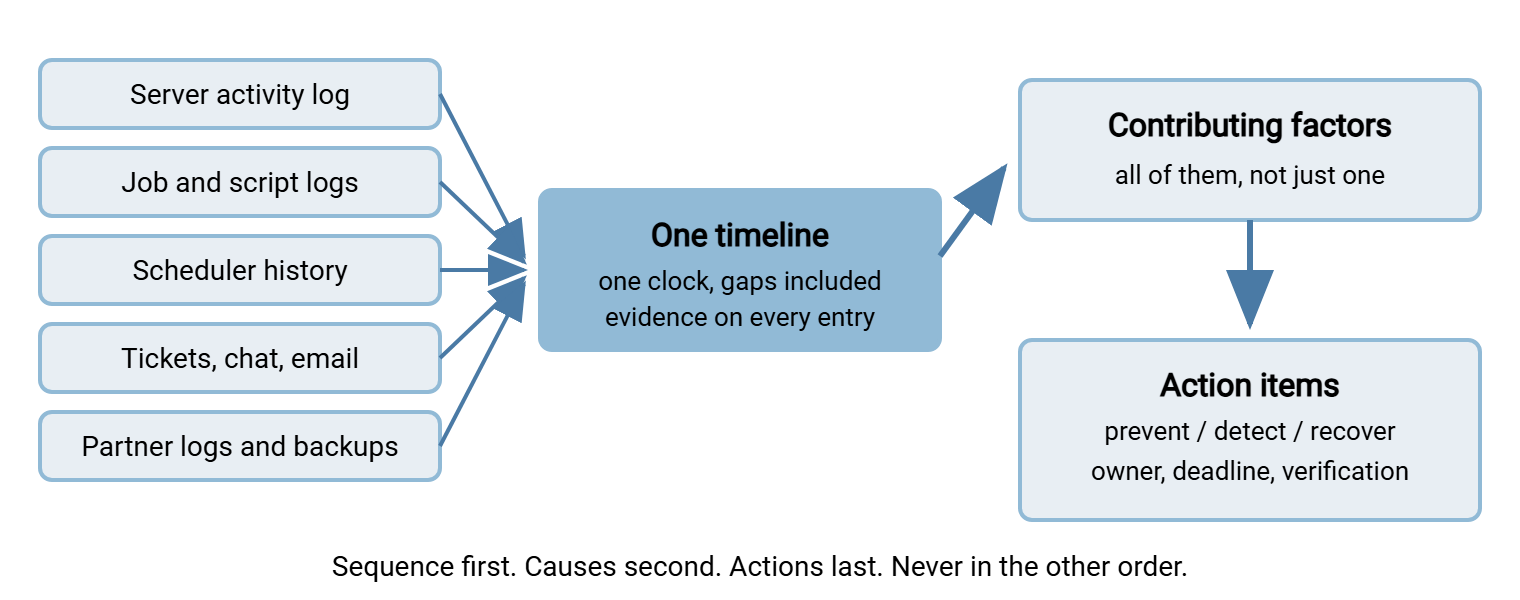
Start with the sources that record facts rather than recollections. The transfer server's activity log is usually the richest. It records every login with account and source address. It records every upload, download, and delete with a path and a time. Sysax Multi Server writes that log to file and can also write it to a database. That makes "who downloaded this file?" or "when did this partner last connect?" a query rather than a search. Add the job's own log, the scheduler's run history, ticket timestamps, chat and email. Add the partner's logs if they will share them. Add the backup catalog, which tells you what existed at a moment in time.
Then normalize. Different hosts keep different clocks and time zones. A server five minutes fast turns a clear sequence into an argument. Check each source's offset against a reference and note it in the timeline header. Write every entry in one format: clock time, source, event, pointer to the evidence. Include the gaps as entries in their own right. An example is Jun 10 04:00 to Jun 30 16:40: no login by the partner account. In a silent miss the absence is the event. Include responder actions, the ones that did not work included, in the same neutral voice as the machine events. Documenting a file journey is that discipline written up. The article on reading transfer logs covers the queries you will reach for most.
You may be unable to build the timeline. Perhaps the job did not log, the server's log had rotated, or the ticket had been edited. That gap is itself a finding, and usually the first action item. What to log is the reference for closing it.
Contributing Factors, Not a Root Cause
Every incident in this series had a single obvious trigger and none had a single cause. An unquoted variable, a widened watch folder, a pasted row: each was necessary and none was sufficient. Each did its damage only because several other things were also true. Those conditions included no dry run, no ceiling, no review, no freshness check, and no address restriction. They also included a backup that ran after the purge. Think of the estate as a stack of defensive layers, each with holes. An incident is a path through a hole in every layer at once. The trigger is the first hole. The postmortem's job is to find all of them, because closing any one blocks the path. Closing only the first leaves the others waiting for the next trigger.
The table below shows the shape across the five stories. It lists the trigger everyone noticed first, the factor that turned a bug into an incident, and why nobody saw it sooner.
| Story | Trigger | Amplifier | Detection gap |
|---|---|---|---|
| Deleted inbox | Empty, unquoted path variable | Working directory at the partner root; account with full delete rights | Log written, never read; no ceiling |
| Looping job | Archive folder inside the watch root | Infinite retry; parallel instances | Failure-only alerts; no volume baseline |
| Leaked credential | Password inside a batch file | Three wide-audience copies; no address restriction | Only failures watched; successes from a new address invisible |
| Silent miss | Partner's job left disabled after cutover | Import treated zero files as success | No freshness check; constant subject line |
| Misdirected file | Pasted routing row, destination unchanged | Typed destinations; shape-only validation; no review | No canary; no freshness check on the sender's side |
To elicit factors, walk the timeline entry by entry. Ask two questions of each: what allowed this step to happen? and what would have stopped or revealed it? Sort the answers into categories (design, configuration, process, monitoring, recovery, ownership). Check that every factor is a property of the system. "Kofi pasted the wrong row" is not a factor. "The destination was a free-text field that could be pasted" is. The test is whether the sentence stays true with a different person in the chair.
Asking Why Without Theater
Asking "why?" repeatedly is a good technique with a bad reputation, because it is so often performed rather than practiced. Performed, it stops at the first answer that names a person. Or it continues past any useful depth into "why do we have partners at all." Practiced, it has a stopping rule: stop when the answer is something you can change and verify.
Take the looping job. Why were nine hundred invoices re-sent? Because the sweep found them in the archive folder. Why was the archive folder swept? Because it sat inside the newly widened watch root. Why did the widening include it? Because nothing checked whether the two paths overlapped. That is a stopping point; an overlap check is a thing you can write and test. Now take a different branch: why did the resends continue all night? Because the archive step's failure was caught and the file left in place. Why was that acceptable? Because "one bad file must not stop the batch" was the design intent. Nobody had distinguished a transient failure from a permanent one. Another stopping point, another action.
Two habits keep the questioning honest. Ask why did it make sense at the time? for every human action on the timeline. Do this not as an excuse, but because the answer usually reveals the information the system should have provided. And accept multiple branches: a real incident has three or four independent why-chains. A review that produces one tidy chain has usually stopped early.
Action Items With Owners and Dates
Actions come in three kinds, and a good postmortem has some of each. Prevent actions close the hole the trigger went through: the purge guard, the overlap check, the derived destination. Detect actions shorten the time to notice: the new-address query, the volume alert, the freshness check. Recover actions shorten the time to fix: the backup moved ahead of the purge, the catch-up mode, the misdelivery runbook. Detect actions are usually the cheapest and pay off across many future incidents, not just this one's replay. If you can do only one thing, do that one. Tools help without being the point. Scheduled-transfer software such as Sysax FTP Automation gives you retry, error handling, and email notifications as settings rather than code. That turns several detect-and-recover actions into configuration. Deciding what to watch for is still the postmortem's job.
Each action needs three things or it will not happen. One owner: a name, not "the team," not "ops," not "whoever is on call." A relative deadline, "within two weeks," "before the next partner onboarding," written at the meeting. And a verification: how will anyone know it is done and working? A dry run whose output was read, a test alert that reached a phone, a reviewed change in version control. "Be more careful" and "additional training" fail all three tests and should be struck out on sight. If training is genuinely needed, the action is the specific runbook or checklist that will be taught. If an action needs money, the impact line is the start of the case. For the method, see costing failed jobs and manual work. It turns "operations spent the afternoon reversing seventeen updates" into a number an approver can act on.
Keep the list to five to eight items and park the rest. Track them somewhere visible, and set a re-check date about a month out. At that re-check, confirm they are done and still holding. An action list that is never re-checked is a postmortem that was never finished.
Writing It Up and Sharing It
The write-up has three audiences and needs three shapes. The internal document is complete: timeline, factors, actions, mistakes and all. It uses first names because the people were there and the tone is neutral. The partner-facing summary is a page. It covers what happened, how it affected them, when it was detected and fixed, and what has changed to stop it recurring. Facts and remedies, no internal names, no speculation. The article on partner SLAs and expectations has the shape it should follow. The leadership paragraph is five sentences and a link.
Where personal data was involved, the privacy owner's record and the postmortem are different documents with different purposes. The article on personal data transfer incidents describes what theirs needs. Where an audit is likely, a postmortem with a timeline, evidence pointers, and verified actions is exactly the artifact evidence auditors accept describes.
Then make it travel. Hold a short read-out for the wider team. Store the document where the next on-call responder will find it at 02:00. Link it from the runbook for that flow. Do not bury it in a project folder. If the flow has no runbook, that is another finding. The article on runbooks per flow is the shape to give it. Keep a library of past postmortems. It is the best onboarding material an operations team can have, because it teaches how this estate actually fails. And resist the urge to sanitize. A postmortem that cannot say "the restore put back the whole tree and the poller reprocessed it" cannot teach anyone to avoid it.
The Template
This is the template behind the five stories. Copy it, keep the headings, and fill it in during the meeting, not afterward.
TRANSFER INCIDENT POSTMORTEM

Title:           <what happened, in one plain sentence>
Incident window: <first effect> to <service restored>      Detected: <time>   Detected by: <system / person / partner>
Flows affected:  <flow names, partners, systems>
Impact:          <what the business or partner experienced; data lost or misdelivered? records affected?>
Facilitator:                 Scribe:                 Participants:
Clock notes:     <time zone used; any host offsets corrected>

1. SUMMARY  (five sentences, for the reader who reads nothing else)

2. TIMELINE  (one line per event; include gaps and responder actions; cite the evidence)
   time         | source        | event                                        | evidence
   Mar 14 00:05 | purge.log     | run started; path variable empty for partner | purge.log, line 3
   Mar 14 00:05 | (gap)         | 431 files deleted; no alert; nobody watching | backup catalog diff

3. DETECTION
   How it was noticed:                         Time from first effect to detection:
   What existing monitoring saw:               What it could not see, and why:

4. RESPONSE
   Steps taken, in order, including what was tried and did not work:
   Mistakes during response (neutral: what happened, what it cost, what would have prevented it):
   What went well (what limited the damage; keep it):

5. CONTRIBUTING FACTORS  (all of them; each a property of the system, true regardless of who was on shift)
   F1 | <factor>                                  | design | configuration | process | monitoring | recovery | ownership
   F2 | ...

6. WHY IT MADE SENSE AT THE TIME  (for each human action on the timeline: the reasonable reason, and what was missing)

7. ACTION ITEMS  (each: one named owner, relative deadline, verification)
   #  | action                                   | prevent/detect/recover | owner | due               | verified by
   A1 | <e.g. add overlap check to sweep job>    | prevent                | name  | within two weeks  | reviewed change + failing test run
   A2 | <e.g. volume alert: sends per 10 min>    | detect                 | name  | within one week   | test alert received on-call
   Parking lot (considered, not now):

8. SHARING AND FOLLOW-UP
   Internal read-out held:        Partner summary sent:        Runbooks updated:
   Re-check date (about a month out): are all actions done and still holding?
Before Your Next Incident
The best time to prepare a postmortem is before there is anything to review. Most of the difficulty in the five stories was not in the meeting. It was in the weeks before. Nobody had decided what would be logged, who would facilitate, or where the write-up would live.
POSTMORTEM READINESS CHECKLIST

[ ] Every transfer server logs logins, uploads, downloads, and deletes with account, address, and time
[ ] Every job logs what it found, what it did, and what it skipped — counts, not just "OK"
[ ] Log retention is longer than the time an incident could plausibly take to notice
[ ] Someone who is not on the flow's team has agreed to facilitate, and has read this article
[ ] The template is stored somewhere everyone can find it, next to the runbooks
[ ] Thresholds for "this gets a postmortem" are written down, and include near misses
[ ] A partner-facing summary format exists, so the first draft is not written under pressure
[ ] Past postmortems are kept in one place and linked from the runbook of each flow they touched
[ ] Action items from the last review have been re-checked, and the results recorded
Then read the five stories again, looking at the method rather than the mechanism. The deleted inbox shows a timeline built from a cron log, a backup catalog, and a server log. That server log mattered most for what it did not contain. The looping job shows volume as evidence and a trigger distinguished from an amplifier. The leaked credential shows evidence handling, an unproven step stated as unproven, and rotation with a dependency list. The file that never arrived shows absence as an event and a partner in the room. The misdirected file shows containment when the file is already gone and a decision handed to the people who owned it. Each ends with a checklist. That way the meeting after your next incident has a different shape from the one this article opened with.
Frequently Asked Questions
Doesn't "blameless" just let people off the hook?
How long should a postmortem meeting take?
What if the logs I need don't exist or have already rotated?
Should we invite the partner or customer to the review?
How many action items is too many?
From the Sysax team: we build secure file transfer software for Windows. Sysax Multi Server is an FTP, FTPS, SFTP, and HTTPS server. Sysax FTP Automation handles scheduled, scripted transfers. Free trials are on the download page.