
Building a Transfer Staging Environment
"We'd love a staging environment. There's no budget for it." The budget being declined is for a second data center, a mirror of everything, a line item with a name. Nobody needs that. A useful transfer staging environment is a virtual machine, a copy of your server settings, and a handful of test accounts. Add a fake partner you control, and one strict rule about what the environment may talk to. Most of it can be built in an afternoon, and even the cheapest version catches the mistakes that cause real outages.
This article builds it, part by part. It covers what a staging environment is made of, the three sizes it comes in, and what each can catch. It explains how to mirror production settings under different names and credentials. It shows how to build a partner simulator (a server of your own that plays the role of a trading partner). It explains how to make scrubbed copies of your job definitions and how to isolate staging so it can never reach a real partner. It also covers how to stop staging from drifting away from production. That last part is the one most estates skip. That is how staging becomes a faithful copy of the production server you used to have. It is part of our Testing and Staging Transfer Changes series. The case for having staging at all is made in why transfer changes deserve staging.
I built my first one on a retired desktop under a desk, with a hosts file and a strong opinion about naming. It caught a wrong destination path on its second day. The desktop is long gone; the opinion about naming is in this article.
What a Staging Environment Is Made Of
Whatever its size, a transfer staging environment has six parts. Naming them first makes the rest of the article easier to follow.
- A staging server — a copy of your transfer server, running the same software with the same settings, under a different name.
- Staging accounts — test logins that mirror production accounts but share nothing with them: different names, different passwords, different keys.
- Scrubbed job copies — your scheduled jobs, duplicated with every production hostname and credential replaced by its staging equivalent.
- A partner simulator — a server you run that pretends to be each partner, with the same folder layout and the same rules they impose.
- An isolation boundary — network and credential barriers that make it impossible for anything in staging to touch a production partner or a production folder.
- Drift control — the habit and the checks that keep staging matching production after every change.
The word that ties them together is environment parity: how closely staging matches production. Perfect parity is impossible — staging has different names and addresses by definition. So the goal is parity in the things that change behavior: software build, settings, folder layout, account permissions, and the way partners are reached. Staging that differs in any of those is an expensive way to feel confident.
The diagram below shows the two environments side by side. Production talks to real partners across the internet. Staging talks only to the partner simulator. The boundary between staging and anything real is enforced by firewall rules and by credentials that exist only on one side.
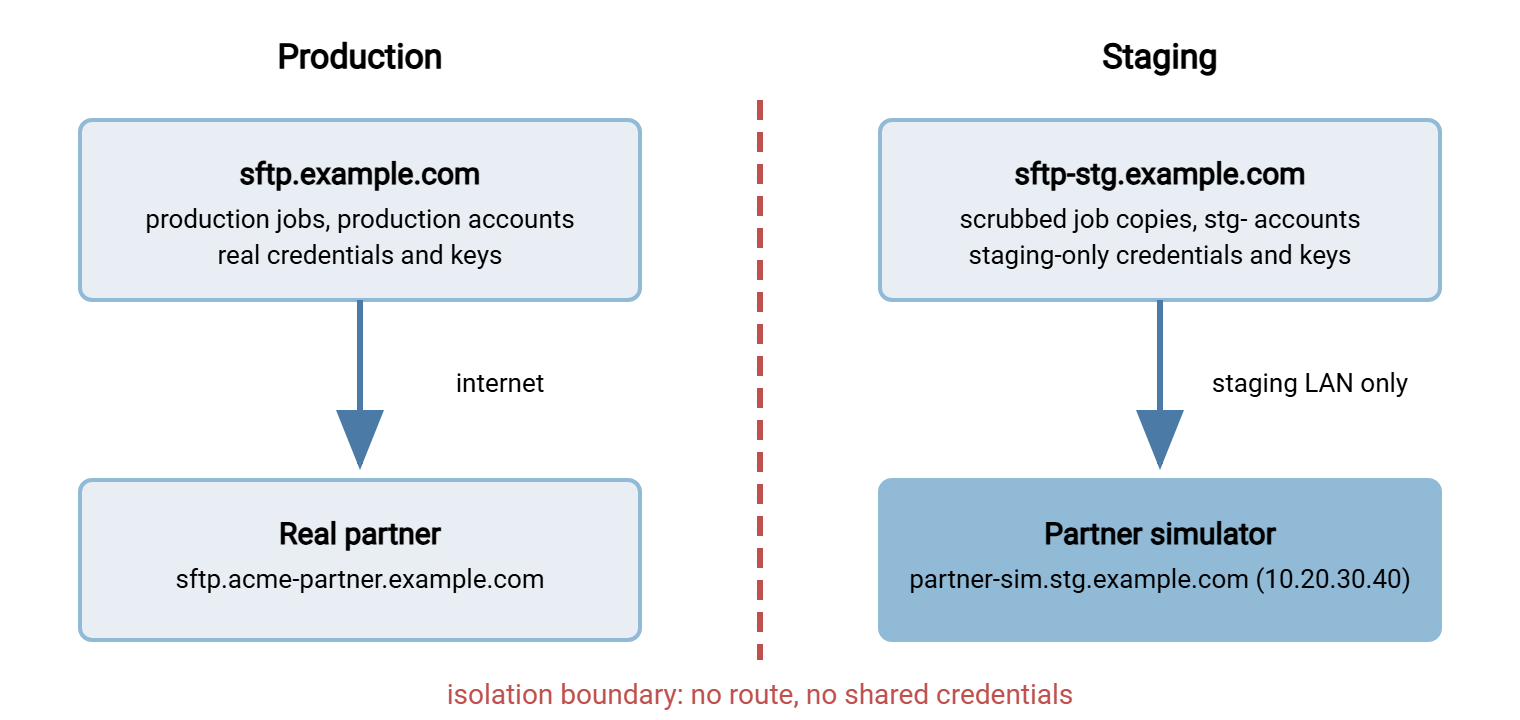
Three Sizes of Staging, and All of Them Count
Each size costs more and catches more; the right one depends on the change classes you make most often.
| Size | What it is | Catches | Cannot catch |
|---|---|---|---|
| Small | A test account and folder tree on the production server; job copies point at it | Wrong paths, patterns, file counts, script logic, post-processing | Anything caused by a server setting or an upgrade — the server is production |
| Medium | A second server on a virtual machine with mirrored settings, plus a partner simulator | All of the above, plus setting changes, upgrades, patches, rebuilds, host key and certificate handling | Production network path, real partner behavior, real volume |
| Full | The medium setup on its own network segment, with its own firewall rules and DNS, refreshed from production on a schedule | All of the above, plus firewall rule changes and the full regression suite running unattended | Real partner behavior, real volume and timing |
The small size is where every estate should start today. The medium size is what this article builds, because it is the point where server changes — the class with the biggest blast radius — become testable. The full size adds isolation and automation; nothing in it is conceptually new.
The Staging Server
The staging server is a virtual machine running the same operating system build and the same transfer server software as production. It has the same settings — all of them. That includes allowed protocols, ciphers, ports, the passive port range, idle timeouts, and connection limits. It includes the folder layout, the permission model, and the logging level. If production writes logs to a particular path in a particular format, so does staging, because your regression suite will read those logs.
Three things must differ, and should differ visibly:
- The hostname. Give it a name nobody could mistake for production:
sftp-stg.example.com, notsftp2.example.com. When a log line or an error message names the host, the reader should know instantly which environment it came from. - The host key and certificate. A staging SFTP server has its own SSH host key, and a staging FTPS or HTTPS server its own certificate. Never copy the production private key to staging. A less-protected machine holding it is a security problem. A staging server presenting the production key hides the exact mistake (a rebuilt server with a changed key) that staging exists to catch. Test clients record the staging key in
known_hostsas a separate entry; host keys and known_hosts explains how. - The address and firewall position. Staging lives on an internal address, reachable from your test clients and nothing else. If the server software has an IP allow list, use it. Sysax Multi Server, for example, runs as a Windows service and lets you restrict which addresses may connect. So a staging instance can be told to accept only the machines your team tests from.
This article assumes the software is the one already in production and the question is whether a change to it is safe. Evaluating a different product is a separate exercise — see designing a server trial. A quick lab for learning the protocols themselves is described in setting up an FTP lab.
Accounts and Credentials That Are Never Shared
Every production account that a job uses gets a staging twin: same permissions, same home folder layout, different name, different secret. A naming rule makes the twin obvious — stg-acme-inbound for acme-inbound. A table records the mapping so the job-scrubbing step can use it.
| Production value | Staging value | Notes |
|---|---|---|
sftp.example.com |
sftp-stg.example.com |
Own host key, internal address 10.20.30.10 |
sftp.acme-partner.example.com |
partner-sim.stg.example.com |
Simulator, 10.20.30.40, account sim-acme |
acme-inbound (account) |
stg-acme-inbound |
Same permissions, new password, new key pair |
svc-transfer (job service account) |
svc-transfer-stg |
No rights on any production share |
The rule behind the table is absolute: no production secret ever exists in staging. Not a password, not a private key, not an API token. Staging is a place where people experiment, so it is less carefully protected than production. A secret that leaks from staging is a production secret. Isolation depends on it too. If a staging job accidentally reaches a production partner, it should fail at the login prompt, not succeed because it carried the production key. A rejected login is the best news a staging server can send. Where jobs store their credentials, and how to keep those stores separate per environment, is covered in job credentials storage.
The Partner Simulator
A partner simulator is a transfer server you run, on the staging network, that stands in for a real partner. Each partner gets an account on it with the folder layout and the rules that partner actually imposes. There may be an inbound folder you may write to but not list. There may be an outbound folder you may read but not delete from, a rename that is refused, or a filename length limit. Staging jobs point at the simulator instead of the partner, so a job can be run a hundred times without anyone at the partner noticing. The simulator also never asks why you are uploading the same file again.
On Windows, the simplest simulator is a second instance of your own server software on the staging virtual machine. Give it one account per simulated partner and per-account permissions set to match what the partner allows. That means write-only on the inbound folder, read-only on the outbound. On Linux, OpenSSH's built-in SFTP subsystem does the job with a chroot — a setting that confines the account to one directory tree. The sshd_config block below creates a simulated partner account that can see nothing outside its own folder.
# /etc/ssh/sshd_config on partner-sim.stg.example.com
Match User sim-acme
    ChrootDirectory /srv/sim/acme
    ForceCommand internal-sftp
    AllowTcpForwarding no
    X11Forwarding no

# The chroot root must be owned by root and not writable by anyone else;
# writable subfolders belong to the simulated account.
#   mkdir -p /srv/sim/acme/inbound /srv/sim/acme/outbound
#   chown root:root /srv/sim/acme && chmod 755 /srv/sim/acme
#   chown sim-acme:sim-acme /srv/sim/acme/inbound /srv/sim/acme/outbound
You are not building a partner's whole system, only the handful of behaviors that make your jobs fail. Read the partner's connection sheet and the production log for that partner. Copy what you see: the folder names exactly, the permissions exactly, the host key type, and whether overwriting is allowed. SFTP server configuration and least privilege in practice show how to express those rules on your own server.
The simulator has one more job: it is a tripwire. Log every login and watch for a production username. A staging job that logs in as acme-inbound instead of stg-acme-inbound was not scrubbed properly, and the simulator is where you find out — harmlessly.
Scrubbed Copies of the Job Definitions
Staging jobs are production jobs with every production name and secret replaced. Most transfer tools can export job definitions to files — XML, a script format, a settings file. The substitution is mechanical once the mapping table exists. The PowerShell below applies the mapping to a folder of exported jobs and then performs a leak check. It searches the result for any production name that survived, and if it finds one the export is not safe to import.
# scrub-jobs.ps1 : turn exported production jobs into staging jobs
$map = [ordered]@{
    'sftp.acme-partner.example.com' = 'partner-sim.stg.example.com'
    'sftp.example.com'              = 'sftp-stg.example.com'
    'acme-inbound'                  = 'stg-acme-inbound'
    'svc-transfer'                  = 'svc-transfer-stg'
}
$src = 'C:\jobs-export'
$dst = 'C:\jobs-staging'
New-Item -ItemType Directory -Force -Path $dst | Out-Null

Get-ChildItem "$src\*.xml" | ForEach-Object {
    $text = Get-Content $_.FullName -Raw
    foreach ($k in $map.Keys) {
        $text = $text -replace [regex]::Escape($k), $map[$k]
    }
    Set-Content -Path (Join-Path $dst $_.Name) -Value $text
}

# Leak check: any production name left behind means STOP.
$leaks = Select-String -Path "$dst\*.xml" -Pattern 'acme-partner\.example\.com|sftp\.example\.com'
if ($leaks) { $leaks; Write-Error 'Production names survived scrubbing - do not import.' }
else        { Write-Output 'Scrub clean.' }
Order matters in the mapping: longer, more specific names go first so that sftp.acme-partner.example.com is replaced whole before the shorter sftp.example.com rule can touch it. Credentials are not in the mapping because they should not be in the export; staging jobs get staging credentials after import.
Whether staging jobs keep their schedules is a choice. Leaving them scheduled means staging runs every night against the simulator. That is free drift detection and a natural home for the regression suite described in regression testing transfer jobs. If you do that, make sure every job's source folder in staging is fed by synthetic files — never by a copy of production data. The reasons are set out in synthetic test files and test data.
Isolation: Staging Must Never Reach Production
The most important property of a staging environment is that nothing in it can touch anything real. That has to hold when somebody makes a mistake, because the whole point of staging is that mistakes happen there. Two layers enforce it, and you want both. One layer is a hope; two is a plan.
Layer one: the network
The staging server and the simulator sit on an internal network. Outbound connections from the staging server to the internet are blocked, and connections to production partners' addresses are blocked explicitly and logged. That way, an attempt is visible. On Windows, one firewall rule does it:
netsh advfirewall firewall add rule name="STG block real partners" dir=out action=block ^
    remoteip=203.0.113.0/24,198.51.100.25 protocol=TCP remoteport=21,22,990
On a Linux staging box, the equivalent with iptables rejects the same destinations and logs the attempt first:
iptables -A OUTPUT -d 203.0.113.0/24 -j LOG --log-prefix "STG-LEAK "
iptables -A OUTPUT -d 203.0.113.0/24 -j REJECT
The addresses are your partners' real ones, taken from the same allowlist your production firewall uses. The two lists must stay in step. When a partner's address changes in production, the staging block rule changes too. Two lists that are supposed to match will, given time, decline to. The design of the production rules is the subject of our Firewalls, NAT, and File Transfer series.
Layer two: names
A firewall rule blocks a job that reaches for a real partner. A hosts-file entry goes one better: it makes the real partner's name resolve to the simulator. So even an unscrubbed job lands harmlessly on the fake. The hosts file is consulted before DNS — C:\Windows\System32\drivers\etc\hosts on Windows, /etc/hosts on Linux — and the entries look like this:
# hosts file on sftp-stg.example.com: every real partner name -> simulator
10.20.30.40   sftp.acme-partner.example.com
10.20.30.40   ftp.northwind-supply.example.com
10.20.30.40   files.contoso-logistics.example.com
With this in place, a job that still says sftp.acme-partner.example.com connects to 10.20.30.40. It either fails host key verification (the simulator's key is not the partner's) or lands in a simulated folder. Nothing real was reachable at any step. Together with the tripwire log on the simulator, this turns "someone imported an unscrubbed job" from an incident into a log line.
Remember: isolation must survive human error. A firewall rule blocks the connection; a hosts-file entry redirects the name; staging-only credentials make any accidental connection fail at login. Build all three, because the day one of them is missing is the day a staging job uploads a test file to a real partner.
Keeping Staging From Drifting
Drift is the gap that opens between staging and production when one changes and the other does not. It happens quietly. A production setting is tightened and nobody updates staging. An experiment in staging is never reverted. A partner is added in production and never simulated. Months later a change passes in staging and fails in production, because staging stopped being a copy of production some time ago. I once inherited a staging server that was a museum of experiments nobody remembered starting.
Drift is controlled with three habits:
- Every production change updates staging. The change record has a box: "staging updated: yes / not applicable." A change that alters a server setting without applying the same setting to staging is not complete.
- A periodic configuration diff. Export the production and staging settings. Normalize the names that are supposed to differ (using the job-scrub mapping table). Compare the settings with an ordinary
difforCompare-Object. Anything that shows up is either an intentional difference to document or drift to fix. Weekly is a good cadence, and the export doubles as the configuration backup our Disaster Recovery for Transfer Workflows series asks for. - A periodic rebuild. Every few months, rebuild staging from the production export and the scrub script rather than patching it forward. A rebuild erases accumulated experiments and proves your configuration export is complete enough to rebuild a server from. That is something you want to know before the day you need to rebuild production.
A configuration diff that is clean looks like nothing; one that shows drift looks like this, and each line is a decision:
$ diff prod-settings.normalized.txt stg-settings.normalized.txt
14c14
< idle_timeout_seconds = 600
---
> idle_timeout_seconds = 300
41a42
> account stg-northwind-outbound   (no production twin: experiment left behind?)
77d77
< account contoso-inbound          (added in production, never simulated)
What Staging Cannot Tell You
A change that passes in staging has proved that the software, the settings, the job logic, and the folder handling work. It has not proved:
- How the real partner behaves. The simulator reproduces what you know about the partner. The cipher their client cannot offer or the filename their loader rejects is exactly what the simulator cannot reproduce. That is what partner test windows and test endpoints exist for.
- Production volume and timing. Staging moves a few synthetic files. It cannot tell you whether the nightly export finishes before the job starts, or whether forty jobs in one hour exhaust the connection limit.
- The production network path. Staging traffic never crosses the production firewall, the DMZ, or the internet. A change that depends on a firewall rule is only fully tested by a canary in production.
- Real data quirks. Synthetic files exercise the edge cases you thought of; real data contains the ones you did not.
Bluewater Bank found the third gap the careful way. They moved their partner-facing SFTP server to a new internal address. Staging passed every regression case for a week beforehand. Staging had the same software, the same settings, and no DMZ firewall at all. In production, the first partner login after the move was refused at the perimeter. The inbound rule on the DMZ firewall still named the old address. Nothing in staging had ever had a rule to be wrong. The rollback plan had been rehearsed, and the old server was still running for exactly this reason. Pointing the DNS name back took four minutes. The change record afterward said what this section says: staging proved the software, and only a canary in production could have proved the path. Their server moves now start with one canary partner at the first window.
Staging is one rung of a ladder, not the whole ladder. The rungs above it — the partner test, the canary, the post-change watch period — are covered in rolling out transfer changes safely.
Build It This Week
A medium-sized staging environment is a few days of work, and it makes server changes testable for the first time. It includes one virtual machine with your server software and settings, and staging twins of the accounts. It has a partner simulator with one account per partner, scrubbed job copies, firewall and hosts-file isolation, and a weekly configuration diff. If even that is out of reach right now, create the test account and folder tree on production today. It is the bottom rung, and it is where most estates catch their first mistake before it ships. It costs nothing, which is the budget you were offered.
The next step in this series is the data to run through it — synthetic test files and test data. Then comes the suite that turns a one-off test into a repeatable one, regression testing transfer jobs.
Frequently Asked Questions
Does a staging server need the same hardware as production?
What is a partner simulator?
Can I just copy the production server's host key to staging so clients do not complain?
What is environment parity?
How do I stop a staging job from accidentally connecting to a real partner?
From the Sysax team: we build secure file transfer software for Windows. Sysax Multi Server is an FTP, FTPS, SFTP, and HTTPS server. Sysax FTP Automation handles scheduled, scripted transfers. Free trials are on the download page.