
Explicit vs Implicit FTPS: Two Flavors, One Endless Source of Confusion
A partner sends you connection details that say only "use FTPS." You configure your client, hit connect, and get a timeout. You try a different port and get a garbled handshake error. You call the partner, and they insist their server is fine. Odds are that nothing is broken at all. You and the partner are simply using two different things that both carry the name FTPS: explicit mode and implicit mode.
The two modes deliver the same protection once a session is running. But they start that protection in completely different ways, on different ports. A client configured for one will reliably fail against a server expecting the other. This article walks through both handshakes step by step and explains why two flavors exist at all. It shows you how to recognize each one in client settings and session logs. It gives a clear recommendation on which to offer and which to merely tolerate. It is part of our FTPS In Depth series, and it is deliberately the first stop. Almost every other FTPS problem is easier to reason about once this distinction is solid.
One Protocol, Two Ways to Start Encrypting
First, the common ground. FTPS is ordinary FTP wrapped in TLS — Transport Layer Security, the same encryption layer that turns HTTP into HTTPS on the web. TLS does two jobs. It encrypts traffic so nobody along the network path can read it. It lets the server prove its identity with a certificate, a signed digital document that says "this really is ftp.example.com." Underneath the encryption, FTPS is still FTP: the same commands, the same replies, and the same two-connection design. There is a long-lived control connection for commands and a fresh data connection for each file transfer or directory listing. If that two-connection model is new to you, our active vs passive FTP explainer covers it from the ground up.
One thing FTPS is not is SFTP. Despite the similar name, SFTP is a different protocol that runs over SSH on a single connection and shares no wire format with FTP at all. The two get confused constantly. If you are not sure which one your partner means, our SFTP vs FTPS vs FTP series untangles them.
Within FTPS itself, the entire difference between explicit and implicit mode comes down to one question: when does the TLS encryption start, and how does the client ask for it?
- Explicit FTPS: the client connects to the normal FTP port,
port 21, in plain text. It then explicitly asks to upgrade the connection to TLS by sending theAUTH TLScommand. Encryption starts mid-conversation, before any credentials are sent. - Implicit FTPS: the client connects to a dedicated port,
port 990, and TLS starts immediately. The very first bytes on the wire are the TLS handshake. Nobody asks for encryption; it is implied by the choice of port.
Everything after the handshake — login, directory listings, transfers, the commands on the wire — is identical in both modes. The confusion exists purely at the front door.
Explicit FTPS, Step by Step
Explicit mode is the standardized flavor, the one defined by the official FTP security extensions. The sequence looks like this:
- The client opens a TCP connection to the server on
port 21— exactly like plain FTP. - The server answers with its normal greeting, something like
220 FTP server ready. This greeting travels in plain text; anyone watching the network can read it. - Instead of logging in, the client sends
AUTH TLS— "I want to switch this connection to TLS before we go any further." (Very old clients sendAUTH SSL, a historical synonym; servers generally accept both.) - The server replies
234, meaning "agreed — start the handshake." - Client and server now perform the TLS handshake. The server presents its certificate, the client checks it, and the two sides agree on encryption keys. From this instant, everything on the control connection is encrypted.
- Only now does the client send
USERandPASS. The credentials travel inside the encrypted tunnel, unreadable to anyone in between. - The client then negotiates protection for the data connections with the
PBSZandPROTcommands. Typically, it usesPROT P, which says "encrypt the data channel too." That negotiation has enough subtlety to deserve its own article: how TLS wraps FTP covers it fully.
The word "explicit" describes step 3: the client explicitly requests security in-band, on the same port plain FTP uses. The diagram below shows the sequence, with the brief plaintext preamble and the point where encryption takes over.
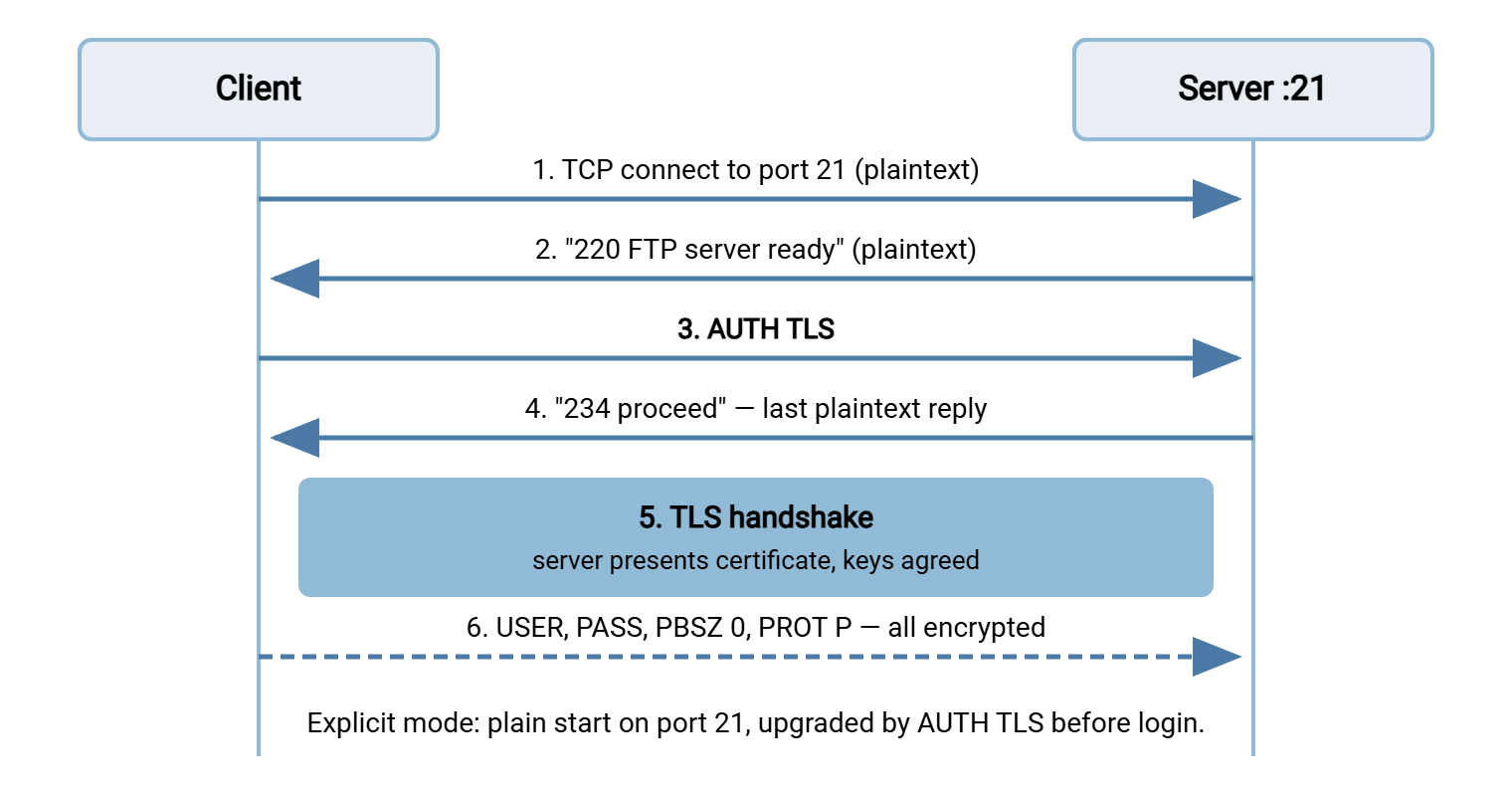
Two details are worth noticing. First, the only things ever exposed in plain text are the server's greeting banner and the AUTH TLS exchange itself. No credentials, filenames, or data are exposed. Second, because the session starts as ordinary FTP, the same port can serve both plain FTP clients and FTPS clients. That is convenient during a migration and dangerous afterward. A server that still accepts a plain login on port 21 lets a misconfigured client quietly send passwords unencrypted. Well-run servers have a policy switch that refuses login until AUTH TLS has succeeded, and our hardening guide treats that switch as non-negotiable.
Implicit FTPS, Step by Step
Implicit mode is older and simpler in concept. It copies the pattern HTTPS used: keep the protocol unchanged, but give the secure version its own dedicated port and encrypt from the very first byte.
- The client opens a TCP connection to
port 990, the conventional implicit FTPS control port. - Without any FTP conversation at all, the client immediately begins the TLS handshake. The server presents its certificate, keys are agreed, and the tunnel comes up.
- Only inside that tunnel does the familiar FTP dialogue begin: the server's
220greeting, thenUSERandPASS— all encrypted from the start. - Data connections follow the same rule: each one is TLS from its first byte. (A companion convention reserves
port 989for implicit-mode data in active mode, though in practice nearly everyone uses passive mode and a negotiated high port.)
The word "implicit" describes the absence of step "ask": the client never requests security, because connecting to port 990 implies it. There is no way to speak plain FTP to an implicit port, and no way for a client to discover the requirement in-band. The client simply has to know in advance. The diagram below shows how much shorter the story is.
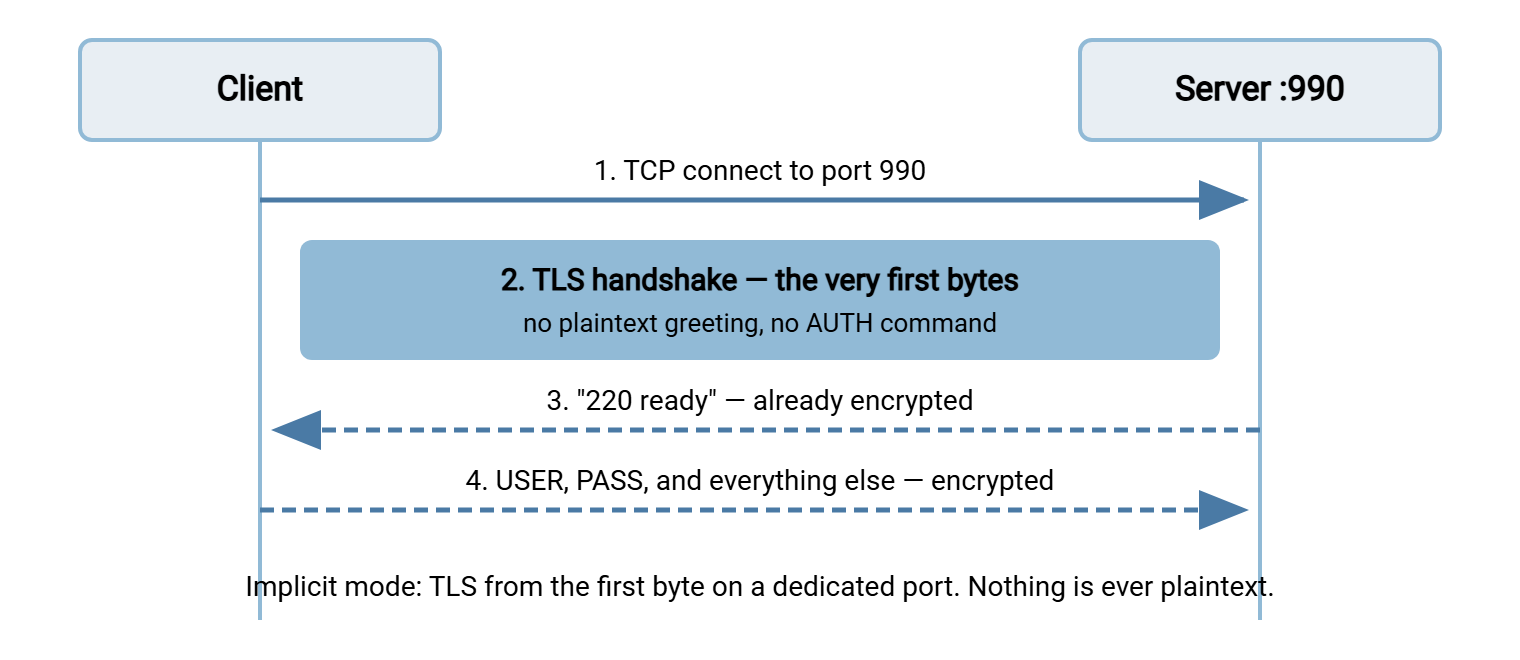
Implicit mode was never carried through the standards process the way explicit mode was. It is a de facto convention that predates the AUTH mechanism. The standards work deliberately chose the in-band upgrade instead. But implicit mode had already shipped in real products by then, and partners built procedures around it. So it survives to this day, fully supported by most server software and many clients.
Why Two Flavors Exist at All
The history explains the mess. When people first bolted TLS onto FTP, the obvious model was the one the web had already proven. The model was to run the same protocol on a second, dedicated port and encrypt everything from the start. HTTP had port 80 and HTTPS port 443; FTP got port 21 and "FTPS" port 990. Simple to implement, simple to firewall, impossible to get half-encrypted.
The standards authors, however, worried about a future where every protocol needed a second port. They preferred a general in-band upgrade: keep one well-known port, and let clients negotiate security at the start of the conversation. That became the AUTH family of commands, and explicit FTPS was the result. It offered real advantages — one port to publish and graceful migration for a fleet of plain-FTP users. It let a client discover server capabilities with the FEAT command before committing.
So the ecosystem ended up with both: the early dedicated-port convention that products already spoke, and the standardized upgrade that came later. Neither ever displaced the other, and both remain in daily use. That is the entire story — not a security difference, not a quality difference, just two eras of design solving the same problem two ways.
Remember: once the TLS handshake completes, explicit and implicit sessions are cryptographically equivalent. Implicit mode is not "more secure" because it encrypts from the first byte. The only things explicit mode exposes are a greeting banner and the AUTH command. The real security difference lies in server policy: an explicit server that still accepts unencrypted logins is the hazard, not explicit mode itself.
The Port Cheat Sheet
Ports are where the confusion usually becomes visible, so here is the layout in one table. For background on the plain-FTP ports themselves, see our short post What port is FTP?.
| Question | Explicit FTPS | Implicit FTPS |
|---|---|---|
| Control port | 21 (shared with plain FTP) | 990 (dedicated) |
| How encryption starts | Client sends AUTH TLS, then handshake |
TLS handshake is the first traffic |
| Anything visible in plaintext? | Greeting banner and AUTH exchange only | Nothing |
| Data connections | Negotiated per session via PROT P |
Always TLS (989 conventional in active mode; passive range in practice) |
| Standardized? | Yes — the official FTP security extensions | De facto convention, widely implemented |
| Typical client setting label | "Explicit FTP over TLS" / "FTPES" | "Implicit FTP over TLS" |
Note what the table does not say: it does not say implicit mode uses one connection. Both flavors keep FTP's two-connection design, so both still need a passive port range opened on the firewall. That is a block of high ports the server hands out for data connections. Encryption actually makes the firewall story harder, not easier. That is because the firewall can no longer peek inside the control connection to learn which data port to expect. That collision is the subject of FTPS through firewalls and NAT.
Which Should You Offer — and Which Merely Tolerate?
If you run the server, the practical recommendation is straightforward.
Offer explicit FTPS as your primary, documented service. It is the standardized mode, and every maintained client speaks it. It lives on a port every network team already knows. It lets you run one listener during a migration from plain FTP. Pair it with two policy settings. Require TLS before login (so no client can accidentally send a plaintext password). Require PROT P (so no client can accidentally transfer file contents in the clear). With those two switches set, explicit mode gives you everything implicit mode promises, on one well-known port.
Tolerate implicit FTPS when a partner's software demands it. A meaningful number of legacy clients, appliances, and long-frozen scripts speak implicit mode only. There is nothing insecure about accommodating them — once connected, the protection is equivalent. But treat it as a compatibility concession. Enable the implicit listener on 990, document it separately, and remember it in your firewall rules. What you want to avoid is ambiguity, the "just use FTPS" instruction that started this article. Every connection document you send a partner should name the mode and the port explicitly.
On the server side, this is mostly a matter of checkboxes rather than heroics. A Windows server such as Sysax Multi Server lets you enable FTPS alongside plain FTP and SFTP and configure the certificate it presents. So offering the secure mode is a configuration decision rather than a separate deployment. The deeper certificate questions — where to get one, chains, name matching, and the errors clients throw when something is off — have their own article: certificates for FTPS.
How to Recognize Each Mode in the Wild
Because the labels vary between clients and documents, you need a few reliable ways to identify which mode you are looking at.
In client settings
Most graphical clients offer a protocol dropdown with entries like "FTP with explicit TLS," "Require explicit FTP over TLS," or "Implicit FTP over TLS." The giveaway is the default port the client fills in when you pick one: 21 means explicit, 990 means implicit. Some tools also use URL-style prefixes, and here be dragons: conventions differ. The prefix ftpes:// usually means explicit and ftps:// often — but not always — means implicit. Never rely on the prefix alone; check the port.
Scripted and scheduled transfers deserve the same explicitness, doubled: an unattended job cannot squint at a timeout and try the other mode. Record the mode and the port in the job's connection profile. In a scheduling tool such as Sysax FTP Automation, the connection profile pins the protocol settings per connection. So every run negotiates the same way the tested run did.
In a session log
A session log settles it instantly. An explicit session opens with a readable greeting and a visible AUTH TLS command:
Status:   Connecting to ftp.example.com:21
Response: 220 FTP server ready
Command:  AUTH TLS
Response: 234 Proceed with negotiation
Status:   TLS handshake successful
Command:  USER alex
Response: 331 Password required
An implicit session log shows the TLS handshake as the very first event, with no greeting before it. If you see "Connecting to host:990" followed immediately by certificate details, you are watching implicit mode.
Probing a server by hand
When you are handed a hostname and nothing else, the openssl command-line tool can identify what the server offers. It is present on nearly every Linux system and easily available for Windows. These two probes are worth keeping in your notes:
# Test for EXPLICIT FTPS: talk plain FTP first, then upgrade
openssl s_client -connect ftp.example.com:21 -starttls ftp

# Test for IMPLICIT FTPS: expect TLS from the first byte
openssl s_client -connect ftp.example.com:990
If the first command prints a certificate chain, the server supports explicit FTPS on port 21. If the second connects and shows a certificate, an implicit listener is up on 990. If a command hangs or errors, that mode (or that port) is not offered. The same probes double as certificate inspection tools later — the certificate article builds on them.
Classic Mismatch Failures, Decoded
Nearly every "FTPS won't connect" ticket that is not a firewall problem is one of these five mismatches. Each has a recognizable signature:
- Implicit client pointed at port 21. The client opens the connection and immediately talks TLS. The server, expecting FTP commands, sees binary noise and replies
500 Syntax erroror drops the connection. The client reports a handshake failure within a second or two. Fix: switch the client to explicit mode, or point it at 990. - Explicit client pointed at port 990. The client connects and politely waits for the plaintext
220greeting. The server is waiting for a TLS handshake. Both sides wait; the client eventually reports a timeout with no server response at all. Fix: switch to implicit mode for that port, or use port 21. - Plain FTP client pointed at 990. Same silent standoff as above — the tell is a connection that opens but never greets. Fix: the partner requires FTPS; get a client that speaks it.
- Explicit client against a server without FTPS. The greeting arrives, the client sends
AUTH TLS, and the server answers502 Command not implementedor530 Please login. The client refuses to continue (correctly — it was told to require encryption). Fix: this server genuinely lacks FTPS; escalate rather than downgrade. - FTPS settings against an SFTP server (or vice versa). Pointing an FTPS client at port 22 yields a garbled banner mentioning SSH. Different protocol entirely — see the SFTP series for that side of the fence.
One diagnostic habit pays for all of this: read the first three lines of the session log before touching any settings. The pattern of what arrived (greeting vs silence vs noise) tells you which mismatch you have.
Gotcha: a timeout on connect does not always mean a mode mismatch — it can also be a firewall dropping the port. Distinguish them by what the log shows after the TCP connection opens. Silence after a successful connect suggests a mode standoff. A connection that never opens at all points to the network. The FTP failure diagnosis guide teaches the fuller version of that triage.
The Version to Tell a Colleague
FTPS is FTP wrapped in TLS, and it comes in two flavors that differ only at the front door. Explicit FTPS starts as plain FTP on port 21 and upgrades to encryption when the client sends AUTH TLS — before any password is transmitted. Implicit FTPS skips the conversation: connect to port 990 and TLS is simply the first thing on the wire. Once the handshake completes they are equally secure, so the choice is about standards and compatibility, not strength. Offer explicit with encryption required. Keep implicit available for the partners who need it. Always write the mode and port into your connection documents so nobody has to guess.
From here, the natural next step is how TLS wraps FTP. It follows the encryption down into the data channel — PROT P, the session-reuse wrinkle, and the CCC escape hatch. After that, FTPS through firewalls and NAT explains why the encrypted control channel gives network gear so much trouble. The client compatibility matrix that closes this series maps which client types handle which mode.
Frequently Asked Questions
Is implicit FTPS more secure than explicit FTPS?
What ports does FTPS use?
Is FTPS the same thing as SFTP?
Do I need to open both port 21 and port 990 on my firewall?
Why does my client report "AUTH TLS not understood"?
Does implicit FTPS avoid FTP's firewall problems?
From the Sysax team: we build secure file transfer software for Windows. Sysax Multi Server is an FTP, FTPS, SFTP, and HTTPS server. Sysax FTP Automation handles scheduled, scripted transfers. Free trials are on the download page.