
File Transfer Terminology Decoded: The Working Glossary
"Control channel is up, the data channel times out, so check your passive range, and make the job idempotent before you switch retries back on." Everyone on my side of the call nodded. I nodded. I had understood about half of it and was hoping the other half was optional. Every trade has vocabulary that its documentation quietly assumes. File transfer has more than most, because its terms come from four different eras and communities at once. A single vendor call can hop from "endpoint" to "passive mode" to "MDN" to "idempotent retries." Nodding along costs you twice. You pay once when you configure the wrong thing. You pay again when you cannot describe a problem precisely enough for support to help.
This is the glossary to fix that: not an alphabetical dump, but the working vocabulary grouped the way the concepts relate. Each term is pinned to a practical example you can picture. Read it straight through once (the groups build on each other), then return to it as a reference. It closes our File Transfer Fundamentals series, and it cross-references the deeper articles as it goes. None of the terms are hard. Several are badly named, and one of them is named so that it sounds like a thing it is not.
The Cast: Endpoints and Roles
Endpoint — either machine participating in a transfer, when you do not care which role it plays. "Verify the checksum at both endpoints" means: on the sender and on the receiver, whoever they are.
Client — the endpoint that initiates the conversation. Not necessarily a human: a scheduled job at 3 a.m. is a client. Not necessarily the sender either — a client can upload or download.
Server — the endpoint that listens and waits to be contacted. In careful usage it means the software (an FTP server process), though people constantly use it for the machine running that software. When a document says "the server," check which one it means; a Windows host can run several. What an FTP server does with each login is explained in what is an FTP server?, and the FTP-specific terms in FTP definitions.
Host — a machine on the network, referred to by name or address. "Remote host" is whichever machine is on the far side from where you are standing; "local" is where you are. The pair flips depending on the speaker, which is why partner troubleshooting calls so often need the question "remote from whose point of view?" Both sides are local. Both sides are certain of it.
Site / connection profile — a client-side saved bundle of settings for one destination: hostname, port, protocol, credentials, mode, default folder. Graphical clients call these "sites" in a site manager; automation tools call them connection profiles. When a colleague says "use the payroll site," they mean the saved profile, not a website. I went looking for the website. Twice.
Service account — an account that exists for software rather than a person, like svc-erp-upload. Unattended flows should run under service accounts so that a person leaving the company never breaks a nightly job. That also lets logs attribute actions to the flow rather than to whoever's password got borrowed.
The Plumbing: Connections, Sessions, Channels, Ports
Port — a numbered doorway on a host, letting one machine offer many services. FTP listens on port 21, SFTP on 22, HTTPS on 443. (Our blog post What port is FTP? is the quick reference.)
Listener — the server-side arrangement where software asks the operating system for everything arriving at a port. "Is anything listening on 22?" is the first question when a connection is refused.
Connection — an established two-way channel between two endpoints, created by the TCP handshake (the three-packet exchange that opens it). Session — the authenticated conversation living inside connections: your login, your current directory, your negotiated options. The distinction earns its keep in troubleshooting: "connection refused" and "login incorrect" are failures of two different things. This is unpacked in how a file transfer actually works.
Channel — one logical conversation, where a protocol runs more than one. FTP is the classic case. It has a control channel (the long-lived connection carrying commands and replies). It also has a separate data channel (a short-lived connection per transfer or directory listing). SSH-based protocols multiplex channels inside one connection instead. The diagram below labels the pieces on FTP, where the vocabulary is most visible:
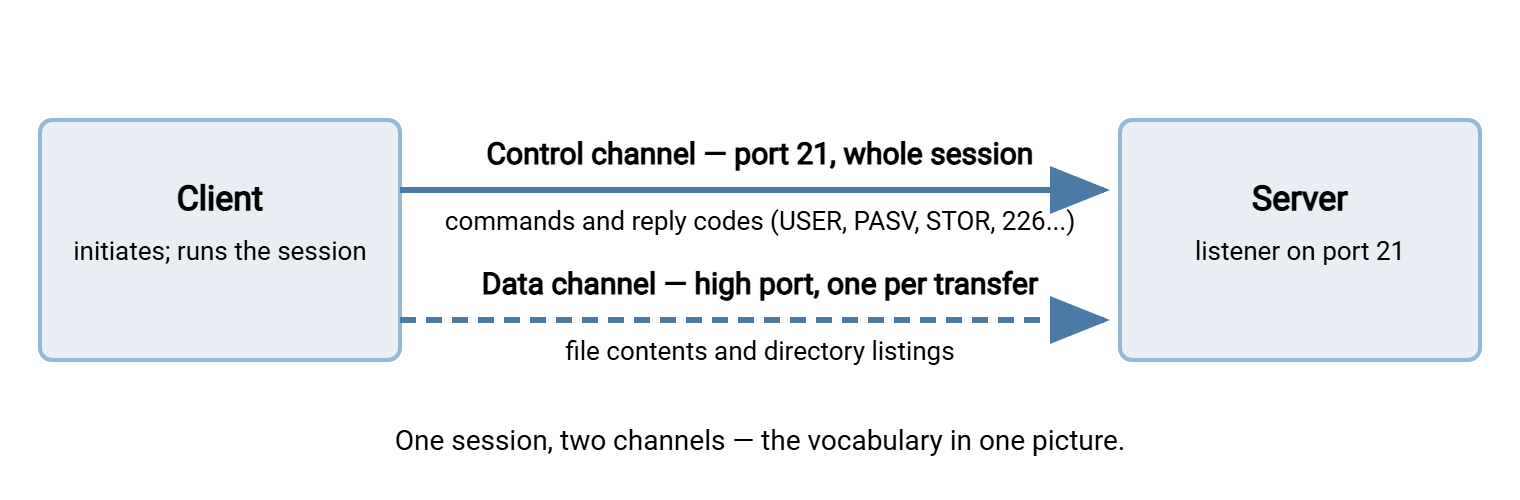
Reading a session log: the terms in action
Half this vocabulary appears in any client log, so here is a labeled specimen, the fastest way I know to make the terms stick. The labels on the right name what each line is:
Response: 220 FTP server ready              <-- banner / greeting (reply code 220)
Command:  USER alex                         <-- command, on the control channel
Response: 331 Password required             <-- reply code: 3xx = "continue"
Command:  PASS ********                     <-- credentials; session being established
Response: 230 Login successful              <-- 2xx = success; session is up
Command:  TYPE I                            <-- transfer type: I = binary, A = ASCII
Command:  PASV                              <-- requesting passive mode
Response: 227 Entering Passive Mode (...)   <-- server offers a data-channel port
Command:  STOR report.csv                   <-- store = upload request
Response: 150 Opening data connection       <-- 1xx = in progress; data channel opens
Response: 226 Transfer complete             <-- completion of THIS transfer
Command:  QUIT                              <-- session ends; control channel closes
Reply code — the three-digit number opening every FTP server response. The first digit alone tells you the story (1xx in progress, 2xx success, 3xx continue, 4xx temporary failure, 5xx permanent failure). Banner — the greeting a server sends the moment you connect, before login. Being able to annotate a log like this from memory is the skill that separates "FTP is broken" tickets from fixable ones.
Directions and Modes
Upload / download — data direction relative to the client: upload sends toward the server, download fetches from it.
Push / pull — flow direction in terms of who initiates: push means the source of the file starts the transfer; pull means the destination does. Independent of upload/download, and the deciding factor for firewalls and failure ownership — the full framework is in push vs pull.
Active mode / passive mode — FTP's two ways of arranging the data channel. Active: the server connects back to the client (firewalls hate it). Passive: the client opens both channels (the modern default). The whole story lives in active vs passive FTP explained. The four commands behind it (PORT, PASV, EPRT, EPSV) are in the data-connection commands guide.
ASCII mode / binary mode — FTP's two transfer types. ASCII "helpfully" rewrites line endings for text files between platforms; binary transfers bytes untouched. Sending a ZIP in ASCII mode corrupts it, a classic; the ASCII/binary trap is the full autopsy. When in doubt: binary. Everyone has sent one ZIP in ASCII mode. Most of us only once.
Passive port range — the block of high ports a server is allowed to offer for passive data channels. The range must match its firewall rules. Sizing and verifying it is covered in configuring passive port ranges.
The Protocol Alphabet: FTP, FTPS, SFTP, SCP, HTTPS and AS2 Defined
One honest sentence each, with the deep dives linked:
- FTP — the original file transfer protocol: two channels, no encryption; venerable, everywhere, and increasingly contained. (Series: the FTP protocol; trivia: what FTP stands for.)
- FTPS — FTP wrapped in TLS encryption; same two-channel architecture, now encrypted, with certificate machinery on top. (FTPS series.)
- SFTP — a file transfer protocol built on SSH: one connection, one port, encrypted by construction. Not FTP-with-an-S — a different protocol entirely. (SFTP series.)
- SCP — SSH's older, simpler copy mechanism: fast, minimal, no fancy file operations. (SCP series.)
- HTTPS — the web's transfer path: uploads and downloads as web requests, loved for needing no special client. (HTTP/HTTPS series.)
- WebDAV — HTTP extended with folder-and-file semantics so remote storage can behave like a drive. (WebDAV series.)
- TFTP — the tiny, authentication-free protocol network devices use for firmware and boot files; never for business data. (TFTP series.)
- AS2 — a B2B envelope protocol adding signing, encryption, and signed receipts on top of HTTP transport; the language of EDI exchanges. (AS2 series.)
- rsync / delta transfer — synchronization that sends only the changed parts of files, not whole copies. (rsync series.)
SSH and TLS (whose predecessor name SSL refuses to die in conversation) are the two encryption foundations underneath the alphabet. SFTP and SCP ride SSH; FTPS, HTTPS, WebDAV-over-HTTPS, and AS2 ride TLS. Which foundation a protocol uses predicts its port behavior, its credential style (keys vs certificates), and half its firewall story. The comparison series SFTP vs FTPS vs FTP is built on exactly that observation.
Reliability and Delivery Words
These terms all come from one article's worth of ideas — the anatomy of a reliable transfer — so the entries here are the pocket versions:
Integrity — the property that delivered bytes equal sent bytes. Checksum / hash — the short fingerprint (MD5, SHA-256) computed from a file's contents and compared across endpoints to prove integrity. A mismatch means the files differ, full stop. It does not say which copy is wrong. That part is your afternoon.
Atomic — describes an operation with no observable in-between state: it has either not happened or fully happened. The atomic rename (upload as report.csv.part, rename to report.csv when finished) is the pattern that stops consumers reading half-written files.
Resume / restart / checkpoint — continuing an interrupted transfer from the byte where it stopped rather than from zero. "Checkpoint" is the recorded position that makes it possible. Always pair a resumed transfer with a checksum.
Retry and backoff — attempting a failed transfer again, and spacing those attempts progressively wider (one minute, five, fifteen) so a down server is not hammered. Idempotent — designed so doing something twice equals doing it once; the property that makes retries safe, achieved with unique filenames and processed-file records. At-least-once / exactly-once — delivery-guarantee jargon: retry-until-confirmed (accepting rare duplicates) versus the ideal that cannot honestly be promised end-to-end, only approximated by at-least-once plus idempotency. Anyone promising exactly-once across a network is selling something, possibly to themselves.
Proof and Paper Trail
Acknowledgment (ack) — any "received" signal, from TCP's per-segment acks up to a partner's confirmation file. Receipt — an acknowledgment with standing: a record generated by the receiving side attesting the delivery. MDN (Message Disposition Notification) — the formal, cryptographically signed receipt in AS2 exchanges. It proves not only that the message arrived but that it decrypted and verified intact. When a trading partner's onboarding sheet asks for "synchronous or asynchronous MDNs," it is asking how you want your receipts delivered.
Non-repudiation — the property that a sender cannot later plausibly deny having sent a file (nor a receiver deny receiving it), built from signatures and receipts. Contract-grade delivery, in other words.
Audit trail / activity log — the chronological record of who connected, from where, and what they transferred. On a transfer server this is a first-class feature. Sysax Multi Server, for example, logs sessions and file operations per account. An audit trail is the difference between answering a dispute with evidence and answering it with vibes.
Security Vocabulary for Vendor Calls
Encryption in transit — protecting bytes while they cross the network (TLS, SSH). Encryption at rest — protecting them where they are stored. A flow can have either, both, or neither; questionnaires ask about the two separately, so answer separately. The questionnaire will ask a third time, in different words, on page nine.
Key pair — the public/private duo behind SSH authentication. The public key is shareable and lives on the server. The private key stays with its owner (ideally locked with a passphrase) and proves identity without any password crossing the wire. Certificate — a public key plus identity information, signed by an authority so strangers can trust it; the credential style of the TLS world. Keys are what SFTP conversations are about; certificates are what FTPS and HTTPS conversations are about. Mixing them up is the fastest way to confuse a partner call.
Fingerprint — a short hash of a key or certificate, used to verify you are talking to the right server. The "host key has changed!" warning is a fingerprint mismatch. The known hosts list is where a client remembers the fingerprints it has accepted.
OpenPGP — file-level encryption and signing applied before transfer. That way, the payload stays protected at rest on both ends and in any intermediate stop, independent of the transport's encryption. OpenPGP is common in B2B flows ("PGP-encrypt the payroll file, then SFTP it"). Automation tools such as Sysax FTP Automation build OpenPGP encrypt/decrypt into the transfer job so the step cannot be forgotten.
Automation and Operations Vocabulary
Job — one configured unit of automated work ("upload yesterday's exports to the partner"). It has its trigger — the thing that starts it: a schedule (clock-based) or an event. Folder monitoring — the commonest event trigger: watching a directory and firing when a file appears. Settle time — the pause a monitor waits after a file stops growing before touching it, to avoid grabbing files mid-write.
Pre/post processing — steps a job runs around the transfer itself: compress or PGP-encrypt before sending, verify and move to an archive folder after, alert on failure. In a tool like Sysax FTP Automation these are configured stages of the job. In scripts they are the lines before and after the transfer command, and the census column where "hope" usually lives.
Batch window — the time slot in which a scheduled exchange is expected to run and finish ("files available after 02:00, collected by 04:00"). Cutoff — the deadline after which a delivery misses its processing cycle. Quarantine — the holding area for files that failed verification or scanning, kept out of the consumer's path pending a human decision.
MFT (managed file transfer) — the industry label for doing everything in this glossary on purpose. Centralized servers and jobs, encryption, retries, verification, audit trails, and alerting live under one roof, instead of scattered scripts. A compliance questionnaire may ask whether you have "an MFT solution." It is asking whether your transfers are managed like this, not whether you bought a specific product. The acronym is three letters. The practice is this entire glossary.
Pairs People Mix Up
The confusions that generate the most wasted meeting minutes, disentangled in one table:
| This | Is not | The one-line difference |
|---|---|---|
| SFTP | FTPS | SFTP is SSH-based, one port, keys; FTPS is FTP-in-TLS, multiple ports, certificates |
| Push / pull | Upload / download | Who initiates the flow vs which way data moves for a client |
| Transfer | Sync | One-shot delivery vs an ongoing promise that two places match |
| Connection | Session | The channel TCP opens vs the authenticated conversation inside it |
| Retry | Resume | Starting the transfer again vs continuing it from a checkpoint |
| Key | Certificate | A raw credential pair (SSH world) vs a signed identity document (TLS world) |
| Protocol | Product | The rules on the wire (SFTP) vs software that speaks them (a server or client) |
Remember: of every pair in that table, the one that causes real outages is SFTP vs FTPS. They share four letters and nothing else — different ports, different encryption layers, different credentials, different firewall behavior. Confirm which one a partner means before anyone configures anything, every time.
Meridian Parts spent a week preparing for a new supplier feed that the supplier's onboarding sheet described as "secure FTP." The team set up an FTPS account, installed a certificate, and opened a passive port range on the firewall. On the first test call, the supplier's engineer asked which SSH key format they should send. Ten minutes of careful questions established that "secure FTP" had meant SFTP all along: port 22, a key pair, and no certificate anywhere. The account was rebuilt that afternoon, well inside the test window. The intake form gained a box that offers SFTP or FTPS and does not accept "secure."
Using the Glossary
Vocabulary is leverage. The admin who can say "the control channel authenticates but the data channel times out, likely a passive range problem" gets a useful answer in one exchange. "FTP doesn't work" gets a week of ticket ping-pong. Keep this page bookmarked. When a term needs more than a pocket definition, the series has the depth. See how a file transfer actually works for the plumbing terms. See push vs pull for direction, and the anatomy of a reliable transfer for the integrity and delivery-guarantee family. Nod along less. It is cheaper.
Frequently Asked Questions
What is the definition of FTP (File Transfer Protocol)?
What does FTP stand for, and what port does it use?
Is SFTP just FTP running over SSH?
What does MFT actually mean when a vendor says it?
What is the difference between a checksum and encryption?
Why does my FTP client call a saved server a "site"?
What is a control channel in plain words?
From the Sysax team: we build secure file transfer software for Windows. Sysax Multi Server is an FTP, FTPS, SFTP, and HTTPS server. Sysax FTP Automation handles scheduled, scripted transfers. Free trials are on the download page.