
What Is FTP? Definition, Full Form, and Meaning in Computer Networking
Every office has a sentence that everyone uses and nobody can define. In file transfer it is "just put it on the FTP." People nod. Somebody in the room knows which server that means. Somebody else has assumed for three years that "the FTP" is a folder. The new starter writes it down and resolves to look it up later, which may be how you got here.
This page is the reference card. It defines FTP in one sentence, then answers the questions people actually type: what an FTP server is and does, what FTP sites, links, folders, and users are, what SFTP, SSH, and MFT stand for, and where FTP sits in a network. Each answer is short. Each one links to a longer article for the day you need more.
It is part of our File Transfer Fundamentals series, which builds these ideas into a working model. Read this page for the vocabulary. Read the series when the vocabulary starts turning up in your job description.
The Definition of FTP
FTP stands for File Transfer Protocol. It is a standard set of rules for copying files between two computers over a network. A program called an FTP client connects to a program called an FTP server, logs in, and then uploads files to it or downloads files from it.
That is the whole FTP definition. The rest is detail. The acronym has three parts, and each one carries part of the meaning:
- File. FTP moves whole files and lists the folders they are in. It does not stream video, sync folders, or let you edit a document in place.
- Transfer. A copy travels from one machine to the other. An upload goes from your computer to the server. A download comes from the server to you.
- Protocol. A protocol is an agreed set of messages and replies. Because the rules are public and fixed, an FTP client from one maker works with an FTP server from any other.
In computer terms, then, the meaning of FTP is "the standard conversation two programs have when one wants to copy files to or from the other." It is one of the oldest protocols still in daily use on the internet. It was designed when networks were small and everyone on them was trusted, which explains both its simplicity and its complete lack of built-in encryption. Our blog post What does FTP stand for? tells the longer story.
What does File Transfer Protocol do?
The main function of FTP is to move files between computers that may be very different from each other. A Windows PC and a Linux server share no file system, but both can speak FTP. Around that main function it offers a few housekeeping jobs: listing a folder, creating and removing folders, and renaming and deleting files. That is the complete list. FTP is a narrow tool that does one job, and it has outlived a great many broader tools that did several.
File transfer programs belong in what software category?
Communications software. Textbooks group programs by purpose, and a program whose job is to move data between computers over a network belongs with email clients and web browsers. Some course material files it under internet utilities or networking software instead. If this is a quiz question, "communications software" is the answer the marker is looking for.
FTP Server Basics: What It Is and What It Does
An FTP server is a program that runs continuously on a computer, listens for incoming connections, and gives logged-in users access to folders on that computer. People also use "FTP server" to mean the machine the program runs on. Both uses are fine, and context usually makes the meaning clear.
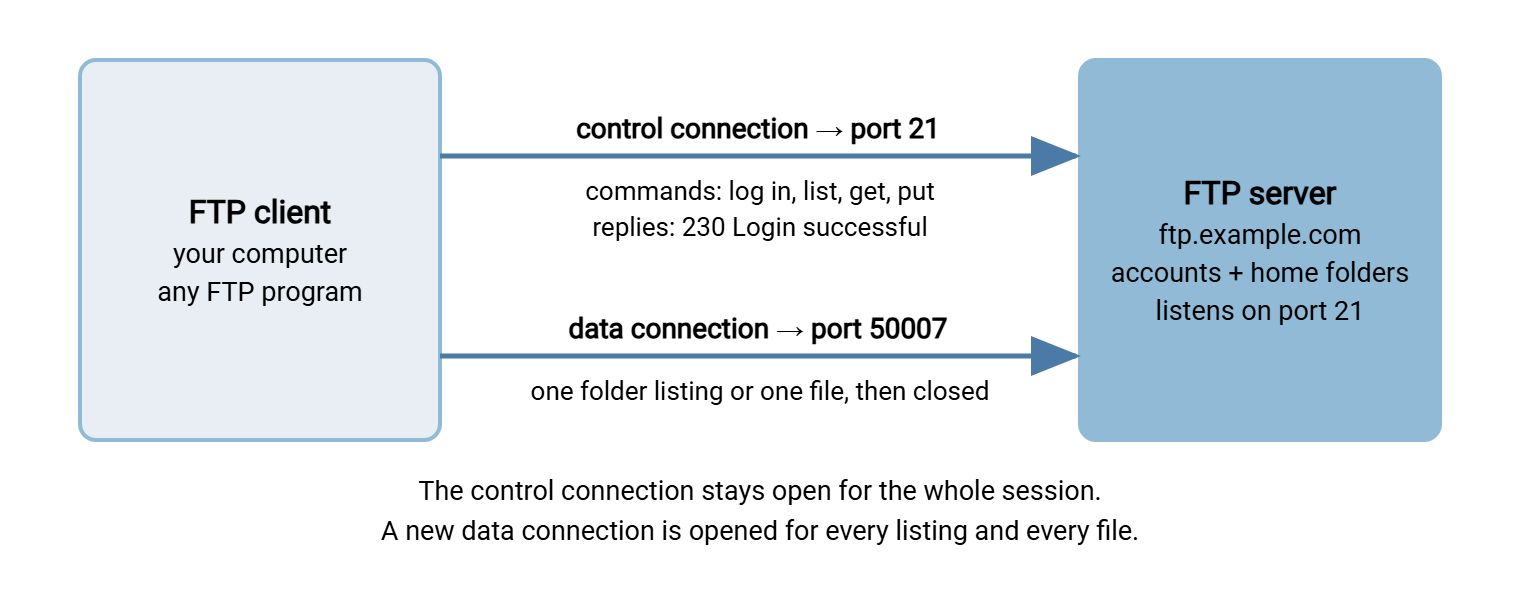
What does an FTP server do, step by step? It waits on a network port. When a client connects, it asks for a user name and password and checks them. It then shows that user a particular folder, called the home folder, and carries out the user's requests: list this folder, send me that file, store this one. It records what happened in a log. A typical FTP server example is the machine a company gives to its suppliers, with one account per supplier and one folder per account, where order files arrive each night.
The FTP server diagram below shows the two connections involved. Commands travel on one. Files and folder listings travel on the other.
What are FTP servers used for?
The most common FTP server use today falls into five groups:
- Exchanging files with business partners. Orders, invoices, payroll files, and reports that move between companies on a schedule.
- Publishing websites. A web host provides an FTP server for website files, and the site owner uploads pages to it.
- Receiving files from devices. Scanners, cameras, industrial equipment, and network gear often know how to send files by FTP and by nothing else.
- Backups. Many storage devices and applications can use an FTP server for backup copies sent to another machine.
- Distributing software. Public download sites, especially for open-source projects, were built on FTP.
FTP server types
FTP servers are sorted three ways. By protocol: plain FTP, FTPS (FTP with encryption), or SFTP (a different, encrypted protocol), and many servers offer all three. By access: an authenticated server requires an account, while an anonymous server lets anyone download without one. By platform: the server software is written for Windows, Linux, or a device's own firmware. The longer explanation is in What is an FTP server? and in how a file transfer actually works.
FTP Sites, Links, Folders, and Users
These four words describe the same server from the user's side. They cause most of the confusion, because each one sounds like something else.
An FTP site is an FTP server as seen from outside: an address you can connect to, plus the folders you find there. "Site" and "server" are used interchangeably. An FTP site is not a website. A website shows pages in a browser. An FTP site shows a list of files and folders in an FTP client, with no pages, no pictures, and no design. When someone says "it's on our FTP website," they mean an FTP site, and they will be puzzled when your browser cannot open it.
An FTP link, meaning an address that begins with ftp://, points at a site or at one file on it:
ftp://alex@ftp.example.com/reports/prices.csv
 |      |         |              |
 |      |         |              +-- folder and file on the server
 |      |         +-- host name of the FTP server
 |      +-- user name (optional; left out for anonymous sites)
 +-- protocol: use FTP, not a web page
Web browsers used to open these links directly and have stopped doing so, as FTP in a web browser explains. An FTP link now needs an FTP client, or File Explorer on Windows, which can keep the site as a network location. Mapping an FTP server drive letter, so that the site looks like a disk, needs extra software.
An FTP folder, also called an FTP directory, is a folder on the server. "Directory" is the older word for the same thing. Your home folder is the one you land in after logging in, and on a well-run server it is the top of everything you are allowed to see.
An FTP user is an account on the server: a user name, a password, a home folder, and a set of permissions saying whether that account may read, write, or delete. An FTP user is not necessarily a person. Many are scripts that log in every night at the same minute and have done so for years. An anonymous user is a shared guest login for public download sites. Account types are explained in FTP account models.
Two more terms complete the set. An FTP client, or FTP program, is the software on your side that connects to the server. And an FTP upload, meaning a copy from your computer to the server, is the opposite of a download, which is a copy from the server to you. People get the direction backwards about as often as they get it right.
What is my FTP server?
If a program is asking for "your FTP server," it wants the host name of the server you were given an account on. It looks like ftp.example.com or sometimes a bare address like 203.0.113.10. It comes from whoever runs the server: your web host's control panel, your partner's onboarding email, or your own IT department. You cannot work it out. You have to be told, together with the user name, the password, and the protocol. What to do with those details is covered in how to connect to an FTP server and test it.
Kestrel Payroll once sent new clients a welcome letter that said, "Please send your timesheets via our FTP." It gave no address, no account, and no explanation. One client put a memory stick in an envelope and posted it to Kestrel's office with a note reading "For the FTP." The receptionist, who had also never been told, put it in the tray marked IT. Kestrel's letter now includes a host name, a user name, and one sentence saying what FTP is. The stick was returned with thanks.
SFTP: What It Stands For and How It Differs
SFTP stands for SSH File Transfer Protocol. You will also see it expanded as "Secure File Transfer Protocol," which describes it fairly but is not the name in the specification. The SFTP definition in one sentence: it is a protocol for listing and copying files that runs inside an encrypted SSH connection.
The important thing about the acronym is what it hides. SFTP is not FTP with security added. It is a different protocol with different commands, a different port, and a different design, and it shares only its purpose and three letters with FTP. What protocol does SFTP use underneath? SSH, which in turn runs over TCP, normally on port 22. Everything travels in one encrypted connection. How it works inside is covered in how SFTP works, and the plain introduction is what is SFTP?
An SFTP site or SFTP server is the same idea as an FTP site: an address, an account, and folders. The difference is that you connect with an SFTP client, and the login and the files are encrypted.
Forms and vendor documents often ask for "FTP/SFTP details." What is FTP/SFTP? Nothing. It is two protocols written with a slash by somebody who did not want to find out which one applies. Ask which, because the answer changes the port, the firewall rule, and the client settings. The protocol that really is FTP with encryption added is FTPS. The three are untangled in SFTP vs FTPS.
What is an SSH server?
SSH stands for Secure Shell. An SSH server is a program that accepts encrypted connections for remote administration. Its original job is to give an administrator a command line on a distant machine. File transfer by SFTP is a second service the same program offers. So every SFTP server is an SSH server with its file transfer part switched on. Many are configured to offer the file transfer part only.
The Abbreviations, Side by Side
| Abbreviation | Full form | What it is, in one line |
|---|---|---|
| FTP | File Transfer Protocol | The original file copying protocol; no encryption |
| FTPS | FTP Secure (FTP over TLS) | FTP with TLS encryption wrapped around it |
| SFTP | SSH File Transfer Protocol | A separate protocol that runs inside SSH |
| SSH | Secure Shell | Encrypted remote login; the carrier for SFTP and SCP |
| SCP | Secure Copy | A simple copy command that also runs over SSH |
| TFTP | Trivial File Transfer Protocol | A tiny protocol for devices; no login, no encryption |
| PASV | Passive (an FTP command) | Asks the server to choose the port for the data connection |
| MFT | Managed File Transfer | Software that adds automation, control, and audit around transfers |
Two rows need a few more words. What is PASV FTP? It is FTP in passive mode, where the client opens both connections and the server only answers. Nearly every client uses it, because it works through firewalls on the client's side. The alternative, active mode, has the server connect back to the client. Both are explained in active vs passive FTP explained.
MFT stands for managed file transfer. The MFT meaning in business is a product category: software that sits on top of protocols such as SFTP and FTPS and adds scheduling, central control, and an audit trail. Managed file transfer in plain words covers it. The same three letters mean something unrelated inside Windows. There, an MFT file is the Master File Table, shown as $MFT, the hidden index that the NTFS file system keeps of every file on a disk. It has nothing to do with sending files anywhere. Acronyms are a shared resource, and nobody is in charge of them.
Where FTP Sits in a Network
What layer is FTP? It is an application layer protocol. In networking, protocols are stacked in layers, each relying on the one below. FTP is at the top, alongside web and email protocols, because it deals in things users care about: files, folders, and logins.
What protocol does FTP use underneath? TCP, the transport protocol that delivers data reliably and in order. TCP in turn rides on IP, which handles addresses. So an FTP session is an application conversation, carried by TCP connections, routed by IP. FTP does not use UDP.
An FTP server listens on TCP port 21 for commands and uses a second connection for the files themselves. SFTP uses port 22 and a single connection. The numbers, and the firewall rules that follow from them, are in ports for FTP, FTPS and SFTP.
Is FTP still used? Yes, heavily, mostly by systems that were set up long ago and by devices that know nothing else. Plain FTP should not be used for anything confidential, because it sends passwords and files unencrypted. The usual replacements are FTPS and SFTP, and why plain FTP has to go makes the case.
FTP Server Software: Examples and Kinds
An FTP server is software, so "which FTP server" really means "which FTP server application." Examples in common use include the FTP service built into Windows, the open-source servers that ship with most Linux distributions, free Windows servers such as FileZilla Server, and commercial Windows products such as Serv-U FTP Server and our own Sysax Multi Server. That is an FTP server software list in one sentence. A proper comparison, with what to look for, is in the Windows FTP server software guide.
Below the full products there is a class of small servers, and they have their place. A simple FTP server that is a single program with no installer is useful in a lab or for a one-off copy between two machines. Descriptions vary: an easy FTP server, a tiny FTP server, a quick FTP server, or a portable FTP server that runs from a memory stick. A local FTP server can even run on the machine you are sitting at and be reached as a localhost FTP server at the address 127.0.0.1, which is a good way to learn the protocol without involving a network.
The limits are the same for all of them. An FTP server, portable or installed, becomes a live FTP server the moment it starts, open to anything that can reach it. A phone-sized FTP server app is fine on a home network for ten minutes. An internet FTP server needs encryption, real accounts, confinement, and logging. Making an FTP server internet-facing is where the small tools stop. Treat any FTP server download the way you would treat any other installer: get it from the maker's own site.
There are also FTP server libraries for most programming languages, which is why searches such as "FTP server Golang" exist. Writing FTP server code is an excellent way to learn the protocol and a poor way to run production. To build a real one, see how to set up an FTP server on Windows, and for what "secure" requires, what makes an FTP server secure.
Using an FTP Server from the Command Line
You do not need a graphical client to work with a server. On current Windows, curl is built in and handles FTP and FTPS. Each command below asks for the password:
REM list files on FTP server
curl --ssl-reqd --user alex ftp://ftp.example.com/reports/

REM download files from FTP server
curl --ssl-reqd --user alex -O ftp://ftp.example.com/reports/prices.csv

REM copy files to FTP server (upload)
curl --ssl-reqd --user alex -T orders.csv ftp://ftp.example.com/inbound/

REM the same download over SFTP, if the server offers it
sftp alex@sftp.example.com:/reports/prices.csv
On Linux, wget does the downloading half: wget --user=alex --ask-password ftps://ftp.example.com/reports/prices.csv fetches one file, and adding -r fetches a folder. Using wget from FTP server folders this way is common in scripts.
One command does not belong here. scp cannot talk to an FTP server at all. It copies over SSH, so it needs an SSH or SFTP server at the other end. If scp works against a machine, that machine is running SSH, whatever anyone calls it. When a transfer has to run every night without a person, move it out of the command prompt and into a scheduled job. That is the purpose of an automation client such as Sysax FTP Automation.
Public FTP Servers, Lists, and Scanners
A public FTP server is one that allows anonymous logins so anyone can download. For decades this was how software, drivers, and research data were published. Many public FTP servers have since closed or moved to web downloads, but some remain. An FTP server list, and the occasional FTP server search engine that indexes what public sites contain, still exist to catalogue them. Some hobbyist pages maintain a whole FTP servers list by subject.
The same idea has an unfriendly side. An FTP server scanner is a tool that sweeps the internet for machines answering on port 21 and tries the anonymous login on each. Attackers run them constantly. They are looking for servers that were never meant to be public: a storage device with FTP left on, a forgotten test server, a camera. Known FTP server vulnerabilities, weak passwords, and open anonymous access are what they hope to find. An unpatched server will be found by a scanner long before it is found by its owner.
The practical lesson is short. Do not test with a stranger's public server, because anything you upload there is public too. And do not let your own server join the list by accident. Turn anonymous access off unless publishing files to the world is the server's actual job. The full program is in hardening file transfer servers.
FTP Servers on Other Platforms and Devices
Searches for an FTP server often name a product or a platform. Most of them have a short answer.
- Browsers. There is no Firefox FTP server download. The browser was an FTP client, able to open FTP links, and it has since dropped FTP support entirely, as have the other major browsers.
- Cloud platforms. On Azure, FTP as a service comes in two forms: a deployment endpoint for web applications and an SFTP option on its storage service. The nearest thing to an Amazon FTP server is that provider's managed transfer service in front of its storage. There is no Google FTP server for its consumer storage. On any of them you can also run your own FTP server: Azure virtual machines, like anyone else's, will host one.
- Linux and open-source projects. Every distribution packages several FTP servers. The GNU FTP server, long the home of that project's source code, is the classic public download site.
- Devices. Printers and scanners can send scans to an FTP server. A Crestron FTP server is the file service built into that maker's control processors for loading programs. Hardware makers ran public driver sites for decades, and the HP FTP server was a well-known example.
- Game consoles. A Wii FTP server is a hobbyist app that lets the console's storage be reached from a PC on the same home network.
The pattern is the same in each case. FTP is simple enough that almost anything with a network port can speak it, and so almost everything, at some point, did.
A Glossary Card to Copy
If you write onboarding letters, partner guides, or help desk articles, paste this where the jargon first appears. It is the paragraph Kestrel's welcome letter was missing.
FILE TRANSFER TERMS

FTP         File Transfer Protocol. A standard way to copy files between
            computers. Not encrypted.
FTPS        FTP with encryption added. Uses a certificate, like a secure website.
SFTP        SSH File Transfer Protocol. A different, encrypted protocol.
            Not the same as FTPS.
Server      The computer that holds the files and waits for you to connect.
Client      The program on your computer that connects to the server.
Site/host   The server's address, for example sftp.example.com.
Account     Your user name and password (or key) on that server.
Home folder The folder you see after logging in.
Upload      Copy a file from your computer to the server.
Download    Copy a file from the server to your computer.

To connect you need five things: the address, the port, the protocol,
your user name, and your password or key.
The Version to Tell a Colleague
FTP is the File Transfer Protocol, a long-established standard for copying files between computers. An FTP server holds the files and waits; an FTP client connects, logs in, and uploads or downloads. An FTP site is a server seen from outside, an FTP link is its address, and an FTP user is an account with a home folder. FTP is not encrypted. FTPS is FTP with encryption added, and SFTP, the SSH File Transfer Protocol, is a separate encrypted protocol with a similar name. MFT, managed file transfer, is software built on top of these.
For the full working vocabulary, continue with file transfer terminology: a working glossary. For how FTP itself behaves on the wire, see the FTP protocol explained, and for how it got this way, a short history of FTP.
Frequently Asked Questions
What is the definition of FTP?
What is an FTP server?
What does SFTP stand for?
What is an FTP site?
What does MFT stand for?
Is FTP secure?
From the Sysax team: we build secure file transfer software for Windows. Sysax Multi Server is an FTP, FTPS, SFTP, and HTTPS server. Sysax FTP Automation handles scheduled, scripted transfers. Free trials are on the download page.