
Why File Transfer Protocols Fight Firewalls
"It's the firewall." "The firewall hasn't changed." Those two sentences have been exchanged, in that order, in every ticket queue I have ever worked. The login succeeds. The directory listing sits there for a minute and dies. The ticket moves from the server queue to the network queue and back, twice. Eventually somebody opens a port they do not fully understand. The listing comes back, and the ticket closes with the root-cause field left blank.
Nobody in that exchange is wrong. The firewall is doing exactly what it was built to do, and the transfer protocol is doing exactly what it was designed to do. They disagree about what a "connection" is, and nobody has ever introduced them. This article explains that disagreement from the ground up. It covers what a stateful firewall actually tracks and why some transfer protocols open extra connections the firewall has never heard of. It explains how NAT quietly makes it worse and why SFTP on a single port stays out of the argument entirely. Every term is defined on first use, and every example uses command output you can reproduce.
This is the opening article of our Firewalls, NAT, and File Transfer series. The later articles build on the model laid out here. Read this one first and the ticket will still bounce, but fewer times, with better questions attached.
What a Firewall Actually Does
A network firewall is a device (or software on a host) that looks at every packet passing through it and decides whether to let it continue. The earliest firewalls were packet filters: they matched only the addresses and ports in each packet's header against a list of rules. They were simple, fast, and blind to whether a packet belongs to a conversation already under way.
Almost every firewall you will meet today is a stateful firewall. "Stateful" means it remembers. When a client sends the first packet of a new TCP connection — the SYN, the "may I connect?" packet — the firewall checks its rules. If a rule says allow, it writes an entry into its state table. This is also called the connection table or, on Linux, the conntrack table. The entry records the five things that identify a TCP connection: protocol, source address, source port, destination address, and destination port. Every later packet matching that entry is allowed through automatically, in both directions, without another rule check. When the connection closes or goes quiet for long enough, the entry is deleted. The firewall's memory is precise, complete, and temporary.
Two consequences matter for file transfer. First, reply traffic is allowed because the state table remembers the outbound request, not because any rule permits inbound traffic. Second, a packet that matches no entry is brand new and must earn its way through the rules. If none allows it, it is dropped — usually silently, which is why the symptom is a hang rather than an error. The firewall does not feel it owes anyone an explanation.
Here is a state table entry on a Linux firewall, listed with the conntrack tool. It is for an FTP control connection from an office workstation to a server on the internet:
$ sudo conntrack -L | grep dport=21
tcp  6 431995 ESTABLISHED src=192.168.10.25 dst=198.51.100.20 sport=49812 dport=21 src=198.51.100.20 dst=203.0.113.5 sport=21 dport=49812 [ASSURED] mark=0 use=1
Read it left to right: TCP, state ESTABLISHED, and a countdown of 431995 seconds of silence before the entry is forgotten. That is about five days, the Linux default; many firewalls use minutes. The first src=/dst= pair is the original direction: workstation 192.168.10.25, port 49812, to server 198.51.100.20, port 21. The second pair is the reply direction — addressed to 203.0.113.5, not to the workstation. That is NAT at work; we will come back to it.
Port 49812 is an ephemeral port: a temporary number the client's operating system picks from a high range. That range is roughly 32768 to 65535, depending on the OS. The client uses the number for its end of each outbound connection. Nobody cares which number it is, as long as the entry exists. Ephemeral ports become a problem only when a protocol asks the other side to connect to one — which is precisely what FTP does.
Remember: a stateful firewall allows replies because it remembers the request. A packet that belongs to no remembered connection is "new," and new packets need an explicit rule or they are dropped — usually silently. Every firewall fight in file transfer comes down to a connection the firewall did not know to expect.
The Multi-Connection Problem
Most application protocols — HTTPS, SSH, SMTP, and the transfer protocols built on them — use one TCP connection per session. The client connects, the firewall writes one state table entry, and everything the protocol does travels inside that connection. The firewall never needs to understand the protocol.
FTP does not work that way. An FTP session is two connections: a control connection on port 21 that carries commands and replies, and a separate data connection. The data connection carries file contents and directory listings, and is created fresh for every transfer. In active mode the server connects back to a port the client announces with the PORT command. In passive mode the client connects out to a port the server announces in its reply to PASV. Our active versus passive FTP explainer walks through both sequences; here we only need the consequence.
From the firewall's point of view, the second connection has nothing to do with the first. Its state table holds one entry: workstation port 49812 to server port 21. Then a completely different connection appears — different ports, possibly a different direction — with no entry. Unless a rule explicitly allows it, it is dropped. The protocol negotiated the second connection inside the payload of the first, and a stateful firewall does not read payloads. It was not invited to that conversation and does not know it happened.
The diagram below shows the collision. The control connection is remembered and allowed. The data connection arrives as a stranger.
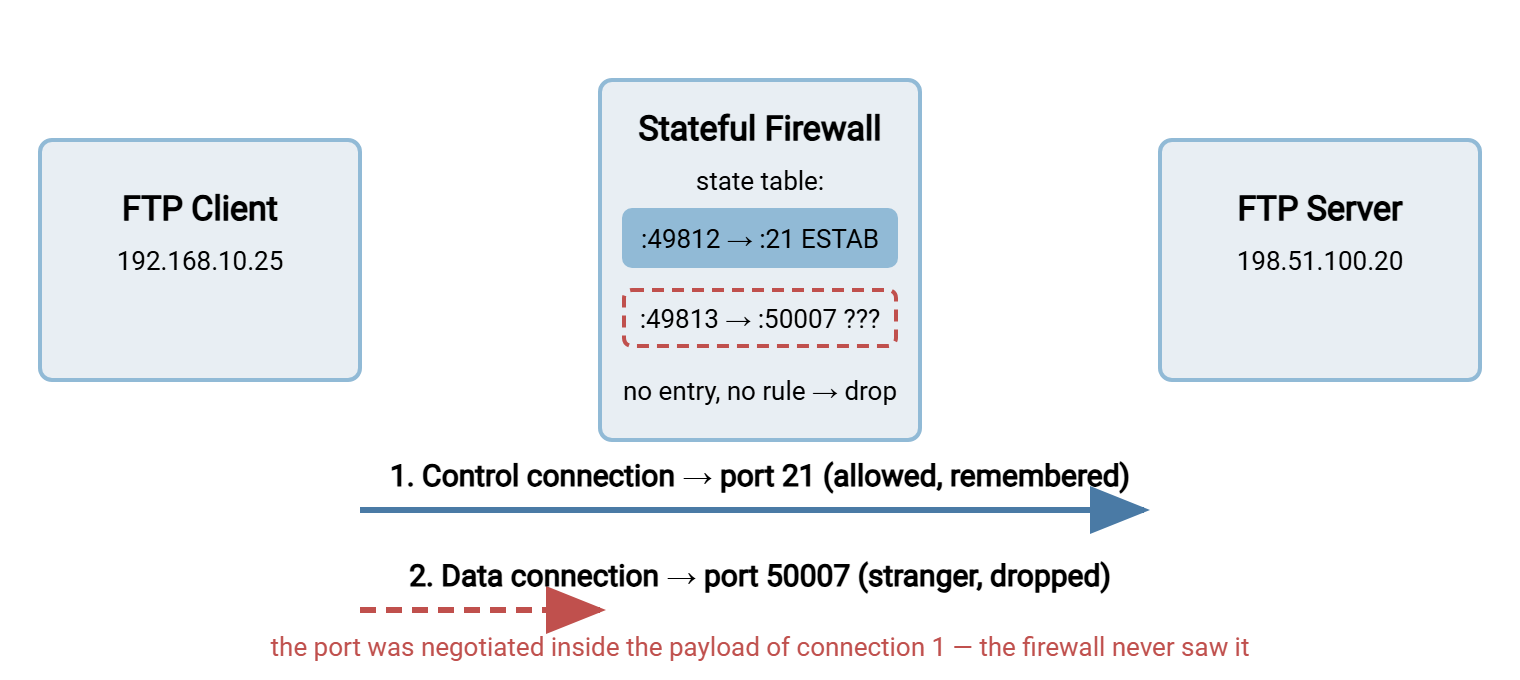
Passive mode softens the fight but does not end it. Both connections now travel from client to server, which client-side firewalls generally permit. But the server-side firewall still sees a new inbound connection to a high port. So the server's administrator must open the whole passive port range in advance. That is the block of ports the server is allowed to hand out. Active mode is worse: the server connects back toward the client. Every client-side firewall treats this as an unsolicited inbound connection and refuses it. See why firewalls block active FTP.
NAT: The Address in the Envelope Is Wrong
Firewalls rarely travel alone. Nearly every network boundary also performs NAT — network address translation. This lets a building full of machines with private addresses share one or a few public addresses. The private ranges are 10.x.x.x, 172.16.x.x to 172.31.x.x, and 192.168.x.x, never routed on the public internet. As each outbound packet leaves, the NAT device rewrites its source address to the public one. It remembers the mapping so replies can be rewritten back. That is what the conntrack entry above showed: 192.168.10.25 became 203.0.113.5 on the way out.
NAT rewrites addresses in packet headers. It does not, by default, read or rewrite addresses an application writes into its payload. FTP does exactly that. A client in active mode sends PORT 192,168,10,25,201,85 — "connect back to 192.168.10.25," a private address the server cannot reach. A server behind NAT answers PASV with 227 Entering Passive Mode (10,0,5,20,195,87) — "connect to 10.0.5.20." From the client's side of the internet, that is unreachable or, worse, some unrelated machine on the client's own network. The header says one thing; the envelope inside says another.
This is the announced-address problem, the single most common reason passive FTP fails through NAT. The fix is a server setting that announces the public address, plus the passive range forwarded through the NAT device. The mechanics are in configuring passive port ranges. The full catalog of NAT variations covers port forwarding, double NAT, carrier-grade NAT, and hairpinning. It is the next article in this series, NAT types and what they do to transfers.
Some firewalls try to help. An application layer gateway (ALG), also called an FTP helper, reads the control connection and spots PORT and 227 lines. It rewrites the addresses inside them and pre-approves the data connection in the state table. When it works, the fight vanishes. When it misfires — and it cannot work once the control connection is encrypted — it creates failures that look like nothing else. See application helpers and ALGs: friend and foe. The helper is helpful the way a colleague who rewrites your email is helpful.
Why SFTP on One Port Is Calm
Now compare all of that with SFTP. SFTP is not FTP with encryption bolted on; it is a file transfer subsystem that runs inside an SSH connection. SSH uses a single TCP connection, normally to port 22. Everything — authentication, directory listings, file reads and writes, several files at once — travels as messages inside that one connection. There is no second connection to negotiate, no port number written into a payload, and no address for NAT to get wrong. The design is described in how SFTP works.
From the firewall's side, an SFTP session is one state table entry, created by the client's outbound SYN to port 22. The entry is used in both directions until the session ends. The client network's ordinary "allow outbound" policy covers it. The server network needs exactly one inbound rule, TCP port 22 (or whatever port the server listens on). Here is the connection view for an SFTP session moving several files in parallel — still one connection:
$ ss -tn dst 198.51.100.20
State   Recv-Q  Send-Q   Local Address:Port     Peer Address:Port
ESTAB   0       0        192.168.10.25:51204    198.51.100.20:22
HTTPS-based transfer behaves the same way for the same reason: one TCP connection to port 443, everything inside it. A server such as Sysax Multi Server offers SFTP and HTTPS alongside FTP and FTPS on the same host. So an administrator tired of the fight can move partners to the single-port protocols one at a time. Meanwhile, the FTP listener stays up for the stragglers.
Why FTPS Starts Even More Arguments
If FTP is the protocol that fights firewalls, FTPS — FTP wrapped in TLS encryption — fights them and disables the referee. FTPS keeps FTP's two-connection design intact; it only encrypts the connections. Every problem above still applies. The data connection is negotiated in the payload, the passive range still has to be opened, and NAT still cannot see the announced address. Encryption hides the port from attackers and, with equal thoroughness, from the firewall.
Then encryption removes the one thing that used to help. An FTP-aware firewall could at least read the 227 reply and open the data port on the fly. With TLS on the control connection it sees only ciphertext: it cannot read the port, rewrite the address, or pre-approve anything. Some helpers, faced with a port-21 stream they cannot parse, do nothing; others treat it as a protocol violation and reset it. FTPS through a firewall works only when the administrator has done the whole job by hand. That means fixed passive range, correct announced address, explicit rules, helper turned off. That recipe is in FTPS through firewalls and NAT. The three protocols are compared from the firewall's seat in the firewall view of FTP, FTPS, and SFTP.
Seeing the Fight in Your Own Logs
Recognizing the fight in real output is what gets tickets closed. Here is a worked example with the diagram's addresses. A workstation at 192.168.10.25 is behind an office firewall whose public address is 203.0.113.5. The workstation connects to a partner's FTP server at 198.51.100.20. The partner forgot to open the passive range on their firewall.
The client's session log
Status:    Connecting to 198.51.100.20:21...
Response:  220 Welcome to ftp.example.com
Command:   USER alex
Response:  331 Password required for alex
Command:   PASS ********
Response:  230 Login successful
Command:   PASV
Response:  227 Entering Passive Mode (198,51,100,20,195,87)
Command:   LIST
Error:     Connection timed out after 20 seconds of inactivity
Error:     Failed to retrieve directory listing
Everything up to 227 is the control connection, and it is healthy. The server announces port 50007 (195 × 256 + 87) and the client tries to open a second connection there. Nothing comes back — no refusal, no error, just silence until the client's own timer expires. Silence is the signature of a dropped packet.
The client's connection table, during the hang
While the listing hangs, look at the machine's own view of its connections. On Windows:
C:\> netstat -ano | findstr 198.51.100.20
  TCP    192.168.10.25:49812    198.51.100.20:21       ESTABLISHED     4812
  TCP    192.168.10.25:49813    198.51.100.20:50007    SYN_SENT        4812
On Linux or macOS the equivalent is ss -tn. The first line is the control connection, established and quiet. The second is the data connection, stuck in SYN_SENT. The client sent its "may I connect?" packet to port 50007 and is still waiting. The last column is the process ID; both lines belong to the same FTP client, which confirms the two connections are one session. I restarted a perfectly healthy FTP service over this exact symptom, twice, before I learned to look for the second line.
A direct reachability test
You can prove the point without an FTP client by testing the two ports separately. In PowerShell, Test-NetConnection against port 21 reports TcpTestSucceeded : True; the passive port does not:
PS C:\> Test-NetConnection -ComputerName 198.51.100.20 -Port 50007
WARNING: TCP connect to (198.51.100.20 : 50007) failed

ComputerName     : 198.51.100.20
RemoteAddress    : 198.51.100.20
RemotePort       : 50007
InterfaceAlias   : Ethernet
SourceAddress    : 192.168.10.25
PingSucceeded    : True
TcpTestSucceeded : False
On Linux, nc -vz 198.51.100.20 21 followed by nc -vz -w 5 198.51.100.20 50007 gives the same answer. The first reports "succeeded," and the second times out. Port 50007 is closed — from this vantage point. A port can be open on the server and still be blocked in between, and only the far side's firewall log can say where. This is the moment the ticket changes queues.
The server-side firewall log
On the partner's Linux firewall, a logging rule in front of the default deny produces one line per dropped packet. Trimmed to the fields that matter:
Mar 14 02:10:07 fw1 kernel: DENY-IN: IN=eth0 OUT=eth1 SRC=203.0.113.5 DST=198.51.100.20 PROTO=TCP SPT=49813 DPT=50007 SYN
Mar 14 02:10:08 fw1 kernel: DENY-IN: IN=eth0 OUT=eth1 SRC=203.0.113.5 DST=198.51.100.20 PROTO=TCP SPT=49813 DPT=50007 SYN
Three things stand out. The source is 203.0.113.5, not 192.168.10.25 — the client's NAT did its job. The public address is what a partner's allowlist must contain. The destination port is 50007, inside the passive range, and the flag is SYN: a brand-new connection attempt. And it repeats at growing intervals, which is TCP retrying its handshake — what the client's SYN_SENT line was waiting on. The fix is a rule allowing TCP 50000–50100 to 198.51.100.20. The systematic version of this investigation is the firewall troubleshooting playbook.
Meridian Parts spent most of a week inside that loop. Their nightly parts feed to a new supplier logged in cleanly and then hung on every listing. The ticket went from the server queue ("port 21 answers, so it is a network problem") to the network queue. There the response was "nothing has changed on our side, so it is a server problem." The ticket made that trip and back, twice. On the third pass somebody ran netstat during the hang. They saw the second connection stuck in SYN_SENT to a port in the fifty thousands. They asked the supplier one question: is your passive range open on your firewall? It was not. The supplier added the rule that afternoon and the feed ran that night. Meridian added a passive-range line to its partner intake form so the question would be asked before the first ticket rather than after the third.
A Protocol-by-Protocol Scorecard
Every transfer protocol sits somewhere between "one connection, one rule" and "several connections, negotiated in secret." The table shows where each lands.
| Protocol | Connections per session | Can the firewall see the negotiation? | What the server-side firewall must allow |
|---|---|---|---|
| FTP, active | Two; server dials back to client | Yes, in cleartext (helpers can rewrite) | Inbound 21, outbound from 20; the client side must accept inbound, which usually fails |
| FTP, passive | Two; client opens both | Yes, in cleartext | Inbound 21 plus the whole passive range; correct announced address behind NAT |
| FTPS, explicit | Two; same as FTP | No — encrypted after AUTH TLS |
Inbound 21 plus passive range; helper off; announced address set by hand |
| FTPS, implicit | Two; same as FTP | No — encrypted from the first byte | Inbound 990 plus passive range; announced address set by hand |
| SFTP | One | Nothing to see; no ports in payload | Inbound 22 only |
| HTTPS | One (or several, all to the same port) | Nothing to see | Inbound 443 only |
The pattern is hard to miss. Protocols that carry a port number inside their own conversation need extra rules, configuration, and explanation. Protocols that keep everything inside one connection need one rule. That is not a reason to rip out FTP tomorrow — plenty of partners and devices still require it. But it is why a firewall administrator quietly cheers when a new partner asks for SFTP. When you do run FTP or FTPS, treat the passive range as part of the service definition and design the rules deliberately. That is the subject of designing transfer-friendly firewall rules.
The Short Version
A stateful firewall allows a packet either because a rule permits it or because it belongs to a connection it already remembers. FTP and FTPS create a second connection per transfer and negotiate its port inside the first connection's payload. There the firewall cannot see it and NAT cannot correct the address. That second connection is a stranger at the door for every listing and every file. SFTP and HTTPS never create that stranger: one connection, one port, one rule. Three habits follow: ask "which connection?" before "which rule?", treat silence as a drop, and know your own public address. That is what the far side's log will show. Write the public address down somewhere. The far side will ask for it at two in the morning.
Continue with NAT types and what they do to transfers for the address-rewriting half of the problem. Then read application helpers and ALGs for the devices that try to fix it. When the far side is a partner with a firewall of their own, coordinating firewall changes with partners covers the etiquette. For a refresher on the port numbers themselves, our blog post What port is FTP? is a two-minute read.
Frequently Asked Questions
What does "stateful" mean when people describe a firewall?
If the firewall allows port 21, why does FTP still fail?
Why does the failure show up as a hang instead of an error?
Does SFTP really need only one port open?
Is FTPS easier or harder for firewalls than plain FTP?
From the Sysax team: we build secure file transfer software for Windows. Sysax Multi Server is an FTP, FTPS, SFTP, and HTTPS server. Sysax FTP Automation handles scheduled, scripted transfers. Free trials are on the download page.