
Rolling Out the Policy Without a Revolt
Most file transfer policies die on a Tuesday. The all-staff email goes out at nine, effective immediately, PDF attached. The approved server exists, and nobody outside IT has an account on it. By ten, the team that sends design files daily has discovered that their working method is now forbidden and its replacement involves a request form. By Friday the policy has a reputation, and the reputation is: ignore it, everyone else does. Nobody repeals it. It simply becomes fiction, and the intranet gains one more page that only its author reads.
None of that is a failure of the policy's content. It is a failure of sequencing, and sequencing is the one part of a rollout you fully control. This article lays out a rollout order that works. It starts with alternatives built and tested before anyone hears a rule, and drafts shaped by the people who transfer the most. It covers an announcement with lead time and a human tone, and training that costs fifteen minutes. It covers grandfathering with real deadlines instead of either amnesty or ambush, and the signals that tell you honestly whether adoption is happening. It is part of our Writing a File Transfer Policy series, and it assumes you arrive with a drafted policy in hand.
What a Revolt Actually Looks Like
Forget pitchforks. Nobody marches on the server room over a transfer policy. The revolt you are avoiding is quiet: people nod in the meeting, agree the policy makes sense, and change nothing. The personal cloud accounts keep syncing. The consumer sharing links keep flowing — now with a faint flavor of secrecy, because everyone knows there is a rule. Quiet non-compliance is worse than the pre-policy state. You have spent your credibility, taught the organization that IT rules are decorative, and pushed the shadow traffic slightly further out of sight.
The causes are predictable, which is what makes them avoidable. Surprise: people met the rule before anyone asked about their work. Blocked work: the forbidden thing was how the job got done, and the approved thing was not ready. Disrespect, or its appearance: a policy that lands as an accusation ("employees are engaging in risky behavior") rather than an upgrade ("here is a better way we built for you"). And missing help: no training, no migration support, no named person to ask. Every phase of the sequence below exists to remove one of those causes. It borrows more from a product launch than from a compliance program. From your colleagues' side, that is exactly what this is: a new product replacing tools they chose themselves.
The Sequence at a Glance
The diagram shows the rollout as a timeline. The order is the whole method: notice that the announcement sits in the middle, not at the start. Half the work happens before anyone outside the pilot group hears a word.
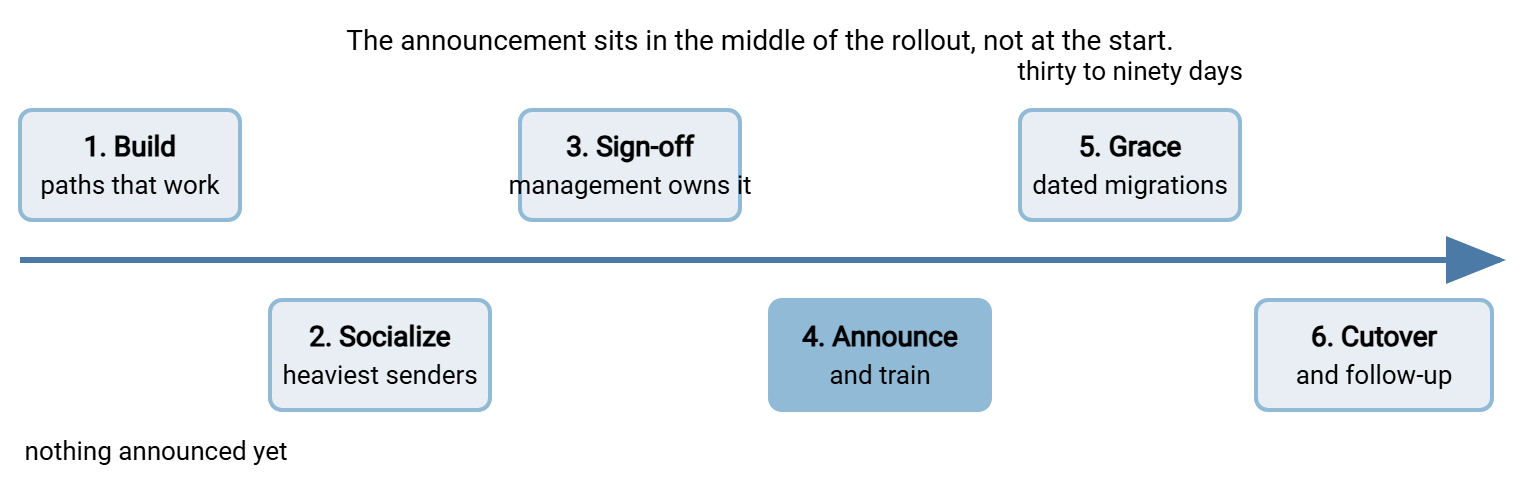
Elapsed time for the whole sequence at a mid-sized organization: a couple of months, most of it grace period. Trying to compress it by skipping early phases does not make the rollout faster — it makes the failure faster.
Build First: the Paths Must Work Before Anyone Hears a Rule
The iron rule of the whole rollout: no rule is announced until its approved alternative works — not "is planned," not "is being procured." Works, today, demonstrated. Every no in your policy is a promise that a yes exists, and the launch is where that promise gets tested in public.
Acme announced its policy nine days before the partner-account workflow was finished, on the theory that the two would meet in the middle. The announcement promised accounts the same business day; the first week brought forty-one requests and a three-day backlog. By the second week the design team had gone back to its sharing site "until IT sorts itself out." The team said so in a meeting the operations director attended. The workflow was ready on day twelve. The policy's reputation took a further quarter to catch up, which was longer than the build would have taken.
For a typical policy, the build checklist looks like this. The transfer server is running, reachable by partners, and monitored. With Sysax Multi Server that means the FTPS, SFTP, or HTTPS front door is up. Staff accounts can come straight from Windows and Active Directory while partners get built-in accounts or public-key logins. Activity logging is switched on from day one — the logs are about to become your adoption gauge. The account workflow is rehearsed: someone requests access for a partner, and it is genuinely ready the same business day. That promise is printed in the policy. The recurring feeds have been rebuilt properly: every under-the-desk scheduled task you found during discovery gets recreated as a managed job. In Sysax FTP Automation, that is a scheduled or folder-triggered transfer with retry handling and email notifications on failure. Each job is run in parallel long enough to trust. How outside parties will authenticate is decided, not improvised per request; the options and tradeoffs are surveyed in our transfer authentication series.
Then pilot it. The colleagues who stress-tested your draft's wording in the hallway test are the natural pilot group. Have each of them perform their own real transfers through the new paths for a week or two. They will find the enrollment step that confuses, the folder permission that blocks, the instruction that assumes knowledge nobody has. Fix all of it now, while the audience is five friendly people instead of the whole company. I have skipped the pilot exactly once, and I found the confusing enrollment step at the same moment as two hundred colleagues.
Socialize the Draft With the People It Will Hit Hardest
From your discovery work — the shadow inventory described in why you need a policy — you know who actually moves files. Those are the departments behind the personal cloud accounts, the owner of the weekly USB run, the assistant who mails the payroll file. These heavy senders are where rollouts are won or lost, so bring the draft to them before it is final. The conversation is short and the question is honest: here is what we are proposing — what would this break for you?
Expect to learn things. The USB run exists because the machine shop's network is genuinely awful; that is an exception waiting to be designed, better discovered now than defied later. The sharing links exist because clients found the old portal confusing; that is a requirement for your build phase. Fold what you learn into the draft, and tell the contributors what changed because of them. People defend what they helped build. Each of these conversations converts a likely objector into the person at the team meeting who says "actually, they asked us, and the new way handles our case."
Then, and only then, management signs. The sequencing matters for authority: leadership is endorsing a document already shaped by the business, not refereeing a fight after launch. Part of sign-off is agreeing who sponsors the announcement — and the right answer is a business leader, not IT. A policy announced by the operations director is company direction; the same text from the admin team is one department's preference. (An excellent preference, but a preference.)
Announce, Then Train — Close Together and Human
Give the organization two weeks of notice — enough to feel respectful, not so much that it evaporates. The announcement's job is small: say what changes, when, where help lives, and strike a tone of upgrade rather than accusation. Something like this:
SUBJECT: One clear way to send files — starting [date]

Team,

Starting [date], we have one simple answer to "how do I send
this?" — the new company transfer page. Files to or from anyone
outside the company go through it; small everyday attachments in
email stay exactly as they are.

Why: our customers trust us with their files, and this lets us
protect them properly and answer for where they went.

What to do now:
  - Nothing breaks today. Your current arrangements keep working
    during the transition, which runs until [date].
  - If you use a personal account or sharing site for work files,
    IT will help you move — no blame, no questions. Book fifteen
    minutes: [link].
  - New setups from today onward use the new system. Accounts for
    your outside contacts are ready the same business day.

The one-page policy is here: [link]. Questions and unusual cases:
[address] — answered within one business day.

[Business sponsor's name and title]
Arm the middle layer too. Team leads will field most of the real questions, so hand them talking points they can deliver in one minute:
FOR MANAGERS — the one-minute version
- One rule: files in or out of the company go via the transfer
  page. Email stays fine for small, non-sensitive attachments.
- Existing arrangements: nothing breaks; each gets a migration
  date before [end date]. IT does the moving.
- Speed: partner accounts same business day. Odd cases: the
  exceptions address answers within one business day.
- The ask: no new personal-account setups from today.
Two refinements make these communications land harder. First, tailor the third paragraph of the announcement per department where it matters. The sales team's version can name the proposal-delivery case; engineering's can name the drawing exchange with the machine shop. A sentence that describes the reader's own Tuesday converts better than any general principle. Second, prepare the sponsor and the managers for the one question that always comes: "why can't we just keep using [the old way]? It's worked for years." The honest answer is short and worth scripting. Nobody can protect, retrieve, or account for files on paths the company cannot see. The day something leaks or goes missing, "it always worked before" is what we would have to tell the customer. Delivered calmly, once, by a manager rather than by IT, that answer settles most rooms. Delivered by IT, the same answer is heard as a complaint.
Training follows within days, while the announcement is fresh — and it is fifteen minutes, task-based, and demo-shaped. It covers how to send a file to an outsider, how to receive one, what to do when something is too big or too strange. No slideware about threat landscapes; the training is a cooking show, not a lecture. Record one session for later hires, and distill it into a one-page cheat sheet that lives next to the policy. People will follow the path they watched someone walk.
Remember: the announcement makes one promise on IT's behalf — help without blame for everyone currently using shadow methods. Honor it literally. The first person shamed for coming forward is the last person who comes forward. The migration you lose will be the one you most needed to see.
Grandfathering With Deadlines, Not Amnesty
Grandfathering — letting existing arrangements continue temporarily under the old rules — is what makes a rollout humane. The deadline is what keeps it from being a surrender. Every existing shadow flow found in discovery or surfaced by the announcement gets logged with an owner, a destination method, and a migration date inside the grace window. Structurally these entries are time-boxed exceptions, and they belong in the same register your exceptions process keeps. They are visible, dated, and reviewed, so "transition" cannot quietly become "forever."
Three migrations deserve special handling. Partner-facing flows change other people's configurations, so they need letters with dates, contact points, and test windows. The mechanics are covered step by step in partner communications, and they apply to any method change, not just FTP retirement. The email-attachment habit responds better to gradual redirection than decree; weaning off attachments is the playbook. A legacy cleartext FTP service may be among the things being retired. If so, fold its shutdown into the same grace window with its own dated plan — the FTP retirement plan. That way, the policy's launch and the old server's funeral reinforce each other.
How long a grace period? Thirty days suits a small organization with a handful of flows; ninety fits most others. Announce the end date in the original email. Send one reminder at the midpoint listing what has moved and what has not (successes make the laggards feel behind, which is useful). Let owners of unmigrated flows hear from their managers — not from IT — as the deadline approaches. Consequences and pressure are management's lane; yours is making the move easy.
Reading the Adoption Signals
Launch day tells you nothing; the following weeks tell you everything, if you watch the right gauges. The healthy signs:
- Accounts and traffic on the approved path grow. The transfer server's activity logs show new partner accounts appearing and real files moving through them. That is one of the quiet payoffs of switching logging on during the build.
- Questions arrive at the named channel. People asking "how do I send this?" at the right address are people who believe the channel answers. Silence is not adoption; silence is people not asking.
- Exception requests arrive. Counterintuitive but true: a trickle of requests means people are bringing you their edge cases instead of hiding them. Zero requests in the first month almost always means the workaround culture survived.
- Migration entries close. The grandfather register shrinks on schedule.
- Shadow traffic falls. Check whatever visibility you have — web filtering categories for consumer sharing sites, mail-size bounce counts, sync-client installs — and expect decline, not extinction.
A prerequisite hides in that last gauge: decline is only visible against a baseline, and the baseline can only be taken before the announcement. During the build phase, while nothing has been said publicly, snapshot whatever numbers you can get cheaply. Examples are sync-client installs from your software inventory and web-filter hit counts for the sharing-site category. Others are the month's tally of oversized-attachment bounces and the number of known shadow flows in your discovery notes. Ten minutes of counting then turns "it feels quieter" into "consumer sharing traffic is down by half, and the remaining hits cluster in one department." That is both a management-friendly progress report and a map of where to visit next. The fuller measurement program is in measuring adoption and closing the gaps.
When the signals are bad — flat server traffic, silent channels, thriving shadow paths — resist the reflex to reach for enforcement. In a fresh rollout, poor adoption is almost always a friction report, not a discipline problem. In those cases, some step of the approved path is slower, more confusing, or less reliable than the workaround it replaced. The article on making the secure path the easy path is the repair manual. Go interview three people who have not moved, walk their task through your path while they watch, and fix what you see. Enforcement has a legitimate place — the next article, enforcing and updating the policy, is about exactly that. But enforcement comes after the approved path has earned the right to be enforced.
Cutover Day, and the Quarter After
If the register did its job, cutover day is an anticlimax — which is the goal. The work is a short, pre-agreed checklist. Any migration entries still open have already been escalated to their owners' managers the week before. Management — not IT — decides whether each straggler gets a dated extension or a hard stop; you implement the decision either way. Legacy endpoints are retired on schedule: the old FTP host goes read-only and then dark per its plan. Credentials that existed only for old arrangements are disabled. Any technical blocks the organization has chosen — a web-filter category, a firewall rule — are switched on now, after the rule and the alternatives, never before. Sequencing blocks last matters: a block that lands before the paths work reads as sabotage. The same block landing after ninety days of help reads as tidying up.
Close the loop publicly. A three-line note from the sponsor — what moved, what improved, thanks to the teams that migrated early — costs nothing and pays twice. It marks the change as finished rather than ongoing nagging, and it signals that the organization notices cooperation. Then keep the help desk warm for a quarter. Stragglers will keep surfacing — the contractor who was on leave, the quarterly job that only now ran for the first time. Each one should meet the same no-blame migration help the announcement promised, plus a fresh register entry if a deadline is needed. Before you file the rollout away, set one more date: the policy's first annual review, booked now while the lessons are fresh.
A Launch, Not an Event
The sequence, compressed: build the approved paths and pilot them until they are boringly reliable. Shape the draft with the heaviest senders so it arrives pre-endorsed. Get management's signature and a business sponsor's name on the announcement. Announce with two weeks' notice and a tone of help. Train in fifteen task-shaped minutes. Grandfather every existing flow with an owner and a date. Read the gauges honestly for a quarter, treating weak adoption as a bug in the path before a fault in the people. Announce on a Tuesday if you like; the day was never the problem.
A rollout done this way does not end — it hands over. The policy becomes part of how the organization works, which means it now needs maintenance. That means enforcement that stays proportionate, and reviews that keep the document matched to reality. That ongoing life is the subject of enforcing and updating your transfer policy, the final article in this series.
Frequently Asked Questions
How much notice should we give before the policy takes effect?
Should executives be covered from day one?
What if people simply ignore the announcement?
How long should the grace period be?
Do we need people to formally acknowledge the policy?
From the Sysax team: we build secure file transfer software for Windows. Sysax Multi Server is an FTP, FTPS, SFTP, and HTTPS server. Sysax FTP Automation handles scheduled, scripted transfers. Free trials are on the download page.