
Measuring Adoption and Closing the Gaps
The modules have run, the cards are on the desks, and the guides are linked from the bounce message. Someone senior asks the reasonable question: did it work? "Ninety-four percent attended" is the answer that comes to hand, and it is an answer to a different question. Attendance measures exposure. What you were asked about is behavior, and behavior leaves different evidence.
This article is about that evidence. An adoption metric is a number that reflects what people actually do with files. It does not reflect what they were told or how many of them sat in the room. You will come away with the signals worth collecting and where each one lives. There is a scorecard with example numbers you can copy. There are feedback loops that tell you about a problem before the numbers do, and refreshers timed to incidents rather than to the calendar. The article defines the champion role properly. It also gives you a template for the quarterly report that says honestly where the policy still loses. This is the last article in our Training & Adoption series, and it closes the loop the first one opened.
Attendance Is Not Adoption
The distinction is between exposure and behavior. Exposure is how many people saw the module, the card, the guide. Behavior is how many files went through the portal instead of by attachment. It is how fast a request was answered and how quickly a mis-send was reported. Exposure is easy to count and comforting to report. Behavior is what the policy exists to change, and it is the only thing worth the word adoption.
The two come apart constantly. A department can be one hundred percent trained and send nothing through the portal, because the portal does not take files of the size they send. Another can be half trained and fully adopted, because their manager sent the first file and the rest followed. Measuring exposure alone would report the first as a success and the second as a gap, which is the wrong way round.
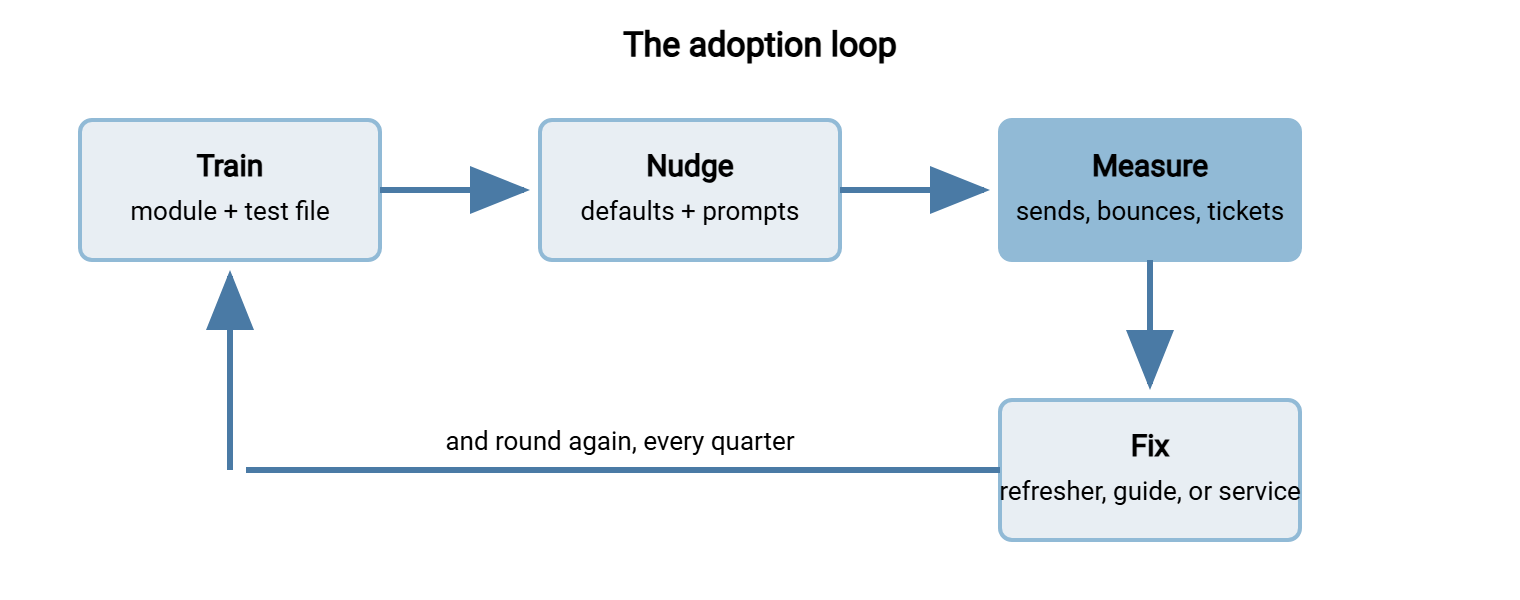
Adoption is measured inside a loop, and the diagram below shows it: train, nudge, measure, fix, and round again. A nudge is a small prompt in the tool at the moment of decision, such as a default expiry or a banner on an external email. The measuring step feeds the fixing step, and the fix might be a refresher, a guide rewrite, or a change to the service. Which one depends on what the number says, so the number has to be specific enough to say something.
The Signals Worth Collecting
Every signal below already exists somewhere in your estate. None requires a survey. The work is finding each one, writing down where it lives, and pulling it once a month into the same spreadsheet. That takes about an hour once the sources are known.
- Portal sends per department per month. The primary behavior signal. It comes from the transfer server's activity log, which records who sent what to whom. A server such as Sysax Multi Server logs each transfer per account. Mapping accounts to departments is a one-off lookup. Reading the log is covered in reading transfer logs.
- Active senders as a share of people who move files. Sends can be one enthusiast. Active senders tells you whether the behavior has spread. Ten sends from ten people beats forty from one.
- External attachments over the size threshold. From the mail gateway's bounce log. A falling count means the "too big" case is moving to the portal. A flat count means the bounce message is not pointing anywhere useful.
- Hits on known consumer sharing sites. From proxy or DNS logs, per department, counted not named. This is the shadow signal. How to collect it without a witch hunt is the subject of our shadow file sharing series.
- Request turnaround. From the ticket system: time from form to "done", per request. The promise in the easy path article was four working hours. Measure whether it is kept.
- Transfer tickets per month, by type. Password resets, "how do I", "it failed". Falling "how do I" tickets mean the guides are being found. Falling resets mean self-service works.
- Test-file completion. From your own training record: who attended and whether they sent the test file. This is exposure, but exposure with a behavior attached, and it is the evidence an auditor accepts.
- Days from start date to first portal send. For new starters. If the starter module is working, this is a small number. If it is thirty, the buddy is not running it.
- Mis-sends reported versus discovered. From the incident log. Reported-by-the-sender rising is good news; it means habit 5 has taken. Discovered-by-someone-else rising is the opposite.
- Manual sends that should be jobs. The same file to the same recipient on a schedule, sent by a person. Each is a scheduled-job request waiting to be raised. A scheduled-transfer tool such as Sysax FTP Automation turns it into a job that runs itself. That is one fewer behavior to measure at all.
The Adoption Scorecard
The scorecard is one table, one row per department, updated monthly and reported quarterly. It holds the baseline from before training, the current number, and a one-word status. The example below is Kestrel Payroll three months after the program started. The numbers are made up, but the pattern is the one you will see.
| Department | Trained (test file sent) | Active senders / movers | Portal sends / month (baseline → now) | Large attachments bounced | Sharing-site hits | Status |
|---|---|---|---|---|---|---|
| Accounts | 12 of 12 | 9 of 12 | 1 → 38 | 14 → 2 | 0 → 0 | On track |
| HR | 8 of 8 | 3 of 8 | 0 → 11 | 6 → 5 | 2 → 1 | Watch |
| Sales | 15 of 20 | 4 of 20 | 0 → 6 | 22 → 19 | 31 → 27 | Act |
| Engineering | 9 of 9 | 8 of 9 | 4 → 52 | 9 → 0 | 18 → 1 | On track |
| Whole company | 44 of 49 (90%) | 24 of 49 (49%) | 5 → 107 | 51 → 26 | 51 → 29 | Request turnaround: 3.2 h |
The scorecard tells four different stories in four rows, and that is its value. Accounts trained everyone and everyone sends: done. Engineering went from a sharing site to the portal almost completely, because their module was built around a real drawing. HR trained everyone and only three of eight send, so five people learned the portal and still use attachments. That is a habit problem, and it needs a desk-side visit, not another module. Sales is the honest row. A quarter of them missed the module, and most of the rest do not send. The bounces barely moved, and the sharing-site hits are nearly where they started. Sales has a gap, and the gap has a name.
Reading the Numbers Honestly
Numbers mislead in predictable ways, and the honest report names them rather than hoping nobody notices. A department whose tickets fell to zero has either adopted the portal or stopped asking. The sharing-site column tells you which. A sends figure that doubled may be one person automating their own routine by hand. That would be good news for a different reason. The active-senders column tells you whether that is what happened. A bounce count that fell may mean the mail limit was raised, not that behavior changed. Ask the mail administrator before celebrating.
Segment by department, always. A whole-company average of forty-nine percent active senders hides a sales team at twenty and an engineering team at ninety. The fix for each is different. The company average is for the board slide. The department rows are for you.
The number cannot tell you why. It tells you where to look, and then a person tells you why. At Kestrel the sales row said "act". It took one conversation with a sales champion to learn that customers were sending contracts back by replying to the original email. So the portal was being used for the outbound half and abandoned for the inbound. That is a service finding: a receive path that customers can use without an account. No amount of refresher training would have found it. The measurement bought the conversation, and the conversation bought the fix.
Feedback Loops: Hearing About It Before the Numbers Do
A feedback loop is any route by which a user's experience reaches the person who can change it. The shorter the route, the sooner you fix things. Monthly numbers are a slow loop. The following are fast ones, and each is a few minutes to set up.
- A line at the foot of every guide: "Did this work? Reply to servicedesk@example.com with the guide number." Three replies a month is enough to catch a renamed button.
- A tag in the ticket system for anything transfer-related, so that the service desk's view of the problem reaches you weekly rather than never.
- The champion's five minutes: a monthly message from each champion answering one question, "what did people in your team struggle with this month?"
- The drill results: when a habit drill from the habits article keeps failing at the same step, that step is a service defect. It goes to the service owner with the step count.
- The near-miss report: every mis-send reported within the hour gets a thank-you and a two-line note in the incident log. The log is read monthly for patterns.
The loops only work if what comes back changes something visible. A user who reports a wrong button and sees the guide fixed the same week reports the next one. A user who reports it and hears nothing has learned that the loop is decorative. That user will not waste a second message on it.
Refreshers Timed to Incidents
The calendar is the worst reason to run a refresher and the most common. A refresher is remembered when it answers a question people are already asking, and the questions are asked after events. Three events earn a refresher, and each one takes five minutes inside the next team meeting.
After a real incident, run the relevant drill within a week. Run it for the team it happened in and any team with the same exposure. Use the anonymized story as the opening. After a slip in the scorecard, make a desk-side visit to the department whose active-senders number fell. It needs a visit, not a module. A number that falls after training is a habit problem, and habits are fixed one desk at a time. After a portal change, re-test the guides. Then give a two-minute "here is what moved" in every team meeting the following week. None of these is annual. An annual refresher can stay on the compliance calendar if it must, but treat it as the floor, not the program.
Remember: a refresher timed to an incident is remembered because it is used the same week. A refresher timed to the calendar is remembered as the one that clashed with quarter-end. If you can only run one, run the first.
Departmental Champions
A champion is one person in a department who knows the portal well. The champion runs the refreshers for their own team and tells you what is going wrong before the scorecard does. The role is not enforcement. A champion who is asked to report colleagues stops being told anything, which defeats the purpose. A champion who is the person you go to when the portal misbehaves becomes the most useful feedback loop you have.
Recruit the heaviest sender who complained loudest during the module. That person has a real need and has already found the rough edges. Their team will listen to them in a way they will not listen to you. Give them three things. Give them early news of every change before it happens, and a direct route to you that skips the ticket queue. Give them public credit in the quarterly report too. Give them no extra duties beyond the five-minute monthly note and the occasional refresher. Clear it with their manager so the time is real.
One champion per department that moves files is the right number. More than that and nobody is sure who is meant to answer. The champion program from the person-to-person sharing rollout is described in rollout and adoption. It is the same idea from the service side, and the same people usually fill both roles.
The Honest Quarterly Report
The report is one page, sent to whoever owns the policy and copied to the department heads. Its defining feature is a section called "Where the policy still loses" that names departments and reasons. A report that only says what went well is read once and trusted less each quarter. A report that names the sales team's inbound gap, and what is being done about it, is the report that gets the receive path funded. The business case series covers how to turn that section into a request.
TRANSFER POLICY ADOPTION - QUARTERLY REPORT
Quarter ending: YYYY-MM-DD        Prepared by: (name)        Page 1 of 1

HEADLINE
  Portal sends per month: 5 at baseline, 107 now. Active senders 49%.
  Large attachments bounced: down 49%. Sharing-site hits: down 43%.
  Request turnaround: 3.2 working hours against a 4-hour promise.

BY DEPARTMENT (trained / active / status)
  Accounts     12/12   9/12   On track
  Engineering   9/9    8/9    On track
  HR            8/8    3/8    Watch - habit; desk-side visits booked
  Sales        15/20   4/20   Act - see below

WHERE THE POLICY STILL LOSES
  1. Sales inbound: customers return contracts by email reply because
     there is no receive path without an account. Service change needed.
  2. HR: five trained staff still attach. Manager has not sent a file
     through the portal; desk-side visit for the manager first.
  3. Five sales staff missed the module. Two sessions booked, week 2.

WHAT CHANGED THIS QUARTER
  Bounce message now links the "too big" guide. Guides TA-01 to TA-06
  re-tested after the portal update. Engineering module rebuilt around
  a real drawing. Champions in place: Accounts, Engineering, HR.

WHAT WE ASK FOR
  A receive path for outside recipients without an account (portal
  feature, service owner). Estimated effect: sales inbound moves to
  the portal; sharing-site hits in sales fall to near zero.

NEXT QUARTER'S TARGETS
  Active senders 65%. Sales sharing-site hits under 10/month.
  Sales champion recruited. Every new starter sends within 5 days.

EVIDENCE ATTACHED
  Training record (attendee + test file sent), scorecard spreadsheet,
  request turnaround export, incident log summary.
The evidence section is what makes the report useful twice. Consider the training record with test-file completion, the scorecard, and the turnaround export. When an auditor wants proof that a control is operating, not just documented, these are exactly the artifacts they ask for. What auditors accept, and how to keep it without a scramble, is covered in evidence auditors accept. A report written honestly every quarter is an audit pack that assembles itself.
A Short War Story: The Forty Stores at Northgate Retail
Northgate Retail's first quarterly report said one hundred percent of store managers had completed transfer training. That was true, because the module had been assigned on the learning platform and the platform recorded completion. When the auditor asked for portal activity from the stores, the log showed that three of forty had ever sent anything. The other thirty-seven were emailing weekly rotas, with home addresses, to head office as before. The second report named it, in a section headed "where the policy still loses". It asked for one champion per region and a desk-side visit to each store manager. Six months later, thirty-four stores were sending through the portal. At that point, the remaining six had a named reason each, and the auditor described the second report as "the useful one".
Close the Loop, Then Open It Again
Adoption is a behavior. Behavior is measured in portal sends, bounced attachments, sharing-site hits, request turnaround, and mis-sends reported by the sender. All are measured by department and against a baseline. Attendance goes in the evidence section. The scorecard shows where the policy is winning and where it is losing. The feedback loops and champions tell you why. The refreshers and service changes are the fix. The quarterly report says all of it plainly to the people who can act. Then the loop runs again.
If a row says "act", start back at the beginning of this series. In that case, use the gap audit to find the cause. Use the module if it is knowledge, or the service levers if it is friction. The bank will keep saying thank you either way. By now, with any luck, the thank-you is going to the portal, and you have a number that says so.
Frequently Asked Questions
What is an adoption metric, in one sentence?
We do not have proxy logs or a mail gateway report. What can we still measure?
How is a champion different from a manager?
Should the quarterly report go to the whole company?
How long before the numbers show whether training worked?
From the Sysax team: we build secure file transfer software for Windows. Sysax Multi Server is an FTP, FTPS, SFTP, and HTTPS server. Sysax FTP Automation handles scheduled, scripted transfers. Free trials are on the download page.