
Making the Secure Path the Easy Path
Training has a ceiling, and the ceiling is the service. You can run the best twenty-minute module in the building and hand out the card and test the guide on six people. But if the approved way to send a file still takes ten steps and a two-day wait, the module will be remembered fondly. The file will still go by email. The first article in this series made that case with a step count. This one is about lowering the ceiling: the levers on the service side that decide whether the secure path is also the easy path.
There are five levers. They include defaults that do the remembering, self-service for the things people wait on, and a step count that beats the alternative. The other levers are browser-based transfer for the people who will never install a client, and a request path that answers in hours rather than weeks. Each lever removes something from the training you would otherwise have to deliver. This article is part of our Training & Adoption series. The design of the sharing service itself, its architecture and features, is covered in sharing service design. Here we take the service as built and ask what makes people use it.
The Step-Count Rule
The rule is short: the secure path may be at most two steps longer than the insecure path it replaces. Count every click, wait, and unknown as a step. Two is the margin people will pay for a benefit they cannot see. Beyond two, the policy becomes a tax, and taxes get avoided. The counting method is in why your policy is being ignored. The friction audit in why users default to attachments is the same idea from the other side.
Email attachment scores two steps: drag, send. That is the number to beat, and it is worth being honest that you will rarely beat it. What you can do is get to three or four. That is close enough that the habit work elsewhere in this series can carry the rest. Every lever below is a way to remove steps, and the table shows what each one typically saves.
| Lever | What it removes | Steps saved | Who owns it |
|---|---|---|---|
| Defaults | Choosing expiry, folder, notification, connection settings | 2 to 4 | Portal and client administrator |
| Self-service | Waiting for a reset, a resend, a status check, a recipient invite | 1 to 3, plus the wait | Portal administrator, service desk |
| Step parity | Navigating folders, typing addresses, confirming by email | 2 to 3 | Service owner |
| Browser-based transfer | Installing and configuring a client, host key prompts | 3 to 5, plus a ticket | Service owner |
| Request path in hours | The multi-day wait that sends people to a workaround | The wait itself | Service desk, approving manager |
Lever 1: Defaults That Do the Remembering
A default is a decision made once, by someone who understood it, on behalf of everyone who will not think about it. Every default you set is a lesson you do not have to teach and a step the user does not have to take. The habits article asks people to remember to set an expiry. A default expiry means they only have to remember not to remove it, which is a much smaller ask.
The defaults worth setting are the ones the training would otherwise nag about. Share links expire after seven days unless changed. The sender gets a confirmation and the recipient gets a notification without anyone ticking a box. A user who logs in lands in their own folder, not at the root of a tree they have to navigate. A server with per-account folders, where each account sees only its own space, does this by construction. The standard client is deployed with the connection profile already in it, so nobody types a host name. None of these is clever. All of them remove a place where the person would have stopped and asked.
Defaults also protect against the training wearing off. A person who forgets the expiry lesson still sends a link that expires. A person who forgets which folder still lands in the right one. The default is the part of the training that never leaves the building.
Lever 2: Self-Service Wherever It Is Safe
Self-service means the user can complete an action without waiting for anyone. Every wait is a step, and it is the worst kind, because it has no fixed length. A person cannot plan around "sometime after IT gets to the ticket". The things people wait on are predictable, and most can be handed to them safely.
- Password reset from the login page, by email, in minutes. The single largest source of transfer tickets, and the easiest to remove.
- Resend the link when the recipient says they never got it, without creating a new share.
- Delivery status: has the recipient opened it? A user who can see that will not email the recipient to ask, and will not email the file again "just in case".
- Revoke a link the moment they realize it went to the wrong person. This is habit 5 from the habits article made possible. Reporting within the hour is only useful if revoking within the hour is too.
- Invite an outside recipient for a one-way send, with the link expiring and the recipient able to download only what was sent to them. Where the portal supports it, this removes the account request from the most common task entirely.
Some things should not be self-service, and the line is worth drawing plainly. Creating an account that can browse or upload into shared folders needs an approval, because that account has reach. Setting up an ongoing exchange with a partner is a different process with its own runbook, in partner onboarding runbook. Self-service is for actions whose worst outcome is small and reversible. Everything else goes through the request path, which is why the request path has to be fast.
Lever 3: Fewer Steps Than the Alternative
The parity checklist is a list of the things email attachments get right. The secure path has to match each one or explain why not. It is the same list that consumer sharing tools get right, which is not a coincidence. Those tools won their users by copying the parts of email that work. The list is short and the service either passes it or it does not.
- Open in one click: a bookmark, a desktop icon, or a button inside the mail client.
- Recipient by email address, with a lookup for people who have been sent to before.
- Drag and drop, with more than one file at once.
- Large files, without the user needing to know the limit.
- Works from a phone, at least for receiving and for approving a request.
- Confirmation the moment it is sent, and notification when it is opened.
- No client to install, no network to join, for the ordinary user.
- Fails with a message that says what to do next, not an error code.
Run the checklist against your own portal with a real user watching. Any item it fails is a step the user will take somewhere else. The requirements behind this list are worked through in ad hoc sharing requirements. The point here is that you cannot train your way past a failed item. If the portal cannot take a file larger than the email limit, the "too big" guide has nowhere to send people. People will then find somewhere.
Remember: the user is not choosing between secure and insecure. They are choosing between two steps and ten, with a deadline. Get the secure path to three or four steps and the choice disappears. With it goes most of what you were about to put in a training module.
Lever 4: Web Transfer for the Non-Technical
Most of the people who move files are not technical, will not install software, and should not have to. For them the secure path is a web page: open the browser, log in, drop the file, type the address, send. A browser-based transfer front end over HTTPS gives the non-technical user the whole service through a tool they already have open. Encryption in transit is provided by the same mechanism their online banking uses, and there is no host key warning to explain. How the browser upload actually works underneath is in how web upload works. The user never needs to know.
This is the lever with the largest single effect on the step count. It removes the client install, the configuration, the ticket to get the install done, and the first-connection warning in one move. It also removes an entire module from the training program: the standard client add-on becomes something only technical users attend. Sysax Multi Server offers HTTPS transfers for exactly this reason. A non-technical user needs only a browser and a login. Each account sees its own folders, and every send is in the activity log. The log is what lets you measure adoption later rather than guess at it.
Technical users and bulk transfers still want a client, and that is fine. The standard client, pre-configured, is their easy path, and our client standardization series covers it. The mistake is giving everyone the client because the technical users need one. Most people need a page.
Lever 5: The Request Path That Answers in Hours
The request path is how a person asks for something the service does not give them by default. That could be an account for a new colleague, a recipient who needs more than a one-way link, a bigger limit, an exception to the rule. Its turnaround is the single number that decides whether people ask or work around. Five working days sends everyone with a deadline to a consumer tool. Four working hours keeps them on the path, because four hours is shorter than the time it takes to set up an alternative.
Four hours is achievable when the form asks for everything the first time. The approver also has to be one named person with a deputy, and the acknowledgement has to state the promise. The diagram below shows the path with its timings; the timings are the design, not a hope.
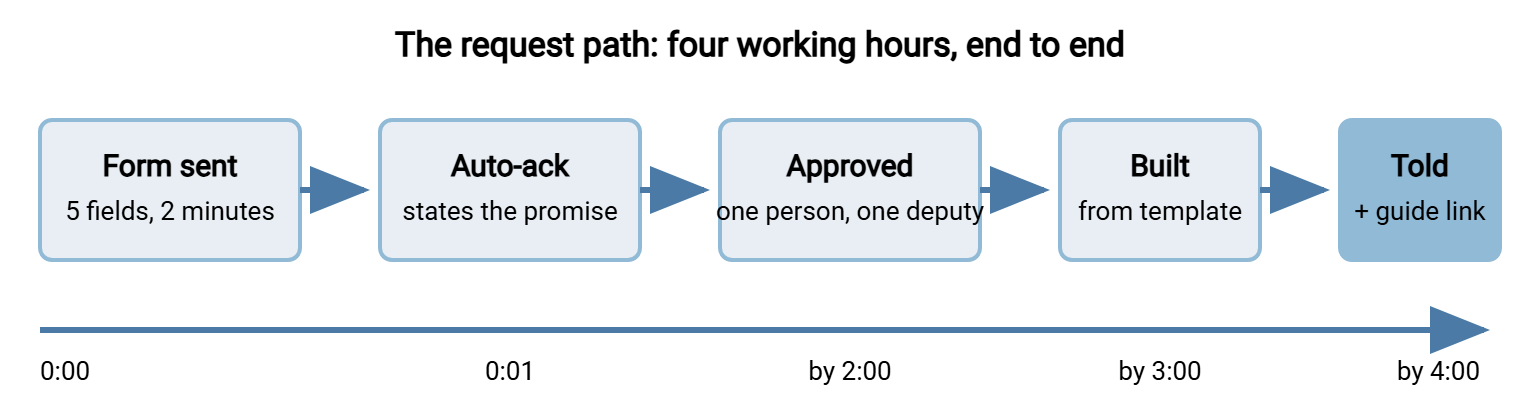
Here is the form. It asks five things, because a form that asks fourteen is itself a step. A form that asks the wrong five produces a reply asking for the rest, which is a day gone. The acknowledgement below it is sent automatically the moment the form arrives, and it contains the promise.
TRANSFER ACCESS REQUEST                              Answered within 4 working hours

1. Who needs access?
   Name: ______________________   Email: ______________________
   Organization: ______________  (colleague / customer / supplier / other)

2. What for?  (one line, in your own words)
   ____________________________________________________________

3. Which direction?
   [ ] They send files to us    [ ] We send files to them    [ ] Both

4. What kind of data?
   [ ] Customer or personal data   [ ] Commercial / contracts   [ ] Other: ______

5. For how long?
   [ ] One-off (link expires in 7 days)   [ ] Ongoing until: YYYY-MM-DD

Your name: ____________   Your manager: ____________   Date: YYYY-MM-DD

--- Automatic acknowledgement (sent on receipt) ---------------------------
Subject: Transfer access request received - answered within 4 working hours

We have your request for access for <name> (<organization>).
It has gone to <approver> for approval. You will hear back within
4 working hours; most requests are done in about 3.
If it is urgent, reply to this message with URGENT in the subject line.
Reference: TA-REQ-<number>
Three design choices make the four hours real. First, one-way sends to an outside recipient for a one-off need no approval at all. They go through self-service and never reach the form. Second, "ongoing" access has an end date on the form, so the account is created with an expiry. The offboarding problem in our user lifecycle series is then smaller by construction. Third, the approver is a named person with a named deputy, not a group mailbox. A request sent to a group mailbox is approved by nobody in particular, which in practice means later.
The exception path uses the same form with a sixth box: "I need to do something the policy does not allow, and here is why." It gets the same four-hour promise. An exception that takes a week is not an exception process, it is a reason to go around the policy. What a good exception process looks like is in the exceptions process.
What This Removes From the Training
Every lever deletes a lesson. Defaults delete "remember to set the expiry". Self-service deletes "how to get your password reset" and most of "what to do when it fails". Browser-based transfer deletes the client module for everyone but the technical audience. The request path deletes "how to get an account", because the answer is now "fill in five boxes and wait until after lunch". What is left for the module is the three-second check, the test file, and the why. That is about twenty minutes, which is the module.
The last lever removes the person altogether. A transfer that happens on a schedule, the same file to the same partner every night, should not be anyone's task. Therefore it should not be anyone's training. A scheduled job in a tool such as Sysax FTP Automation moves it on a timetable with retries and a log. The person who used to do it at half past five now does not. The best training for a recurring transfer is a job that runs itself. Every recurring transfer still done by hand is on the list for the automation owner, and the list is usually longer than anyone expected.
A Short War Story: The Fourteen-Field Form at Acme
Acme's transfer access request form had fourteen fields, two approvals, and an average turnaround of eleven working days. Nobody had measured that turnaround until the sales director asked why her team was using a personal sharing account for customer contracts. The team had asked for portal accounts at the start of the quarter. The requests were still open, one waiting on a cost-center code and the other on a second approver who had left. The form was cut to five fields, and the second approval was removed. The acknowledgement promised four working hours with a named deputy. Turnaround the following month averaged three hours. The sharing account was closed by the team themselves, without being asked.
Where Discovery Fits
This article is the build side of a two-sided problem. The other side is finding out where people already go when the secure path is too hard, and doing so without a witch hunt. That way, the workarounds become requirements rather than disciplinary matters. That is the subject of our shadow file sharing series. The parity checklist above is best filled in by looking at what the shadow tools got right. The wider design of sanctioned paths for the things people currently do with memory sticks and shared folders is in designing sanctioned paths.
Lower the Ceiling, Then Train
Adoption is decided at the moment a person with a file compares two paths. The comparison is made in steps and waits, not in policy. Defaults, self-service, parity with email, browser-based transfer, and a request path measured in hours are the five levers. They bring the secure path within two steps of the insecure one. Pull them first, because every step you remove from the service is a lesson you never have to teach. Every hour you remove from the request path is a workaround that never starts.
With the ceiling lowered, the training in designing a training program has a fair chance. The guides in writing user-facing guides get shorter. And the numbers in measuring adoption start moving for reasons you can name. The five-field form is on this page. The fourteen-field one can be retired with the slide deck.
Frequently Asked Questions
Isn't making things easier the same as making them less secure?
What is a request path, and why does the turnaround matter so much?
Should every outside recipient need an approved account?
We cannot promise four hours. What is the minimum that works?
Which lever should I pull first?
From the Sysax team: we build secure file transfer software for Windows. Sysax Multi Server is an FTP, FTPS, SFTP, and HTTPS server. Sysax FTP Automation handles scheduled, scripted transfers. Free trials are on the download page.