
What High Availability Means for a Transfer Service
Somebody in a meeting says "the SFTP server needs to be highly available." Everyone nods, and the sentence lands on your desk as a task. What does it actually mean? A second server? A cluster? A promise of some number of nines? Most of the confusion comes from the phrase being used as if it were one thing. It is really a target, a set of design choices, and a set of tradeoffs. A transfer service makes those tradeoffs differently from a web site or a database.
This article is the plain-words foundation. By the end you will be able to say what "available" means for a transfer service specifically. You will be able to turn percentages into hours of downtime and explain recovery time and recovery point without hand-waving. You will be able to list the failures worth designing against and draw the line between high availability and disaster recovery. This is the first article in our High Availability for Transfer Services series. The rest builds the designs this one only names.
Availability in Plain Words
Availability is the fraction of time a service is usable, measured over some period. Suppose your SFTP server was usable for all but four hours of a thirty-day month. It was available for roughly ninety-nine and a half percent of that month. The number is simple; what is hard is agreeing on what "usable" means and over which period you measure it.
People talk about availability in nines: "three nines" means 99.9 percent, "four nines" means 99.99 percent. Each extra nine cuts the allowed downtime by a factor of ten, and the cost of achieving it rises by considerably more. The table turns the percentages into time, which is how you should always think about them.
| Target | Allowed downtime per year | Per month (roughly) | What it takes |
|---|---|---|---|
| 99% ("two nines") | About three and a half days | About seven hours | One well-run server, good backups, someone on call |
| 99.9% ("three nines") | About eight and three-quarter hours | About forty-three minutes | Two nodes with failover; patching without full outages |
| 99.99% ("four nines") | About fifty-two minutes | About four minutes | Automatic failover in seconds, redundant storage and network, drills |
| 99.999% ("five nines") | About five minutes | Under half a minute | Multiple sites, no human in the loop; rarely justified for file transfer |
Look at the three-nines row: eight and three-quarter hours a year is one bad Saturday. A single server that is patched carefully and restored quickly from backup can plausibly hit two nines. Three nines is where a second node becomes necessary, because one hardware failure at the wrong time eats the year's allowance in an afternoon. Four nines is where "someone notices and fixes it" stops being a strategy. Fifty-two minutes a year leaves no room for a human to wake up, log in, and think.
What "Up" Means for a Transfer Service
A web server is up when it answers requests. A transfer server has more ways to be half-up, and those partial states are where availability numbers quietly lie. Consider everything that has to be true for a partner to drop a file on your SFTP server:
- The machine is powered on and reachable across the network.
- The service process is running and accepting connections on its port.
- The SSH handshake completes: the host key loads, the ciphers negotiate.
- Authentication works: the account store is readable and the partner's key or password is accepted.
- The partner's home folder exists, is writable, and has free space.
- The upload completes and lands where the downstream job expects it.
A monitoring check that only tests "is the process running" reports a happy green while the disk is full. Every upload fails at the last step. That is why serious availability work defines "up" as a real transfer succeeding. It is why the health checks in this series log in and move a file rather than just pinging a port. What to watch on a transfer server belongs to our Transfer Server Health Monitoring series; here we only need the definition.
For FTP and FTPS there is an extra layer: the data connection, the second, temporary connection that carries file contents and directory listings. A server can accept logins perfectly and still fail every transfer if the passive port range is blocked or wrongly announced. So "up" for FTP means the data channel works, not just the login. The mechanics are in our active vs passive FTP article.
The Failure Modes Worth Designing For
High availability is protection against specific failures, not against "bad things." Listing the failures first keeps you from buying a design that handles the rare ones and ignores the common ones. Here is the honest list, roughly in order of how often each happens:
- Planned maintenance. Patches, service upgrades, certificate renewals, reboots. This is the largest source of downtime on most transfer servers, and it is entirely predictable. A design that lets you patch one node while the other serves partners often pays for itself on this line alone.
- Service failure. The process crashes, hangs, exhausts its connection limit, or stops accepting logins after a configuration change. The machine is fine; the service is not.
- Disk and storage problems. A full volume, a failed disk, or a mount that silently went read-only. Uploads fail while logins still succeed.
- Host failure. Hardware death, a hypervisor problem, a power event, an operating system that will not boot after a patch.
- Network failure. A dead network card, a switch port, a firewall rule that someone "cleaned up," or an upstream link.
- Human error. The wrong file deleted, the wrong account disabled, the passive port range changed to something the firewall does not allow.
- Site loss. Fire, flood, prolonged power loss, or the whole data center becoming unreachable.
Now notice which of these a second server actually fixes. A standby node handles planned maintenance, service failure, and host failure well. It handles network failure only if the two nodes do not share a network path. It handles storage problems only if the storage is not shared: a full shared disk is full for both. It does nothing about human error, because the mistake is replicated faithfully to the standby. It does nothing about site loss, because both nodes were in the room that flooded.
Remember: a second node protects you from the loss of one node. It does not protect you from a change that was wrong on both nodes. It does not protect you from a disk that both nodes share, or a building that both nodes live in. Design for the failures on the list, not for the word "redundant."
Recovery Time: How Long Until It Works Again
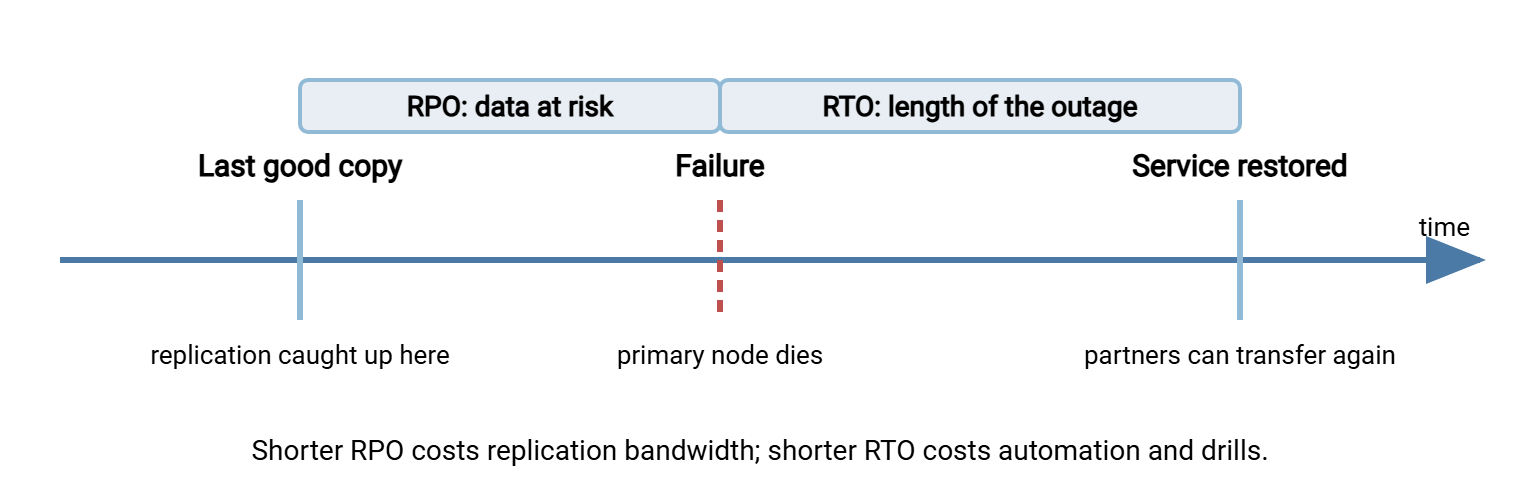
Recovery time objective, usually shortened to RTO, is the longest interruption you are willing to accept. It is measured from the moment the service breaks to the moment it works again. It is a target you choose, not a measurement you take afterwards. Consider a one-hour RTO. If the primary server dies at ten past two in the morning, partners must be able to transfer again by ten past three. The RTO drives the design more than any other number. A one-hour RTO can be met by a human following a runbook. A one-minute RTO requires automatic failover with nobody in the loop. When a partner agreement says "restore service within one hour," that sentence is your RTO whether or not anyone used the term.
Recovery Point: How Much You Are Willing to Lose
Recovery point objective, or RPO, is the most data you are willing to lose, expressed as an amount of time. An RPO of two minutes means the following. After a failure, the surviving node may be missing anything that arrived in the two minutes before the failure. You have agreed that this is acceptable. For a transfer service, "data" means the files partners uploaded, the configuration and account changes you made, and the logs that prove what happened. Each may deserve a different RPO. You can re-create a lost account, but a partner cannot re-create a file they deleted after your server said "transfer complete." RPO is set by how often data is copied from the active node to wherever the standby will read it. Copy nightly and your RPO is a day; replicate continuously and it is seconds.
The diagram below places both numbers on a timeline. The gap between the last good copy and the failure is what RPO bounds. The gap between the failure and service coming back is what RTO bounds.
A worked example with real numbers
Suppose a partner contract says you will restore service within one hour of any outage. Your standby node receives a copy of the data folder every two minutes. Your RTO is one hour; your RPO is two minutes. Now a partner is forty percent of the way through uploading a 3 GB file when the primary node dies.
First, the upload itself is gone. An SFTP session does not survive the death of the server it was talking to. The partner's client sees a broken connection. When it reconnects it starts a new session against whichever node now answers. The partial 1.2 GB on the dead node was never complete, so losing it is not really a loss. It may need cleaning up, though. Our temp names and atomic renames article explains how to make sure a half-file can never be mistaken for a finished one.
Second, and more subtly, any file that finished uploading in the two minutes before the failure may not have reached the standby yet. The partner's client reported success; the file exists only on a dead machine. That is what a two-minute RPO means in practice. It is why the RPO, not the generous RTO, is the number that causes the awkward phone call. The options for shrinking that gap are compared in our article on shared storage vs replication.
What Partners Actually Need to Keep Connecting
From the partner's chair, availability is not about your nodes at all. Their automated job connects to one hostname, expects one host key or certificate, presents one credential, and writes into one folder. If any of those changes during a failover, the transfer fails even though your service is technically up. Keeping them constant is the art of partner-transparent redundancy, which gets its own article in this series; the short list is:
- One address. The hostname and the IP it resolves to must stay valid whichever node is serving. Usually this is a virtual IP, an address not tied to a specific machine that can move to whichever node is currently active.
- The same SSH host key. An SFTP client remembers the server's host key and refuses to connect if it changes. That is because a changed key looks exactly like an impersonation attack. Every node must present the identical key; our host keys and known_hosts article explains why.
- The same certificate. FTPS and HTTPS clients check the certificate against the hostname; every node needs the same certificate and private key.
- The same accounts, permissions, and folder view. A user that exists only on the primary cannot log in after failover. Yesterday's upload must still be visible where the downstream job looks.
Partners also need one thing from themselves: a client that retries. It must treat a dropped connection as a reason to wait and reconnect rather than a final failure. Our partner SLAs and expectations article covers writing that into the agreement so a thirty-second failover never becomes a ticket.
The Vocabulary You Will Meet in the Rest of the Series
The later articles use a handful of terms constantly. Here is each in a sentence or two, so the first encounter is not a surprise.
- Failover: moving the service from a failed node to a healthy one, manually or automatically. Failback is moving it back once the original is repaired, often skipped on purpose to avoid a second interruption.
- Health check: a test that decides whether a node is fit to serve. Good ones perform a real login and a real transfer; weak ones only check that a port answers.
- Heartbeat: a regular signal between nodes that says "I am still alive." When heartbeats stop arriving, the survivor assumes its partner is dead and takes over.
- Split-brain: the dangerous state where both nodes believe they are active, usually because the heartbeat link failed while both machines kept running. Two nodes writing the same data at once corrupt it.
- Quorum: the rule that a node may act as active only if it can see a majority of the voting members. It is the usual defense against split-brain. Two nodes have no majority, so a third vote, often a small witness share, is added.
- Session affinity: in a load-balanced design, the rule that all connections from one client session go to the same node. FTP needs it because the data connection must reach the node that issued the passive reply.
- Replication lag: the delay between a write on the active node and the same write appearing on the standby. Replication lag is, in effect, your live RPO.
High Availability vs Disaster Recovery
The two phrases get used interchangeably, and the confusion costs real money because they solve different problems with different tools. High availability keeps the service running through the loss of a component, usually automatically, within the same site, with little or no data loss. Disaster recovery rebuilds the service after a loss too large for redundancy to absorb, usually manually, somewhere else, from backups and documented procedures.
| Question | High availability | Disaster recovery |
|---|---|---|
| What failure does it handle? | One node, one service, one disk, planned maintenance | Site loss, data corruption, both nodes wrong, ransomware |
| Typical RTO | Seconds to minutes | Hours to days |
| Typical RPO | Zero to a few minutes | Last backup: hours to a day |
| Who acts? | Software, automatically; or one admin with a short runbook | A team following a long runbook |
| Where? | Same site, nodes close together | A different site, often rebuilt from scratch |
| Do partners notice? | Ideally not; at most a reconnect | Yes; communication is part of the plan |
The two are complementary, not alternatives. A healthy estate has both. It has an HA pair so that a Tuesday patch or a dead power supply never becomes an incident. It has a DR plan for the day the whole rack is gone. That way, you know where the backups are, which keys you need, and who calls the partners. This series stays on the HA side of the line. Backups, key escrow, the rebuild runbook, and restore drills are the subject of our Disaster Recovery for Transfer Workflows series. If you can only fund one this year, DR comes first. A service that can be rebuilt is worth more than one that survives a single failure and has nowhere to go after the second.
Choosing a Target Honestly
Before designing anything, write down three numbers and one sentence. Write the availability target with its measurement period, the RTO, and the RPO. Write the sentence that says which failures you are designing against. Here is how to arrive at them without guessing:
- Find the strictest partner promise. Read partner agreements for words like "restore within," "uptime," or "no more than." The strictest one sets the floor. If nothing is written anywhere, write down what you currently deliver and propose it.
- Look at the schedule. Consider a server that receives files only between ten at night and four in the morning. It needs to be reliably up during the window, not four nines around the clock. Our cutoff times and deadlines article shows how to express that.
- Price the RPO in awkward phone calls. If we lost the last two minutes of uploads, could we tell partners which files to resend? If yes, a few minutes of replication lag is fine. If no, you need shared storage or synchronous replication.
- Match the RTO to who is awake. A one-hour RTO can be met by an on-call person with a tested runbook. Anything under about ten minutes needs automatic failover, because humans do not reliably wake, log in, diagnose, and act that fast.
- Write the exclusions. "This design does not protect against site loss or against configuration errors replicated to both nodes; those are covered by the DR plan." Exclusions written in advance are engineering; exclusions discovered during an outage are excuses.
The software you run shapes what is practical. Consider a transfer server that runs as an ordinary Windows service. It keeps its configuration where you can copy it, and logs to a file or database both nodes can reach. That server is straightforward to place on either node of a pair. Sysax Multi Server is built that way: a Windows service with a configurable passive port range, so both nodes announce the same ports. It logs to file or database. None of that makes a server "highly available" by itself; the availability comes from the design around it.
Where to Go From Here
High availability for a transfer service means partners keep logging in and moving files through the loss of a node. The interruption is no longer than your RTO, and the data loss is no larger than your RPO. This is against a list of failures you wrote down in advance. Everything else is implementation. The next article, active-passive failover for transfer servers, builds the simplest design that meets a three-nines target. It uses two nodes, a floating address, a real health check, and a runbook. After that, active-active and load-balanced clusters shows what changes when both nodes serve at once. The article on failover drills explains how to prove any of it works before the night it has to.
Frequently Asked Questions
Is a nightly backup a form of high availability?
Do I need a cluster to reach three nines?
Will partners notice a failover?
Does high availability protect me from ransomware or a bad config change?
From the Sysax team: we build secure file transfer software for Windows. Sysax Multi Server is an FTP, FTPS, SFTP, and HTTPS server. Sysax FTP Automation handles scheduled, scripted transfers. Free trials are on the download page.