
The Many-Small-Files Problem
Here is a paradox every administrator eventually meets. You transfer a fifty-gigabyte archive to a remote server and it takes ten minutes. You transfer fifty gigabytes of user home directories — the same bytes, spread across a million small files — and the job is still grinding two days later. Same link, same protocol, same servers. The network did not get slower; the shape of the data changed, and shape matters more than size once files get small and numerous.
This article explains exactly where that time goes — per-file round trips and directory operations, counted honestly. Then it works through the strategies that restore sanity: parallelism, which helps until it doesn't, and bundling, which changes the game entirely. By the end you will be able to look at a directory tree, estimate the pain before the transfer starts, and pick the right fix. It is part of our Moving Media and Massive Datasets series. It pairs with when normal file transfer breaks down, which covers the size axis of the same territory.
Where the Time Actually Goes
Transfer protocols do more per file than move its bytes. Take a typical file sent over SFTP — the pattern is similar for its cousins. The client must open the remote file (a request travels to the server, a file handle travels back). It must write the data (one or more requests, each acknowledged) and close the handle (another exchange). It must usually set attributes like the modification time (another exchange). Each of those is a round trip: a message to the server and a reply back. It costs the network's round-trip time (RTT) — the up-and-back travel delay — no matter how few bytes the message carries.
On a local network the round-trip time is well under a millisecond, so four round trips per file cost almost nothing and nobody ever notices the machinery. Over a wide-area path — another city, another coast — the round-trip time is commonly tens of milliseconds. Call it fifty. Now those four round trips cost two hundred milliseconds per file, regardless of the file's size. For a ten-gigabyte file, two hundred milliseconds is nothing. For a fifty-kilobyte file, it is a tax that dwarfs the payload — and it is charged a million times.
Here is a useful analogy. Transferring a million small files one at a time is shipping a warehouse one parcel per phone call. Dial, confirm the address, hand over a tiny package, hang up, redial. The freight is trivial; the dialing is your whole day. Bundling, which we will get to, is loading the pallet once and booking a single truck.
Two honest footnotes before the arithmetic. First, good modern clients pipeline — they overlap some of these exchanges rather than waiting for each reply before sending the next request. That trims the per-file cost but never eliminates it. The open of the next file typically cannot complete before the close of housekeeping around the current one. Every file still costs a floor of protocol work. Second, files are not the whole story: directory operations ride the same round-trip meter. Creating each remote directory is an exchange; checking whether one exists is an exchange; listing a directory during a resume scan is one or more. A tree with fifty thousand directories spends its own round trips. At two exchanges each over that fifty-millisecond path, that takes five thousand seconds, well over an hour, before counting a single file's data.
The Worked Numbers
Make the dataset concrete: one million files averaging fifty kilobytes — fifty gigabytes in total. A source tree of build artifacts, a mail archive, a decade of scanned documents, a rendered frame sequence: trees like this are everywhere. The link is gigabit-class, sustaining an effective seven hundred megabits per second, and the path's round-trip time is fifty milliseconds.
Moved as one large archive, the math is the ordinary kind. Fifty gigabytes is four hundred thousand megabits; divided by seven hundred megabits per second, about five hundred seventy seconds — under ten minutes.
Moved as a million individual files, one at a time, the payload math barely changes — but it no longer governs. Each file's fifty kilobytes takes about half a millisecond to transmit at this rate. Each file's protocol overhead, at four round trips of fifty milliseconds, takes about two hundred milliseconds. The overhead outweighs the payload roughly three hundred fifty to one. The transfer spends its life waiting, not sending:
dataset:        1,000,000 files x 50 kilobytes  =  fifty gigabytes
path:           50 ms round-trip time, ~700 megabits/s effective

as one archive: 400,000 megabits / 700  = ~570 seconds  = under ten minutes

file by file:   per-file overhead  = ~4 round trips x 50 ms = 200 ms
                per-file payload   = 50 KB at ~87 MB/s      = ~0.6 ms
                total overhead     = 1,000,000 x 0.2 s      = 200,000 s
                                   = about fifty-five hours = MORE THAN TWO DAYS
                (directory round trips come on top of this)
The diagram below shows the same contrast as a timeline. File-by-file transfer spends almost all of its time waiting between round trips, with slivers of actual data. The bundled transfer is one continuous stream.
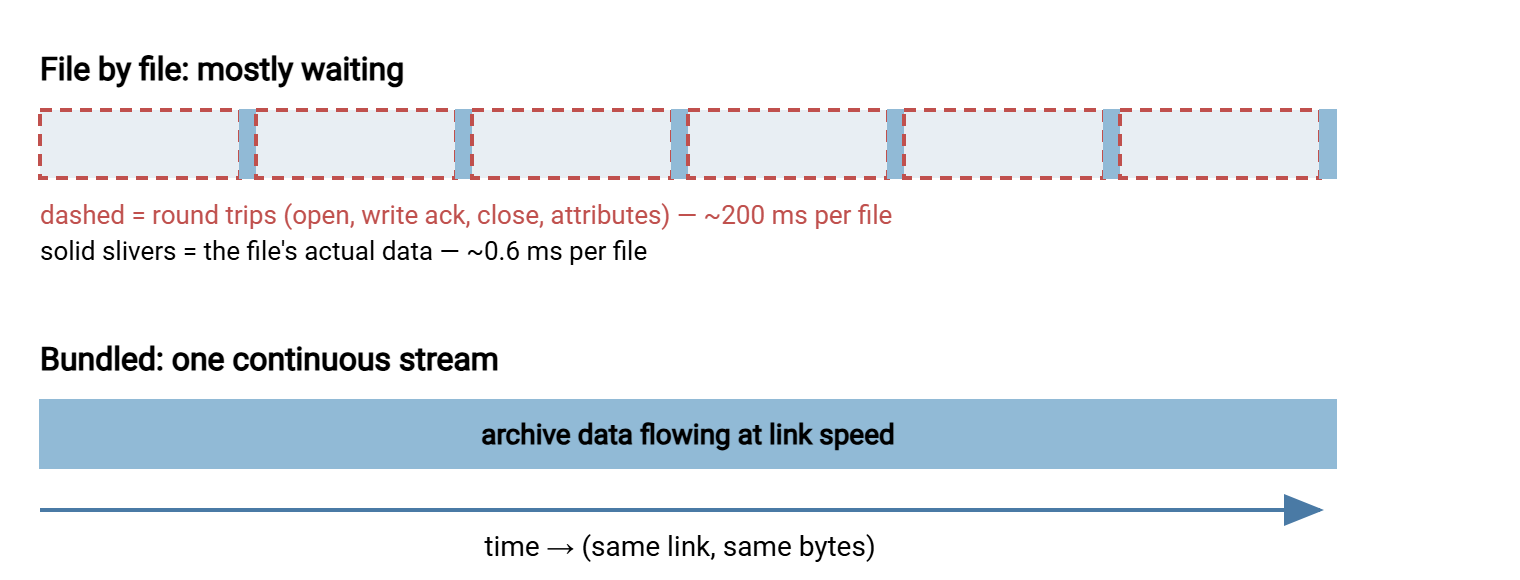
The progress display gives you the same diagnosis at a glance. A transfer reporting thousands of files completed but only a trickle of megabytes per second is latency-bound, not bandwidth-bound. The link sits mostly idle between round trips. The ceiling is easy to compute: files per second per worker is one divided by (round trips times round-trip time). At four round trips over fifty milliseconds, a single worker cannot exceed about five files per second. That number does not care whether the link is a hundred megabits or ten gigabits. Upgrading bandwidth to fix a small-files transfer is buying a wider road for a queue of phone calls.
Fifty-five hours against ten minutes, for identical bytes over an identical link. And the same tree moved across the office LAN, where the round-trip time is half a millisecond, would carry only about thirty-three minutes of per-file overhead. That is why this problem so often ambushes teams the first time a familiar job stretches across a real distance. The tree that synced fine between buildings falls off a cliff between cities, and everyone blames the new circuit. The circuit is fine. The shape is the problem.
Remember: before planning any large move, run two counts — total bytes and total files. A hundred gigabytes in ten files and a hundred gigabytes in ten million files are different projects. If the file count has six digits or more and the path leaves the building, per-file overhead is your real opponent.
Parallelism Helps — Until It Doesn't
The first instinct is sound. If one file at a time spends most of its life waiting on round trips, run many files at once and overlap the waiting. Ten parallel workers cut our fifty-five hours of latency tax toward five and a half; in principle fifty workers cut it toward one. Parallel transfer tools and multi-threaded copy utilities exist precisely for this, and for modest trees they are often all you need. (This is a different lever from splitting one big file across parallel connections to fill a long fat pipe. That technique has its own article in parallel streams, though the underlying idea, overlapping waits, is shared.)
Then the returns diminish, for reasons worth knowing before you crank a worker count to a hundred:
- The disks push back. A million small files scattered across a spinning disk means a million head movements. A single spindle manages perhaps one hundred to one hundred fifty random reads per second. So just reading the tree once costs on the order of two hours, no matter how wide the network side runs. Parallel workers turn sequential-ish access into a seek storm and can make the disk slower, not faster. Solid-state storage largely dissolves this limit; know which kind you have at both ends.
- The far end pushes back. Every worker is a connection: more sessions to authenticate, more encryption state, more open handles, more simultaneous metadata operations against the destination filesystem. Servers and their administrators both have limits.
- The walk doesn't parallelize well. Enumerating the tree — the directory-by-directory discovery of what exists — is largely serial and repeats on every retry. A resume scan of a million-file tree can burn an hour of round trips before the first byte of the rerun moves, and no worker count fixes the rescan.
Here is the practical curve: going from one worker to four to eight buys dramatic wins. Beyond low tens, most estates are paying in disk seeks and server load for throughput they no longer receive. Parallelism is a good tactic and a poor strategy. The strategy is to stop having a million files on the wire at all.
Bundling: Changing the Shape Instead of Fighting It
Bundling means packing the tree into archive files — the tar or zip family — moving those, and unpacking at the far end. It wins because it relocates each cost to where it is cheap:
- The million-file walk still happens, but locally, at each end, once — against the disk, with no network round trips attached to any of it.
- The wire carries a handful of large objects: the shape protocols love. Transfers become streamable, resumable from an offset, and easy to schedule.
- Verification collapses from a million questions to a few: checksum each archive, compare, done. The archive's own internal structure catches truncation on extraction. Pair it with a manifest and the whole move becomes provable, as covered in checksum files and manifests.
Bundle with judgment, though — three decisions make or break it:
Chunk it. One fifty-gigabyte archive is an all-or-nothing bet: a corrupt archive, a failed extraction, or a full scratch disk costs you everything. Cut the tree into archives of a few gigabytes each. Do it by top-level directory when the tree is balanced, by a file-count or size budget when it is not. Chunks restore fine-grained resume ("re-send chunk seventeen"), let transfer overlap extraction, and cap the blast radius of any single failure.
Compress selectively. Archiving and compressing are separate choices. Text-heavy trees can shrink several-fold and repay the CPU time; already-compressed content (media, most document formats) shrinks negligibly and just burns cycles at both ends. The tradeoffs are worked through in compression in transfer pipelines. When in doubt, test one chunk both ways and let the numbers decide.
Budget the scratch space. Bundling needs room for the archives at both ends — up to a full extra copy of the dataset if you build everything before sending anything. Chunking again helps: build, send, verify, and delete rolling chunks so the high-water mark stays a few chunks deep.
This problem has a recurring version — a nightly report tree, a daily export of thousands of small files to a partner. For that version, the bundling step belongs inside the scheduled job, not in a human's fingers. A Windows automation tool like Sysax FTP Automation covers exactly this lane. A scheduled task can zip a folder as a pre-transfer step and push the bundle over SFTP or FTPS. It can send an email notification with the result. So the many-small-files tax gets paid once, locally, every night, without anyone remembering to do it.
The same logic runs inbound. If a partner delivers you tens of thousands of tiny files a day, negotiating one bundled archive per run improves both sides at once. Their transfer stops paying the tax, and your receiving picture gets legible. On an endpoint like Sysax Multi Server, the activity log then records one clean arrival per delivery instead of a fifty-thousand-line blizzard. So "did today's delivery arrive, complete, on time" becomes a one-line check instead of a counting exercise. And a half-arrived delivery is obvious instead of statistical.
When You Cannot Bundle
Sometimes the destination needs the tree live — a standby server, a mirror users browse, a sync that must reflect yesterday's changes as files, not as archives. Then the strategies shift:
- Move deltas, not the tree. After the first full copy, only what changed needs to travel. Delta-aware tools compare source and destination and send the difference. Their file-list scan still walks the tree, but a walk plus a thousand changed files beats re-sending a million. The long-distance behavior and tuning of the standard tool for this is covered in rsync over WAN.
- Use a multi-threaded copier for Windows-to-Windows moves. Bulk copy utilities with parallel workers respect the parallelism ceilings above but reach them efficiently. Our robocopy migration guide covers the flags that matter for huge trees.
- Seed by bundle, then sync deltas. The hybrid most large moves land on: bundle for the initial bulk positioning, then let a delta tool keep the live tree current. You pay the small-files tax only on the (small) changing set.
- Fix the shape upstream. The most durable fix of all: applications that write millions of tiny files can often be persuaded to write packed containers, rotated bundles, or databases instead. One conversation with a development team has ended more small-files suffering than any transfer tool ever has.
Choosing Your Approach
| Situation | Best approach | Why |
|---|---|---|
| One-time move of a huge tree | Bundle in chunks, verify by manifest | Pays the walk once per end; big resumable objects on the wire |
| Recurring delivery of many small files | Bundle inside the scheduled job | One archive per run; simple verification and notification |
| Destination needs a live, current tree | Seed by bundle, then delta sync | Small-files tax applies only to the changed set |
| Modest tree, short distance | Parallel workers, single digits to low tens | Overhead is small; bundling effort not repaid |
| The tree grows without limit | Change what the application writes | Every downstream copy, backup, and sync benefits forever |
A Bundling Recipe You Can Adapt
The skeleton below is deliberately tool-plain — substitute your archiver, hasher, and transfer client. The sequence is what matters:
# 1. cut the tree into chunk archives of a few gigabytes
tar -cf chunk-001.tar  projects/a projects/b
tar -cf chunk-002.tar  projects/c
...

# 2. fingerprint every chunk into a manifest
sha256sum chunk-*.tar > manifest.sha256

# 3. transfer the chunks plus the manifest (resume-capable client)

# 4. at the destination, verify BEFORE extracting
sha256sum -c manifest.sha256        # every line must say OK

# 5. extract, then spot-check: compare total file count and bytes
#    of the extracted tree against the source's counts

# 6. keep manifest.sha256 with the job record: it is your proof
Remember: verify chunks before extracting, not after. Extraction happily unpacks a truncated archive partway and leaves a plausible-looking, silently incomplete tree. That is the worst outcome in this whole problem space, because nothing looks wrong.
The Shape of the Fix
The many-small-files problem is fixed by arithmetic awareness, not by heroics. Count files as well as bytes before any move. Expect roughly four round trips of tax per file, plus directory operations, and multiply by your path's round-trip time to estimate the pain. Use parallel workers for modest trees and short distances. Use bundling — chunked, selectively compressed, manifest-verified — whenever the counts get serious. And use seed-then-delta when the far end needs living files. The same thinking recurs across this series. There is the backup case in backups and archives over the wire (backup tools bundle for exactly these reasons). There are also the full worked plans in reference patterns for massive data movement.
Frequently Asked Questions
Why do many small files transfer so much slower than one big file?
How many parallel transfer threads should I use?
Should I zip files before transferring them?
Is it better to make one huge archive or several smaller ones?
Why is the resume scan of my transfer taking so long?
From the Sysax team: we build secure file transfer software for Windows. Sysax Multi Server is an FTP, FTPS, SFTP, and HTTPS server. Sysax FTP Automation handles scheduled, scripted transfers. Free trials are on the download page.