
Reference Patterns for Massive Data Movement
Nearly every massive data move an administrator will ever face is one of three problems wearing different clothes. A storage migration, a facility move, and a dataset handoff to a partner are all the one-time bulk move. A weekly dataset to a research consortium, a nightly export to a processor, and a monthly media deliverable are all the recurring heavy delivery. Field stations reporting in, branch systems uploading their day, and instruments pushing captures to headquarters are all the distributed collection. Learn the three patterns and you stop designing from scratch. You start from a shape that already works and adapt it.
This closing article of our Moving Media and Massive Datasets series presents each pattern whole. It covers the situation each pattern fits, the decisions that define it, the design itself, and the safeguards and verification that keep it honest. Everything rests on the groundwork laid earlier in the series — the transfer arithmetic, the small-files problem, the ship-or-send crossover. The article links back to that groundwork at each decision point rather than repeating it.
How to Read These Patterns
Each pattern below follows the same skeleton. Fits when helps you recognize your problem. Decisions covers the choices that shape the design, in order. The design shows what actually gets built. Proof of done shows what evidence exists when it worked. Treat them as starting points with the reasoning attached, not prescriptions. The point of showing the decisions is that you can see exactly which choice to revisit when your situation differs. Two tools recur throughout, so name them once. The manifest is the list of every file with its checksum fingerprint, made at the source. The daily budget is the realistic terabytes per day your measured link can carry. It comes from the arithmetic in when normal file transfer breaks down.
Real estates also mix the patterns, usually by composition rather than mutation. An offsite backup program is a one-time bulk move (the seed) that hands off to a recurring heavy delivery (the nightly increments). A media operation runs all three at once in different corners of the building. When a new request lands, name the pattern out loud before designing anything. A surprising number of long meetings turn out to be two people unknowingly designing two different patterns for the same data.
Pattern One: The One-Time Bulk Move
Fits when: a large dataset must relocate once. That could mean server or storage migration, or moving to or from a facility. It could mean handing a completed dataset to a partner, or retiring a system whose data must land in an archive. The defining features: it has an end, the dataset is finite, and afterward someone will ask you to prove nothing was lost.
Decisions, in order:
- Census first. Total bytes and total files, measured, not estimated. The two numbers route everything after.
- Ship or send. Divide size by the daily budget; compare against a realistic shipment's end-to-end days. The crossover math is worked in when to ship drives instead of sending bits.
- Fix the shape. Six-digit file counts crossing a distance get bundled into chunked archives before anything moves. The reasoning and recipe are in the many-small-files problem.
- Live source or frozen source? A frozen dataset is one clean pass. A source still changing needs seed-then-delta: bulk-copy the bulk, then sweep the changes, possibly several times, before a final cutover freeze. The discipline differs from routine transfer work in exactly the ways covered in bulk moves versus daily transfers.
- Window and rate. Decide when the move may run and how much of the link it may eat. Get that agreement in writing before hour one, not at the first complaint.
The design that falls out for the common network case starts with a manifest generated at the source. Data is staged or snapshotted. Chunked, resume-capable transfers run inside the agreed window with retries and notifications. Arrivals are verified against the manifest continuously rather than in one terrifying batch at the end. A delta sweep follows if the source lived on during the move. Then comes the closing ceremony — final verification, sign-off, and only then release of the source. The full verification pass at the end has its own guide, verifying nothing was left behind. The phase checklist compresses to:
ONE-TIME BULK MOVE — PHASE CHECKLIST
1. CENSUS ....... bytes ____  files ____  measured rate ____ /day
2. ROUTE ........ send / ship / hybrid (crossover math attached)
3. SHAPE ........ bundle plan if file count is six digits or more
4. MANIFEST ..... generated at source, stored in two places
5. FREEZE ....... snapshot or staging copy; cutoff time recorded
6. MOVE ......... windowed, resumable, retrying, notifying
7. VERIFY ....... every chunk against manifest, as it lands
8. DELTA ........ changes since freeze swept and verified
9. SIGN-OFF ..... receiving side confirms counts + checksums in writing
10. RELEASE ..... source retired only after step 9 exists
Worked in miniature: fifteen terabytes, two million files, a completed project handed to a partner across the country. The census routes everything. Fifteen terabytes against the partner link's measured daily budget of about seven and a half terabytes is two days of continuous wire time. That is comfortably sendable, no shipment needed. Two million files means bundling is mandatory: at four gigabytes per chunk, roughly thirty-seven hundred archives, built and fingerprinted locally. The dataset is finished, so the source is naturally frozen — one clean pass, no delta sweep. The partner allows transfers only outside their business hours, so the realistic window is about a third of each day. The two days of wire time spread across six nights. The plan honestly promises "verified within a week," with the weekend as slack for retries. Every number in that paragraph came from the census and the daily budget; nothing was guessed.
Proof of done: the manifest, the verification results, and the written sign-off, filed together. A bulk move without that bundle is finished only until the first "are you sure everything came over?" That question arrives, on average, months later, when the source is gone.
Pattern Two: The Recurring Heavy Delivery
Fits when: the same large payload must go to the same destination on a rhythm. That could mean a weekly dataset to a partner organization, a nightly export to a downstream processor, a periodic deliverable of finished media. The defining features: it repeats forever, and both sides build processes around its timing. A missed or malformed delivery breaks someone else's schedule, not just yours.
Decisions, in order: first, decide what triggers a run. That could be a clock, or a watch folder that fires when the payload appears — the hot folder pattern. Next, decide how the payload is packaged. Bundle per run, with a datestamped name so every delivery is unique and re-runnable without ambiguity. Then decide whether to compress. It is worth it for data that shrinks — test once, decide once, per compression in transfer pipelines. Finally, decide what the delivery contract says. That means the agreed naming, destination folder, completion signal, and deadline that the receiving side's automation depends on.
The design: a scheduled or folder-triggered job assembles the run's payload into one or a few archives. The job names them by date, generates the run's manifest, and transfers with resume and retry. It signals completion with a done-marker file or the manifest arriving last, so the receiver never processes a half-landed delivery. It notifies both sides of the outcome. This entire loop is what transfer automation tools exist for. On Windows, Sysax FTP Automation covers it end to end. It provides scheduled tasks or folder monitoring for the trigger, and zip bundling for the packaging step. It provides OpenPGP encryption when the payload is sensitive, SFTP or FTPS for the transfer, and email notification with the result. So the weekly delivery becomes configuration rather than a script someone maintains alone.
Size the margin, not just the transfer. Recurring deliveries live or die on slack. Suppose the weekly payload is two terabytes, due at the partner by eight on Monday morning. Suppose the export completes Saturday evening. At an effective seven hundred megabits, two terabytes is about six and a half hours. Starting Saturday night, it lands early Sunday morning, leaving nearly a full day of margin. That margin is the design's reliability. It absorbs a failed run and a complete re-send, a slow night, or a payload that doubled without warning. The working rule: schedule so that one full re-transmission still meets the deadline. A delivery whose window exactly fits its transfer time is a delivery that misses its deadline the first time anything hiccups — which is to say, soon.
Safeguards particular to this pattern:
- Datestamped, never-reused names. Each run's payload is distinct, so a re-send after a failure overwrites nothing and confuses no one downstream.
- A freshness watch on the far side of the contract. The deadliest failure of a recurring delivery is silence — the job that stops running and nobody notices for six weeks. Monitor for the expected arrival, not just for errors, using the approach in freshness checks for expected files.
- A size trend line. Payload growth is your early warning that the delivery will one day outgrow its window. Read the trend line quarterly and act while the fix is cheap.
- A catch-up rule, agreed in advance. When a run misses — outage, holiday, breakage — does the next run carry both payloads? Or does the missed one get sent late and named honestly? Either works; deciding during the incident does not.
Proof of done, every run: the transfer log, the manifest verification result, and the completion notification, retained on both sides. When a dispute arrives — "we never got the March delivery" — the answer should be a lookup, not an investigation.
Pattern Three: The Distributed Collection
Fits when: many remote sources send data inward to one place. That could mean branch systems uploading their day's output, field stations and instruments reporting captures, regional teams submitting datasets. The defining features: the senders are numerous and uneven (different link qualities, different reliability, sometimes offline for days). The center's real problem is less bandwidth than accounting — knowing at a glance who has reported and who has not.
The diagram below shows the standard shape: isolated per-site landing areas at a collection hub, a verification step, and promotion into processing only after a site's delivery proves complete.
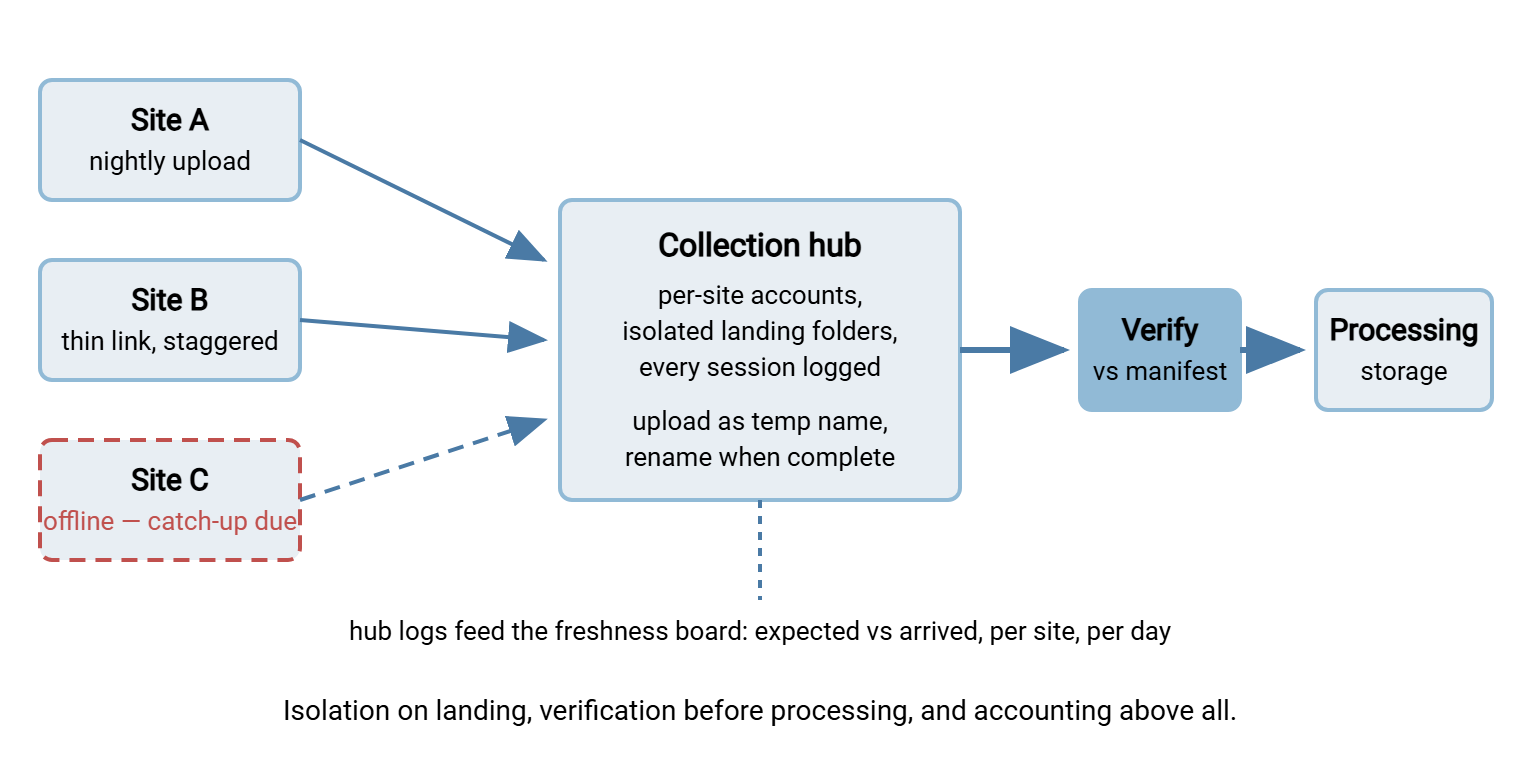
Decisions, in order: first, decide whether to push or pull. Push from sites is the norm — sites know when their data is ready, and only outbound connections from each site are needed. Next comes the packaging contract every site follows: bundled, datestamped, site-coded names. Files are uploaded under a temporary name and renamed on completion so the hub never reads half a file. Then comes the schedule. Use staggered waves if site uplinks share regional infrastructure, or simply to keep the arrival picture readable. Finally, decide the catch-up rule for sites that were dark. They send everything owed, oldest first, clearly named — the hub must never mistake catch-up data for today's.
The design: the hub is a transfer endpoint with one isolated account per site. So a compromised or misconfigured site can touch only its own landing folder. Every session is logged. This is the lane a Windows server like Sysax Multi Server is built for. Per-account home folders provide the isolation. SFTP, FTPS, or HTTPS serve uneven site capabilities. An activity log doubles as the collection's arrival record. Behind the landing folders, a verification step checks each site's delivery against its manifest and promotes complete deliveries into processing storage. Incomplete or failed deliveries stay quarantined in the landing area with an alert, never half-visible to downstream jobs.
What runs at each site is deliberately small: a scheduled push job. The job bundles the day's output, names it by site and date, and uploads under a temporary name. It renames on completion and retries on failure. It keeps the local copy until the hub's verification has confirmed the delivery. That is typically a rolling few days of retention, so a bad night at the hub never orphans a site's data. Keeping the site side simple is a design goal in itself. There are many sites, and they are far away. Every clever feature at the edge is a feature you will one day debug over a bad connection. A non-technical person's hands will be on the keyboard.
The accounting is the design's real product. With forty sites reporting nightly, each morning brings an interesting question. It is not "did transfers run" but "which sites have not arrived" — a freshness question. It is answered by comparing the expected list against the landing record. Sum the volumes and the hub's network side is usually the easy part. Forty sites sending five gigabytes each is two hundred gigabytes a night. That is well under an hour of an effective gigabit-class link even arriving all at once. The scarce resources are attention and accounting, which is why the pattern spends its complexity there.
Proof of done, daily: the freshness board green for every expected site, verification results for each delivery, and a dated record of exceptions and catch-ups. This pattern is the inbound mirror of one-to-many distribution — pushing the same content out to many sites. That distribution pattern has its own series at multi-site file distribution. The hub, staging, and direction-of-connection reasoning underneath both is covered in server-to-server exchange patterns.
The Safeguards Every Pattern Shares
Strip the three patterns to their common skeleton and you get the safeguard list this whole series has been circling:
| Safeguard | What it prevents |
|---|---|
| Manifest with checksums, made at the source | Silent corruption and silent omission — the two failures nobody sees happen |
| Resume-capable, retrying transfers | One blip costing a night; a bad week costing the move |
| Temp names or done-markers on arrival | Downstream systems consuming half-landed data |
| Source survives until destination verifies | The only copy dying in transit — the unrecoverable failure |
| Notification and freshness monitoring | Jobs failing silently for weeks; silence read as success |
| Written plan and sign-off | Months-later disputes with no evidence either way |
None of these is expensive, and all of them are cheaper than the incident they prevent. If a design you are reviewing lacks one, that gap is the review finding.
One safeguard sits above the table because it applies to the plan rather than the data: rehearse. Run the bulk move end to end on one percent of the dataset before committing the whole. Let the recurring delivery run for two throwaway cycles before the partner depends on it. Bring two pilot sites onto the collection hub before forty. A rehearsal costs a day and surfaces the surprises while they are still funny. Those include the folder nobody could write to, the checksum tool missing at the far end, and the settle time nobody set.
Remember: a massive-move design is judged by its evidence, not its throughput. If the plan cannot answer "prove everything arrived" with a manifest, verification results, and a sign-off — or "who has not reported today" with one glance — it is not finished, however fast it moves bytes.
Closing the Series
Massive data movement stops being frightening the moment it becomes arithmetic plus pattern. Measure the size, the count, and the real rate. Let the math route you between wire and wheels. Pick the pattern that matches your problem's shape — one-time bulk move, recurring heavy delivery, or distributed collection. Keep the shared safeguards intact. For the foundations, return to when normal file transfer breaks down. For the special cases that bend the patterns, see backups and archives over the wire and the offsite seeding it shares with ship or send. And when your massive move crosses into rented infrastructure, our cloud and hybrid transfer series picks up where this one leaves off.
Frequently Asked Questions
Which pattern applies to my situation?
What is a manifest and why does every pattern use one?
Why upload with a temporary name and rename afterward?
How do I handle a collection site that was offline for days?
Do these patterns require special software?
From the Sysax team: we build secure file transfer software for Windows. Sysax Multi Server is an FTP, FTPS, SFTP, and HTTPS server. Sysax FTP Automation handles scheduled, scripted transfers. Free trials are on the download page.