
Backups and Archives Over the Wire
A backup that lives in the same building as the data it protects is a copy, not a safeguard. Fire, flood, theft, and ransomware do not respect the distinction between a server and the backup server two racks away. That is why every serious backup design ends with the same requirement: get a copy offsite. And for most organizations today, offsite means over the network: a nightly push to a second site or a rented endpoint, humming along unattended at three in the morning.
The trouble is that backup data is massive by construction — it is everything you have, plus history — and the wire is finite. This article works through the whole offsite-over-network problem. It covers the arithmetic that makes full copies impossible and incrementals mandatory. It covers the seeding strategies for the first copy and verification that actually proves something. It also covers the restore-time question that most designs skip until the day it is the only question anyone asks. It is part of our Moving Media and Massive Datasets series. It leans on the transfer math established in when normal file transfer breaks down.
Backups and Archives Are Different Jobs
The two words travel together but describe different obligations, and they stress a network differently.
A backup is a recent, recoverable copy of live data, maintained on a cycle. Its virtue is freshness: what matters is how quickly you could return to something close to now. Backup transfer is a recurring load — something must cross the wire every night, forever, inside a window that never grows.
An archive is data retired from active life but kept — for regulation, for history, for the re-release a decade out. Its virtue is completeness and durability: written once, read rarely, retained for years under rules covered in retention basics for administrators. Archive transfer is usually a one-time bulk move with unusually strong proof requirements. That is because nobody will look at the data again until long after everyone who moved it has forgotten the details — or left.
Keep the two apart in your design. A backup pipeline tuned for nightly freshness makes a poor archive (its old copies age out by design). An archive store makes a slow, awkward restore source. What they share is the subject of this article: both must cross the wire, both are enormous, and both are worthless unverified.
The Arithmetic That Rules the Night
Start with the numbers, because they eliminate most designs before any product discussion. Take a ten-terabyte estate and a gigabit path to the offsite endpoint sustaining an effective seven hundred megabits per second.
A full copy is ten terabytes — eighty million megabits. Divided by seven hundred, that is about one hundred fourteen thousand seconds: about thirty-two hours. A nightly window is eight, maybe ten hours. A nightly full does not fit the night; it does not even fit the day and the night. Sending fulls every night is not a policy choice you get to make — arithmetic already made it.
Now measure what actually changes in a day. Ordinary business estates typically churn one to a few percent of their data daily. Call it one and a half percent of ten terabytes — one hundred fifty gigabytes. That is one million two hundred thousand megabits; at seven hundred per second, about seventeen hundred seconds: about half an hour. Even over a modest 100-megabit path sustaining an effective seventy, the same increment is just under five hours — tight but inside a night.
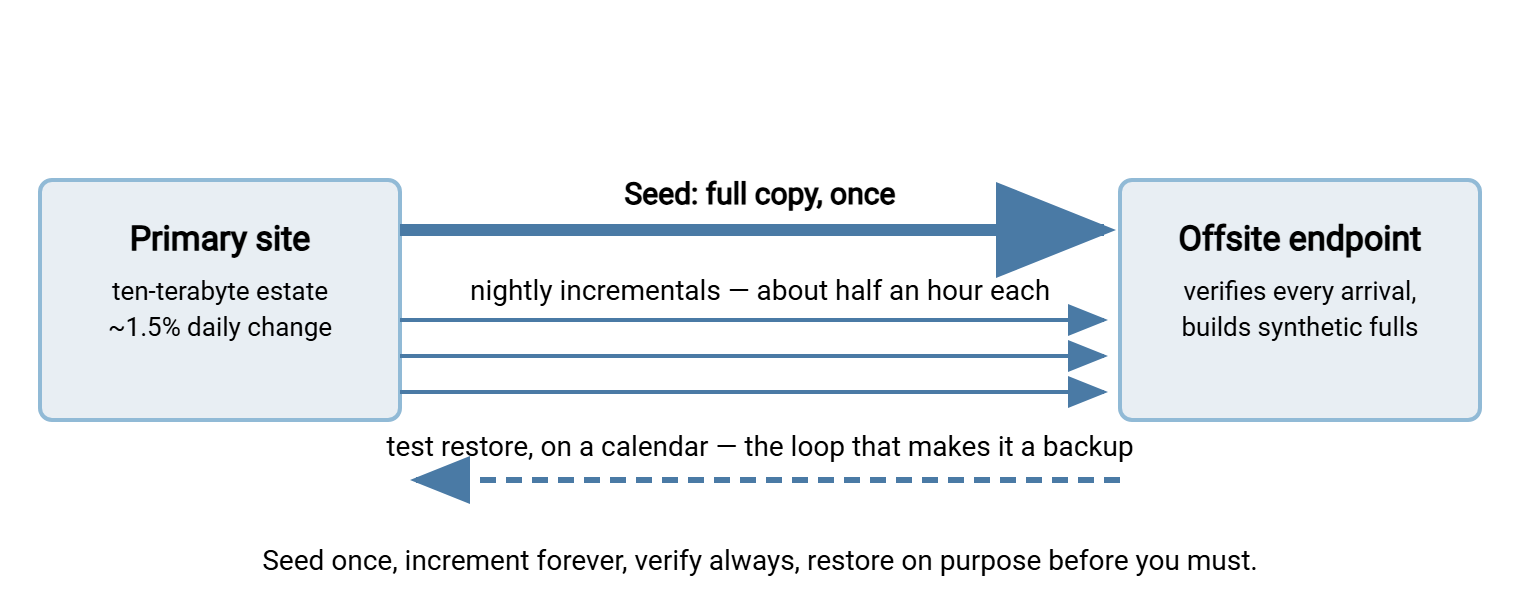
So the design that every serious offsite scheme converges on falls straight out of the division:
- Seed once: get the full copy offsite one time, by whatever method the math permits.
- Send increments forever: each night, transfer only what changed since the night before — an incremental.
- Consolidate at the far end: periodically, the offsite side combines the seed and its increments into a fresh full — a synthetic full. That means restores don't have to replay months of history and the full never crosses the wire again.
The diagram below shows the shape of the whole pattern, including the two loops people forget — verification every night, and the scheduled test restore.
Seeding: Getting the First Copy There
The seed is a classic one-time bulk move, and it deserves the full planning treatment rather than "start the copy Friday and hope." Four workable strategies, in the order to consider them:
- One long window over the wire. Our ten-terabyte seed at an effective seven hundred megabits takes about thirty-two hours. A three-day holiday weekend absorbs that with margin for a restart. Take a snapshot so the source holds still, use a resume-capable transfer, verify checksums as you go, and rate-cap if anything else shares the link.
- A trickle seed. When the window math fails, send the seed slowly — capped at, say, half the link, over a week or three. Accept that the offsite copy is not protective until the seed and the accumulated catch-up increments complete. Honest, cheap, and slow; fine when the risk clock isn't ticking loudly.
- Seed by shipped drive. When the wire needs weeks, a copy written to encrypted drives and couriered arrives in days. The network then takes over from there for increments only. The crossover math and the full runbook live in when to ship drives instead of sending bits. Backup seeding is that article's single most common use case.
- Seed locally, then relocate. Build the offsite copy while the target hardware is still on your LAN — at LAN speeds. Then move the hardware to its offsite home and let increments flow. Unglamorous and extremely effective for second-office designs.
Whichever route you take, the seed-then-delta discipline — freeze, bulk copy, verify, then switch to increments — is the same pattern used for storage migrations. It is worked through in seed and delta cutover. Steal its checklists.
Archives: The One-Way Bulk Move
The archive transfer is the seed's stern older sibling: the same one-time bulk mechanics, but with the proof requirements turned all the way up. That is because an archive's whole purpose is to be trusted by strangers years from now. Three habits distinguish an archive move from an ordinary copy:
- Bundle and manifest everything. Archives are usually old project trees — exactly the many-small-files shape that transfers worst and verifies slowest. Pack them into chunked archives, and fingerprint every chunk. Record the manifest alongside a plain-text description of what the archive contains and why it was kept. Assume the reader of that description has never heard of the project.
- Store the manifest in more than one place. With the archive, with the job record, and in whatever catalog your organization keeps. A perfectly intact archive nobody can identify or verify is functionally lost.
- Re-verify on a calendar. Storage rots quietly — drives fail, bits flip, media formats drift toward unreadable. A periodic fixity check means re-hashing the stored archive and comparing against the manifest. It turns silent decay into a detected event while a fresh copy can still be made. Yearly is a common cadence; the important part is that a calendar owns it, not a memory.
Retention rules decide how long all this must keep working, and they are policy questions before they are technical ones. The retention series linked earlier covers that ground. The transfer job's contribution is to deliver the archive with proof attached: manifest verified at the destination, results kept. Everything else is stewardship.
Keeping the Nights Sane Forever After
Once seeded, the recurring job settles into rhythm — and three practices keep it from decaying:
Watch the increment size like a gauge. Nightly volume is your early-warning instrument. A slow upward drift says the estate is growing toward the window ceiling — you can read the deadline months out and act calmly. A sudden spike says something churned the data: a mass reorganization, a re-encryption, database maintenance that rewrote every block. Expect occasional spike nights. Let the job spill into the weekend by design rather than by surprise. Alert on "increment larger than usual" as seriously as on "job failed."
Know your options when the increment outgrows the night. Growth eventually presses on the window, and the escape ladder is worth knowing in advance. Compress the increments if the data compresses — databases and documents often shrink well, media does not. Let the backup software deduplicate at the source — storing each unique block once, so repeated data never crosses the wire twice. That is a backup-tool capability, not a transfer trick. But it directly shrinks what the transfer must carry. Split the estate so different portions ship on different nights. And when the ladder runs out, the honest answers are the same as everywhere in this series: a faster link or a rethink of what genuinely needs offsite copies nightly.
Mind the shape, not just the size. File-based backup of a million small files inherits every pathology described in the many-small-files problem. This is why mature backup tools package data into large container files rather than mirroring trees file-by-file. And if your offsite scheme is homegrown, yours should too: bundle first, then transfer bundles.
Make the job boring and observable. The nightly push belongs to a scheduler with retry and notification, not to hope. This is the lane where a Windows automation tool like Sysax FTP Automation fits naturally. A scheduled task pushes the night's backup bundles over SFTP or FTPS and retries transient failures. It applies OpenPGP encryption to sets headed for storage you don't fully control. The reasoning is in how PGP file encryption works. The task emails a result either way, because a backup job that fails silently for six weeks is the most expensive kind of quiet there is. On the receiving side, your offsite target may be your own second site. In that case, a Windows endpoint like Sysax Multi Server gives the backup account an isolated folder tree over an encrypted protocol. It logs every arrival — byte counts and timestamps that double as your evidence the copy exists.
Verification: An Unchecked Copy Is a Hope
Backup verification has three levels, and each answers a question the previous one cannot:
| Level | Question it answers | How often |
|---|---|---|
| Transfer integrity | Did each piece arrive bit-for-bit intact? (checksums compared) | Every transfer, automatically |
| Set completeness | Is every piece of the set present — nothing missing from the chain? | Every cycle, against a manifest |
| Restorability | Can real data actually be brought back, and how long does it take? | On a calendar — monthly or quarterly |
Level one is table stakes and cheap: fingerprint at the source, compare at the destination, keep the results. That is the end-to-end habit from verifying transfers end to end. Level two matters because backup sets are chains. A restore may need the seed plus every increment since the last consolidation. One missing or corrupt link strands everything after it. Verify the chain as a set — count the pieces against the catalog, not just each piece against itself. Consolidate into synthetic fulls often enough that no restore ever depends on months of unbroken luck.
Level three is the one that separates backup programs from backup rituals. A scheduled test restore — real files, pulled back from the offsite copy, opened and used — is the only evidence that the entire chain of assumptions holds. It also produces the number the next section needs: how long a restore actually takes, measured, not estimated.
Remember: a backup you have never restored is a hypothesis. Put a test restore on the calendar, restore real data from the offsite copy, and time it. Every horror story in this field ends with "the backups had been failing for months and nobody knew". Every one of them was preventable by this single habit.
The Restore-Time Question People Skip
Here is the question that gets asked exactly once, at the worst possible moment: how long does it take to get it all back?
Two terms make the discussion precise. The recovery time objective (RTO) is how long the business can tolerate being down — the deadline for having data back and services running. The recovery point objective (RPO) is how much recent work can be lost — the acceptable gap between the last good copy and the disaster. Nightly increments give you an RPO of roughly a day; the wire decides your RTO, and the wire does not care what the disaster-recovery document says.
Run the honest math for our example estate. Restoring ten terabytes back over the same effective seven hundred megabits is the same thirty-two hours the seed took. Call it a day and a half before restore processing even finishes. That is against, say, a four-hour RTO written by someone who never did the division. That gap is not fixable with urgency on the day. It is fixable only in the design, and there are three standard ways:
- Keep a local copy too. The classic pattern keeps one recent backup copy on site (fast restores for the common disasters: deletion, corruption, one dead server). It keeps the offsite copy for the rare total-loss event. The local copy serves the RTO; the offsite copy serves survival.
- Tier the restore. Not everything deserves the same RTO. Identify the critical subset — the databases and shares the business stops without. Structure the offsite copy so that subset restores first and fast, with the bulk following behind.
- Plan the reverse shipment. For a full-estate disaster, drives written at the offsite location and couriered back can beat the wire by days. That is the same crossover arithmetic as seeding, run in reverse. Put it in the runbook now; nobody prices couriers well mid-crisis.
Do the worksheet below once a year and whenever the estate grows. It takes ten minutes and settles arguments that otherwise run for meetings:
RESTORE-TIME WORKSHEET
1. Full restore size ............ ______ terabytes
2. Effective link rate .......... ______ megabits per second (measured)
3. Wire time = size / rate ...... ______ hours
4. Restore processing time ...... ______ hours (from your last TEST restore)
5. Total restore time ........... line 3 + line 4 = ______ hours
6. Business RTO ................. ______ hours
7. Verdict: if line 5 > line 6, the design fails before the disaster.
   Fix with: local copy / tiered restore / reverse shipment / faster link.
8. Critical-subset size ......... ______ gigabytes
9. Critical-subset wire time .... ______ hours (must beat RTO on its own)
Pulling the Design Together
An offsite scheme that works looks the same almost everywhere once the arithmetic has had its say. Seed once by whatever method the math allows. Send verified increments nightly inside a window you monitor like a gauge. Consolidate so restore chains stay short, and encrypt what lands on storage you don't control. Test restores on a calendar — timing them, because the measured restore time against the business's RTO is the real grade your design gets. The transfer arithmetic underneath is in when normal file transfer breaks down. The shipping option for seeds and disaster restores is in ship or send. And the whole pattern reappears as one of the three worked designs in reference patterns for massive data movement.
Frequently Asked Questions
Why can't I just send a full backup every night?
What is backup seeding?
What are RTO and RPO in plain words?
How do I know my offsite backup actually works?
Should offsite backups be encrypted?
From the Sysax team: we build secure file transfer software for Windows. Sysax Multi Server is an FTP, FTPS, SFTP, and HTTPS server. Sysax FTP Automation handles scheduled, scripted transfers. Free trials are on the download page.